import VoxelLayer from "@arcgis/core/layers/VoxelLayer.js";const VoxelLayer = await $arcgis.import("@arcgis/core/layers/VoxelLayer.js");- Since
- ArcGIS Maps SDK for JavaScript 4.22
- Overview
- Creating a VoxelLayer
- Data Visualization
- Exploring a Voxel Layer
- VoxelLayer Volume
- VoxelLayer and time
Overview
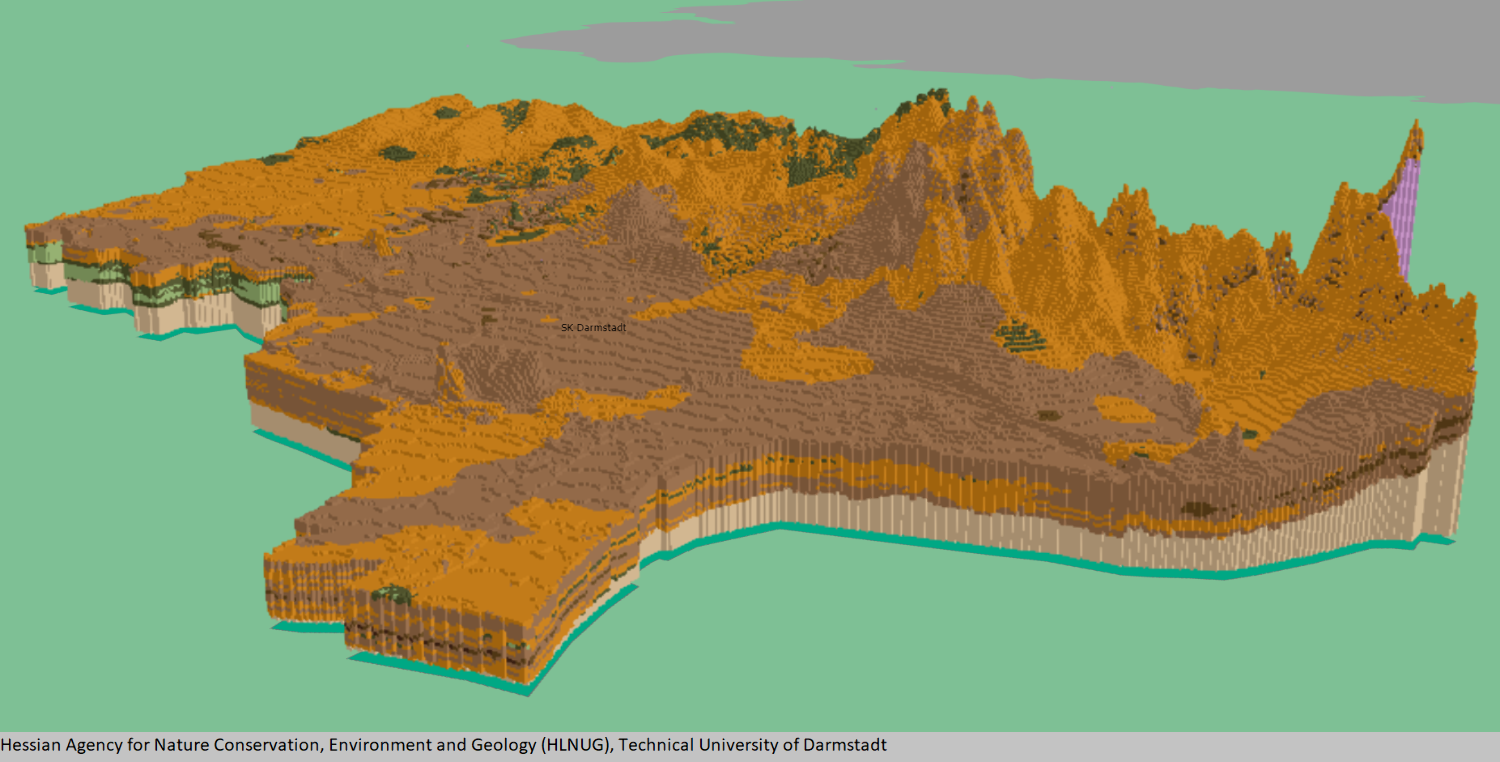
A voxel layer represents multidimensional volumetric data. For example, atmospheric or oceanic data, geological underground models, or space-time cubes can be visualized as voxel layer. The VoxelLayer can be visualized in a SceneView with the viewingMode set to local.
Use voxel layers to explore spatial relationships with other content. For example, an underground model visualized as a voxel layer can be viewed together with buildings or subterrain utilities to evaluate the underground for planned construction or maintenance.
Known Limitations
- VoxelLayer requires the
EXT_color_buffer_floatextension. - Visualizing voxels with data type
INT16orUINT16additionally requires theEXT_texture_norm16extension, which is currently only supported by the Chrome browser. - Visualizing voxels with data type
FLOAT32additionally requires theOES_texture_float_linearextension. - For best performance, use Chrome browser and a dedicated graphics card.
- Mobile support differs across devices. Voxel scene layers are not recommended for use on mobile.
- Measurement widget for both distance and area allows you to choose a point in a voxel layer. However, the point selection and measurement may not be accurate.
Creating a VoxelLayer
From ArcGIS Pro, you can author a voxel layer and publish it as a Scene Service. Scene Services can be hosted on ArcGIS Online or ArcGIS Enterprise by uploading a Scene Layer Package (.slpk) or by sharing it from ArcGIS Pro.
The Scene Service is identified by a service URL or portal item ID and can be used to create an instance of a VoxelLayer.
Read More
Reference a service URL
To create a VoxelLayer instance from a service, you must set the url property to the REST endpoint of a VoxelLayer. For a layer to be visible in a view, it must be added to the Map.
const voxelLayer = new VoxelLayer({ url: "https://tiles.arcgis.com/tiles/z2tnIkrLQ2BRzr6P/arcgis/rest/services/EMU_Caribbean_Voxel/SceneServer"});const map = new Map({ layers: [voxelLayer], basemap: { baseLayers: [ new VectorTileLayer({ url: "https://basemaps.arcgis.com/arcgis/rest/services/OpenStreetMap_GCS_v2/VectorTileServer" }) ] }});If the voxel service is requested from a different domain, a CORS enabled server or a proxy is required.
Reference an ArcGIS portal Item ID
You can also create a VoxelLayer from the portal item ID.
const voxelLayer = new VoxelLayer({ portalItem: { id: "3a922ed0c7a8489ea4fbe8747ac560ba" },});
Data Visualization
Voxel layers can be visualized as volumes or surfaces using the property
renderMode. When set to surfaces, only isosurfaces and sections are displayed,
whereas volume draws the full volume.
A voxel layer contains variables representing continuous or discrete data. For example, permeability could be defined as a continuous variable and soil type as a discrete variable. Voxel layer only visualizes one variable at a time. A VoxelVariable describes a single variable in the VoxelLayer. The currentVariableId controls which variable is being rendered.
You can define how a continuous or discrete variable can be rendered. You can apply a data filter to, modify the color scheme of, or add transparency to a continuous variable by using VoxelTransferFunctionStyle. For a discrete variable, you can modify the color and label by using uniqueValues.
Exploring a Voxel Layer
Voxel layers often cover large areas. There are various capabilities you can use to explore the voxel layer in detail.
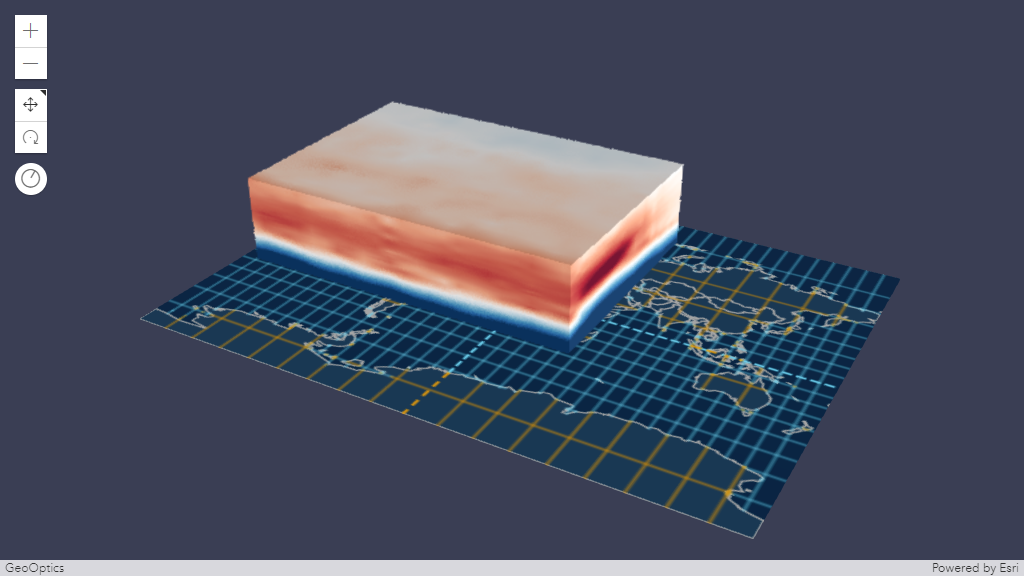
VoxelSlice
Use VoxelSlice to define an area of interest. You can slice a voxel layer vertically to show a smaller volume, or horizontally slice to reduce the voxel layer to a specific height.
It is possible to have multiple slices in a VoxelLayer by modifying the VoxelVolumeStyle's slices or by authoring slices in ArcGIS Pro before publishing the voxel layer as a scene service.
Slices modified using VoxelVolumeStyle's slices and the slices authored from ArcGIS Pro are persistent in the web scene or layer definition respectively.
Position, tilt and orientation of a VoxelSlice can be modified with real-time rendering updates.
VoxelDynamicSection
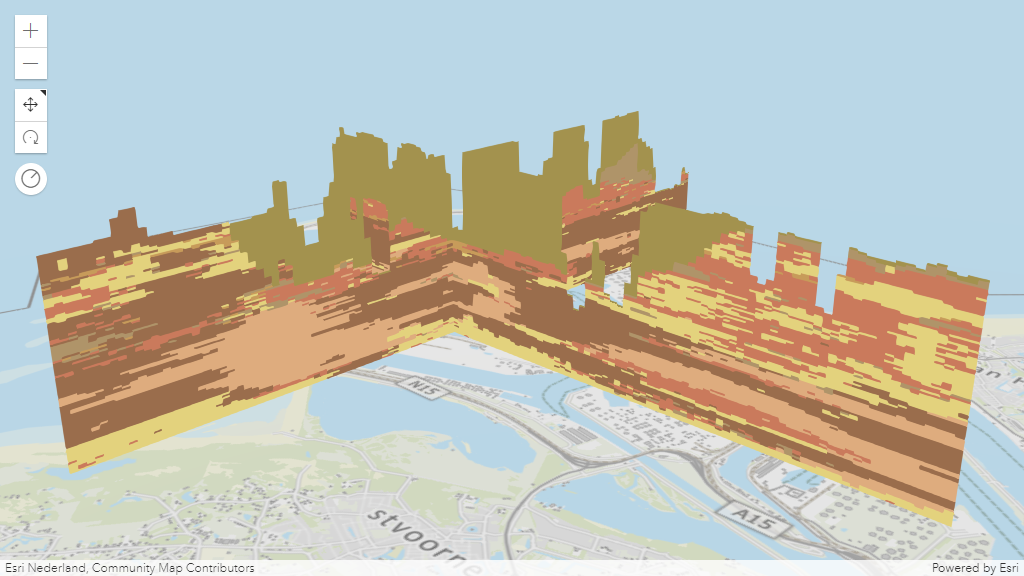
A section is a plane which cuts through a voxel volume. Sections can reveal valuable information,
such as soil composition and contamination across a subsurface profile.
The VoxelDynamicSection
allows you to define the properties of an individual dynamic section.
You can create VoxelDynamicSection to understand structures in the voxel layer.
For example, you can create a cross section diagram to explore an underground model
at locations where new construction is planned.
VoxelDynamicSection can only be visualized when the
renderMode is set to surfaces.
Position, tilt and orientation of a VoxelDynamicSection can be modified with real-time rendering updates.
VoxelIsosurface
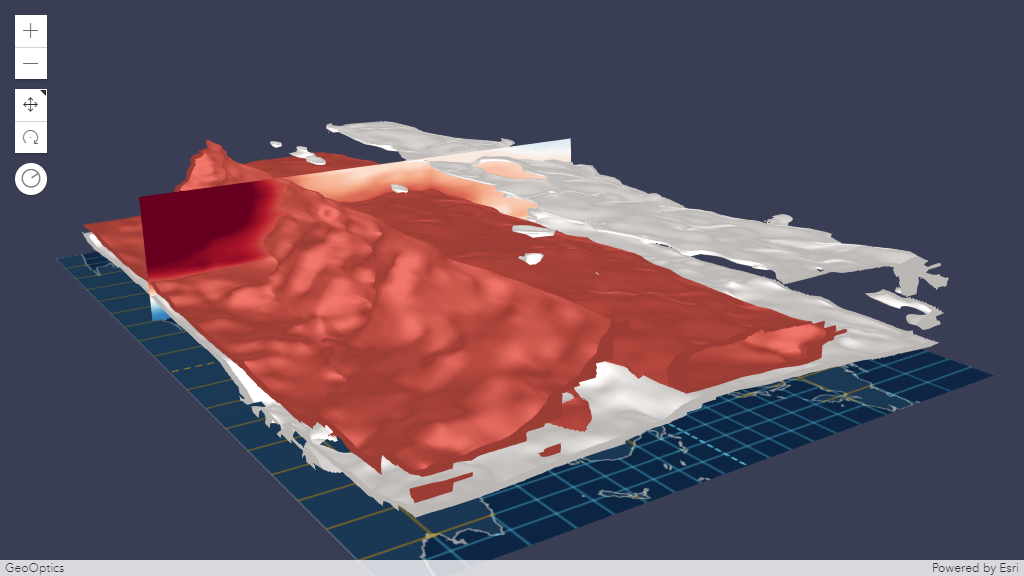
A VoxelIsosurface
is a surface representing a specific value within a continuous variable.
For example, you can visualize a threshold value for pollutants in the atmosphere as an isosurface.
This allows you to identify the location of key values. You can visualize isosurfaces together with sections.
VoxelIsosurface can only be visualized when the renderMode
is set to surfaces.
By default, the color of an isosurface matches the color in the
colorStops for the specific value.
You can choose a different color and lock the color by using the property colorLocked
in VoxelIsosurface.
You can have up to four isosurfaces in a voxel layer.
Analysis Tool
The Slice, DirectLineMeasurement3D and AreaMeasurement3D works with VoxelLayer.
Slice
The VoxelLayer treats the slice as an infinite plane and ignores the slice plane extent.
Slice widget allows you to interactively modify a single slice. The visualization created using the Slice widget are temporary and cannot be persisted in a WebScene or in slides.
Read More
Below is a comparison between the VoxelSlice and the Slice widget.
| VoxelSlice | Slice widget | |
|---|---|---|
| Persisted | yes | no |
| Editable | yes (by modifying the properties of the VoxelSlice) | yes |
| Multiple slices | yes (by modifying VoxelVolumeStyle's slices) | no |
Measurement
The DirectLineMeasurementAnalysis and AreaMeasurementAnalysis and their related components allow selecting points on the VoxelLayer to measure. However, the selection of the points and the measurement results may not be accurate. The measurement results include the verticalExaggeration applied to the VoxelLayer.
Popup
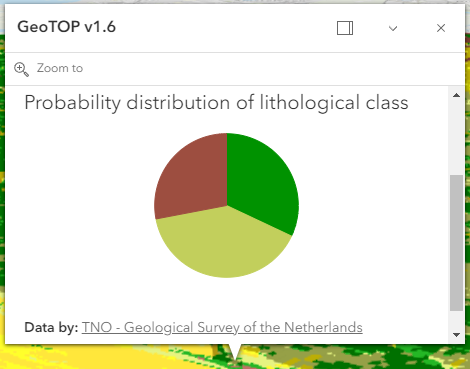
You can explore the properties of individual voxels by creating a customized popup using the popupTemplate. Use the fields to list all available fields that can be used to customize the popup of a VoxelLayer.
VoxelLayer Volume
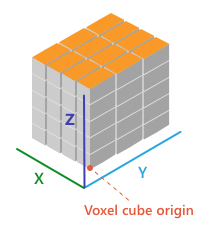
The voxel layer is structured in dimensional regularly gridded cubes that store one or many variables.
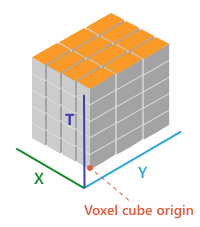
A voxel layer can represent different dimensions. The volumeType property in VoxelVolume defines the dimension of the voxel layer.
- X, Y, Z in which each dimension represents a geographic coordinate
- X, Y, T in which X and Y represent a geographic coordinate and T represents time as a level
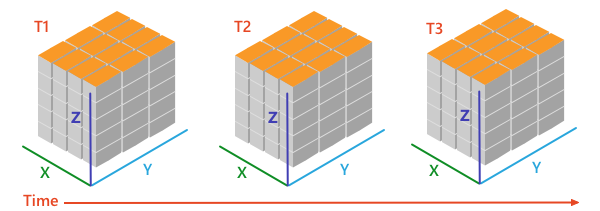
- X, Y, Z, T in which each dimension represents geographic coordinates and includes a fourth dimension representing time.
VoxelLayer and time
A VoxelLayer enables the visualization of time as the fourth dimension if the volumeType is "xyzt". A volumeType of "xyt" is not a time-aware layer. The time is represented along the z dimension.
You can access the temporal data of a VoxelLayer by using the stops in the TimeInfo.
The stops indicates time instants that a layer has data for.
You can use the stops with the TimeSlider widget or use it to configure the VoxelLayer's timeExtent.
The layer and the view can have a different TimeExtent. The useViewTime determines if the VoxelLayer will show the data based on the view's timeExtent or the layer's timeExtent.
Read More
The table below shows an example of how the VoxelLayer chooses the data to draw when the useViewTime is used in conjunction with the view's and the layer's timeExtent.
For example, a VoxelLayer has the following stops on the timeInfo:
[0] 2019-06-01 12
AM[1] 2019-07-01 12
AM[2] 2019-08-01 12
AM| useViewTime | view's timeExtent | VoxelLayer's timeExtent | VoxelLayer will draw the data |
|---|---|---|---|
| true | not set | not set | [0] 2019-06-01 12 AM |
| true | not set | From 2019-07-01 12 AM to 2019-07-01 12 AM | [1] 2019-07-01 12 AM |
| true | From 2019-06-15 12 AM to 2019-07-15 12 AM | not set | [1] 2019-07-01 12 AM |
| true | From 2019-06-15 12 AM to 2019-07-15 12 AM | From 2019-08-01 12 AM to 2019-08-01 12 AM | VoxelLayer will not draw because the view's timeExtent does not intersect the VoxelLayer's timeExtent |
| false | not set | not set | [0] 2019-06-01 12 AM |
| false | not set | From 2019-07-01 12 AM to 2019-07-01 12 AM | [1] 2019-07-01 12 AM |
| false | From 2019-06-15 12 AM to 2019-07-15 12 AM | not set | [0] 2019-06-01 12 AM |
| false | From 2019-06-15 12 AM to 2019-07-15 12 AM | From 2019-08-01 12 AM to 2019-08-01 12 AM | [2] 2019-08-01 12 AM |
- See also
Constructors
Constructor
Parameters
| Parameter | Type | Description | Required |
|---|---|---|---|
| properties | | |
Example
// Typical usagelet layer = new VoxelLayer({// URL to the serviceurl: "your voxel service url"});Properties
| Property | Type | Class |
|---|---|---|
apiKey inherited | ||
copyright inherited | ||
| | ||
customParameters inherited | ||
declaredClass readonly inherited | ||
| | ||
| | ||
| | ||
fields readonly | Field[] | |
fullExtent inherited | ||
id inherited | ||
layerId inherited | ||
| | ||
listMode inherited | ||
loaded readonly inherited | ||
loadError readonly inherited | ||
loadStatus readonly inherited | "not-loaded" | "loading" | "failed" | "loaded" | |
loadWarnings readonly inherited | any[] | |
maxScale inherited | ||
minScale inherited | ||
opacity inherited | ||
parent inherited | Map | Basemap | Ground | GroupLayer | CatalogDynamicGroupLayer | CatalogLayer | null | undefined | |
persistenceEnabled inherited | ||
| | ||
| | ||
portalItem inherited | PortalItem | null | undefined | |
| | ||
spatialReference inherited | ||
TimeExtent | null | undefined | | |
timeInfo readonly | | |
| | ||
title inherited | ||
type readonly | "voxel" | |
uid readonly inherited | ||
url inherited | ||
| | ||
variables readonly | | |
| | ||
version readonly inherited | ||
visibilityTimeExtent inherited | TimeExtent | null | undefined | |
visible inherited | ||
volumes readonly | | |
| |
apiKey
An authorization string used to access a resource or service. This property will append the API key to all requests made by the layer to the service. API keys are generated and managed in the portal. An API key is tied explicitly to an ArcGIS account; it is also used to monitor service usage. Setting a fine-grained API key on a specific class overrides the global API key.
If loading a secure layer with API authentication via a PortalItem, the API key needs to be set on the layer's portalItem property.
Example
// set the api key to access a protected serviceconst layer = new FeatureLayer({ url: serviceUrl, apiKey: "YOUR_API_KEY"}); copyright
The copyright text as defined by the scene service.
currentVariableId
- Type
- number
- Since
- ArcGIS Maps SDK for JavaScript 4.24
The variable that is being displayed. The currentVariableId must be the id of a VoxelVariable that is
in the variables collection of the VoxelLayer.
- Default value
- 0
customParameters
- Type
- CustomParameters | null | undefined
A list of custom parameters appended to the URL of all resources fetched by the layer.
It's an object with key-value pairs where value is a string.
The layer's refresh() method needs to be called if the customParameters are updated at runtime.
Example
// send a custom parameter to your special servicelet layer = new MapImageLayer({ url: serviceUrl, customParameters: { "key": "my-special-key" }}); enableDynamicSections
- Type
- boolean
- Since
- ArcGIS Maps SDK for JavaScript 4.25
Controls whether or not to globally disable all dynamic sections in the current VoxelVolumeStyle.
- Default value
- true
enableIsosurfaces
- Type
- boolean
- Since
- ArcGIS Maps SDK for JavaScript 4.25
Controls whether or not to globally disable all isosurfaces in the current VoxelVariableStyle.
- Default value
- true
enableSlices
- Type
- boolean
- Since
- ArcGIS Maps SDK for JavaScript 4.25
Controls whether or not to globally disable all slices in the current VoxelVolumeStyle.
- Default value
- true
fields
- Type
- Field[]
- Since
- ArcGIS Maps SDK for JavaScript 4.31
A complete list of fields that consists of fixed voxel fields and the voxel variables. This list is used for the layer's popupTemplate.
The fixed voxel fields used in popups represent the voxel's position, current variable being displayed, depth and time. These fields are prefixed with Voxel.
to indicate that they are special fields and to avoid any potential conflict with voxel variable fields.
Below is a list of fixed fields that exists for all VoxelLayer depending on the voxel's volume.
Fixed voxel fields
- The
Voxel.CurrentVariablefield returns the current variable being displayed. - The
Voxel.Positionfield returns the clicked voxel's position. - The
Voxel.Depthfield returns the depth of the clicked voxel. (Only applicable forXYZandXYZTvolumeType). - The
Voxel.LocalTimefield returns the local date and/or time of the clicked voxel if the VoxelLayer has a time dimension. (Only applicable forXYTandXYZTvolumeType). - The
Voxel.SourceTimefield returns the source time of the clicked voxel if the VoxelLayer has a time dimension. (Only applicable forXYTandXYZTvolumeType).
Example
layer.when(() => { // print out field names returned in layer.fields layer.fields.forEach((field) => { console.log(field.name); });}); fullExtent
The full extent of the layer. By default, this is worldwide. This property may be used to set the extent of the view to match a layer's extent so that its features appear to fill the view. See the sample snippet below.
The fullExtent property is always null for GroupLayer.
Example
// Once the layer loads, set the view's extent to the layer's full extentlayer.when(function(){ view.extent = layer.fullExtent;}); layerId
- Type
- number
The layer ID, or layer index, of a Scene Service layer. This is particularly useful when loading a single layer with the portalItem property from a service containing multiple layers. You can specify this value in one of two scenarios:
- When loading the layer via the portalItem property.
- When pointing the layer url directly to the Scene Service.
If a layerId is not specified in either of the above scenarios, then the first layer
in the service (layerId = 0) is selected.
Examples
// while these examples use a SceneLayer, the same pattern can be// used for other layers that may be loaded from portalItem ids
// loads the third layer in the given Portal Itemlet layer = new SceneLayer({  portalItem: {    id: "73df987984b24094b848d580eb83b0fb"  },  layerId: 2});
// If not specified, the first layer (layerId: 0) will be returnedlet layer = new SceneLayer({ portalItem: { id: "73df987984b24094b848d580eb83b0fb" }});// Can also be used if URL points to service and not layerlet layer = new SceneLayer({ url: "https://scenesampleserverdev.arcgis.com/arcgis/rest/services/Hosted/DevA_Trees/SceneServer", layerId: 0 // Notice that the url doesn't end with /2});// This code returns the same layer as the previous snippetlet layer = new SceneLayer({ url: "https://scenesampleserverdev.arcgis.com/arcgis/rest/services/Hosted/DevA_Trees/SceneServer/layers/0", // The layer id is specified in the URL}); legendEnabled
- Type
- boolean
Indicates whether the layer will be included in the legend.
- Default value
- true
listMode
- Type
- LayerListMode
Indicates how the layer should display in the Layer List component. The possible values are listed below.
| Value | Description |
|---|---|
| show | The layer is visible in the table of contents. |
| hide | The layer is hidden in the table of contents. |
| hide-children | If the layer is a GroupLayer, BuildingSceneLayer, KMLLayer, MapImageLayer, SubtypeGroupLayer, TileLayer, or WMSLayer, hide the children layers from the table of contents. |
- Default value
- "show"
loadError
The Error object returned if an error occurred while loading.
loadStatus
- Type
- "not-loaded" | "loading" | "failed" | "loaded"
Represents the status of a load() operation.
| Value | Description |
|---|---|
| not-loaded | The object's resources have not loaded. |
| loading | The object's resources are currently loading. |
| loaded | The object's resources have loaded without errors. |
| failed | The object's resources failed to load. See loadError for more details. |
- Default value
- "not-loaded"
loadWarnings
- Type
- any[]
A list of warnings which occurred while loading.
maxScale
- Type
- number
The maximum scale (most zoomed in) at which the layer is visible in the view.
If the map is zoomed in beyond this scale, the layer will not be visible.
A value of 0 means the layer does not have a maximum scale.
The maxScale value should always be smaller than the minScale value,
and greater than or equal to the service specification.
- Default value
- 0
Examples
// The layer will not be visible when the view is zoomed in beyond a scale of 1:1,000layer.maxScale = 1000;// The layer's visibility is not restricted to a maximum scale.layer.maxScale = 0; minScale
- Type
- number
The minimum scale (most zoomed out) at which the layer is visible in the view.
If the map is zoomed out beyond this scale, the layer will not be visible.
A value of 0 means the layer does not have a minimum scale.
The minScale value should always be larger than the maxScale value,
and lesser than or equal to the service specification.
- Default value
- 0
Examples
// The layer will not be visible when the view is zoomed out beyond a scale of 1:3,000,000layer.minScale = 3000000;// The layer's visibility is not restricted to a minimum scale.layer.minScale = 0; opacity
- Type
- number
The opacity of the layer. This value can range between 1 and 0, where 0 is 100 percent
transparent and 1 is completely opaque.
Known Limitations
In a 3D SceneView, modifying opacity is not supported for DimensionLayer, GaussianSplatLayer, IntegratedMesh3DTilesLayer, IntegratedMeshLayer, LineOfSightLayer, PointCloudLayer, ViewshedLayer, and VoxelLayer.
- Default value
- 1
Example
// Makes the layer 50% transparentlayer.opacity = 0.5; parent
- Type
- Map | Basemap | Ground | GroupLayer | CatalogDynamicGroupLayer | CatalogLayer | null | undefined
- Since
- ArcGIS Maps SDK for JavaScript 4.27
The parent to which the layer belongs.
persistenceEnabled
- Type
- boolean
- Default value
- true
popupEnabled
- Type
- boolean
- Since
- ArcGIS Maps SDK for JavaScript 4.26
Indicates whether to display popups when voxels in the layer are clicked. The layer needs to have a popupTemplate to define what
information should be displayed in the popup. Alternatively, a default popup template may be automatically used if
defaultPopupTemplateEnabled is set to true.
- Default value
- false
popupTemplate
- Type
- PopupTemplate | null | undefined
- Since
- ArcGIS Maps SDK for JavaScript 4.31
The popup template for the layer. When set on the layer, the popupTemplate allows users to access attributes and display their values using text and/or charts in the view's popup when a voxel is clicked. See this sample for an example of how PopupTemplate interacts with a VoxelLayer.
A default popup template is automatically used if no popupTemplate has been defined when
defaultPopupTemplateEnabled
is set to true.
- See also
portalItem
- Type
- PortalItem | null | undefined
The portal item from which the layer is loaded. If the portal item references
a feature or scene service, then you can specify a single layer
to load with the layer's layerId property.
Loading non-spatial tables
Non-spatial tables can be loaded from service items hosted in ArcGIS Online and ArcGIS Enterprise. This only applies to:
- FeatureLayer if the layer's isTable returns
trueat version 4.17. - SubtypeGroupLayer if the layer's isTable returns
trueat version 4.32.
Examples
// While this example uses FeatureLayer, this same pattern can be// used for other layers that may be loaded from portalItem ids.const layer = new FeatureLayer({ portalItem: { // autocasts as new PortalItem() id: "caa9bd9da1f4487cb4989824053bb847" } // the first layer in the service is returned});// Set hostname when using an on-premise portal (default is ArcGIS Online)// esriConfig.portalUrl = "http://myHostName.esri.com/arcgis";
// While this example uses FeatureLayer, this same pattern can be// used for SceneLayers.const layer = new FeatureLayer({ portalItem: { // autocasts as new PortalItem() id: "8d26f04f31f642b6828b7023b84c2188" }, // loads the third item in the given feature service layerId: 2});// Initialize GeoJSONLayer by referencing a portalItem id pointing to geojson file.const layer = new GeoJSONLayer({ portalItem: new PortalItem({ id: "81e769cd7031482797e1b0768f23c7e1", // optionally define the portal, of the item. // if not specified, the default portal defined is used. // see https://developers.arcgis.com/javascript/latest/references/core/config/#portalUrl portal: new Portal({ url: "https://jsapi.maps.arcgis.com/" }) }});// This snippet loads a table hosted in ArcGIS Online.const table = new FeatureLayer({ portalItem: { // autocasts as esri/portal/PortalItem id: "123f4410054b43d7a0bacc1533ceb8dc" }});
// Before adding the table to the map, it must first be loaded and confirm it is the right type.table.load().then(() => { if (table.isTable) { map.tables.add(table); }});// While this example uses FeatureLayer, this same pattern can be// used for other layers that may be loaded from portalItem ids.const layer = new FeatureLayer({ portalItem: { // autocasts as esri/portal/PortalItem id: "caa9bd9da1f4487cb4989824053bb847", // Set an API key to access a secure portal item configured with API key authentication. apiKey: "APIKEY" }}); renderMode
- Type
- VoxelRenderMode
- Since
- ArcGIS Maps SDK for JavaScript 4.24
Current rendering mode for the VoxelLayer. The volume mode draws the full voxel layer volume whereas the surfaces mode draws
dynamic sections and isosurfaces only.
- Default value
- "volume"
spatialReference
- Type
- SpatialReference
The spatial reference of the layer.
timeExtent
- Type
- TimeExtent | null | undefined
- Since
- ArcGIS Maps SDK for JavaScript 4.30
The layer's time extent. When the layer's useViewTime is false, the layer
instructs the view to show data from the layer based on this time extent.
You can choose the layer's time extent from the voxel layer's timeInfo.stops.
Example
// Configure the layer to ignore the view's time and instead// draw using the data from its last time stopvxlLayer.useViewTime = false;const lastStopTime = vxlLayer.timeInfo.stops.at(-1);vxlLayer.timeExtent = new TimeExtent({ start: lastStopTime, end: lastStopTime,}); timeInfo
- Since
- ArcGIS Maps SDK for JavaScript 4.30
TimeInfo provides information such as stops the layer has data for and the fullTimeExtent for the layer.
Example
// Configure the timeSlider to use the layer's timeInfo.stopsconst vxlLayer = new VoxelLayer({ url: url,});const map = new Map({ layers: [vxlLayer]});const view = new SceneView({ map: map, container: "viewDiv"});const timeSlider = new TimeSlider({ container: "timeSlider", view: view, mode: "instant", playRate: 3000});view.whenLayerView(vxlLayer).then((vxlLayerView) => { timeSlider.fullTimeExtent = vxlLayer.timeInfo.fullTimeExtent; timeSlider.stops = { dates: vxlLayer.timeInfo.stops };}); timeOffset
- Type
- TimeInterval | null | undefined
- Since
- ArcGIS Maps SDK for JavaScript 4.30
A temporary offset of the time data based on a certain TimeInterval. This allows users to overlay data from two or more time-aware layers with different time extents. For example, if a layer has data recorded for the year 1970, an offset value of 2 years would temporarily shift the data to 1972. You can then overlay this data with data recorded in 1972. A time offset can be used for display purposes only. The data shown in popups are not affected by the offset.
Example
// Offset a Voxel layer, adding 2 yearslet vxlLayer = new VoxelLayer({ url: url, timeOffset: { unit: "years", value: 2 }}) title
The title of the layer used to identify it in places such as the Layer List component.
If the layer is loaded from a portal item, the title of the portal item will be used. If a layer is loaded as part of a webmap or a webscene, then the title of the layer as stored in the webmap/webscene will be used.
uid
- Type
- string
- Since
- ArcGIS Maps SDK for JavaScript 4.33
An automatically generated unique identifier assigned to the instance. The unique id is generated each time the application is loaded.
url
The URL of the REST endpoint of the layer or scene service. The URL may either point to a resource on ArcGIS Enterprise or ArcGIS Online.
The layer may be specified using the layerId property when the url points directly to a service and not a specific layer. If layerId is not specified, then it will default to the first layer in the service.
Examples
// Layer from Scene Service on ArcGIS Serverlet sceneLayer = new SceneLayer({ url: "https://services.arcgis.com/V6ZHFr6zdgNZuVG0/arcgis/rest/services/Paris_3D_Local_WSL2/SceneServer/layers/0"});// Can also be used if URL points to service and not layerlet layer = new SceneLayer({ // Notice that the url doesn't end with /0 url: "https://scenesampleserverdev.arcgis.com/arcgis/rest/services/Hosted/DevA_Trees/SceneServer", layerId: 0}); useViewTime
- Type
- boolean
- Since
- ArcGIS Maps SDK for JavaScript 4.30
Determines if the layer will update its temporal data based on the view's
timeExtent. When false, the layer will display its temporal
data based on the layer's timeExtent, regardless of changes to the view.
If both view and layer time extents are set while this property is true, then the data that fall within
the intersection of the view and layer time extents will be displayed.
For example, if a layer's time extent is set to display the data between 1970 and 1975 and
the view has a time extent set to 1972-1980, the effective time on the voxel layer will be 1972-1975.
- Default value
- true
Example
if (vxlLayer.useViewTime) { console.log("Displaying data between:", view.timeExtent.start, " - ", view.timeExtent.end)} variables
- Type
- Collection<VoxelVariable>
- Since
- ArcGIS Maps SDK for JavaScript 4.24
The collection of variables that the VoxelLayer has data for.
variableStyles
- Type
- Collection<VoxelVariableStyle>
- Since
- ArcGIS Maps SDK for JavaScript 4.25
The collection of variable styles, containing exactly one VoxelVariableStyle for each VoxelVariable.
version
- Type
- SceneServiceVersion
The version of the scene service specification used for this service.
- See also
Example
// Prints the version to the console - e.g. 1.4, 1.5, etc.console.log(layer.version.versionString); visibilityTimeExtent
- Type
- TimeExtent | null | undefined
- Since
- ArcGIS Maps SDK for JavaScript 4.30
Specifies a fixed time extent during which a layer should be visible. This property can be used to configure a layer that does not have time values stored in an attribute field to work with time. Once configured, the TimeSlider widget will display the layer within the set time extent. In the case that only one of the TimeExtent.start or TimeExtent.end date values are available, the layer remains visible indefinitely in the direction where there is no time value.
Aerial imagery can capture seasonal variations in vegetation, water bodies, and land use patterns. For example, in agricultural regions, aerial imageries taken during different growing seasons provide insights into crop health and productivity. Defining a fixed time extent on imageries from specific time periods provides temporal context and facilitates focused analysis based on specific time periods or events.
visible
- Type
- boolean
Indicates if the layer is visible in the View. When false,
the layer may still be added to a Map
instance that is referenced in a view, but its features will not be visible in the view.
- Default value
- true
Example
// The layer is no longer visible in the viewlayer.visible = false;
// Watch for changes in the layer's visibility// and set the visibility of another layer when it changesreactiveUtils.watch(  () => layer.visible,  (visible) => {    if (visible) {      anotherLayer.visible = true;    } else {      anotherLayer.visible = false;    }  });
volumes
- Type
- Collection<VoxelVolume>
- Since
- ArcGIS Maps SDK for JavaScript 4.25
The collection of volumes that the VoxelLayer has variables for. Currently only a single volume is supported.
volumeStyles
- Type
- Collection<VoxelVolumeStyle>
- Since
- ArcGIS Maps SDK for JavaScript 4.24
The collection of volume styles. There is currently only one volume and thus also only one VoxelVolumeStyle.
Methods
| Method | Signature | Class |
|---|---|---|
fromArcGISServerUrl inherited static | fromArcGISServerUrl(params: string | FromArcGISServerUrlParameters): Promise<Layer> | |
fromPortalItem inherited static | fromPortalItem(params: LayerFromPortalItemParameters): Promise<Layer> | |
cancelLoad inherited | cancelLoad(): this | |
createLayerView inherited | createLayerView<T extends LayerView = LayerView>(view: View<T>, options?: AbortOptions): Promise<T> | |
createPopupTemplate(options?: CreatePopupTemplateOptions): PopupTemplate | null | undefined | | |
destroy inherited | destroy(): void | |
emit inherited | emit<Type extends EventNames<this>>(type: Type, event?: this["@eventTypes"][Type]): boolean | |
fetchAttributionData inherited | fetchAttributionData(): Promise<any> | |
getColorForContinuousDataValue(variableId: number, dataValue: number, applyOpacityStops: boolean): Color | null | undefined | | |
getField(fieldName: string): Field | null | undefined | | |
getVariable(variableId: number | null | undefined): VoxelVariable | null | undefined | | |
getVariableStyle(variableId: number | null | undefined): VoxelVariableStyle | null | undefined | | |
getVolume(variableId: number | null | undefined): VoxelVolume | null | undefined | | |
getVolumeStyle(variableId: number | null | undefined): VoxelVolumeStyle | null | undefined | | |
hasEventListener inherited | hasEventListener<Type extends EventNames<this>>(type: Type): boolean | |
isFulfilled inherited | isFulfilled(): boolean | |
isRejected inherited | isRejected(): boolean | |
isResolved inherited | isResolved(): boolean | |
load inherited | load(options?: AbortOptions | null | undefined): Promise<this> | |
on inherited | on<Type extends EventNames<this>>(type: Type, listener: EventedCallback<this["@eventTypes"][Type]>): ResourceHandle | |
when inherited | when<TResult1 = this, TResult2 = never>(onFulfilled?: OnFulfilledCallback<this, TResult1> | null | undefined, onRejected?: OnRejectedCallback<TResult2> | null | undefined): Promise<TResult1 | TResult2> |
fromArcGISServerUrl
- Signature
-
fromArcGISServerUrl (params: string | FromArcGISServerUrlParameters): Promise<Layer>
Creates a new layer instance from an ArcGIS Server URL. Depending on the URL, the returned layer type may be a BuildingSceneLayer, CatalogLayer, ElevationLayer, FeatureLayer, GroupLayer, ImageryLayer, ImageryTileLayer, IntegratedMeshLayer, KnowledgeGraphLayer, MapImageLayer, OrientedImageryLayer, PointCloudLayer, SceneLayer, StreamLayer, SubtypeGroupLayer, TileLayer, or VideoLayer.
This is useful when you work with various ArcGIS Server URLs, but you don't necessarily know which layer type(s) they create. This method creates the appropriate layer type for you. In case of a feature service or a scene service, when the URL points to the service and the service has multiple layers, the returned promise will resolve to a GroupLayer.
Beginning with version 4.17, it is possible to load tables from hosted feature services.
This only applies to feature layers, and will successfully load if FeatureLayer.isTable returns true.
The following table details what is returned when loading specific URL types.
| URL | Returns |
|---|---|
| Feature service with one layer | FeatureLayer where FeatureLayer.isTable returns false. |
| Feature service with one table | FeatureLayer where FeatureLayer.isTable returns true. |
| Feature service with more than one layer(s)/table(s) | GroupLayer with layers and tables. |
| Layers with type other than "Feature Layer" are discarded, e.g. Utility Network Layers | N/A |
- See also
Parameters
| Parameter | Type | Description | Required |
|---|---|---|---|
| params | Input parameters for creating the layer. | |
Examples
// This snippet shows how to add a feature layer from an ArcGIS Server URL// Get an ArcGIS Server URL from a custom functionconst arcgisUrl = getLayerUrl();
Layer.fromArcGISServerUrl({  url: arcgisUrl,  properties: {    // set any layer properties here    popupTemplate: new PopupTemplate()  }}).then(function(layer){  // add the layer to the map  map.add(layer);});
// This snippet shows how to add a table from an ArcGIS Server URL// Get an ArcGIS Server URL from a custom functionconst arcgisUrl = getLayerUrl();
Layer.fromArcGISServerUrl({ url: arcgisUrl}).then(function(layer){ // Load the table before it can be used layer.load().then(function() { // Check that it is the right type if (layer.isTable) { // Add table to map's tables collection map.tables.add(layer); } });}); fromPortalItem
- Signature
-
fromPortalItem (params: LayerFromPortalItemParameters): Promise<Layer>
Creates a new layer instance of the appropriate layer class from an ArcGIS Online or ArcGIS Enterprise portal item. If the item points to a feature service with multiple layers, then a GroupLayer is created. If the item points to a service with a single layer, then it resolves to a layer of the same type of class as the service.
Note
- At version 4.29, MediaLayer can be loaded from portal items.
- At version 4.28, GroupLayer and OrientedImageryLayer can be loaded from portal items.
- At version 4.25, CSVLayer and GeoJSONLayer can be loaded from CSV and GeoJSON portal items respectively.
- At version 4.17, it is possible to load tables from feature service items hosted in ArcGIS Online and ArcGIS Enterprise.
This only applies to feature layers, and will successfully load
if FeatureLayer.isTable returns
true.
The following table details what is returned when loading specific item types.
| Item(s) | Returns |
|---|---|
| Feature service with one layer | FeatureLayer where FeatureLayer.isTable returns false. |
| Feature service with one table | FeatureLayer where FeatureLayer.isTable returns true. |
| Feature service with more than one layer(s)/table(s) | GroupLayer with layers and tables. |
| Feature collection with one layer | FeatureLayer where FeatureLayer.isTable returns false. |
| Feature collection with one table | FeatureLayer where FeatureLayer.isTable returns true. |
| Feature collection with more than one layer(s)/table(s) | GroupLayer with layers and tables. |
Known Limitations
- This method does not currently work with OGCFeatureServer portal items.
Parameters
| Parameter | Type | Description | Required |
|---|---|---|---|
| params | The parameters for loading the portal item. | |
Examples
// Create a layer from a specified portal item and add to the mapLayer.fromPortalItem({ portalItem: { // autocasts new PortalItem() id: "8444e275037549c1acab02d2626daaee" }}).then(function(layer){ // add the layer to the map map.add(layer);});// Create a table from a specified portal item and add it to the map's tables collectionLayer.fromPortalItem({ portalItem: { // autocasts new PortalItem() id: "123f4410054b43d7a0bacc1533ceb8dc" // This is a hosted table stored in a feature service }}).then(function(layer) { // Necessary to load the table in order for it to be read correctly layer.load().then(function() { // Confirm this reads as a table if (layer.isTable) { // Add the new table to the map's table collection map.tables.add(layer); } });}); cancelLoad
- Signature
-
cancelLoad (): this
Cancels a load() operation if it is already in progress.
- Returns
- this
createLayerView
- Signature
-
createLayerView <T extends LayerView = LayerView>(view: View<T>, options?: AbortOptions): Promise<T>
Called by the views, such as MapView and SceneView, when the layer is added to the Map.layers collection and a layer view must be created for it. This method is used internally and there is no use case for invoking it directly.
- See also
Parameters
| Parameter | Type | Description | Required |
|---|---|---|---|
| view | The parent view. | | |
| options | An object specifying additional options. See the object specification table below for the required properties of this object. | |
createPopupTemplate
- Signature
-
createPopupTemplate (options?: CreatePopupTemplateOptions): PopupTemplate | null | undefined
- Since
- ArcGIS Maps SDK for JavaScript 4.31
Creates a default popup template for the layer, populated with the default voxel fields and a field for each variable in the layer.
Parameters
| Parameter | Type | Description | Required |
|---|---|---|---|
| options | Options for creating the popup template. | |
- Returns
- PopupTemplate | null | undefined
The popup template, or
nullif the layer does not have any fields.
destroy
- Signature
-
destroy (): void
Destroys the layer and any associated resources (including its portalItem, if it is a property on the layer). The layer can no longer be used once it has been destroyed.
The destroyed layer will be removed from its parent object like Map, WebMap, WebScene, Basemap, Ground, or GroupLayer.
- Returns
- void
emit
- Signature
-
emit <Type extends EventNames<this>>(type: Type, event?: this["@eventTypes"][Type]): boolean
- Type parameters
- <Type extends EventNames<this>>
Emits an event on the instance. This method should only be used when creating subclasses of this class.
getColorForContinuousDataValue
- Signature
-
getColorForContinuousDataValue (variableId: number, dataValue: number, applyOpacityStops: boolean): Color | null | undefined
- Since
- ArcGIS Maps SDK for JavaScript 4.25
Returns a Color for a given value for the continuous VoxelVariable identified by variableId using the variable's VoxelTransferFunctionStyle. The applyOpacityStops parameter determines whether the transfer function's opacity stops are applied or not. Returns null if the variable is not a continuous variable or if the transfer function is not configured correctly.
Parameters
getField
- Signature
-
getField (fieldName: string): Field | null | undefined
- Since
- ArcGIS Maps SDK for JavaScript 4.31
Returns the Field instance for a field name (case-insensitive).
- See also
getVariable
- Signature
-
getVariable (variableId: number | null | undefined): VoxelVariable | null | undefined
- Since
- ArcGIS Maps SDK for JavaScript 4.24
Returns a VoxelVariable based on an id. If you call getVariable(null)
the current VoxelVariable is returned.
getVariableStyle
- Signature
-
getVariableStyle (variableId: number | null | undefined): VoxelVariableStyle | null | undefined
- Since
- ArcGIS Maps SDK for JavaScript 4.25
Returns a VoxelVariableStyle based on an id. If you call getVariableStyle(null)
the current VoxelVariableStyle is returned.
getVolume
- Signature
-
getVolume (variableId: number | null | undefined): VoxelVolume | null | undefined
- Since
- ArcGIS Maps SDK for JavaScript 4.25
Returns a VoxelVolume based on the id of a VoxelVariable. If you call getVolume(null)
the current variable's VoxelVolume is returned.
getVolumeStyle
- Signature
-
getVolumeStyle (variableId: number | null | undefined): VoxelVolumeStyle | null | undefined
- Since
- ArcGIS Maps SDK for JavaScript 4.25
Returns a VoxelVolumeStyle based on the id of a VoxelVariable. If you call getVolumeStyle(null)
the current variable's VoxelVolumeStyle is returned.
hasEventListener
- Signature
-
hasEventListener <Type extends EventNames<this>>(type: Type): boolean
- Type parameters
- <Type extends EventNames<this>>
Indicates whether there is an event listener on the instance that matches the provided event name.
Parameters
| Parameter | Type | Description | Required |
|---|---|---|---|
| type | Type | The name of the event. | |
- Returns
- boolean
Returns true if the class supports the input event.
isFulfilled
- Signature
-
isFulfilled (): boolean
isFulfilled() may be used to verify if creating an instance of the class is fulfilled (either resolved or rejected).
If it is fulfilled, true will be returned.
- Returns
- boolean
Indicates whether creating an instance of the class has been fulfilled (either resolved or rejected).
isRejected
- Signature
-
isRejected (): boolean
isRejected() may be used to verify if creating an instance of the class is rejected.
If it is rejected, true will be returned.
- Returns
- boolean
Indicates whether creating an instance of the class has been rejected.
isResolved
- Signature
-
isResolved (): boolean
isResolved() may be used to verify if creating an instance of the class is resolved.
If it is resolved, true will be returned.
- Returns
- boolean
Indicates whether creating an instance of the class has been resolved.
load
- Signature
-
load (options?: AbortOptions | null | undefined): Promise<this>
Loads the resources referenced by this class. This method automatically executes for a View and all of the resources it references in Map if the view is constructed with a map instance.
This method must be called by the developer when accessing a resource that will not be loaded in a View.
The load() method only triggers the loading of the resource the first time it is called. The subsequent calls return the same promise.
It's possible to provide a signal to stop being interested into a Loadable instance load status.
When the signal is aborted, the instance does not stop its loading process, only cancelLoad() can abort it.
on
- Signature
-
on <Type extends EventNames<this>>(type: Type, listener: EventedCallback<this["@eventTypes"][Type]>): ResourceHandle
- Type parameters
- <Type extends EventNames<this>>
Registers an event handler on the instance. Call this method to hook an event with a listener.
Parameters
| Parameter | Type | Description | Required |
|---|---|---|---|
| type | Type | An event or an array of events to listen for. | |
| listener | EventedCallback<this["@eventTypes"][Type]> | The function to call when the event fires. | |
- Returns
- ResourceHandle
Returns an event handler with a
remove()method that should be called to stop listening for the event(s).Property Type Description remove Function When called, removes the listener from the event.
Example
view.on("click", function(event){ // event is the event handle returned after the event fires. console.log(event.mapPoint);}); when
- Signature
-
when <TResult1 = this, TResult2 = never>(onFulfilled?: OnFulfilledCallback<this, TResult1> | null | undefined, onRejected?: OnRejectedCallback<TResult2> | null | undefined): Promise<TResult1 | TResult2>
when() may be leveraged once an instance of the class is created. This method takes two input parameters: an onFulfilled function and an onRejected function.
The onFulfilled executes when the instance of the class loads. The
onRejected executes if the instance of the class fails to load.
Parameters
| Parameter | Type | Description | Required |
|---|---|---|---|
| onFulfilled | OnFulfilledCallback<this, TResult1> | null | undefined | The function to call when the promise resolves. | |
| onRejected | The function to execute when the promise fails. | |
- Returns
- Promise<TResult1 | TResult2>
Returns a new promise for the result of
onFulfilledthat may be used to chain additional functions.
Example
// Although this example uses MapView, any class instance that is a promise may use when() in the same waylet view = new MapView();view.when(function(){ // This function will execute once the promise is resolved}, function(error){ // This function will execute if the promise is rejected due to an error});Events
| Name | Type |
|---|---|
layerview-create inherited | |
layerview-create-error inherited | |
layerview-destroy inherited |
layerview-create
layerview-create: CustomEvent<LayerLayerviewCreateEvent> Fires after the layer's LayerView is created and rendered in a view.
- See also
Example
// This function will fire each time a layer view is created for this// particular view.layer.on("layerview-create", function(event){ // The LayerView for the layer that emitted this event event.layerView;}); layerview-create-error
layerview-create-error: CustomEvent<LayerLayerviewCreateErrorEvent> Fires when an error emits during the creation of a LayerView after a layer has been added to the map.
- See also
Example
// This function fires when an error occurs during the creation of the layer's layerviewlayer.on("layerview-create-error", function(event) { console.error("LayerView failed to create for layer with the id: ", layer.id, " in this view: ", event.view);}); layerview-destroy
layerview-destroy: CustomEvent<LayerLayerviewDestroyEvent> Fires after the layer's LayerView is destroyed and no longer renders in a view.
Type definitions
VoxelRenderMode
Current rendering mode for the VoxelLayer. The volume mode draws the full voxel layer volume whereas the surfaces mode draws
sections and isosurfaces only.
- Type
- "volume" | "surfaces"