import DimensionalDefinition from "@arcgis/core/layers/support/DimensionalDefinition.js";const DimensionalDefinition = await $arcgis.import("@arcgis/core/layers/support/DimensionalDefinition.js");- Inheritance:
- DimensionalDefinition→
Accessor
- Since
- ArcGIS Maps SDK for JavaScript 4.0
A dimensional definition defines a filter based on one variable and one dimension. You can filter multidimensional data with one or multiple dimensional slices. Instances of this class are typically used when filtering data based on slices or ranges in one or more dimensions by setting MosaicRule.multidimensionalDefinition on an ImageryLayer.mosaicRule or the ImageryTileLayer.multidimensionalDefinition on an ImageryTileLayer.
For example, a single ImageryLayer may have a depth dimension storing sea temperatures for the same pixel location at various depths. Another dimension
could be time where the same pixel stores multiple values based on a window of time.
The snippet in the image below renders sea temperature at the surface for a specific time in the year.
let multidimensionalDefinition = [];multidimensionalDefinition.push(new DimensionalDefinition({  variableName: "water_temp",  dimensionName: "StdZ", // water depth  values: [0], // sea surface or 0ft  isSlice: true}));
let mosaicRule = new MosaicRule();mosaicRule.multidimensionalDefinition = multidimensionalDefinition;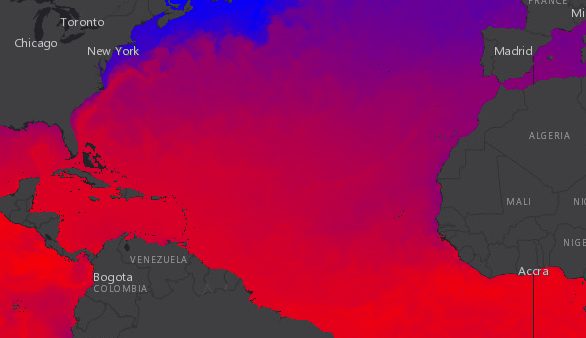
In contrast, the following image renders sea temperature data from the same service at 5000 meters below the surface within the same time window.
let multidimensionalDefinition = [];multidimensionalDefinition.push(new DimensionalDefinition({  variableName: "water_temp",  dimensionName: "StdZ", // water depth  values: [-5000], // 5000 m below  isSlice: true}));
let mosaicRule = new MosaicRule();mosaicRule.multidimensionalDefinition = multidimensionalDefinition;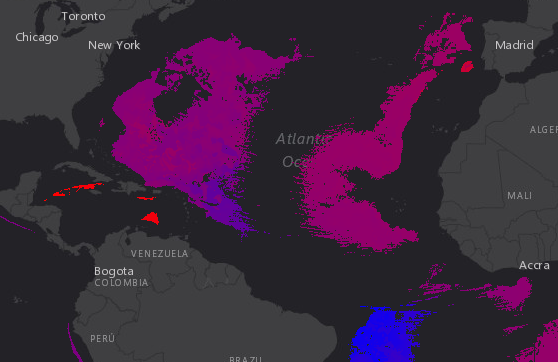
Constructors
Constructor
Parameters
| Parameter | Type | Description | Required |
|---|---|---|---|
| properties | | |
Properties
| Property | Type | Class |
|---|---|---|
declaredClass readonly inherited | ||
| | ||
| | ||
| | ||
| |
isSlice
- Type
- boolean
Indicates whether the values indicate slices (rather than ranges).
- Default value
- false
Methods
fromJSON
- Signature
-
fromJSON (json: any): any
Creates a new instance of this class and initializes it with values from a JSON object
generated from an ArcGIS product. The object passed into the input json
parameter often comes from a response to a query operation in the REST API or a
toJSON()
method from another ArcGIS product. See the Using fromJSON()
topic in the Guide for details and examples of when and how to use this function.
Parameters
| Parameter | Type | Description | Required |
|---|---|---|---|
| json | A JSON representation of the instance in the ArcGIS format. See the ArcGIS REST API documentation for examples of the structure of various input JSON objects. | |
- Returns
- any
Returns a new instance of this class.
clone
- Signature
-
clone (): DimensionalDefinition
Creates a clone of the DimensionalDefinition object.
- Returns
- DimensionalDefinition
A clone of the object that invoked this method.
Example
// Creates a clone of the DimensionalDefinitionlet dimensionalDefinition1 = dimensionalDefinition.clone(); toJSON
- Signature
-
toJSON (): any
Converts an instance of this class to its ArcGIS portal JSON representation. See the Using fromJSON() guide topic for more information.
- Returns
- any
The ArcGIS portal JSON representation of an instance of this class.