import RasterFunction from "@arcgis/core/layers/support/RasterFunction.js";const RasterFunction = await $arcgis.import("@arcgis/core/layers/support/RasterFunction.js");- Inheritance:
- RasterFunction→
Accessor
- Since
- ArcGIS Maps SDK for JavaScript 4.0
Raster functions specify processing to be done to the image service. They allow the mosaic image service to deliver a dynamically mosaicked image and they can be used to enhance the mosaicked image product by applying processing operations such as image enhancements, and image algebra. See raster functions for a list of functions and their arguments. The following image shows a landcover ImageryLayer rendered with two chained client-side raster functions used to reclass pixel values (Remap) and assign each pixel a new color (Colormap).
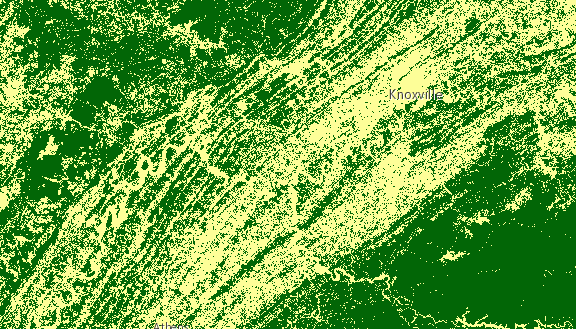
Chaining raster functions is accomplished by setting the Raster argument in the functionArguments property to another defined raster function. See example below on chaining a Remap raster function with a Colormap.
let remapRF = new RasterFunction();remapRF.functionName = "Remap";remapRF.functionArguments = {  InputRanges: [-3,10,11,37], // remap pixels with values -3 to 10 to now have value of 1  OutputValues: [1,2],        // remap pixel values from 11 to 37 to have a value of 2  Raster: "$$"  // Apply remap to the image service};remapRF.outputPixelType = "u8";
let colorRF = new RasterFunction();colorRF.functionName = "Colormap";colorRF.functionArguments = {  Colormap: [    [1, 255, 0, 0],  // Symbolize pixels with value of 1 using red color    [2, 0, 255, 0]   // Symbolize pixels with value of 2 using green color  ],  Raster : remapRF  // Apply Colormap to output raster from the remap rasterFunction};
imageLayer.rasterFunction = colorRF;
The following code snippet shows how convenience methods from the rasterFunctionUtils module can be used when applying a raster function to an imagery or imagery tile layer.
// apply NDVI and colormap raster function to an imagery tile layer// use rasterFunctionUtils convenience methods to create raster functionsconst ndvi = rasterFunctionUtils.bandArithmeticNDVI({  nirBandId: 4,  redBandId: 3,  scientificOutput: false});
const colormap = rasterFunctionUtils.colormap({ colorRampName: "NDVI3", raster: ndvi});layer.rasterFunction = colormap;Constructors
Constructor
Parameters
| Parameter | Type | Description | Required |
|---|---|---|---|
| properties | | |
Properties
| Property | Type | Class |
|---|---|---|
declaredClass readonly inherited | ||
| | ||
| | ||
| | ||
| | ||
| |
functionArguments
The arguments for the raster function. The structure depends on the function specified. See raster functions for a list of functions and their arguments. Also parses the arguments of RFT format.
Example
rasterFunction.functionArguments = { "Azimuth":215.0, "Altitude":75.0, "ZFactor":0.3}; functionName
The raster function name. See raster functions for a list of functions and their arguments. The name in the raster function in RFT JSON format is also parsed to functionName.
Example
rasterFunction.functionName = "Stretched";rasterFunction.name = "GrayScale"; outputPixelType
- Type
- RasterPixelType
Defines the pixel type of the output image.
- Default value
- "unknown"
Example
rasterFunction.outputPixelType = "u8";Methods
fromJSON
- Signature
-
fromJSON (json: any): any
Creates a new instance of this class and initializes it with values from a JSON object
generated from an ArcGIS product. The object passed into the input json
parameter often comes from a response to a query operation in the REST API or a
toJSON()
method from another ArcGIS product. See the Using fromJSON()
topic in the Guide for details and examples of when and how to use this function.
Parameters
| Parameter | Type | Description | Required |
|---|---|---|---|
| json | A JSON representation of the instance in the ArcGIS format. See the ArcGIS REST API documentation for examples of the structure of various input JSON objects. | |
- Returns
- any
Returns a new instance of this class.
clone
- Signature
-
clone (): RasterFunction
- Since
- ArcGIS Maps SDK for JavaScript 4.29
Creates a deep clone of the raster function.
- Returns
- RasterFunction
A deep clone of the object that invoked this method.
Example
// Creates a deep clone of the layer's rasterFunctionlet rasterFunction = layer.rasterFunction.clone(); toJSON
- Signature
-
toJSON (): any
Converts an instance of this class to its ArcGIS portal JSON representation. See the Using fromJSON() guide topic for more information.
- Returns
- any
The ArcGIS portal JSON representation of an instance of this class.