import AttachmentsContent from "@arcgis/core/popup/content/AttachmentsContent.js";const AttachmentsContent = await $arcgis.import("@arcgis/core/popup/content/AttachmentsContent.js");- Since
- ArcGIS Maps SDK for JavaScript 4.11
An AttachmentsContent popup element represents an attachment element associated with a
feature. This resource is available only if the FeatureLayer.capabilities.data.supportsAttachment
or the Sublayer.capabilities.data.supportsAttachment is true.
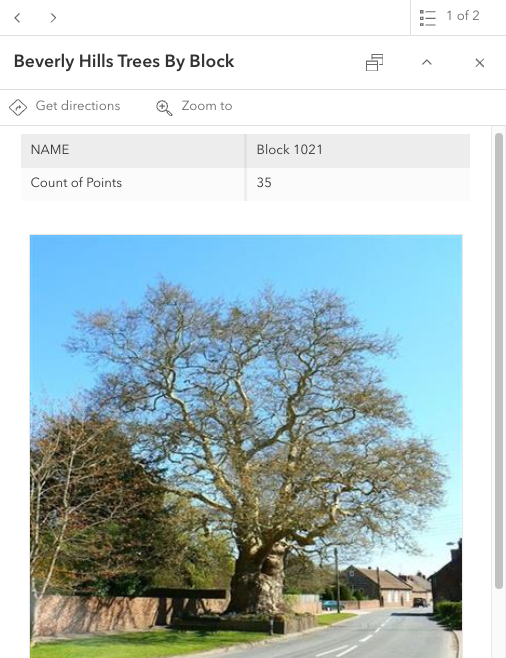
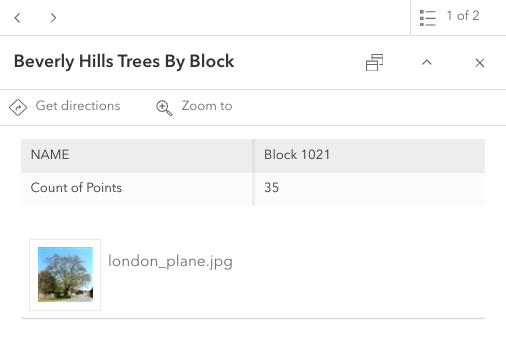
| Preview view | List view |
|---|---|
 |  |
Example
// Create the AttachmentsContent popup element// If the selected feature has attributes associated with it, they will display within the popuplet attachmentsElement = new AttachmentsContent({  // Shows all attachments as a list of linked files  displayType: "list",  // Sorts the attachments by their `ATT_NAME` attachmentInfo field in descending order  orderByFields: [{ field: "ATT_NAME", order: "descending" }]});
// Create the PopupTemplatelet template = new PopupTemplate({  title: "Beverly Hills trees by block",  outFields: ["*"],  content: [attachmentsElement]});
Constructors
Constructor
Parameters
| Parameter | Type | Description | Required |
|---|---|---|---|
| properties | | |
Properties
| Property | Type | Class |
|---|---|---|
| | ||
| | ||
declaredClass readonly inherited | ||
| | ||
"auto" | "preview" | "list" | | |
| | ||
| | ||
type readonly | "attachments" | |
attachmentKeywords
- Since
- ArcGIS Maps SDK for JavaScript 4.34
An array of strings used to identify attachment(s). When keywords are specified, attachments will be filtered using this array of keywords. Matching is case-sensitive and requires exact keyword matches; partial matches are not supported.
displayType
- Type
- "auto" | "preview" | "list"
- Since
- ArcGIS Maps SDK for JavaScript 4.22
A string value indicating how to display an attachment.
| Value | Description |
|---|---|
| auto | The attachments will display in preview mode if the feature layer capabilities or sublayer capabilites support resized attachments. Otherwise, the attachments are displayed in list mode. |
| preview | Shows a thumbnail image of the attachment. |
| list | Shows a list of attachment links. |
- Default value
- "auto"
orderByFields
- Type
- AttachmentsOrderByInfo[] | null | undefined
- Since
- ArcGIS Maps SDK for JavaScript 4.32
An array of AttachmentsOrderByInfo indicating the display order for the attachments, and whether they should be sorted in ascending or descending order. This only applies if the feature layer capabilities supports attachment.supportsOrderByFields.
Example
// Sort the attachments by their `ATT_NAME` attribute in descending orderconst attachmentsElement = new AttachmentsContent({ orderByFields: [ { field: "ATT_NAME", order: "descending" } ]});Methods
fromJSON
- Signature
-
fromJSON (json: any): any
Creates a new instance of this class and initializes it with values from a JSON object
generated from an ArcGIS product. The object passed into the input json
parameter often comes from a response to a query operation in the REST API or a
toJSON()
method from another ArcGIS product. See the Using fromJSON()
topic in the Guide for details and examples of when and how to use this function.
Parameters
| Parameter | Type | Description | Required |
|---|---|---|---|
| json | A JSON representation of the instance in the ArcGIS format. See the ArcGIS REST API documentation for examples of the structure of various input JSON objects. | |
- Returns
- any
Returns a new instance of this class.
clone
- Signature
-
clone (): this
Creates a deep clone of this object. Any properties that store values by reference will be assigned copies of the referenced values on the cloned instance.
- Returns
- this
A deep clone of the class instance that invoked this method.
toJSON
- Signature
-
toJSON (): any
Converts an instance of this class to its ArcGIS portal JSON representation. See the Using fromJSON() guide topic for more information.
- Returns
- any
The ArcGIS portal JSON representation of an instance of this class.