import RotationVariable from "@arcgis/core/renderers/visualVariables/RotationVariable.js";const RotationVariable = await $arcgis.import("@arcgis/core/renderers/visualVariables/RotationVariable.js");- Inheritance:
- RotationVariable→
VisualVariable→ Accessor
- Since
- ArcGIS Maps SDK for JavaScript 4.10
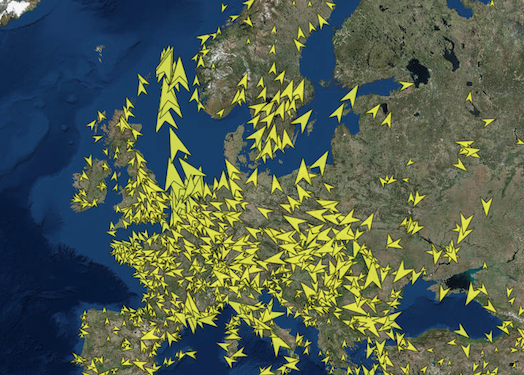
The rotation visual variable, determined by mapping the values to data in a field or
by other arithmetic means with an Arcade expression, controls how features rendered with
marker symbols or text symbols in a MapView ,
as well as with marker symbols, ObjectSymbol3DLayer or IconSymbol3DLayer in a SceneView,
are rotated. The final rotation is derived by adding the mapped or calculated rotation
value to the symbol's initial angle.
This object may be used to depict variables such as wind direction, vehicle heading, trend indicators, etc.
Known Limitations
In a SceneView rotation visual variables are not currently supported with text symbols and 3D text symbol layers.
Example
const rotationVisualVariable = { type: "rotation", field: "heading", rotationType: "geographic"};renderer.visualVariables = [ rotationVisualVariable ];Constructors
Constructor
Parameters
| Parameter | Type | Description | Required |
|---|---|---|---|
| properties | | |
Properties
| Property | Type | Class |
|---|---|---|
"heading" | "tilt" | "roll" | | |
declaredClass readonly inherited | ||
field inherited | ||
legendOptions inherited | ||
"geographic" | "arithmetic" | | |
type readonly | "rotation" | |
valueExpression inherited | ||
valueExpressionTitle inherited |
axis
- Type
- "heading" | "tilt" | "roll"
Only applicable when working in a SceneView with an ObjectSymbol3DLayer. Defines the axis the rotation visual variable should be applied to when rendering features with an ObjectSymbol3DLayer.
If the symbol resource is aligned such that its forward facing side points in the direction of the y-axis (the y-axis always points North in WGS84 or WebMercator coordinates), its upwards facing side is pointing in the direction of the z-axis, and its right-hand side points in the direction of the x-axis (the x-axis always points East in WGS84 or WebMercator coordinates), then the following rotation axis will rotate the symbol as indicated by their name.
| Possible Value | Description |
|---|---|
| heading | The rotation of the symbol in the horizontal plane (i.e., around the z axis). |
| tilt | The rotation of the symbol in the longitudinal vertical plane (i.e., around the x axis). |
| roll | The rotation of the symbol in the lateral vertical plane (i.e., around the y axis). |
- Default value
- "heading"
field
- Type
- string
The name of the numeric attribute field that contains the data values used to determine the color/opacity/size/rotation of each feature.
legendOptions
- Type
- VisualVariableLegendOptions | null | undefined
An object providing options for displaying the visual variable in the Legend.
rotationType
- Type
- "geographic" | "arithmetic"
Defines the origin and direction of rotation depending
on how the angle of rotation was measured. See the table below for a list of possible values.
This property only applies to rotations around the heading axis.
| Value | Description |
|---|---|
| geographic | Rotates the symbol from the north in a clockwise direction. |
| arithmetic | Rotates the symbol from the east in a counter-clockwise direction. |
- Default value
- "geographic"
valueExpression
An Arcade expression following the specification
defined by the Arcade Visualization Profile. Expressions
in visual variables may reference field values using the $feature profile variable and must return a number.
The values returned from this expression are the data used to drive the visualization as defined in the stops. This takes precedence over field. Therefore, this property is typically used as an alternative to field in visual variables.
- See also
valueExpressionTitle
The title identifying and describing the associated
Arcade expression as defined in the valueExpression property. This is displayed
as the title of the corresponding visual variable in the Legend in the absence of a
provided title in the legendOptions property.
Methods
fromJSON
- Signature
-
fromJSON (json: any): any
Creates a new instance of this class and initializes it with values from a JSON object
generated from an ArcGIS product. The object passed into the input json
parameter often comes from a response to a query operation in the REST API or a
toJSON()
method from another ArcGIS product. See the Using fromJSON()
topic in the Guide for details and examples of when and how to use this function.
Parameters
| Parameter | Type | Description | Required |
|---|---|---|---|
| json | A JSON representation of the instance in the ArcGIS format. See the ArcGIS REST API documentation for examples of the structure of various input JSON objects. | |
- Returns
- any
Returns a new instance of this class.
clone
- Signature
-
clone (): RotationVariable
Creates a deep clone of the RotationVariable.
- Returns
- RotationVariable
A deep clone of the rotation visual variable that invoked this method.
Example
// Creates a deep clone of the visual variablelet renderer = renderer.visualVariables[0].clone(); toJSON
- Signature
-
toJSON (): any
Converts an instance of this class to its ArcGIS portal JSON representation. See the Using fromJSON() guide topic for more information.
- Returns
- any
The ArcGIS portal JSON representation of an instance of this class.