import SizeVariable from "@arcgis/core/renderers/visualVariables/SizeVariable.js";const SizeVariable = await $arcgis.import("@arcgis/core/renderers/visualVariables/SizeVariable.js");- Inheritance:
- SizeVariable→
VisualVariable→ Accessor
- Since
- ArcGIS Maps SDK for JavaScript 4.10
The size visual variable defines the size of individual features in a layer based on a numeric (often thematic) value. This value comes from one of the following:
- An attribute field
- The value of an attribute
fielddivided by a normalizationField - A value returned from an Arcade expression specified in valueExpression.
Size is defined in the form of a continuous ramp, which may be applied to renderers in either a MapView or a SceneView.
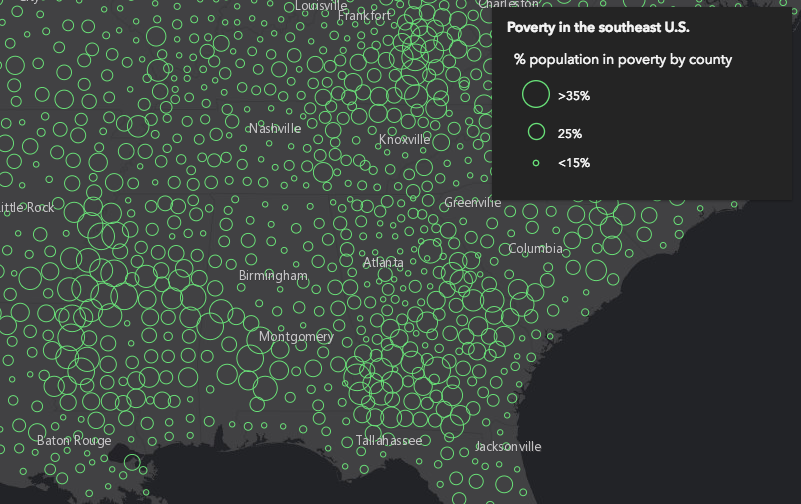
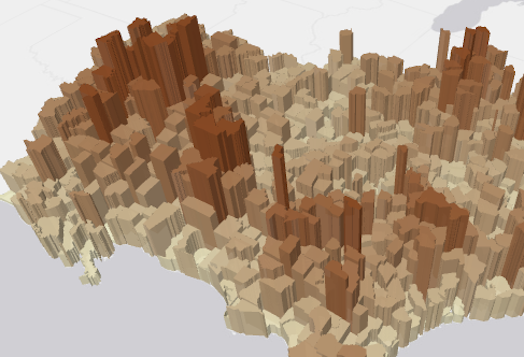
Symbol size may be applied either thematically, or literally using real-world units. See the example snippets below for details about each potential use of a size visual variable:
Bounded proportional symbols
Symbol sizes are generally proportional to data values, but bounded by min and max sizes. Intermediate sizes are linearly interpolated between the minSize and maxSize depending on the minDataValue and maxDataValue.
// features with WIND_SPEED of 0 will be rendered with a size of 8pts// features with WIND_SPEED of 60 will be rendered with a size of 40pts// features with WIND_SPEED between 0 and 60 will be rendered with sizes// between 8 and 40 points, interpolated linearly
const sizeVisualVariable = {  type: "size",  field: "WIND_SPEED",  minDataValue: 0,  maxDataValue: 60,  minSize: 8,  maxSize: 40};renderer.visualVariables = [ sizeVisualVariable ];
Intermediate bounded proportional symbols
Symbol sizes are generally proportional to data values, but may be defined with 2-6 stops at which symbol sizes are mapped to specific data values (and interpolated between those stops). This is a variation on the bounded proportional symbols, and is good for emphasizing certain ranges of data values. It also provides you with control over the legend labels.
// features with POP_POVERTY / TOTPOP_CY = 0.15 will be rendered with a size of 4pts// features with POP_POVERTY / TOTPOP_CY = 0.25 will be rendered with a size of 12pts// features with POP_POVERTY / TOTPOP_CY = 0.35 will be rendered with a size of 24pts// features with POP_POVERTY / TOTPOP_CY between those values will be rendered// will be rendered with sizes between the defined stops, interpolated linearly// the legend will show the labels defined in each stop
renderer.visualVariables = [{  type: "size",  field: "POP_POVERTY",  normalizationField: "TOTPOP_CY",  legendOptions: {    title: "% population in poverty by county"  },  stops: [    { value: 0.15, size: 4, label: "<15%" },    { value: 0.25, size: 12, label: "25%" },    { value: 0.35, size: 24, label: ">35%" }  ]}];
Scale-dependent stops
Symbol sizes vary depending on the view scale and are otherwise not data-driven. This is used to create symbols with all the same sizes at a given scale, but the symbol sizes change as the user zooms in and out. It may also be used to define scale-dependent stops for polygon outline widths.
// all features will be rendered with the same outline width at a given view scale// outline width will shrink as the user zooms out (until it eventually disappears),// and grow as the user zooms in.
const sizeVisualVariable = {  type: "size",  valueExpression: "$view.scale",  target: "outline",  stops: [    { size: 2, value: 1155581.108577 },    { size: 1, value: 9244648.868618 },    { size: 0.5, value: 73957190.948944 },    { size: 0, value: 591657527.591555 }  ]};renderer.visualVariables = [ sizeVisualVariable ];
Scale-dependent bounded proportional symbols
Symbol sizes vary depending on the view scale, but are also data-driven. Sizes are bounded by min and max data values, but the minSize and maxSize (and interpolated sizes) vary based on the scale of the MapView.scale. This doesn't apply to a 3D SceneView.
// features are rendered as bounded proportional symbols based on the poverty rate, but the overall// sizes of the symbols will grow as the user zooms in and shrink as the user zooms out, providing// a cleaner visualization of the data at each scale.
// features with poverty rates of 15% will be rendered with a size of 3pts at scale 1:15,886,548// and a size of 12pts at scale 1:1,128// features with poverty rates of 45% will be rendered with a size of 32pts at scale 1:15,886,548// and a size of 60pts at scale 1:1,128// features with poverty rates between 15-45% will be rendered with sizes between those values,// depending on the view scale.
const sizeVisualVariable = {  type: "size",  valueExpression: "( $feature.POP_POVERTY / $feature.TOTPOP_CY ) * 100",  legendOptions: {    title: "% population living in poverty"  },  maxDataValue: 45,  // the max symbol size will map to the minDataValue at an  // interpolated size depending on the current view scale  maxSize: {    type: "size",    valueExpression: "$view.scale",    stops: [      { size: 60, value: 1128 },      { size: 50, value: 36111 },      { size: 37.5, value: 43334 },      { size: 32, value: 15886548 }    ]  },  minDataValue: 15,  // the min symbol size will map to the minDataValue at an  // interpolated size depending on the current view scale  minSize: {    type: "size",    valueExpression: "$view.scale",    stops: [      { size: 12, value: 1128 },      { size: 8, value: 36111 },      { size: 5, value: 43334 },      { size: 3, value: 15886548 }    ]  }};renderer.visualVariables = [ sizeVisualVariable ];
RealWorldSize
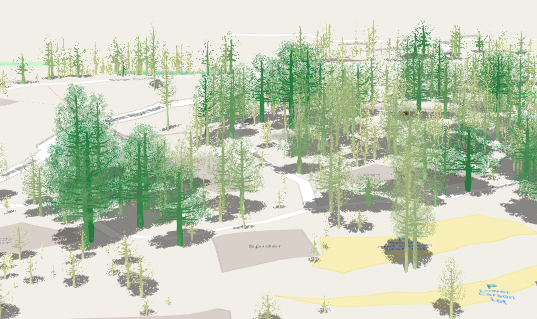
Symbol sizes are determined based on real-world measurements and units, not thematic values and screen units. This is useful for visualizing features with realistic sizes in either a MapView or a SceneView. It can also be used for thematic volumetric visualizations in 3D.
// features will be rendered with a height based on the "Height" attribute field// and a width and depth based on the "Width_EW" and "Width_NS" attribute fields
const treeSizeVisualVariables = [{ type: "size", axis: "height", field: "Height", // tree height valueUnit: "feet"}, { type: "size", axis: "width", field: "Width_EW", // crown diameter from east to west valueUnit: "feet"}, { type: "size", axis: "depth", field: "Width_NS", // crown diameter from north to south valueUnit: "feet"}];renderer.visualVariables = treeSizeVisualVariables;| Thematic Icon size | Thematic extrusion | Real world size |
|---|---|---|
 |  |  |
For CIMSymbols, the size value is only applied to the largest symbol layer instead of the full symbol. All other symbol layers will scale proportionally.
Constructors
Constructor
Parameters
| Parameter | Type | Description | Required |
|---|---|---|---|
| properties | | |
Properties
| Property | Type | Class |
|---|---|---|
| | ||
declaredClass readonly inherited | ||
field inherited | ||
| | ||
| | ||
number | SizeVariable | null | undefined | | |
| | ||
number | SizeVariable | null | undefined | | |
| | ||
| | ||
| | ||
type readonly | "size" | |
| | ||
valueExpression inherited | ||
valueExpressionTitle inherited | ||
| | ||
| |
axis
- Type
- SizeVariableAxis
Only applicable when working in a SceneView. Defines the axis the size visual variable should be applied to when rendering features with an ObjectSymbol3DLayer. See the local scene sample for an example of this.
| Possible Value | Description |
|---|---|
| width | The diameter of the symbol from east to west. |
| depth | The diameter of the symbol from north to south. |
| height | The height of the symbol. |
| width-and-depth | Applies the size visual variable to both width and depth axes. |
| all | Applies the size visual variable to all axes. |
- Default value
- "all"
field
- Type
- string
The name of the numeric attribute field that contains the data values used to determine the color/opacity/size/rotation of each feature.
legendOptions
- Type
- SizeVariableLegendOptions | null | undefined
An object providing options for displaying the visual variable in the Legend.
maxSize
- Type
- number | SizeVariable | null | undefined
The size used to render a feature containing the maximum data value.
- When setting a number, sizes are expressed in points for all 2D symbols and 3D flat symbol layers; size is expressed in meters for all 3D volumetric symbols.
- String values are only supported for 2D symbols and 3D flat symbol layers. Strings may specify size in
either points or pixels (e.g.
minSize: "16pt",minSize: "12px"). - When an object is used, the size of features whose data value (defined in field or valueExpression) is greater than or equal to the maxDataValue for the given view scale.
minSize
- Type
- number | SizeVariable | null | undefined
The size used to render a feature containing the minimum data value.
- When setting a number, sizes are expressed in points for all 2D symbols and 3D flat symbol layers; size is expressed in meters for all 3D volumetric symbols.
- String values are only supported for 2D symbols and 3D flat symbol layers. Strings may specify size in
either points or pixels (e.g.
minSize: "16pt",minSize: "12px"). - When an object is used, the size of features whose data value (defined in field or valueExpression) is greater than or equal to the minDataValue for the given view scale.
normalizationField
The name of the numeric attribute field used to normalize the data in the given field. If this field is used, then the values in maxDataValue and minDataValue or stops should be normalized as percentages or ratios.
stops
An array of objects that defines the mapping of data values returned from field or
valueExpression to icon sizes. You must specify 2 - 6 stops. The stops must be listed in ascending order
based on the value of the value property in each stop.
useSymbolValue
When setting a size visual variable on a renderer using an ObjectSymbol3DLayer, this property indicates whether to apply the value defined by the ObjectSymbol3DLayer.height, ObjectSymbol3DLayer.width, or ObjectSymbol3DLayer.depth properties to the corresponding axis of this visual variable instead of proportionally scaling this axis' value. View an example of this.
valueExpression
An Arcade expression following the specification
defined by the Arcade Visualization Profile. Expressions
in visual variables may reference field values using the $feature profile variable and must return a number.
The values returned from this expression are the data used to drive the visualization as defined in the stops. This takes precedence over field. Therefore, this property is typically used as an alternative to field in visual variables.
- See also
valueExpressionTitle
The title identifying and describing the associated
Arcade expression as defined in the valueExpression property. This is displayed
as the title of the corresponding visual variable in the Legend in the absence of a
provided title in the legendOptions property.
valueRepresentation
- Type
- SizeVariableRepresentation | null | undefined
Specifies how to apply the data value when mapping real-world sizes. See table below for supported values.
| Value | Description |
|---|---|
| radius | The point data value represents the radius of a circular feature. |
| diameter | The point data value represents the diameter of a circular feature. |
| area | The point data value represents the area of a feature. |
| width | The polyline data value represents the width of a line. |
| distance | The polyline data value represents the distance from the center line (one half of the width). |
Known Limitations
- This property is not supported for flat (2D) line symbols driven by real world sizes in 3D SceneViews.
- Data values must refer to the planar size of the feature in the units of the view's spatial reference.
valueUnit
- Type
- SizeVariableUnit
Indicates the unit of measurement used to interpret the value returned by field or valueExpression.
For 3D volumetric symbols the default is meters. This property should not be used if the data value
represents a thematic quantity (e.g. traffic count, census data, etc.).
Known Limitations
- This property is not supported for flat (2D) line symbols driven by real world sizes in 3D SceneViews.
- Data values must refer to the planar size of the feature in the units of the view's spatial reference.
Methods
fromJSON
- Signature
-
fromJSON (json: any): any
Creates a new instance of this class and initializes it with values from a JSON object
generated from an ArcGIS product. The object passed into the input json
parameter often comes from a response to a query operation in the REST API or a
toJSON()
method from another ArcGIS product. See the Using fromJSON()
topic in the Guide for details and examples of when and how to use this function.
Parameters
| Parameter | Type | Description | Required |
|---|---|---|---|
| json | A JSON representation of the instance in the ArcGIS format. See the ArcGIS REST API documentation for examples of the structure of various input JSON objects. | |
- Returns
- any
Returns a new instance of this class.
clone
- Signature
-
clone (): SizeVariable
Creates a deep clone of the SizeVisualVariable.
- Returns
- SizeVariable
A deep clone of the size visual variable that invoked this method.
Example
// Creates a deep clone of the visual variablelet renderer = renderer.visualVariables[0].clone(); flipSizes
- Signature
-
flipSizes (): this
Modifies the SizeVariable in place by flipping the sizes in the stops. This is designed for scenarios where you want small numbers (such as rankings 1, 2, 3) to be rendered with larger icons. This function is particularly useful for flipping the sizes of a SizeVariable after it has been returned from a method in the sizeRendererCreator module.
- Returns
- this
Example
// flips the size ramp when a checkbox is clicked in the app UIcheckbox.addEventListener("change", function() { const renderer = layer.renderer.clone(); const sizeVariable = renderer.visualVariables[0]; sizeVariable.flipSizes(); layer.renderer = renderer;}); toJSON
- Signature
-
toJSON (): any
Converts an instance of this class to its ArcGIS portal JSON representation. See the Using fromJSON() guide topic for more information.
- Returns
- any
The ArcGIS portal JSON representation of an instance of this class.