import ElevationInfo from "@arcgis/core/symbols/support/ElevationInfo.js";const ElevationInfo = await $arcgis.import("@arcgis/core/symbols/support/ElevationInfo.js");- Inheritance:
- ElevationInfo→
Accessor
- Since
- ArcGIS Maps SDK for JavaScript 4.34
Specifies how elements like features, observers, targets or flow are placed on the vertical axis (z). This property may only be used in a SceneView. See the ElevationInfo sample for an example of how this property may be used.
If elevationInfo is not set, the elevation mode is picked on the fly for each feature:
- Features with z-values default to
absolute-height. - Features without z-values:
- Polylines, polygons, and points drawn with
ObjectSymbol3DLayerdefault toon-the-ground. - Points drawn with
IconSymbol3DLayerdefault torelative-to-ground.
- Polylines, polygons, and points drawn with
Feature services do not persist elevationInfo, so elevation settings from publishing tools such as ArcGIS Pro are lost unless saved in a web scene.
Constructors
Constructor
Parameters
| Parameter | Type | Description | Required |
|---|---|---|---|
| properties | | |
Properties
| Property | Type | Class |
|---|---|---|
declaredClass readonly inherited | ||
| | ||
Modes | | |
| | ||
| |
featureExpressionInfo
- Type
- FeatureExpressionInfo | null | undefined
Defines how to override an element's Z-value based on its attributes.
mode
- Type
- Modes
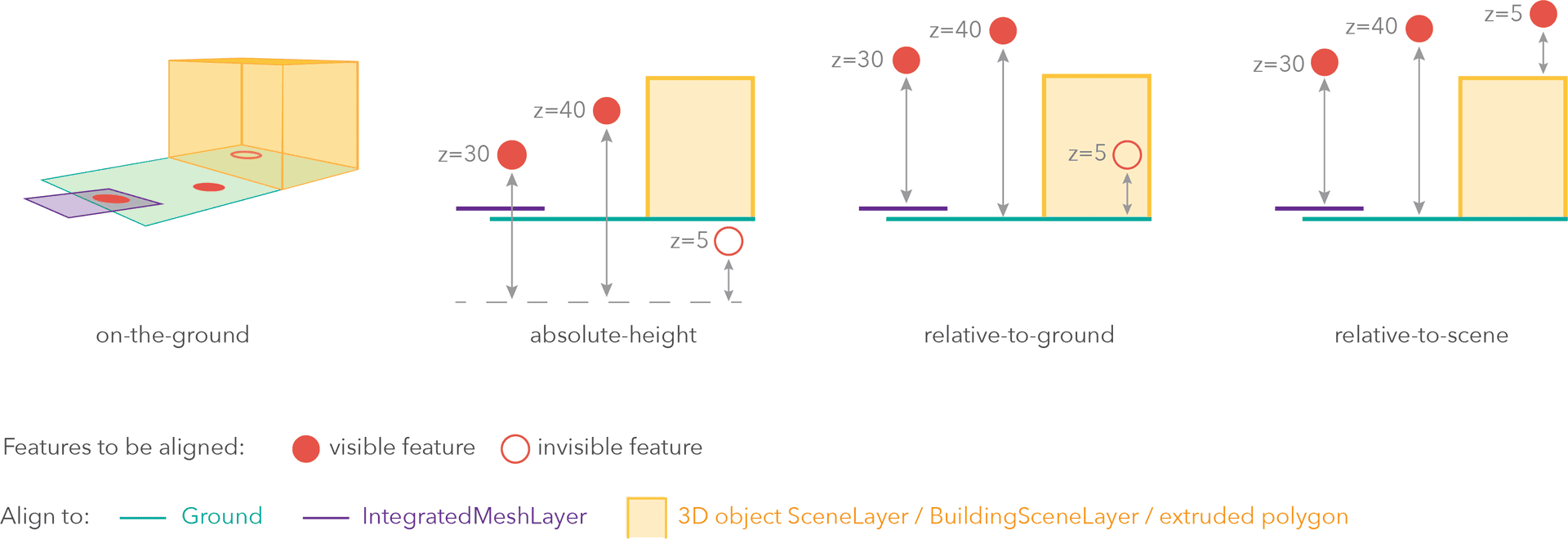
Defines how the element is placed with respect to the terrain surface or 3D objects in the scene. If the geometry consists of multiple points (e.g. lines or polygons), the elevation is evaluated separately for each point. See the table below for a list of possible values.
| Mode | Description |
|---|---|
| on-the-ground | Elements are aligned to the Ground. If the scene contains an IntegratedMeshLayer or IntegratedMesh3DTilesLayer, then elements are aligned to the IntegratedMeshLayer or IntegratedMesh3DTilesLayer. If elements have z-values, then the z-values are ignored in this mode. Elements with 2D symbols are draped on the Ground or IntegratedMeshLayer or IntegratedMesh3DTilesLayer. This is the default mode for layers without z-values containing Polyline, Polygon or Point rendered with ObjectSymbol3DLayer. |
| absolute-height | Elements are placed at an absolute elevation (z-value) above sea level. This z-value is determined by the geometry's z-value (if present). If featureExpressionInfo is defined, the result of the expression is used instead of the geometry's z-value. This mode doesn't take the elevation of the Ground or any other layers into account. This is the default value of elements with any geometry type where hasZ = true. |
| relative-to-ground | Elements are placed at an elevation relative to the Ground or IntegratedMeshLayer or IntegratedMesh3DTilesLayer. The element's elevation is determined by summing up the elevation of the Ground or IntegratedMeshLayer or IntegratedMesh3DTilesLayer and the geometry's z-value (if present). If featureExpressionInfo is defined, the result of the expression is used instead of the geometry's z-value. If the geometries don't have z-values, relative-to-ground is the default value for Point geometries rendered with IconSymbol3DLayers. |
| relative-to-scene | Elements are aligned to extruded polygons, meshes, 3D Object SceneLayers or BuildingSceneLayers, depending on which one has higher elevation. If the element is not directly above a building or any other element, it is aligned to the elevation of the Ground or the IntegratedMeshLayer or IntegratedMesh3DTilesLayer. If present, the geometry's z-value is added to the elevation. If featureExpressionInfo is defined, the result of the expression is used instead of the geometry's z-value. |
unit
- Type
- ElevationUnit | null | undefined
The unit for featureExpressionInfo and offset values.
Methods
fromJSON
- Signature
-
fromJSON (json: any): any
Creates a new instance of this class and initializes it with values from a JSON object
generated from an ArcGIS product. The object passed into the input json
parameter often comes from a response to a query operation in the REST API or a
toJSON()
method from another ArcGIS product. See the Using fromJSON()
topic in the Guide for details and examples of when and how to use this function.
Parameters
| Parameter | Type | Description | Required |
|---|---|---|---|
| json | A JSON representation of the instance in the ArcGIS format. See the ArcGIS REST API documentation for examples of the structure of various input JSON objects. | |
- Returns
- any
Returns a new instance of this class.
clone
- Signature
-
clone (): this
Creates a deep clone of this object. Any properties that store values by reference will be assigned copies of the referenced values on the cloned instance.
- Returns
- this
A deep clone of the class instance that invoked this method.
toJSON
- Signature
-
toJSON (): any
Converts an instance of this class to its ArcGIS portal JSON representation. See the Using fromJSON() guide topic for more information.
- Returns
- any
The ArcGIS portal JSON representation of an instance of this class.