import SunLighting from "@arcgis/core/views/3d/environment/SunLighting.js";const SunLighting = await $arcgis.import("@arcgis/core/views/3d/environment/SunLighting.js");- Inheritance:
- SunLighting→
SunLighting→ Accessor
- Since
- ArcGIS Maps SDK for JavaScript 4.23
The SunLighting class allows you to change the lighting in the scene to sunlight. The position of the light is set to the sun's location.
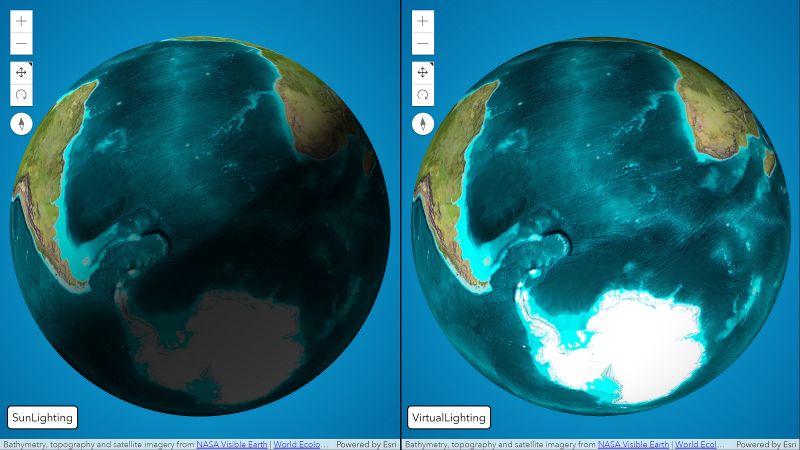
Example:
let view = new SceneView({  container: "viewDiv",
  map: new Map({    basemap: "satellite",    ground: "world-elevation"  }),  environment: {    lighting: {      type: "sun"    // autocasts as new SunLighting()    }  }});
The lighting visualization updates as soon as the type property changes:
view.environment.lighting = { type: "sun", directShadowsEnabled: true // autocasts as new SunLighting({ directShadowsEnabled: true })}- See also
Constructors
Constructor
Parameters
| Parameter | Type | Description | Required |
|---|---|---|---|
| properties | | |
Properties
| Property | Type | Class |
|---|---|---|
| | ||
| | ||
declaredClass readonly inherited | ||
directShadowsEnabled inherited | ||
displayUTCOffset inherited | ||
glow inherited | ||
type readonly | "sun" | |
cameraTrackingEnabled
- Type
- boolean
Indicates whether the date and time of the simulated sun is automatically updated to maintain the current time of day while the camera changes.
- Default value
- true
date
- Type
- Date
The current date and time of the simulated sun. When setting the date, specifying the time zone is important, otherwise the time zone of the browser will be used. This might lead to different lighting for users in different time zones.
- Default value
- new Date("March 15, 2022 12:00:00 UTC")
directShadowsEnabled
- Type
- boolean
Indicates whether to show shadows cast by the sun.
Shadows are only displayed for real world 3D objects. Terrain doesn't cast shadows. In local scenes at small zoom
levels, shadows are not displayed. For more control on which 3D objects cast shadows use the castShadows
property available on ObjectSymbol3DLayer.castShadows,
FillSymbol3DLayer.castShadows,
ExtrudeSymbol3DLayer.castShadows,
and PathSymbol3DLayer.castShadows.
- Default value
- false
displayUTCOffset
The UTC time zone offset in hours that should be displayed in the UI to represent the date. This value does not have an impact on the actual lighting of the scene.
glow
Adds a glow effect to the scene intended for stylistic visualizations. When set, this property creates a halo around
light emitters, making them appear brighter and more prominent. Accepts a Glow instance or null to
disable the effect.
Example:
scene.environment.lighting.glow = new Glow({ intensity: 1 });Methods
| Method | Signature | Class |
|---|---|---|
fromJSON inherited static | fromJSON(json: any): any | |
clone inherited | clone(): SunLighting | |
emit inherited | emit<Type extends EventNames<this>>(type: Type, event?: this["@eventTypes"][Type]): boolean | |
hasEventListener inherited | hasEventListener<Type extends EventNames<this>>(type: Type): boolean | |
on inherited | on<Type extends EventNames<this>>(type: Type, listener: EventedCallback<this["@eventTypes"][Type]>): ResourceHandle | |
toJSON inherited | toJSON(): any |
fromJSON
- Signature
-
fromJSON (json: any): any
Creates a new instance of this class and initializes it with values from a JSON object
generated from an ArcGIS product. The object passed into the input json
parameter often comes from a response to a query operation in the REST API or a
toJSON()
method from another ArcGIS product. See the Using fromJSON()
topic in the Guide for details and examples of when and how to use this function.
Parameters
| Parameter | Type | Description | Required |
|---|---|---|---|
| json | A JSON representation of the instance in the ArcGIS format. See the ArcGIS REST API documentation for examples of the structure of various input JSON objects. | |
- Returns
- any
Returns a new instance of this class.
clone
- Signature
-
clone (): SunLighting
Creates a deep clone of this object.
- Returns
- SunLighting
Creates a new clone of the instance calling this method.
emit
- Signature
-
emit <Type extends EventNames<this>>(type: Type, event?: this["@eventTypes"][Type]): boolean
- Type parameters
- <Type extends EventNames<this>>
Emits an event on the instance. This method should only be used when creating subclasses of this class.
hasEventListener
- Signature
-
hasEventListener <Type extends EventNames<this>>(type: Type): boolean
- Type parameters
- <Type extends EventNames<this>>
Indicates whether there is an event listener on the instance that matches the provided event name.
Parameters
| Parameter | Type | Description | Required |
|---|---|---|---|
| type | Type | The name of the event. | |
- Returns
- boolean
Returns true if the class supports the input event.
on
- Signature
-
on <Type extends EventNames<this>>(type: Type, listener: EventedCallback<this["@eventTypes"][Type]>): ResourceHandle
- Type parameters
- <Type extends EventNames<this>>
Registers an event handler on the instance. Call this method to hook an event with a listener.
Parameters
| Parameter | Type | Description | Required |
|---|---|---|---|
| type | Type | An event or an array of events to listen for. | |
| listener | EventedCallback<this["@eventTypes"][Type]> | The function to call when the event fires. | |
- Returns
- ResourceHandle
Returns an event handler with a
remove()method that should be called to stop listening for the event(s).Property Type Description remove Function When called, removes the listener from the event.
Example
view.on("click", function(event){ // event is the event handle returned after the event fires. console.log(event.mapPoint);}); toJSON
- Signature
-
toJSON (): any
Converts an instance of this class to its ArcGIS portal JSON representation. See the Using fromJSON() guide topic for more information.
- Returns
- any
The ArcGIS portal JSON representation of an instance of this class.