import SketchLabelOptions from "@arcgis/core/views/interactive/sketch/SketchLabelOptions.js";const SketchLabelOptions = await $arcgis.import("@arcgis/core/views/interactive/sketch/SketchLabelOptions.js");- Inheritance:
- SketchLabelOptions→
Accessor
- Since
- ArcGIS Maps SDK for JavaScript 4.24
The SketchLabelOptions allows users to configure the labels which are shown next to each
segment of a graphic while sketching and editing. The labels display each segment's
horizontal length and are not shown for non-planar polygons and polylines.
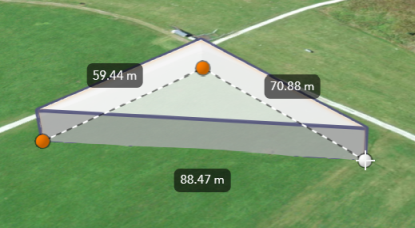
How the segment lengths are computed depends on the view's spatial reference. In geographic coordinate systems (GCS) and in Web Mercator, the lengths are computed geodetically. In projected coordinate systems (PCS), apart from Web Mercator, the lengths are computed in a Euclidean manner (in the respective PCS).
Known Limitation
Sketch labels are currently only supported when working with a SceneView.
Set the unit system for labels
Utilize either a Portal or a PortalItem to establish the unit system for labels while using the Sketch widget.
Read More
The unit of measurement used in the Sketch labels can be programmatically set through the PortalItem of a Map by defining the Portal.units property.
// Create a PortalItem instance for the map used in the 3D viewview.map.portalItem = new PortalItem({ portal: { units: "english" //or "metric" },});Or, if a PortalItem already exists, the Portal.units property can be directly set or changed.
// Set the units directly on an existing PortalItem of the 3D viewview.map.portalItem.portal.units = "english" //or "metric"In alternative, if there is no an existing Portal, it is possible to set the Portal.units property
from a new default Portal created using the Portal.getDefault() method.
// Create an instance of a new Portal and set the unitconst portal = Portal.getDefault();portal.units = "english" //or "metric"Constructors
Constructor
Parameters
| Parameter | Type | Description | Required |
|---|---|---|---|
| properties | | |
Properties
| Property | Type | Class |
|---|---|---|
declaredClass readonly inherited | ||
| |
enabled
- Type
- boolean
Whether labels are shown next to each segment of the graphic being sketched.
- Default value
- false