import Directions from "@arcgis/core/widgets/Directions.js";const Directions = await $arcgis.import("@arcgis/core/widgets/Directions.js");- Since
- ArcGIS Maps SDK for JavaScript 4.6
The Directions widget provides a way to calculate directions, between two or more input locations with a RouteLayer, using ArcGIS Online and custom Network Analysis Route services. Similar to how route works, this widget generates a route finding a least-cost path between multiple points using the routing service associated with the assigned route layer The resulting directions are displayed with detailed turn-by-turn instructions.
Directions widget uses Search to locate each stop, either by selecting a point on the map,
or by entering a search term into the textbox. Search uses settings defined in
Search properties. This includes the locationType, which defines the type of geocoding result
that is returned, and defaults to "street".
The Directions widget requires a RouteLayer to be associated with the layer property. A RouteLayer can be programmatically created or derived from an external source like a portal item or webmap. Please note that in order to view or interact with routing inputs and results, the RouteLayer must be added to the map. Routing service and symbology is configured in the layer, specifically the RouteLayer.url and RouteLayer.defaultSymbols properties respectively.
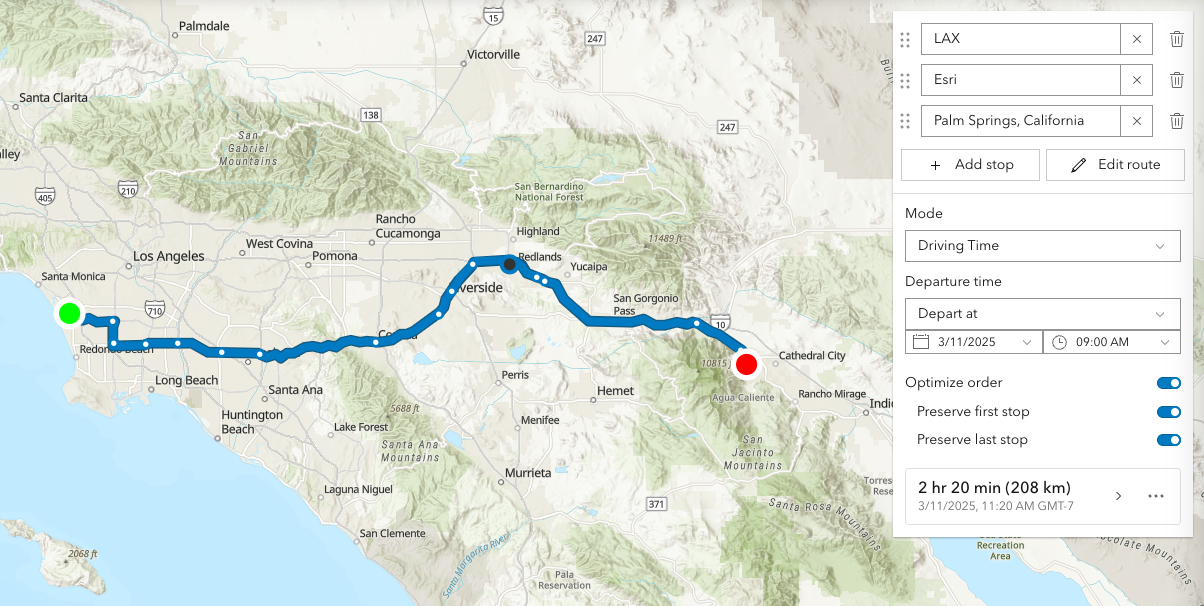
It is important to note that the Directions widget will automatically assign two empty stops if the assigned RouteLayer does not have any stops defined. An empty stop is a stop without a name or location. In the UI, these empty stops will appear as a placeholder for the user to either enter a search term, or digitize a location on the map. This behavior existed in legacy mode (no RouteLayer explicitly passed to the Directions widget constructor) as well, in which the Directions widget would assign a temporary RouteLayer if one was not assigned. Additionally, there is different default symbology created for a Directions widget instantiated with and without a RouteLayer:
| Directions with RouteLayer |
|---|
 |
This routing service requires authentication. If an API key is specified at the app level (see Config) or widget level (see apiKey) then this key will accompany requests to both the routing service and geocoder/reverse-geocoder. Please refer to the Search widget for more information on geocoding.
| Pick a location on the map |
|---|
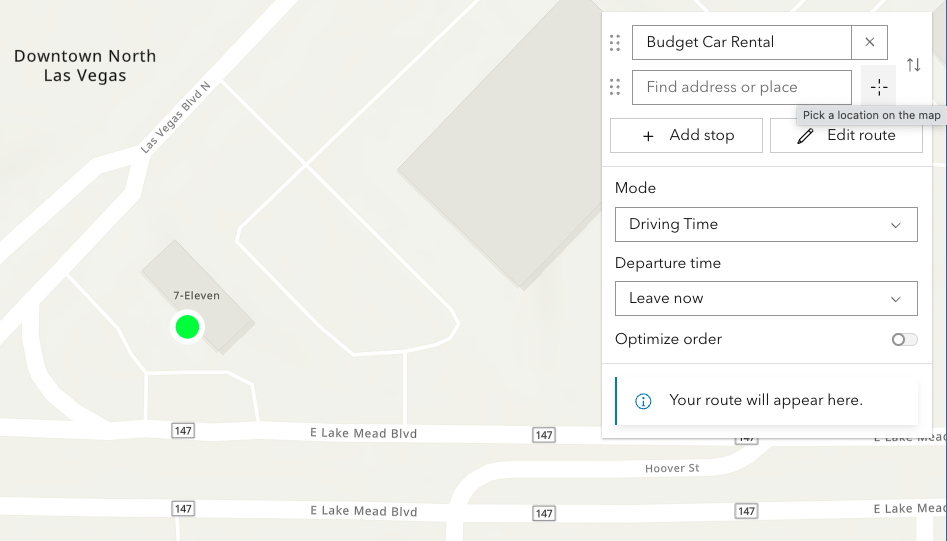 |
Locations on the map can be reverse geocoded and used as stops in the route.
Click the button with a crosshairs icon to associate a location with a new or existing stop. After clicking the button, click the map once. To cancel this process, press the escape key.
| Route options | Route options |
|---|---|
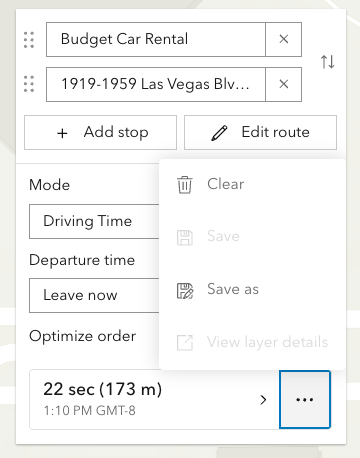 | 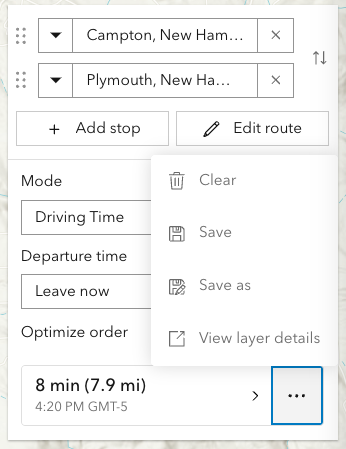 |
The resulting driving directions are automatically collapsed and can be optionally saved to a new or existing portal item. This can be achieved programically with save() and saveAs().
The Clear button calls the DirectionsViewModel.reset()
method, which removes all stops, directions, and the solved route.
| Editing | Editing |
|---|---|
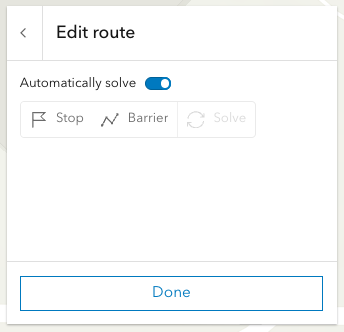 | 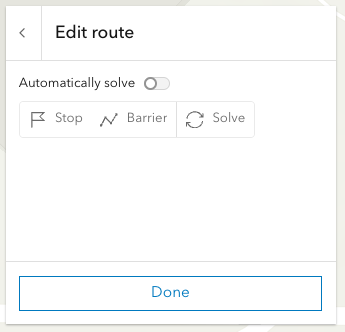 |
Selecting the Edit route button allows you to add/move/remove stops, add/move/remove/reshape polyline barriers.
By default the route will be automatically resolve at the completion of any editing operation. For more complex routes, it may be advantageous to disable auto-solving and solve as and when needed with the dedicated solve button.
Currently, this is only supported in 2D MapViews.
Note: Printing in Directions is in beta and considered experimental.
The print preview dialog, in some scenarios, may not display as aniticipated.
Please consider hiding the print button by setting visibleElements.printButton to false in these situations.
Examples
// 1. Add empty RouteLayer to Directions widget
// create a new empty RouteLayerconst routeLayer = new RouteLayer();
// new RouteLayer must be added to the map// for route visualizationconst map = new Map({  basemap: "topo-vector",  layers: [routeLayer]});
// new RouteLayer must be added to Directions widgetconst directionsWidget = new Directions({  view: view,  layer: routeLayer});
// adds the Directions widget to the// top right corner of the viewview.ui.add(directionsWidget, {  position: "top-right"});
// 2. Add RouteLayer from portal to Directions widget
// create a new RouteLayer from a portal itemconst routeLayer = new RouteLayer({ portalItem: { // autocasts as new PortalItem() id: "fd4188722f3e4e14986abca86cad80c6" }});
// new RouteLayer must be added to the map// for route visualizationconst map = new Map({ basemap: "topo-vector", layers: [routeLayer]});
// new RouteLayer must be added to Directions widgetconst directionsWidget = new Directions({ view: view, layer: routeLayer});
// adds the Directions widget to the// bottom right corner of the viewview.ui.add(directionsWidget, { position: "bottom-right"});// 3. Create a Directions widget with 2 pre-set stops
// create a new RouteLayer with 2 stopsconst routeLayer = new RouteLayer({ stops: [ { name: "Redlands, CA", geometry: { x: -117.1825, y: 34.0547 } }, { name: "Palm Springs, CA", geometry: { x: -116.5452, y: 33.8302 } } ]});
// new RouteLayer must be added to the map// for route visualizationconst map = new Map({ basemap: "topo-vector", layers: [routeLayer]});
// new RouteLayer must be added to Directions widgetconst directionsWidget = new Directions({ view: view, layer: routeLayer});// 4. Update the empty stops that are automatically added by the Directions widget
// create a new empty RouteLayerconst routeLayer = new RouteLayer();
// new RouteLayer must be added to the map// for route visualizationconst map = new Map({ basemap: "topo-vector", layers: [routeLayer]});
// new RouteLayer must be added to Directions widgetconst directionsWidget = new Directions({ view: view, layer: routeLayer});
// call the asynchronous functiondirectionsReady();
// asynchronous function to seed the Directions widget// with two initials stops (Campton to Plymouth)// instead of the empty stopsasync function directionsReady(){ await directionsWidget.when(); directionsWidget.layer.stops.at(0).name = "Campton, NH"; directionsWidget.layer.stops.at(0).geometry = new Point({ x: -71.64133, y: 43.85191 }); directionsWidget.layer.stops.at(1).name = "Plymouth, NH"; directionsWidget.layer.stops.at(1).geometry = new Point({ x: -71.68808, y: 43.75792 });}Constructors
Constructor
Parameters
| Parameter | Type | Description | Required |
|---|---|---|---|
| properties | | |
Properties
| Property | Type | Class |
|---|---|---|
| | ||
container inherited | HTMLElement | null | undefined | |
declaredClass readonly inherited | ||
destroyed readonly inherited | ||
| | ||
| | ||
Icon["icon"] | | |
id inherited | ||
| | ||
lastRoute readonly | | |
RouteLayer | null | undefined | | |
| | ||
| | ||
| | ||
| | ||
| | ||
visible inherited | ||
| |
apiKey
- Since
- ArcGIS Maps SDK for JavaScript 4.19
An authorization string used to access a resource or service. API keys are generated and managed in the portal. An API key is tied explicitly to an ArcGIS account; it is also used to monitor service usage. Setting a fine-grained API key on a specific class overrides the global API key.
By default, the following URLs will be used (unless overwritten in the app, or if using different defaults from a portal):
Geocoding URL: https://geocode-api.arcgis.com/arcgis/rest/services/World/GeocodeServer
Routing URL: https://route-api.arcgis.com/arcgis/rest/services/World/Route/NAServer/Route_World
Example
const directionsWidget = new Directions({ view: view, layer: routeLayer, apiKey: "YOUR_API_KEY"});// Add the Directions widget to the top right corner of the viewview.ui.add(directionsWidget, { position: "top-right"}); container
- Type
- HTMLElement | null | undefined
The ID or node representing the DOM element containing the widget. This property can only be set once. The following examples are all valid use case when working with widgets.
Examples
// Create the HTML div element programmatically at runtime and set to the widget's containerconst basemapGallery = new BasemapGallery({  view: view,  container: document.createElement("div")});
// Add the widget to the top-right corner of the viewview.ui.add(basemapGallery, {  position: "top-right"});
// Specify an already-defined HTML div element in the widget's container
const basemapGallery = new BasemapGallery({ view: view, container: basemapGalleryDiv});
// Add the widget to the top-right corner of the viewview.ui.add(basemapGallery, { position: "top-right"});
// HTML markup<body> <div id="viewDiv"></div> <div id="basemapGalleryDiv"></div></body>// Specify the widget while adding to the view's UIconst basemapGallery = new BasemapGallery({ view: view});
// Add the widget to the top-right corner of the viewview.ui.add(basemapGallery, { position: "top-right"}); goToOverride
- Type
- GoToOverride | null | undefined
- Since
- ArcGIS Maps SDK for JavaScript 4.8
This function provides the ability to override either the MapView goTo() or SceneView goTo() methods.
- See also
Example
// The following snippet uses Search but can be applied to any// widgets that support the goToOverride property.search.goToOverride = function(view, goToParams) { goToParams.options = { duration: updatedDuration }; return view.goTo(goToParams.target, goToParams.options);}; headingLevel
- Type
- HeadingLevel
- Since
- ArcGIS Maps SDK for JavaScript 4.20
Indicates the heading level to use for the origin and destination addresses (i.e. "380 New York Street").
By default, this is rendered
as a level 2 heading (e.g. <h2>380 New York Street</h2>). Depending on the widget's placement
in your app, you may need to adjust this heading for proper semantics. This is
important for meeting accessibility standards.
- See also
- Default value
- 2
Example
// address text will render as an <h3>directions.headingLevel = 3; icon
- Type
- Icon["icon"]
- Since
- ArcGIS Maps SDK for JavaScript 4.27
Icon which represents the widget. It is typically used when the widget is controlled by another one (e.g. in the Expand widget).
- Default value
- "right"
lastRoute
- Type
- RouteLayerSolveResult | null | undefined
The most recent route result. Returns a RouteLayerSolveResult object containing properties for barriers (if any), stops, and directions.
- See also
layer
- Type
- RouteLayer | null | undefined
- Since
- ArcGIS Maps SDK for JavaScript 4.24
The RouteLayer associated with the Directions widget. This property is required. The RouteLayer contains stops and barriers and will be used to display and solve routes.
searchProperties
- Type
- SearchProperties | null | undefined
Controls the default properties used when searching.
Note that the default searchProperties differ slightly from
the Search component.
- Default value
- { popupEnabled: false, resultGraphicEnabled: false }
unit
- Type
- SystemOrLengthUnit
- Since
- ArcGIS Maps SDK for JavaScript 4.25
Unit system (imperial, metric) or specific unit used for displaying the distance values. If not set, the widget will attempt to pick "imperial" or "metric" based on the user's portal settings.
This property will affect the summary distance as well as distance for each turn-by-turn maneuver.
Example
// Display distances in nautical miles.const directions = new Directions({ unit: "nautical-miles", layer: routeLayer, view: view}); view
- Type
- MapViewOrSceneView | null | undefined
The view from which the widget will operate.
viewModel
- Type
- DirectionsViewModel
The view model for this widget. This is a class that contains all the logic (properties and methods) that controls this widget's behavior. See the DirectionsViewModel class to access all properties and methods on the widget.
visible
- Type
- boolean
Indicates whether the widget is visible.
If false, the widget will no longer be rendered in the web document. This may affect the layout of other elements or widgets in the document. For example, if this widget is
the first of three widgets associated to the upper right hand corner of the DefaultUI, then the other widgets will reposition when this widget is made invisible.
For more information, refer to the css display value of "none".
- Default value
- true
Example
// Hides the widget in the viewwidget.visible = false; visibleElements
- Since
- ArcGIS Maps SDK for JavaScript 4.24
The visible elements that are displayed within the widget. This property provides the ability to turn individual elements of the widget's display on/off.
Example
// Hide the save button, save-as button and layer details link.const directions = new Directions({ view: view, layer: routeLayer, visibleElements: { layerDetailsLink: false, saveAsButton: false, saveButton: false }});Methods
| Method | Signature | Class |
|---|---|---|
classes inherited | classes(...classNames: ((string | null | undefined) | ((string[] | Record<string, boolean>) | null | undefined) | false | null | undefined)[]): string | |
destroy inherited | destroy(): void | |
emit inherited | emit<Type extends EventNames<this>>(type: Type, event?: this["@eventTypes"][Type]): boolean | |
getDirections(): Promise<RouteLayerSolveResult> | | |
hasEventListener inherited | hasEventListener<Type extends EventNames<this>>(type: Type): boolean | |
isFulfilled inherited | isFulfilled(): boolean | |
isRejected inherited | isRejected(): boolean | |
isResolved inherited | isResolved(): boolean | |
on inherited | on<Type extends EventNames<this>>(type: Type, listener: EventedCallback<this["@eventTypes"][Type]>): ResourceHandle | |
postInitialize inherited | postInitialize(): void | |
render inherited | render(): any | null | |
renderNow inherited | renderNow(): void | |
save(): Promise<PortalItem> | | |
saveAs(portalItem: PortalItem, options?: LayerSaveAsOptions): Promise<PortalItem> | | |
scheduleRender inherited | scheduleRender(): void | |
when inherited | when<TResult1 = this, TResult2 = never>(onFulfilled?: OnFulfilledCallback<this, TResult1> | null | undefined, onRejected?: OnRejectedCallback<TResult2> | null | undefined): Promise<TResult1 | TResult2> | |
zoomToRoute(): void | |
classes
- Signature
-
classes (...classNames: ((string | null | undefined) | ((string[] | Record<string, boolean>) | null | undefined) | false | null | undefined)[]): string
- Since
- ArcGIS Maps SDK for JavaScript 4.7
A utility method used for building the value for a widget's class property.
This aids in simplifying css class setup.
Parameters
- Returns
- string
The computed class name.
Example
// .tsx syntax showing how to set css classes while rendering the widget
render() {  const dynamicClasses = {    [css.flip]: this.flip,    [css.primary]: this.primary  };
return ( <div class={classes(css.root, css.mixin, dynamicClasses)} /> );} emit
- Signature
-
emit <Type extends EventNames<this>>(type: Type, event?: this["@eventTypes"][Type]): boolean
- Type parameters
- <Type extends EventNames<this>>
Emits an event on the instance. This method should only be used when creating subclasses of this class.
getDirections
- Signature
-
getDirections (): Promise<RouteLayerSolveResult>
Computes a route and directions. If successfully computed, results will be assigned to lastRoute returned. If a view is assigned, it will zoom to the extent of the route.
- Returns
- Promise<RouteLayerSolveResult>
When resolved, returns a RouteLayerSolveResult.
hasEventListener
- Signature
-
hasEventListener <Type extends EventNames<this>>(type: Type): boolean
- Type parameters
- <Type extends EventNames<this>>
Indicates whether there is an event listener on the instance that matches the provided event name.
Parameters
| Parameter | Type | Description | Required |
|---|---|---|---|
| type | Type | The name of the event. | |
- Returns
- boolean
Returns true if the class supports the input event.
isFulfilled
- Signature
-
isFulfilled (): boolean
isFulfilled() may be used to verify if creating an instance of the class is fulfilled (either resolved or rejected).
If it is fulfilled, true will be returned.
- Returns
- boolean
Indicates whether creating an instance of the class has been fulfilled (either resolved or rejected).
isRejected
- Signature
-
isRejected (): boolean
isRejected() may be used to verify if creating an instance of the class is rejected.
If it is rejected, true will be returned.
- Returns
- boolean
Indicates whether creating an instance of the class has been rejected.
isResolved
- Signature
-
isResolved (): boolean
isResolved() may be used to verify if creating an instance of the class is resolved.
If it is resolved, true will be returned.
- Returns
- boolean
Indicates whether creating an instance of the class has been resolved.
on
- Signature
-
on <Type extends EventNames<this>>(type: Type, listener: EventedCallback<this["@eventTypes"][Type]>): ResourceHandle
- Type parameters
- <Type extends EventNames<this>>
Registers an event handler on the instance. Call this method to hook an event with a listener.
Parameters
| Parameter | Type | Description | Required |
|---|---|---|---|
| type | Type | An event or an array of events to listen for. | |
| listener | EventedCallback<this["@eventTypes"][Type]> | The function to call when the event fires. | |
- Returns
- ResourceHandle
Returns an event handler with a
remove()method that should be called to stop listening for the event(s).Property Type Description remove Function When called, removes the listener from the event.
Example
view.on("click", function(event){ // event is the event handle returned after the event fires. console.log(event.mapPoint);}); save
- Signature
-
save (): Promise<PortalItem>
- Since
- ArcGIS Maps SDK for JavaScript 4.24
Saves the RouteLayer associated with the view model. This method will update the portal-item associated with layer.
- Returns
- Promise<PortalItem>
When resolved, returns a PortalItem.
saveAs
- Signature
-
saveAs (portalItem: PortalItem, options?: LayerSaveAsOptions): Promise<PortalItem>
- Since
- ArcGIS Maps SDK for JavaScript 4.24
Saves the RouteLayer associated with the view model as a new portal item.
Parameters
| Parameter | Type | Description | Required |
|---|---|---|---|
| portalItem | The new portal item to which the layer will be saved. | | |
| options | Save options. Currently, there is only one property that can be set, which is | |
- Returns
- Promise<PortalItem>
Saved portal item.
when
- Signature
-
when <TResult1 = this, TResult2 = never>(onFulfilled?: OnFulfilledCallback<this, TResult1> | null | undefined, onRejected?: OnRejectedCallback<TResult2> | null | undefined): Promise<TResult1 | TResult2>
when() may be leveraged once an instance of the class is created. This method takes two input parameters: an onFulfilled function and an onRejected function.
The onFulfilled executes when the instance of the class loads. The
onRejected executes if the instance of the class fails to load.
Parameters
| Parameter | Type | Description | Required |
|---|---|---|---|
| onFulfilled | OnFulfilledCallback<this, TResult1> | null | undefined | The function to call when the promise resolves. | |
| onRejected | The function to execute when the promise fails. | |
- Returns
- Promise<TResult1 | TResult2>
Returns a new promise for the result of
onFulfilledthat may be used to chain additional functions.
Example
// Although this example uses MapView, any class instance that is a promise may use when() in the same waylet view = new MapView();view.when(function(){ // This function will execute once the promise is resolved}, function(error){ // This function will execute if the promise is rejected due to an error}); zoomToRoute
- Signature
-
zoomToRoute (): void
Zoom so that the full route is displayed within the current map extent.
- Returns
- void