import Search from "@arcgis/core/widgets/Search.js";const Search = await $arcgis.import("@arcgis/core/widgets/Search.js");- Since
- ArcGIS Maps SDK for JavaScript 4.0
The Search widget provides a way to perform search operations on locator service(s), map/feature service feature layer(s), SceneLayers with an associated feature layer, BuildingComponentSublayer with an associated feature layer, GeoJSONLayer, CSVLayer, OGCFeatureLayer, and/or table(s). If using a locator with a geocoding service, the findAddressCandidates operation is used, whereas queries are used on feature layers.
By default, the Search widget uses the ArcGIS World Geocoding Service via this URL:
https://geocode.arcgis.com/arcgis/rest/services/World/GeocodeServer.
If a global apiKey is present, the Search widget uses this URL:
https://geocode-api.arcgis.com/arcgis/rest/services/World/GeocodeServer.
If an LocatorSearchSource.apiKey is present on the
LocatorSearchSource,
then the Search widget uses the URL defined by the LocatorSearchSource.url
property.
The Search widget sets the view on the Search result. The level of detail (LOD)
at the center of the view depends on the data source, with higher quality data sources returning extents closer to the
feature obtained from the search. To manually define the scale of the view at the Search result, use the zoomScale property
of the LocatorSearchSource.zoomScale
or LayerSearchSource.zoomScale.
Search widget results are typically sorted according to their relevance to the search and their relative importance.
However, when the scale of the MapView.scale or
SceneView.scale is less than or equal to 300,000, the operations
support prioritization of candidates based on their distance from a specified point (the center of the view)
by passing in the location parameter. Features closest to the input location show up higher in the list of results.
This behavior can be changed by using the LocatorSearchSource.localSearchDisabled
property.

You can use the view's DefaultUI to add widgets to the view's user interface via the
ui property on the view. See the example below.
Example
const searchWidget = new Search({ view: view});// Adds the search widget below other elements in// the top left corner of the viewview.ui.add(searchWidget, { position: "top-left", index: 2});Constructors
Constructor
Parameters
| Parameter | Type | Description | Required |
|---|---|---|---|
| properties | | |
Example
// typical usageconst searchWidget = new Search({ view: view, sources: [ ... ]});Properties
| Property | Type | Class |
|---|---|---|
| | ||
activeSource readonly | | |
| | ||
| | ||
allSources readonly | | |
| | ||
| | ||
container inherited | HTMLElement | null | undefined | |
declaredClass readonly inherited | ||
defaultSources readonly | | |
destroyed readonly inherited | ||
| | ||
| | ||
Icon["icon"] | | |
id inherited | ||
| | ||
| | ||
| | ||
| | ||
| | ||
| | ||
| | ||
| | ||
| | ||
| | ||
| | ||
results readonly | | |
| | ||
| | ||
selectedResult readonly | | |
SearchViewModel["sources"] | | |
suggestions readonly | SearchViewModel["suggestions"] | |
| | ||
| | ||
| | ||
visible inherited |
activeMenu
- Type
- SearchActiveMenu
The current active menu of the Search widget.
- Default value
- "none"
activeSource
- Type
- SupportedSearchSource | null | undefined
The source object currently selected. Can be either a LayerSearchSource or a LocatorSearchSource.
activeSourceIndex
- Type
- number
The selected source's index. This value is -1 when all sources are selected.
- Default value
- 0

allSources
- Since
- ArcGIS Maps SDK for JavaScript 4.8
The combined collection of SearchViewModel.defaultSources and SearchViewModel.sources. The SearchViewModel.defaultSources displays first in the Search UI.
autoNavigate
- Type
- boolean
- Since
- ArcGIS Maps SDK for JavaScript 4.32
Indicates whether to automatically navigate to the selected result once selected.
- Default value
- true
autoSelect
- Type
- boolean
Indicates whether to automatically select and zoom to the first geocoded result. If false, the
findAddressCandidates
operation will still geocode the input string, but the top result will not be selected. To work with the
geocoded results, you can set up a @search-complete event handler and get the results
through the event object.
- Default value
- true
container
- Type
- HTMLElement | null | undefined
The ID or node representing the DOM element containing the widget. This property can only be set once. The following examples are all valid use case when working with widgets.
Examples
// Create the HTML div element programmatically at runtime and set to the widget's containerconst basemapGallery = new BasemapGallery({  view: view,  container: document.createElement("div")});
// Add the widget to the top-right corner of the viewview.ui.add(basemapGallery, {  position: "top-right"});
// Specify an already-defined HTML div element in the widget's container
const basemapGallery = new BasemapGallery({ view: view, container: basemapGalleryDiv});
// Add the widget to the top-right corner of the viewview.ui.add(basemapGallery, { position: "top-right"});
// HTML markup<body> <div id="viewDiv"></div> <div id="basemapGalleryDiv"></div></body>// Specify the widget while adding to the view's UIconst basemapGallery = new BasemapGallery({ view: view});
// Add the widget to the top-right corner of the viewview.ui.add(basemapGallery, { position: "top-right"}); defaultSources
- Since
- ArcGIS Maps SDK for JavaScript 4.8
A read-only property that is a Collection of LayerSearchSource and/or LocatorSearchSource. This property may contain ArcGIS Portal locators and any web map or web scene configurable search sources. Web maps or web scenes may contain map/feature service feature layer(s), and/or table(s) as sources.
This property is used to populate the Search UI if the SearchViewModel.sources property is not set.
disabled
- Type
- boolean
- Since
- ArcGIS Maps SDK for JavaScript 4.15
When true, the widget is visually withdrawn and cannot be interacted with.
- Default value
- false
goToOverride
- Type
- GoToOverride | null | undefined
- Since
- ArcGIS Maps SDK for JavaScript 4.8
This function provides the ability to override either the MapView goTo() or SceneView goTo() methods.
- See also
Example
// The following snippet uses Search but can be applied to any// widgets that support the goToOverride property.search.goToOverride = function(view, goToParams) { goToParams.options = { duration: updatedDuration }; return view.goTo(goToParams.target, goToParams.options);}; icon
- Type
- Icon["icon"]
- Since
- ArcGIS Maps SDK for JavaScript 4.27
Icon which represents the widget. It is typically used when the widget is controlled by another one (e.g. in the Expand widget).
- Default value
- "search"
includeDefaultSources
- Type
- boolean | SourcesHandler
- Since
- ArcGIS Maps SDK for JavaScript 4.8
Indicates whether or not to include SearchViewModel.defaultSources in the Search UI. This can be a boolean value or a function that returns an array of Search SearchViewModel.sources.
- Default value
- true
Example
// includeDefaultSources passed as a boolean valueconst searchWidget = new Search({  view: view,  sources: [customSearchSource],  includeDefaultSources: false});
// includeDefaultSources passed as a functionconst searchWidget = new Search({ view: view, sources: [customSearchSource], includeDefaultSources: function(sourcesResponse) { return sourcesResponse.defaultSources; }}); locationEnabled
- Type
- boolean
- Since
- ArcGIS Maps SDK for JavaScript 4.6
Enables location services within the widget.
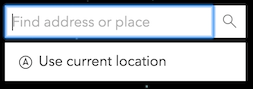
The use of this property is only supported on secure origins. To use it, switch your application to a secure origin, such as HTTPS. Note that localhost is considered "potentially secure" and can be used for easy testing in browsers that supports Window.isSecureContext (currently Chrome and Firefox).
- Default value
- true
maxResults
- Type
- number
The maximum number of results returned by the widget if not specified by the source.
- Default value
- 6
maxSuggestions
- Type
- number
The maximum number of suggestions returned by the widget if not specified by the source.
If working with the default
ArcGIS Online Geocoding service,
the default remains at 5.
- Default value
- 6
minSuggestCharacters
- Type
- number
Indicates the minimum number of characters required before querying for a suggestion.
- Default value
- 3
popupTemplate
- Type
- PopupTemplate | null | undefined
A customized PopupTemplate for the selected feature. Note that any templates defined on allSources take precedence over those defined directly on the template.
portal
- Since
- ArcGIS Maps SDK for JavaScript 4.8
It is possible to search a specified portal instance's locator services Use this property to set this ArcGIS Portal instance to search.
resultGraphic
The graphic used to highlight the resulting feature or location.
A graphic will be placed in the View's
View.graphics
for layer views
that do not support the highlight method.
resultGraphicEnabled
- Type
- boolean
Indicates if the resultGraphic will display at the location of the selected feature.
- Default value
- true
results
- Type
- BaseSearchResults<SearchResult>[] | null | undefined
An array of objects, each containing a SearchResult from the search.
searchAllEnabled
- Type
- boolean
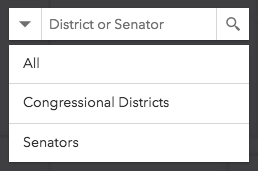
Indicates whether to display the option to search all sources. When true, the "All" option
is displayed by default:
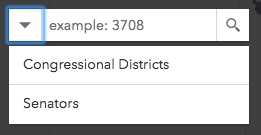
When false, no option to search all sources at once is available:
- Default value
- true
selectedResult
- Type
- SearchResult | null | undefined
The result selected from a search.
sources
- Type
- SearchViewModel["sources"]
The Search widget may be used to search features in a
map/feature service feature
layer(s), SceneLayers with an associated feature layer,
BuildingComponentSublayer with an associated feature layer,
GeoJSONLayer, CSVLayer or
OGCFeatureLayer, or table,
or geocode locations with a locator. The sources property defines the sources from which
to search for the view specified by the Search widget instance. There are two types of sources:
Any combination of these sources may be used together in the same instance of the Search widget.
Feature layers created from client-side graphics are not supported.
Examples
// Default sources[] when sources is not specified[ { url: "https://geocode-api.arcgis.com/arcgis/rest/services/World/GeocodeServer", singleLineFieldName: "SingleLine", outFields: ["Addr_type"], name: "ArcGIS World Geocoding Service", placeholder: "Address", resultSymbol: { type: "picture-marker", // autocasts as new PictureMarkerSymbol() url: this.basePath + "/images/search/search-symbol-32.png", size: 24, width: 24, height: 24, xoffset: 0, yoffset: 0 } }]// Example of multiple sources[]const sources = [{ url: "https://geocode-api.arcgis.com/arcgis/rest/services/World/GeocodeServer", singleLineFieldName: "SingleLine", name: "Custom Geocoding Service", placeholder: "Search Geocoder", maxResults: 3, maxSuggestions: 6, suggestionsEnabled: false, minSuggestCharacters: 0}, { layer: new FeatureLayer({ url: "https://services.arcgis.com/DO4gTjwJVIJ7O9Ca/arcgis/rest/services/GeoForm_Survey_v11_live/FeatureServer/0", outFields: ["*"] }), searchFields: ["Email", "URL"], displayField: "Email", exactMatch: false, outFields: ["*"], name: "Point FS", placeholder: "example: esri", maxResults: 6, maxSuggestions: 6, suggestionsEnabled: true, minSuggestCharacters: 0},{ layer: new FeatureLayer({ outFields: ["*"] }), placeholder: "esri", name: "A FeatureLayer", prefix: "", suffix: "", maxResults: 1, maxSuggestions: 6, exactMatch: false, searchFields: [], // defaults to FeatureLayer.displayField displayField: "", // defaults to FeatureLayer.displayField minSuggestCharacters: 0}];// Set source(s) on creationconst searchWidget = new Search({ sources: []});// Set source(s)const searchWidget = new Search();const sources = [{ ... }, { ... }, { ... }]; //array of sourcessearchWidget.sources = sources;// Add to source(s)const searchWidget = new Search();searchWidget.sources.push({ ... }); //new source suggestions
- Type
- SearchViewModel["suggestions"]
An array of results from the suggest method.
This is available if working with a 10.3 or greater geocoding service that has
suggest capability loaded or a
10.3 or greater feature layer that supports pagination, i.e. supportsPagination = true.
suggestionsEnabled
- Type
- boolean
Enable suggestions for the widget.
This is only available if working with a 10.3 or greater geocoding service that has suggest capability
loaded or a 10.3 or greater feature layer that supports pagination, i.e. supportsPagination = true.
- Default value
- true
view
- Type
- MapViewOrSceneView | null | undefined
viewModel
- Type
- SearchViewModel
The view model for this widget. This is a class that contains all the logic (properties and methods) that controls this widget's behavior. See the SearchViewModel class to access all properties and methods on the widget.
visible
- Type
- boolean
Indicates whether the widget is visible.
If false, the widget will no longer be rendered in the web document. This may affect the layout of other elements or widgets in the document. For example, if this widget is
the first of three widgets associated to the upper right hand corner of the DefaultUI, then the other widgets will reposition when this widget is made invisible.
For more information, refer to the css display value of "none".
- Default value
- true
Example
// Hides the widget in the viewwidget.visible = false;Methods
| Method | Signature | Class |
|---|---|---|
blur(): void | | |
classes inherited | classes(...classNames: ((string | null | undefined) | ((string[] | Record<string, boolean>) | null | undefined) | false | null | undefined)[]): string | |
clear(): void | | |
destroy inherited | destroy(): void | |
emit inherited | emit<Type extends EventNames<this>>(type: Type, event?: this["@eventTypes"][Type]): boolean | |
focus(): void | | |
hasEventListener inherited | hasEventListener<Type extends EventNames<this>>(type: Type): boolean | |
isFulfilled inherited | isFulfilled(): boolean | |
isRejected inherited | isRejected(): boolean | |
isResolved inherited | isResolved(): boolean | |
on inherited | on<Type extends EventNames<this>>(type: Type, listener: EventedCallback<this["@eventTypes"][Type]>): ResourceHandle | |
postInitialize inherited | postInitialize(): void | |
render inherited | render(): any | null | |
renderNow inherited | renderNow(): void | |
scheduleRender inherited | scheduleRender(): void | |
search(searchTerm?: SearchItem | null | undefined): Promise<SearchResponse | null | undefined> | | |
suggest(query?: string): Promise<SuggestResponse | null | undefined> | | |
when inherited | when<TResult1 = this, TResult2 = never>(onFulfilled?: OnFulfilledCallback<this, TResult1> | null | undefined, onRejected?: OnRejectedCallback<TResult2> | null | undefined): Promise<TResult1 | TResult2> |
classes
- Signature
-
classes (...classNames: ((string | null | undefined) | ((string[] | Record<string, boolean>) | null | undefined) | false | null | undefined)[]): string
- Since
- ArcGIS Maps SDK for JavaScript 4.7
A utility method used for building the value for a widget's class property.
This aids in simplifying css class setup.
Parameters
- Returns
- string
The computed class name.
Example
// .tsx syntax showing how to set css classes while rendering the widget
render() {  const dynamicClasses = {    [css.flip]: this.flip,    [css.primary]: this.primary  };
  return (    <div class={classes(css.root, css.mixin, dynamicClasses)} />  );}
clear
- Signature
-
clear (): void
Clears the current searchTerm, search results, suggest results, graphic, and graphics layer. It also hides any open menus.
- Returns
- void
emit
- Signature
-
emit <Type extends EventNames<this>>(type: Type, event?: this["@eventTypes"][Type]): boolean
- Type parameters
- <Type extends EventNames<this>>
- Since
- ArcGIS Maps SDK for JavaScript 4.5
Emits an event on the instance. This method should only be used when creating subclasses of this class.
hasEventListener
- Signature
-
hasEventListener <Type extends EventNames<this>>(type: Type): boolean
- Type parameters
- <Type extends EventNames<this>>
Indicates whether there is an event listener on the instance that matches the provided event name.
Parameters
| Parameter | Type | Description | Required |
|---|---|---|---|
| type | Type | The name of the event. | |
- Returns
- boolean
Returns true if the class supports the input event.
isFulfilled
- Signature
-
isFulfilled (): boolean
isFulfilled() may be used to verify if creating an instance of the class is fulfilled (either resolved or rejected).
If it is fulfilled, true will be returned.
- Returns
- boolean
Indicates whether creating an instance of the class has been fulfilled (either resolved or rejected).
isRejected
- Signature
-
isRejected (): boolean
isRejected() may be used to verify if creating an instance of the class is rejected.
If it is rejected, true will be returned.
- Returns
- boolean
Indicates whether creating an instance of the class has been rejected.
isResolved
- Signature
-
isResolved (): boolean
isResolved() may be used to verify if creating an instance of the class is resolved.
If it is resolved, true will be returned.
- Returns
- boolean
Indicates whether creating an instance of the class has been resolved.
on
- Signature
-
on <Type extends EventNames<this>>(type: Type, listener: EventedCallback<this["@eventTypes"][Type]>): ResourceHandle
- Type parameters
- <Type extends EventNames<this>>
Registers an event handler on the instance. Call this method to hook an event with a listener.
Parameters
| Parameter | Type | Description | Required |
|---|---|---|---|
| type | Type | An event or an array of events to listen for. | |
| listener | EventedCallback<this["@eventTypes"][Type]> | The function to call when the event fires. | |
- Returns
- ResourceHandle
Returns an event handler with a
remove()method that should be called to stop listening for the event(s).Property Type Description remove Function When called, removes the listener from the event.
Example
view.on("click", function(event){ // event is the event handle returned after the event fires. console.log(event.mapPoint);}); search
- Signature
-
search (searchTerm?: SearchItem | null | undefined): Promise<SearchResponse | null | undefined>
Depending on the sources specified, search() queries the feature layer(s) and/or performs address matching using any specified locator(s) and returns any applicable results.
Parameters
| Parameter | Type | Description | Required |
|---|---|---|---|
| searchTerm | SearchItem | null | undefined | This searchTerm can be a string, geometry, suggest candidate object, or an array of [longitude,latitude] coordinate pairs. If a geometry is supplied, then it will reverse geocode (locator) or findAddressCandidates with geometry instead of text. | |
- Returns
- Promise<SearchResponse | null | undefined>
When resolved, returns a SearchResponse containing a SearchResult.
suggest
- Signature
-
suggest (query?: string): Promise<SuggestResponse | null | undefined>
Performs a suggest() request on the active Locator. It also uses the current value of the widget or one that is passed in.
Suggestions are available if working with a 10.3 or greater geocoding service that has
suggest capability loaded
or a 10.3 or greater feature layer that supports pagination, i.e. supportsPagination = true.
Parameters
| Parameter | Type | Description | Required |
|---|---|---|---|
| query | The string value used to suggest() on an active Locator or feature layer. If nothing is passed in, takes the current value of the widget. | |
- Returns
- Promise<SuggestResponse | null | undefined>
When resolved, returns SuggestResponse containing an array of result objects. Each of these results contains a SuggestResult.
when
- Signature
-
when <TResult1 = this, TResult2 = never>(onFulfilled?: OnFulfilledCallback<this, TResult1> | null | undefined, onRejected?: OnRejectedCallback<TResult2> | null | undefined): Promise<TResult1 | TResult2>
- Since
- ArcGIS Maps SDK for JavaScript 4.6
when() may be leveraged once an instance of the class is created. This method takes two input parameters: an onFulfilled function and an onRejected function.
The onFulfilled executes when the instance of the class loads. The
onRejected executes if the instance of the class fails to load.
Parameters
| Parameter | Type | Description | Required |
|---|---|---|---|
| onFulfilled | OnFulfilledCallback<this, TResult1> | null | undefined | The function to call when the promise resolves. | |
| onRejected | The function to execute when the promise fails. | |
- Returns
- Promise<TResult1 | TResult2>
Returns a new promise for the result of
onFulfilledthat may be used to chain additional functions.
Example
// Although this example uses MapView, any class instance that is a promise may use when() in the same waylet view = new MapView();view.when(function(){ // This function will execute once the promise is resolved}, function(error){ // This function will execute if the promise is rejected due to an error});Events
| Name | Type |
|---|---|
search-clear inherited | |
search-complete inherited | |
search-start inherited | |
select-result inherited | |
suggest-complete inherited | |
suggest-start inherited | CustomEvent<{ searchTerm: string; }> |
search-blur
search-blur: CustomEvent<void> Fires when the widget's text input loses focus.
Example
const searchWidget = new Search();
searchWidget.on("search-blur", function(event){  console.log("Focus removed from search input textbox.");});
search-clear
search-clear: CustomEvent<void> Fires when a result is cleared from the input box or a new result is selected.
Example
const searchWidget = new Search();
searchWidget.on("search-clear", function(event){  console.log("Search input textbox was cleared.");});
search-complete
search-complete: CustomEvent<SearchResponse> Fires when the Search.search() method is called and returns its results.
Example
const searchWidget = new Search();
searchWidget.on("search-complete", function(event){  // The results are stored in the event Object[]  console.log("Results of the search: ", event);});
search-focus
search-focus: CustomEvent<void> Fires when the widget's text input sets focus.
Example
const searchWidget = new Search();
searchWidget.on("search-focus", function(event){  console.log("Search input textbox is focused.");});
search-start
search-start: CustomEvent<void> Fires when the Search.search() method starts.
Example
const searchWidget = new Search();
searchWidget.on("search-start", function(event){  console.log("Search started.");});
select-result
select-result: CustomEvent<SearchViewModelSelectResultEvent> Fires when a search result is selected.
Example
const searchWidget = new Search();
searchWidget.on("select-result", function(event){  console.log("The selected search result: ", event);});
suggest-complete
suggest-complete: CustomEvent<SuggestResponse | null> Fires when the Search.suggest() method is called and returns its results.
Example
const searchWidget = new Search();
searchWidget.on("suggest-complete", function(event){  // The results are stored in the event Object[]  console.log("Results of suggest: ", event);});
suggest-start
suggest-start: CustomEvent<{ searchTerm: string; }> Fires when the Search.suggest() method starts.
Example
const searchWidget = new Search();
searchWidget.on("suggest-start", function(event){  console.log("suggest-start", event);});