import SearchViewModel from "@arcgis/core/widgets/Search/SearchViewModel.js";const SearchViewModel = await $arcgis.import("@arcgis/core/widgets/Search/SearchViewModel.js");- Inheritance:
- SearchViewModel→
Accessor
- Since
- ArcGIS Maps SDK for JavaScript 4.0
Provides the logic for the Search widget and Search component, which performs search operations on locator service(s), map/feature service feature layer(s), and/or table(s). If using a locator with a geocoding service, the findAddressCandidates operation is used, whereas queries are used on feature layers.
- See also
Search widget - Deprecated since 4.33. Use the Search component instead.
Constructors
Constructor
Parameters
| Parameter | Type | Description | Required |
|---|---|---|---|
| properties | | |
Properties
| Property | Type | Class |
|---|---|---|
activeSource readonly | | |
| | ||
| | ||
allSources readonly | | |
| | ||
| | ||
declaredClass readonly inherited | ||
| | ||
defaultSources readonly | | |
| | ||
goToOverride inherited | ||
| | ||
| | ||
| | ||
| | ||
| | ||
| | ||
| | ||
placeholder readonly | | |
| | ||
| | ||
| | ||
| | ||
resultGraphic readonly | | |
| | ||
resultLocation readonly | | |
results readonly | SearchResults[] | null | undefined | |
| | ||
| | ||
selectedResult readonly | | |
selectedSuggestion readonly | | |
| | ||
state readonly | | |
| | ||
| | ||
suggestions readonly | SuggestResults[] | null | undefined | |
| | ||
updating readonly | | |
| |
activeSource
- Type
- SupportedSearchSource | null | undefined
The source object currently selected. Can be either a feature layer or a locator.

allSources
- Since
- ArcGIS Maps SDK for JavaScript 4.8
The combined collection of defaultSources and sources. The defaultSources displays first in the Search UI.
autoNavigate
- Type
- boolean
- Since
- ArcGIS Maps SDK for JavaScript 4.32
Indicates whether to automatically navigate to the selected result.
- Default value
- true
autoSelect
- Type
- boolean
Indicates whether to automatically select and zoom to the first geocoded result. If false, the
findAddressCandidates
operation will still geocode the input string, but the top result will not be selected. To work with the
geocoded results, you can set up a @search-complete event handler and get the results
through the event object.
- Default value
- true
defaultPopupTemplate
- Type
- PopupTemplate | null | undefined
- Since
- ArcGIS Maps SDK for JavaScript 4.32
The default popupTemplate.
defaultSources
- Since
- ArcGIS Maps SDK for JavaScript 4.8
A read-only property that is a Collection of LayerSearchSource and/or LocatorSearchSource. This property may contain ArcGIS Portal locators and any web map or web scene configurable search sources. Web maps or web scenes may contain map/feature service feature layer(s), and/or table(s) as sources.
This property is used to populate the Search UI if the sources property is not set.
defaultSymbols
- Type
- SearchDefaultSymbols
- Since
- ArcGIS Maps SDK for JavaScript 4.22
The default symbol(s) for the search result. Choosing a symbol depends on the View type (SceneView or MapView), and the geometry type of the search result. This property allows developers to overwrite the default symbology for one or more geometry types.
Example
searchViewModel.defaultSymbols = { point: new PictureMarkerSymbol({ url: "https://freesvg.org/img/1287178070.png", size: 24, width: 24, height: 24 }), polygon: new SimpleFillSymbol({ color: [235, 235, 235, 0.4], outline: { color: [130, 130, 130, 1], width: 2 } }), polyline: new SimpleLineSymbol({ color: [130, 130, 130, 1], width: 2 })}; goToOverride
- Type
- GoToOverride | null | undefined
- Since
- ArcGIS Maps SDK for JavaScript 4.8
This function provides the ability to override either the MapView goTo() or SceneView goTo() methods.
- See also
Example
// The following snippet uses Search but can be applied to any// widgets that support the goToOverride property.search.goToOverride = function(view, goToParams) { goToParams.options = { duration: updatedDuration }; return view.goTo(goToParams.target, goToParams.options);}; includeDefaultSources
- Type
- boolean | SourcesHandler
- Since
- ArcGIS Maps SDK for JavaScript 4.8
Indicates whether or not to include defaultSources in the Search UI. This can be a boolean value or a function that returns an array of Search sources.
- Default value
- true
Example
// includeDefaultSources passed as a boolean valuesearchViewModel.includeDefaultSources = false;
// includeDefaultSources passed as a functionsearchViewModel.includeDefaultSources = function(sourcesResponse) {    return sourcesResponse.defaultSources;};
locationEnabled
- Type
- boolean
- Since
- ArcGIS Maps SDK for JavaScript 4.8
Indicates whether location services are enabled.
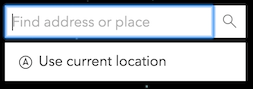
The use of this property is only supported on secure origins. To use it, switch your application to a secure origin, such as HTTPS. Note that localhost is considered "potentially secure" and can be used for easy testing in browsers that supports Window.isSecureContext (currently Chrome and Firefox).
maxInputLength
- Type
- number
The maximum character length of the search text.
- Default value
- 128
maxResults
- Type
- number
The maximum number of results returned if not specified by the source.
- Default value
- 6
maxSuggestions
- Type
- number
The maximum number of suggestions returned if not specified by the source.
If working with the default
ArcGIS Online Geocoding service,
the default remains at 5.
- Default value
- 6
minSuggestCharacters
- Type
- number
The minimum number of characters needed for the search if not specified by the source.
- Default value
- 3
popupTemplate
- Type
- PopupTemplate | null | undefined
A customized PopupTemplate for the selected feature. Note that any templates defined on allSources take precedence over those defined directly on the template.
portal
- Since
- ArcGIS Maps SDK for JavaScript 4.8
It is possible to search a specified portal instance's locator services Use this property to set this ArcGIS Portal instance to search.
resultGraphicEnabled
- Type
- boolean
Indicates if the resultGraphic will display at the location of the selected feature.
A graphic will be placed in the View's
View.graphics
for layer views
that do not support the highlight method.
- Default value
- true
results
- Type
- SearchResults[] | null | undefined
An array of current results from the search.
searchAllEnabled
- Type
- boolean
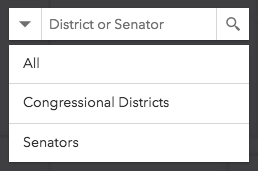
Indicates whether to display the option to search all sources. When true, the "All" option
is displayed by default:
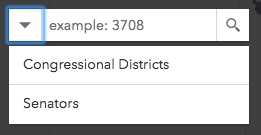
When false, no option to search all sources at once is available:
- Default value
- true
selectedResult
- Type
- SearchResult | null | undefined
The result selected from a search.
selectedSuggestion
- Type
- SuggestResult | null | undefined
The selected SuggestResult.
sources
Search may be used to search features in a
FeatureLayer or table,
or geocode locations with a locator. The sources property defines the sources from which
to search for the view specified by the Search instance. There are two types of sources:
Any combination of these sources may be used together in the same instance of Search.
Examples
// Default sources[] when sources is not specified[ { url: "https://geocode-api.arcgis.com/arcgis/rest/services/World/GeocodeServer", singleLineFieldName: "SingleLine", outFields: ["Addr_type"], name: "ArcGIS World Geocoding Service", placeholder: "Adresse", resultSymbol: { type: "picture-marker", // autocasts as new PictureMarkerSymbol() url: this.basePath + "/images/search/search-symbol-32.png", size: 24, width: 24, height: 24, xoffset: 0, yoffset: 0 } }]// Example of multiple sources[]let sources = [{ url: "https://geocode-api.arcgis.com/arcgis/rest/services/World/GeocodeServer", singleLineFieldName: "SingleLine", name: "Custom Geocoding Service", placeholder: "Search Geocoder", maxResults: 3, maxSuggestions: 6, suggestionsEnabled: false, minSuggestCharacters: 0}, { layer: new FeatureLayer({ url: "https://services.arcgis.com/DO4gTjwJVIJ7O9Ca/arcgis/rest/services/GeoForm_Survey_v11_live/FeatureServer/0", outFields: ["*"] }), searchFields: ["Email", "URL"], displayField: "Email", exactMatch: false, outFields: ["*"], name: "Point FS", placeholder: "example: esri", maxResults: 6, maxSuggestions: 6, suggestionsEnabled: true, minSuggestCharacters: 0},{ layer: new FeatureLayer({ outFields: ["*"] }); placeholder: "esri", name: "A FeatureLayer", prefix: "", suffix: "", maxResults: 1, maxSuggestions: 6, exactMatch: false, searchFields: [], // defaults to FeatureLayer.displayField displayField: "", // defaults to FeatureLayer.displayField minSuggestCharacters: 0}];let sources = [{ ... }, { ... }, { ... }]; // array of sourcessearchViewModel.sources = sources;
// Add to source(s)searchViewModel.sources.push({ ... }); // new source state
- Type
- SearchViewModelState
- Since
- ArcGIS Maps SDK for JavaScript 4.8
The current state. This property was removed from Search and should now be accessed within the SearchViewModel.
- Default value
- "ready"
suggestions
- Type
- SuggestResults[] | null | undefined
An array of results from the suggest method.
This is available if working with a 10.3 or greater geocoding service that has
suggest capability loaded or a
10.3 or greater feature layer that supports pagination, i.e. supportsPagination = true.
suggestionsEnabled
- Type
- boolean
Enable suggestions.
This is only available if working with a 10.3 or greater geocoding service that has [suggest capability loaded]
(https://developers.arcgis.com/rest/geocode/api-reference/geocoding-suggest.htm) or a 10.3 or greater feature layer that supports pagination, i.e. supportsPagination = true.
- Default value
- true
updating
- Type
- boolean
- Since
- ArcGIS Maps SDK for JavaScript 4.16
Indicates whether the View or Portal is loading resources prior to use.
If resources are still loading, this value is false.
If resources are done loading, this value is true.
- Default value
- false
view
- Type
- MapViewOrSceneView | null | undefined
Methods
| Method | Signature | Class |
|---|---|---|
clear(): void | | |
emit inherited | emit<Type extends EventNames<this>>(type: Type, event?: this["@eventTypes"][Type]): boolean | |
hasEventListener inherited | hasEventListener<Type extends EventNames<this>>(type: Type): boolean | |
on inherited | on<Type extends EventNames<this>>(type: Type, listener: EventedCallback<this["@eventTypes"][Type]>): ResourceHandle | |
search(searchItem?: SearchItem | null | undefined, options?: AbortOptions): Promise<SearchResponse | null | undefined> | | |
searchNearby(options?: AbortOptions): Promise<SearchResponse | null | undefined> | | |
select(value: SearchResult | null | undefined): Promise<SearchResult> | | |
suggest(suggestTerm?: string, suggestionDelay?: number | null | undefined, options?: AbortOptions): Promise<SuggestResponse | null | undefined> | | |
when(): Promise<void> | |
clear
- Signature
-
clear (): void
Clears the current value, search results, suggest results, graphic, and graphics layer. It also hides any open menus.
- Returns
- void
emit
- Signature
-
emit <Type extends EventNames<this>>(type: Type, event?: this["@eventTypes"][Type]): boolean
- Type parameters
- <Type extends EventNames<this>>
- Since
- ArcGIS Maps SDK for JavaScript 4.5
Emits an event on the instance. This method should only be used when creating subclasses of this class.
hasEventListener
- Signature
-
hasEventListener <Type extends EventNames<this>>(type: Type): boolean
- Type parameters
- <Type extends EventNames<this>>
Indicates whether there is an event listener on the instance that matches the provided event name.
Parameters
| Parameter | Type | Description | Required |
|---|---|---|---|
| type | Type | The name of the event. | |
- Returns
- boolean
Returns true if the class supports the input event.
on
- Signature
-
on <Type extends EventNames<this>>(type: Type, listener: EventedCallback<this["@eventTypes"][Type]>): ResourceHandle
- Type parameters
- <Type extends EventNames<this>>
Registers an event handler on the instance. Call this method to hook an event with a listener.
Parameters
| Parameter | Type | Description | Required |
|---|---|---|---|
| type | Type | An event or an array of events to listen for. | |
| listener | EventedCallback<this["@eventTypes"][Type]> | The function to call when the event fires. | |
- Returns
- ResourceHandle
Returns an event handler with a
remove()method that should be called to stop listening for the event(s).Property Type Description remove Function When called, removes the listener from the event.
Example
view.on("click", function(event){ // event is the event handle returned after the event fires. console.log(event.mapPoint);}); search
- Signature
-
search (searchItem?: SearchItem | null | undefined, options?: AbortOptions): Promise<SearchResponse | null | undefined>
Depending on the sources specified, search() queries the feature layer(s) and/or performs
address matching using any specified Locator(s) and
returns the applicable results.
Parameters
| Parameter | Type | Description | Required |
|---|---|---|---|
| searchItem | SearchItem | null | undefined | This searchItem can be a string, point geometry, suggest candidate object, or an array containing [latitude,longitude]. If a geometry is supplied, then it will reverse geocode (locator) or findAddressCandidates with geometry instead of text (featurelayer). | |
| options | An object containing an optional | |
- Returns
- Promise<SearchResponse | null | undefined>
When resolved, returns an object containing an array of search results.
searchNearby
- Signature
-
searchNearby (options?: AbortOptions): Promise<SearchResponse | null | undefined>
Returns search results near your current location. It checks whether
locationEnabled is true. If so, and your browser
supports geolocation,
it will return search results nearby your current location.
Parameters
| Parameter | Type | Description | Required |
|---|---|---|---|
| options | An object containing an optional | |
- Returns
- Promise<SearchResponse | null | undefined>
When resolved, returns SearchResponse containing an array of search objects. Each of these objects contains a SearchResult.
select
- Signature
-
select (value: SearchResult | null | undefined): Promise<SearchResult>
- Since
- ArcGIS Maps SDK for JavaScript 4.32
Selects a result.
Parameters
| Parameter | Type | Description | Required |
|---|---|---|---|
| value | The result object to select. | |
- Returns
- Promise<SearchResult>
When resolved, returns SearchResult.
suggest
- Signature
-
suggest (suggestTerm?: string, suggestionDelay?: number | null | undefined, options?: AbortOptions): Promise<SuggestResponse | null | undefined>
Performs a suggest() request on the active Locator. It uses the current value or one that is passed in.
Suggestions are available if working with a 10.3 or greater geocoding service that has
suggest capability loaded
or a 10.3 or greater feature layer that supports pagination, i.e.supportsPagination = true.
Parameters
| Parameter | Type | Description | Required |
|---|---|---|---|
| suggestTerm | The string value used to suggest() on an active Locator or feature layer. If nothing is passed in, takes the current value. | | |
| suggestionDelay | The millisecond delay after keyup and before making a | | |
| options | An object containing an optional | |
- Returns
- Promise<SuggestResponse | null | undefined>
When resolved, returns SuggestResponse containing an array of result objects. Each of these results contains a SuggestResult.
Events
search-clear
search-clear: CustomEvent<void> Fires when a result is cleared from the input box or a new result is selected.
Example
const searchWidget = new Search();
searchWidget.on("search-clear", function(event){  console.log("Search input textbox was cleared.");});
search-complete
search-complete: CustomEvent<SearchResponse> Fires when the Search.search() method is called and returns its results.
Example
const searchWidget = new Search();
searchWidget.on("search-complete", function(event){  // The results are stored in the event Object[]  console.log("Results of the search: ", event);});
search-start
search-start: CustomEvent<void> Fires when the Search.search() method starts.
Example
const searchWidget = new Search();
searchWidget.on("search-start", function(event){  console.log("Search started.");});
select-result
select-result: CustomEvent<SearchViewModelSelectResultEvent> Fires when a search result is selected.
Example
const searchWidget = new Search();
searchWidget.on("select-result", function(event){  console.log("The selected search result: ", event);});
suggest-complete
suggest-complete: CustomEvent<SuggestResponse | null> Fires when the Search.suggest() method is called and returns its results.
Example
const searchWidget = new Search();
searchWidget.on("suggest-complete", function(event){  // The results are stored in the event Object[]  console.log("Results of suggest: ", event);});
suggest-start
suggest-start: CustomEvent<{ searchTerm: string; }> Fires when the Search.suggest() method starts.
Example
const searchWidget = new Search();
searchWidget.on("suggest-start", function(event){  console.log("suggest-start", event);});
Type definitions
SearchViewModelSelectResultEvent
source
The source of the selected result. Please see Search.sources for additional information on its properties.