import TimeSliderViewModel from "@arcgis/core/widgets/TimeSlider/TimeSliderViewModel.js";const TimeSliderViewModel = await $arcgis.import("@arcgis/core/widgets/TimeSlider/TimeSliderViewModel.js");- Inheritance:
- TimeSliderViewModel→
Accessor
- Since
- ArcGIS Maps SDK for JavaScript 4.12
Provides the logic for the TimeSlider widget and component.
- See also
TimeSlider widget
Example
// Add a TimeSlider widget to the top left corner of the view.const timeSlider = new TimeSlider({ container: "timeSliderDiv", viewModel: { view: view, mode: "instant", fullTimeExtent: { start: new Date(2000, 0, 1), end: new Date(2010, 0, 1) }, timeExtent: { start: new Date(2000, 0, 1), end: new Date(2000, 0, 1) } }});view.ui.add(timeSlider, "top-left");Constructors
Constructor
Parameters
| Parameter | Type | Description | Required |
|---|---|---|---|
| properties | | |
Properties
| Property | Type | Class |
|---|---|---|
| | ||
declaredClass readonly inherited | ||
effectiveStops readonly | | |
TimeExtent | null | undefined | | |
| | ||
| | ||
| | ||
state readonly | | |
| | ||
TimeExtent | null | undefined | | |
| |
actions
- Type
- Collection
- Since
- ArcGIS Maps SDK for JavaScript 4.21
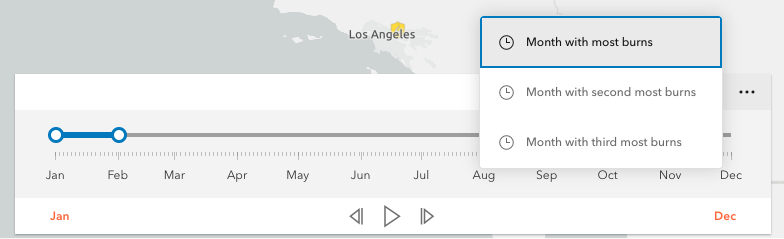
Defines actions that will appear in a menu when the user clicks the ellipsis button
 in the widget. The
ellipsis button will not display if this property is
in the widget. The
ellipsis button will not display if this property is null or if the collection is empty.
Each Action is defined with a unique id, a title,
and an icon.
The @trigger-action event fires each time an action in the menu is clicked. This event can be used to execute custom code such as setting the timeExtent to a specific date or copying the timeExtent to the browser's clipboard.
Example
// Create a TimeSlider with two actions to snap the thumb to two specific time extents.const timeSlider = new TimeSlider({ container: "timeSliderDiv", viewModel: { fullTimeExtent: { start: new Date(2011, 0, 1), end: new Date(2012, 0, 1) }, mode: "instant", actions: [ { id: "quake", icon: "exclamation-mark-triangle", title: "Jump to Earthquake" }, { id: "quake-plus-one-month", icon: "organization", title: "One month later" } ] }});timeSlider1.on("trigger-action", (event) => { const quake = new Date(Date.UTC(2011, 3, 11, 8, 16, 12)); const oneMonthLater = new Date(quake.getTime()).setMonth(quake.getMonth() + 1); switch(event.action.id) { case "quake": timeSlider1.timeExtent = { start: quake, end: quake }; break; case "quake-plus-one-month": timeSlider1.timeExtent = { start: oneMonthLater, end: oneMonthLater }; break; }}); effectiveStops
Defined specific locations on the timeline that the handles will snap to when manipulated.
Example
// Add yearly stops starting from the beginning of 2001.let timeSlider = new TimeSlider({ container: "timeSliderDiv", viewModel: { fullTimeExtent: { start: new Date(2000, 5, 1), end: new Date(2010, 0, 1) }, stops: { interval: { value: 1, unit: "years" } }, timeExtent: { start: new Date(2001, 0, 1), end: new Date(2010, 0, 1) } }});timeSlider.viewModel.effectiveStops.forEach((stop) => { console.log(stop);}); fullTimeExtent
- Type
- TimeExtent | null | undefined
The temporal extent of the entire slider. It defines the entire time period within which you can visualize your time aware data using the time slider widget.
Example
// Create a new TimeSliderlet timeSlider = new TimeSlider({  container: "timeSliderDiv",  viewModel: {    view: view  }});
// wait for the time-aware layer to loadlayer.when(() => {  // set up time slider properties based on layer timeInfo  timeSlider.fullTimeExtent = layer.timeInfo.fullTimeExtent;  timeSlider.stops = {    interval: layer.timeInfo.interval    timeExtent: timeSlider.fullTimeExtent  };});
loop
- Type
- boolean
If animating, the time indicator(s) will restart if they reach the edge.
- Default value
- false
Example
// Start a time slider animation that advances every second and restarts when it reaches the end.let timeSlider = new TimeSlider({ container: "timeSliderDiv", viewModel: { loop: true, playRate: 1000 }});timeSlider.viewModel.play(); mode
- Type
- TimeSliderMode
The time slider mode. This property is used for defining if the temporal data will be displayed cumulatively up to a point in time, a single instant in time, or within a time range. See the following table for possible values.
| Possible Values | Description | Example |
|---|---|---|
| instant | The slider will show temporal data that falls on a single instance in time. Set the timeExtent property's start and end dates to same date: {start: sameDate, end: sameDate} |  |
| time-window | The slider will show temporal data that falls within a given time range. This is the default. Set timeExtent property's start and date properties to desired dates. |  |
| cumulative-from-start | Similar to time-window with the start time is always pinned to the start of the slider. Set the timeExtent property's start date to null and set end date to a desired date: {start: null, end: date} |  |
| cumulative-from-end | Also, similar to the time-window with the end time pinned to the end of the slider. Set the timeExtent property's start date to a desired date and set end date to null: {start: date, end: null} |  |
- Default value
- "time-window"
Example
// Create a single thumbed time slider that includes all historic content.let timeSlider = new TimeSlider({ container: "timeSliderDiv", viewModel: { view: view, mode: "cumulative-from-start", fullTimeExtent: { start: new Date(2000, 0, 1), end: new Date(2010, 0, 1) }, timeExtent: { start: null, end: new Date(2001, 0, 1) } }}); playRate
- Type
- number
The time (in milliseconds) between animation steps.
When a View is associated with a TimeSlider and the TimeSlider is playing, the playback will pause before advancing if the View is still updating.
For example, if the playRate is set to 1,000 (one second) and the View takes 1.5 seconds to render then the TimeSlider thumb(s) will advance every
1.5 seconds rather than every second.
- Default value
- 1000
Example
// Start a time slider animation that advances// ten times a second and stops when it reaches the end.timeSlider.set({ loop: false, playRate: 100});timeSlider.play(); state
- Type
- TimeSliderState
The view model's state.
| Value | Description |
|---|---|
| disabled | Widget is not ready yet. |
| ready | Ready for time navigation. |
| playing | Time is playing in the navigator. |
- Default value
- "disabled"
Example
// Display the current state of the view model.switch (timeSlider.viewModel.state) { case "disabled": console.log("The view is not ready or some property are not set."); break; case "ready": console.log("The time slider is ready for use."); break; case "playing": console.log("The time slider is currently animating."); break;} stops
Defines specific locations on the time slider where thumbs will snap to when manipulated. If unspecified, ten evenly spaced stops will be added.
For continuous sliding set stops to null.
timeSlider.viewModel.stops = null;To define regularly spaced stops, parse an object with interval and timeExtent properties
with types TimeInterval and TimeExtent respectively.
The timeExtent property is optional and used to confine stops to a certain date range.
This property is useful to commence stops on a specific day or the week or month.
If a stop definition by interval results in excess of 10,000 stops then the view model
will default to ten evenly spaced stops.
// Add yearly intervals starting from the beginning of the TimeSlider.timeSlider.viewModel.stops = { interval: { value: 1, unit: "years" }};Rather than regular time intervals the TimeSlider can be divided into evenly spaced stops. As with the previous method, divisions can be confined to a specific date range using the optional timeExtent property.
// Add stops at 15 evenly spaced intervals.timeSlider.viewModel.stops = { count: 15};For irregular spaced stops simply assign an array of dates as demonstrated below.
// Add nine irregular stops.timeSlider.viewModel.stops = { dates: [ new Date(2000, 0, 1), new Date(2001, 3, 8), new Date(2002, 0, 10), new Date(2003, 12, 8), new Date(2004, 2, 19), new Date(2005, 7, 5), new Date(2006, 9, 11), new Date(2007, 11, 21), new Date(2008, 1, 10) ]};Lastly, to constrain or offset division by count or interval use the optional timeExtent property.
// Add yearly stops from Christmas 2019 to Christmas 2029 onlytimeSlider.viewModel.stops = {  interval: {    value: 1,    unit: "years"  },  timeExtent: {    start: new Date(2019, 11, 25),    end: new Date(2029, 11, 25)  }};
// Likewise, add stops that represent quarters of 2019 only.timeSlider.viewModel.stops = { count: 4, timeExtent: { start: new Date(2019, 0, 1), end: new Date(2020, 0, 1) }};- Default value
- { count : 10 }
timeExtent
- Type
- TimeExtent | null | undefined
The current time extent of the time slider. This property can be watched for
updates and used to update the time extent property in queries and/or the layer filters and effects.
The following table shows the timeExtent values returned for each mode.
| Mode | The timeExtent value |
|---|---|
time-window | {start: startDate, end: endDate} |
instant | {start: sameDate, end: sameDate} |
cumulative-from-start | {start: null, end: endDate} |
cumulative-from-end | {start: startDate, end: null} |
Example
// Display the time extent to the console whenever it changes.const timeSlider = new TimeSlider({  container: "timeSliderDiv",  mode: "time-window",  fullTimeExtent: {    start: new Date(2019, 2, 3),    end: new Date(2019, 2, 5)  },  timeExtent: {    start: new Date(2019, 2, 1),    end: new Date(2019, 2, 28)  }});
reactiveUtils.watch(  () => timeSlider.timeExtent,  (timeExtent) => {    console.log("Time extent now starts at", timeExtent.start, "and finishes at:", timeExtent.end);  });
view
- Type
- MapViewOrSceneView | null | undefined
A reference to the MapView or SceneView. If this property is set, the TimeSlider widget will update the view's MapView.timeExtent property whenever the time slider is manipulated or updated programmatically. This property will affect any time-aware layer in the view.
Example
// Create and then add a TimeSlider widget and then listen to changes in the View's time extent.const timeSlider = new TimeSlider({  container: "timeSliderDiv",  viewModel: {    view: view,    mode: "instant",    fullTimeExtent: {      start: new Date(2000, 0, 1),      end: new Date(2010, 0, 1)    },    timeExtent: {      start: null,      end: new Date(2000, 0, 1)    }  }});view.ui.add(timeSlider, "top-left");
reactiveUtils.watch(  () => view.timeExtent,  (timeExtent) => {    console.log("New view time is: " + timeExtent.start);  });
Methods
| Method | Signature | Class |
|---|---|---|
emit inherited | emit<Type extends EventNames<this>>(type: Type, event?: this["@eventTypes"][Type]): boolean | |
hasEventListener inherited | hasEventListener<Type extends EventNames<this>>(type: Type): boolean | |
next(): void | | |
on inherited | on<Type extends EventNames<this>>(type: Type, listener: EventedCallback<this["@eventTypes"][Type]>): ResourceHandle | |
play(): void | | |
previous(): void | | |
stop(): void | | |
updateWebDocument(document: WebMap | WebScene): void | |
emit
- Signature
-
emit <Type extends EventNames<this>>(type: Type, event?: this["@eventTypes"][Type]): boolean
- Type parameters
- <Type extends EventNames<this>>
Emits an event on the instance. This method should only be used when creating subclasses of this class.
hasEventListener
- Signature
-
hasEventListener <Type extends EventNames<this>>(type: Type): boolean
- Type parameters
- <Type extends EventNames<this>>
Indicates whether there is an event listener on the instance that matches the provided event name.
Parameters
| Parameter | Type | Description | Required |
|---|---|---|---|
| type | Type | The name of the event. | |
- Returns
- boolean
Returns true if the class supports the input event.
next
- Signature
-
next (): void
Incrementally moves the time extent forward one stop
- Returns
- void
Example
// Advance the slider's time extent.const timeSlider = new TimeSlider({ container: "timeSliderDiv", viewModel: { mode: "instant", fullTimeExtent: { start: new Date(2000, 0, 1), end: new Date(2010, 0, 1) }, timeExtent: { start: new Date(2000, 0, 1), end: new Date(2000, 0, 1) } }});timeSlider.viewModel.next(); on
- Signature
-
on <Type extends EventNames<this>>(type: Type, listener: EventedCallback<this["@eventTypes"][Type]>): ResourceHandle
- Type parameters
- <Type extends EventNames<this>>
Registers an event handler on the instance. Call this method to hook an event with a listener.
Parameters
| Parameter | Type | Description | Required |
|---|---|---|---|
| type | Type | An event or an array of events to listen for. | |
| listener | EventedCallback<this["@eventTypes"][Type]> | The function to call when the event fires. | |
- Returns
- ResourceHandle
Returns an event handler with a
remove()method that should be called to stop listening for the event(s).Property Type Description remove Function When called, removes the listener from the event.
Example
view.on("click", function(event){ // event is the event handle returned after the event fires. console.log(event.mapPoint);}); play
- Signature
-
play (): void
Initiates the time slider's temporal playback.
- Returns
- void
Example
// Start a TimeSlider animation if not already playing.if (timeSlider.viewModel.state === "ready") { timeSlider.viewModel.play();} previous
- Signature
-
previous (): void
Incrementally moves the time extent back one stop.
- Returns
- void
Example
timeSlider.viewModel.previous(); stop
- Signature
-
stop (): void
Stops the time slider's temporal playback.
- Returns
- void
Example
// Stop the current TimeSlider animation.if (timeSlider.viewModel.state === "playing") { timeSlider.viewModel.stop();} updateWebDocument
- Signature
-
updateWebDocument (document: WebMap | WebScene): void
- Since
- ArcGIS Maps SDK for JavaScript 4.18
Updates the time slider widget definition in the provided WebMap or WebScene.
Parameters
- Returns
- void
Example
// Load a webmap containing a timeslider widget into a MapView. Once loaded, advance the current time// extent by one stop and then update the original webmap.
const webmap = new WebMap({  portalItem: {    id: "acea555a4b6f412dae98994bcfdbc002"  }});
const view = new MapView({  container: "viewDiv",  map: webmap});await view.when();
const timeSlider = new TimeSlider({  view});// Advance to thumb to next time extenttimeSlider.next();timeSlider.updateWebDocument(webmap);webmap.save();
Events
trigger-action
trigger-action: CustomEvent<TimeSliderViewModelTriggerActionEvent> - Since
- ArcGIS Maps SDK for JavaScript 4.21
Fires when a user clicks on an action in the actions menu.
- See also
Example
// Add an action to reset the time extent to the full time extent.timeSlider.actions.add({ id: "full-extent", icon: "content-full", title: "Full Extent"});timeSlider.on("trigger-action", (event) => { if (event.action.id === "full-extent") { timeSlider.timeExtent = timeSlider.fullTimeExtent; }});