import ShadowCastAnalysis from "@arcgis/core/analysis/ShadowCastAnalysis.js";const ShadowCastAnalysis = await $arcgis.import("@arcgis/core/analysis/ShadowCastAnalysis.js");- Since
- ArcGIS Maps SDK for JavaScript 5.0
The ShadowCastAnalysis displays the cumulative shadows of 3D features in a SceneView. This type of analysis is helpful in urban development, where new projects have to satisfy certain shadow duration constraints.
The analysis calculates the cumulative shadows for a time range during a single day. The user can configure the time range and select a calendar date. This time range and calendar date are only used for the shadow analysis and are not connected to the lighting in the scene. To control the lighting in the scene, use the Daylight component. Changing the timezone in the analysis updates the visualization by interpreting the time range as being in that timezone. This behavior is different than for the Daylight component where selecting a timezone updates the environment lighting's date and time according to the camera position.
The analysis provides three visualization modes.
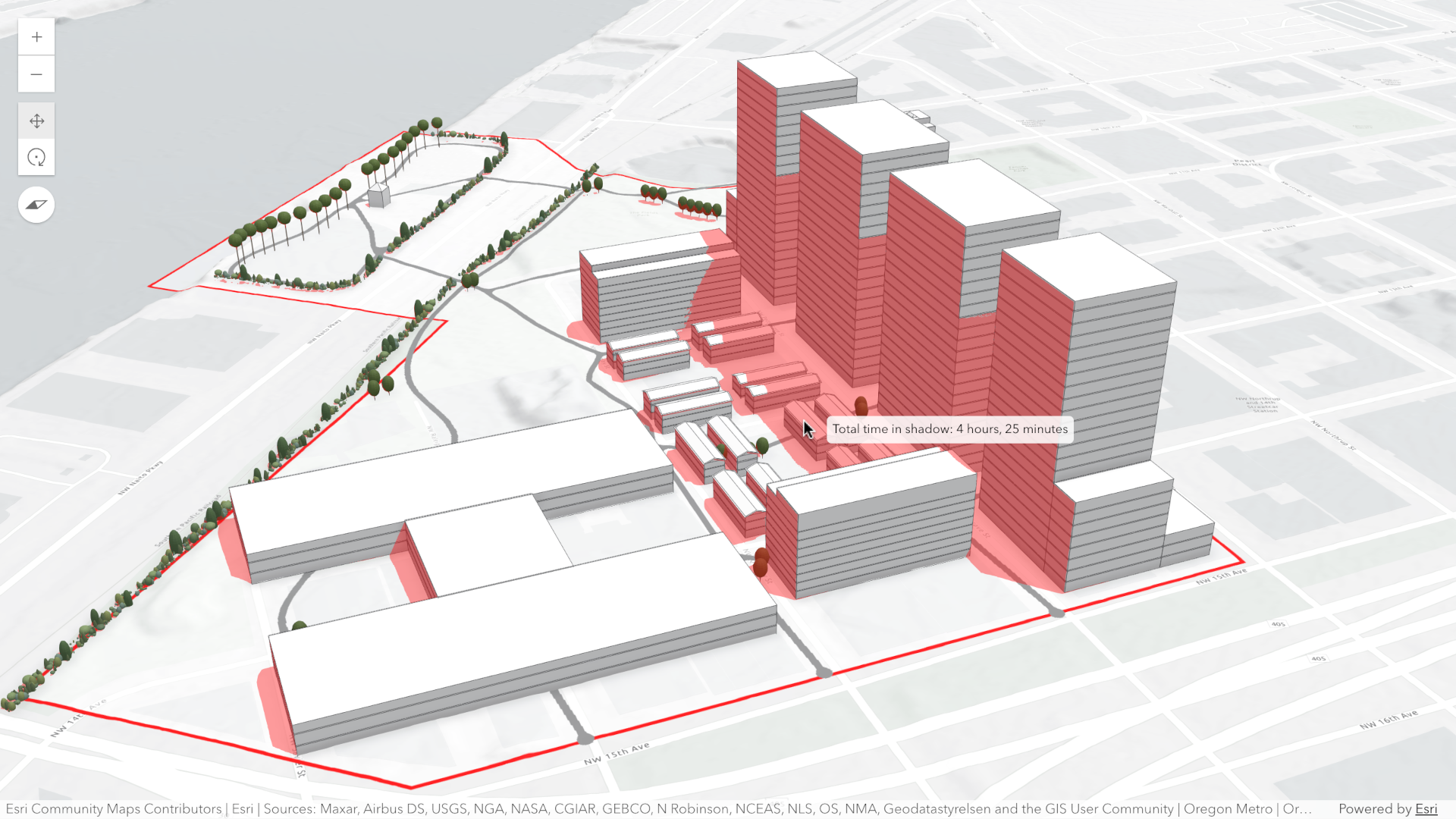
Minimum duration mode displays shadows only in areas where shading accumulates for longer than a specified duration within the selected time range. Areas that receive less shading than the minimum show no shadow. In the image below, on May 1, 2021, shadows are displayed only where shading exceeds 4 hours between 10AM and 4PM.
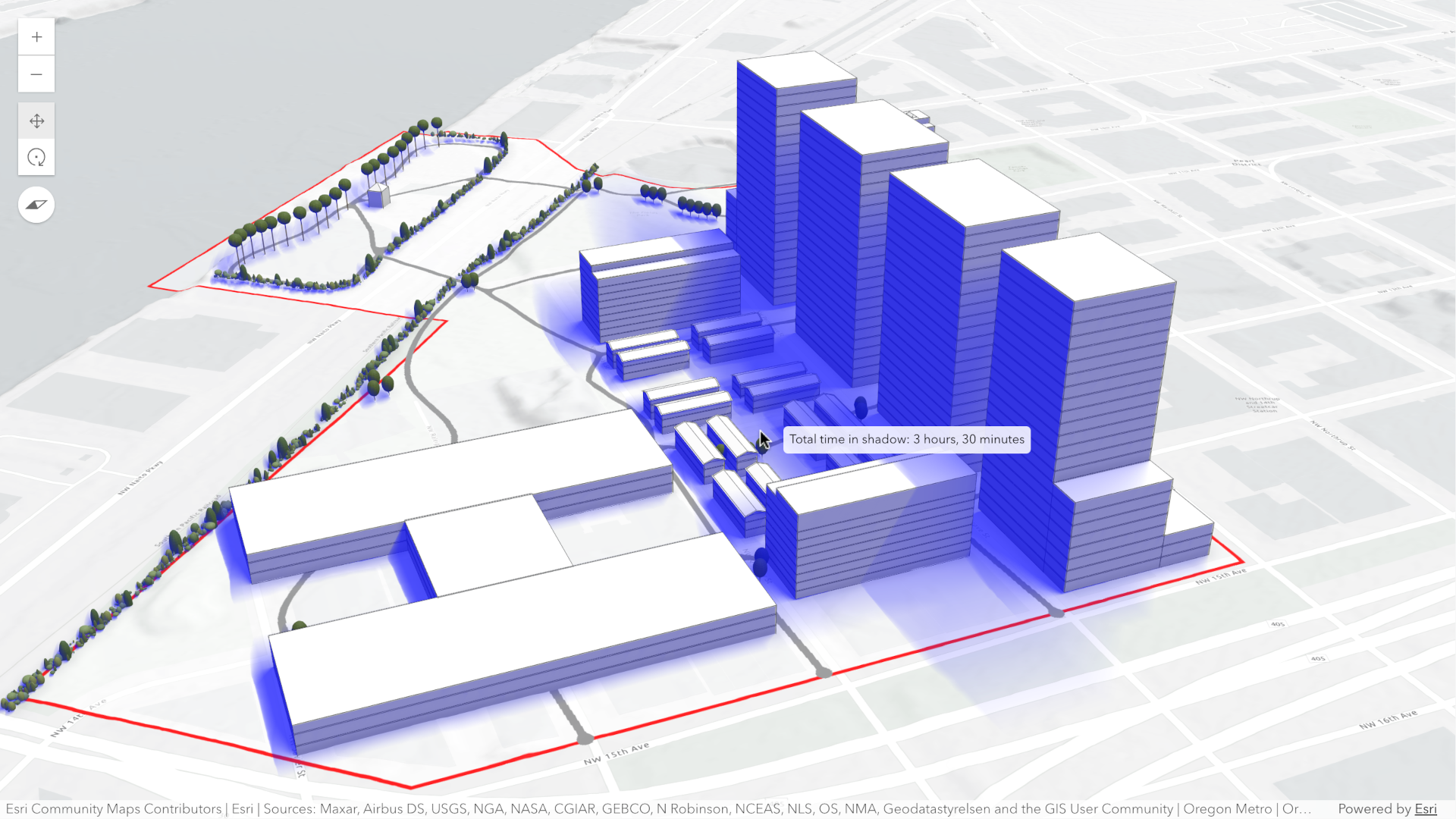
Total shadow duration mode displays the cumulative duration of shadow within the selected time range using opacity: areas that receive no shadow remain fully transparent, while areas receiving the highest accumulated shadow duration use a default opacity of 0.7. Intermediate values are interpolated. This mode can visualize shadows continuously or in 1-hour intervals.
Discrete shadows mode displays individual shadows at regular intervals within the selected time range. For example, with a time range from 10AM to 11AM and an interval set to 30 minutes, the shadows at 10AM, 10
and 11 will be displayed.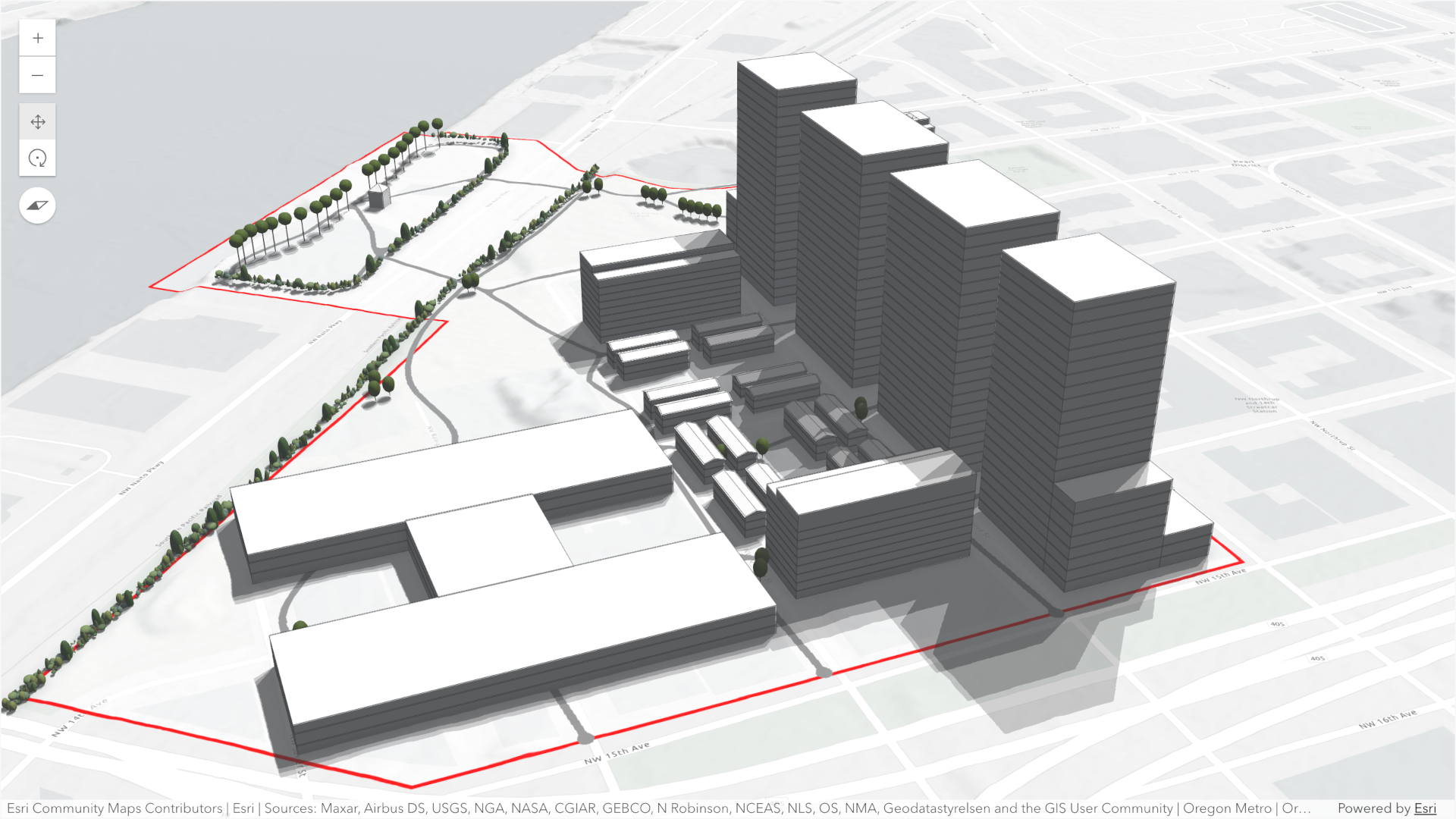
By default, the analysis also displays a tooltip next to the pointer that reports the total shadow duration at that location, rounded to 15‑minute increments. This allows you to inspect precise shadow durations anywhere within the view without additional configuration.
To perform a shadow cast analysis in your WebScene:
- Create a new instance of ShadowCastAnalysis.
- Set the desired mode.
- Configure the analysis time range using the date, startTimeOfDay, and endTimeOfDay properties.
- Optionally set the utcOffset property to define the timezone used for the analysis.
- If using the "discrete" mode, optionally set custom properties with DiscreteOptions.
- If using the "min-duration" mode, optionally set custom properties with MinDurationOptions.
- If using the "total-duration" mode, optionally set custom properties with TotalDurationOptions.
- Add the ShadowCastAnalysis instance to SceneView.analyses.
Use the ShadowCastAnalysisView3D class and its
ShadowCastAnalysisView3D.getDurationAtScreen() method to
obtain the shadow duration at a specific screen location programmatically.
To disable the shadow tooltip next to the pointer set the ShadowCastAnalysisView3D.interactive
property to false.
// create analysisconst shadowCastAnalysis = new ShadowCastAnalysis({  date: new Date("March 1, 2026"),  startTimeOfDay: 10 * 3600 * 1000, // 10AM,  endTimeOfDay: 16 * 3600 * 1000, // 4PM,  mode: "min-duration",  minDurationOptions: {    minDuration: 3 * 3600 * 1000, // 3 hours    color: [255, 0, 0, 0.4], // Transparent red  },  utcOffset: -8, // Pacific Standard Time});
// add to scene viewview.analyses.add(shadowCastAnalysis);
// use getDurationAtScreen method from the analysis view once availableconst analysisView = await view.whenAnalysisView(shadowCastAnalysis);
// get shadow duration at the pointer locationview.on("pointer-move", async (event) => {  // duration in milliseconds  const duration = await analysisView.getDurationAtScreen({ x: event.x, y: event.y });  // ... do something with the duration})
Known Limitations
- Terrain does not cast shadows in this analysis.
- As a result, to avoid incorrect shadow visualization,
startTimeOfDayshould be set after local sunrise andendTimeOfDaybefore local sunset. If these times fall outside daylight hours, shadows may be missing in areas where terrain would normally block sunlight. - The analysis does not take daylight savings into account. Use the timezone dropdown to adjust the offset from the Coordinated Universal Time (UTC) and account for the daylight saving time.
- The timezone is automatically detected based on the camera location. In some situations this might not be accurate. In case of an inaccurate timezone, users can set it manually using the utcOffset.
Constructors
Constructor
Parameters
| Parameter | Type | Description | Required |
|---|---|---|---|
| properties | | |
Properties
date
- Type
- Date
The calendar date used to calculate the shadow cast. This date excludes the time.
If a date with a time is set, the time value will be set to midnight (00:00:00) of that date in local system time.
If no date is set, then it defaults to the current date in local system time.
minDurationOptions
- Type
- MinDurationOptions
Options specific to the min-duration mode.
mode
- Type
- ShadowCastMode
Mode of analysis to use when computing and displaying shadows.
- "discrete": Displays individual shadow snapshots at regular time intervals within the selected time range.
- "min-duration": Displays shadows only in areas where accumulated shading exceeds a user‑defined minimum duration within the selected time range. Optional discrete shadow overlays can provide additional context.
- "total-duration": Displays total shadow accumulation within the selected time range using opacity: areas with longer shadow duration appear more opaque. Supports continuous or 1‑hour aggregated modes.
- Default value
- "min-duration"
origin
- Type
- AnalysisOriginWebScene | null | undefined
The origin of the analysis. The origin can be of type web-scene when the analysis was applied from the
WebScene.initialViewProperties or a
Slide.
totalDurationOptions
- Type
- TotalDurationOptions
Options specific to the total-duration mode.
uid
- Type
- string
- Since
- ArcGIS Maps SDK for JavaScript 4.33
An automatically generated unique identifier assigned to the instance. The unique id is generated each time the application is loaded.
utcOffset
The UTC offset in hours (e.g., -8 for PST, 1 for CET). This value determines how the date,
startTimeOfDay, and endTimeOfDay properties are interpreted when computing the
shadow cast analysis.
If not specified, the analysis will automatically determine an approximate UTC offset based on the longitude of the view's camera position.
Known Limitations
Full support for time zones with daylight saving time is not yet supported.
valid
- Type
- boolean
Indicates whether the analysis is ready to be computed and interacted with in the view.
Methods
fromJSON
- Signature
-
fromJSON (json: any): any
Creates a new instance of this class and initializes it with values from a JSON object
generated from an ArcGIS product. The object passed into the input json
parameter often comes from a response to a query operation in the REST API or a
toJSON()
method from another ArcGIS product. See the Using fromJSON()
topic in the Guide for details and examples of when and how to use this function.
Parameters
| Parameter | Type | Description | Required |
|---|---|---|---|
| json | A JSON representation of the instance in the ArcGIS format. See the ArcGIS REST API documentation for examples of the structure of various input JSON objects. | |
- Returns
- any
Returns a new instance of this class.
clone
- Signature
-
clone (): this
Creates a deep clone of this object. Any properties that store values by reference will be assigned copies of the referenced values on the cloned instance.
- Returns
- this
A deep clone of the class instance that invoked this method.
equals
- Signature
-
equals (other: this): boolean
Compares this analysis with another analysis to determine whether they are equivalent.
toJSON
- Signature
-
toJSON (): any
Converts an instance of this class to its ArcGIS portal JSON representation. See the Using fromJSON() guide topic for more information.
- Returns
- any
The ArcGIS portal JSON representation of an instance of this class.