import MeshMaterialMetallicRoughness from "@arcgis/core/geometry/support/MeshMaterialMetallicRoughness.js";const MeshMaterialMetallicRoughness = await $arcgis.import("@arcgis/core/geometry/support/MeshMaterialMetallicRoughness.js");- Inheritance:
- MeshMaterialMetallicRoughness→
MeshMaterial→ Accessor
- Since
- ArcGIS Maps SDK for JavaScript 4.15
A material determines how a MeshComponent is visualized. This particular material (based on MeshMaterial) uses the metallic/roughness lighting model to enable physically based lighting. The metallic and roughness properties can be used to model various realistic materials including metals and plastics.
In this image you can see how metallic and roughness property values influence the display of the material:
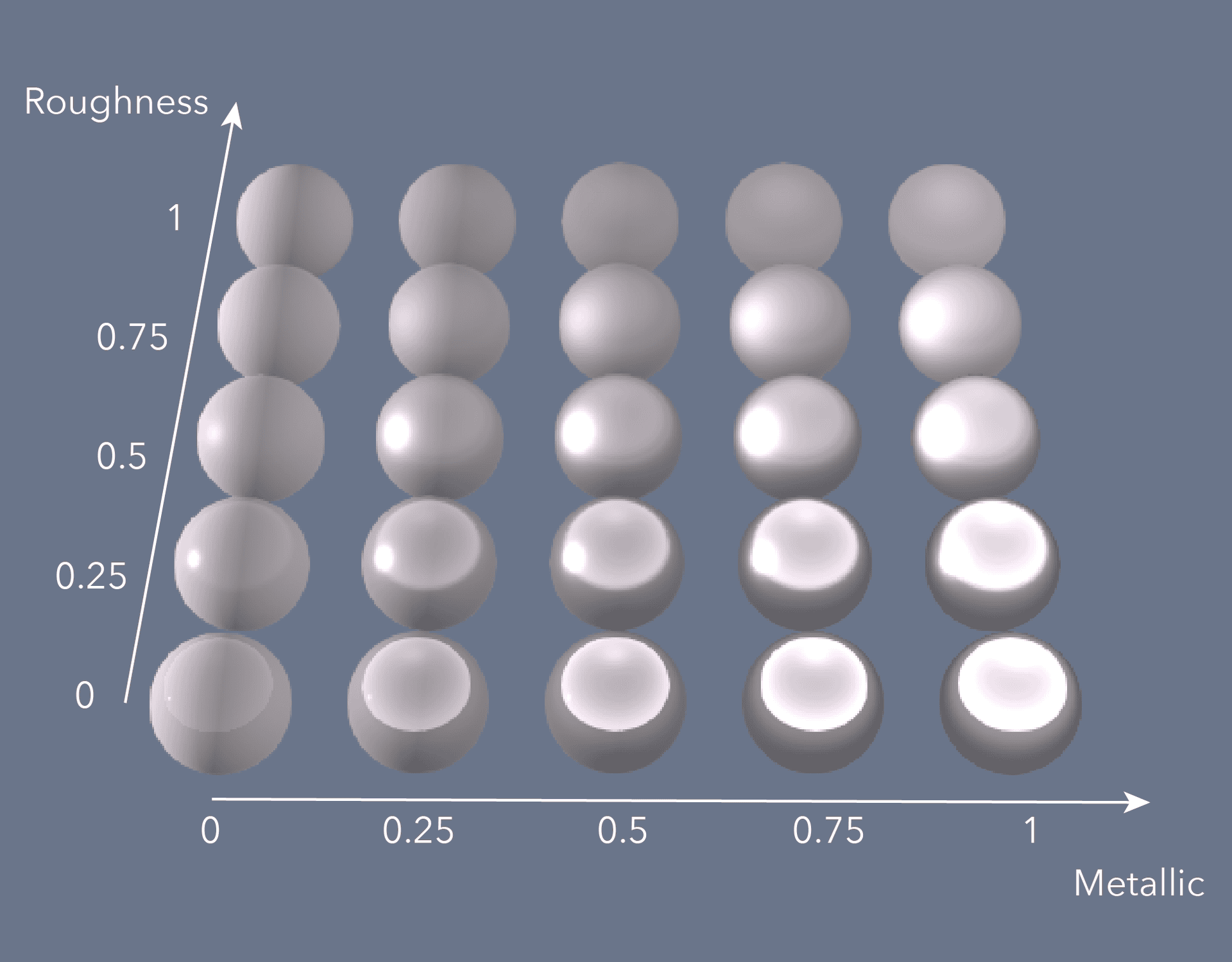
The metallicRoughnessTexture can be used to map specific metallic/roughness properties on different parts of the model.
Constructors
Constructor
Parameters
| Parameter | Type | Description | Required |
|---|---|---|---|
| properties | | |
Properties
| Property | Type | Class |
|---|---|---|
alphaCutoff inherited | ||
alphaMode inherited | ||
color inherited | ||
colorTexture inherited | MeshTexture | null | undefined | |
colorTextureTransform inherited | ||
declaredClass readonly inherited | ||
doubleSided inherited | ||
| | ||
| | ||
MeshTexture | null | undefined | | |
| | ||
| | ||
MeshTexture | null | undefined | | |
normalTexture inherited | MeshTexture | null | undefined | |
normalTextureTransform inherited | ||
MeshTexture | null | undefined | | |
| | ||
| |
alphaCutoff
- Type
- number
Specifies how transparency on the object is handled.
If alphaMode is set to either mask or auto this property specifies the cutoff value below which
masking happens (that is, the corresponding part of the Mesh is rendered fully transparent).
- Default value
- 0.5
alphaMode
Specifies how transparency on the object is handled. See also alphaCutoff.
| Type | Description |
|---|---|
| opaque | Alpha is ignored, and the object is rendered fully opaque. |
| blend | Alpha values are used for gradual transparency, blending between the object and its background. |
| mask | Alpha values are used for binary transparency, either displaying the object or its background. See also alphaCutoff. |
| auto | The implementation mixes the mask and blend settings, masking below alphaCutoff and blending above it. |
- Default value
- "auto"
colorTexture
- Type
- MeshTexture | null | undefined
Specifies a texture from which to get color information. The texture is accessed using the UV coordinates specified for each vertex in the Mesh.vertexAttributes.
colorTextureTransform
- Type
- MeshTextureTransform | null | undefined
- Since
- ArcGIS Maps SDK for JavaScript 4.27
A transformation of UV mesh coordinates used to sample the color texture. Texture transformations can be used to optimize re-use of textures, for example by packing many images into a single texture "atlas" and using the texture transform offset and scale to sample a specific region within this larger texture.
doubleSided
- Type
- boolean
Specifies whether both sides of each triangle are displayed, or only the front sides.
- Default value
- true
emissiveColor
Specifies a single, uniform emissive color for the MeshComponent.
The emissiveColor is added to the base color of the component.
This can be autocast with a named string, hex string, array of rgb values, an object with r, g, b
properties, or a Color object. Note that the alpha channel is ignored for emissive colors.
emissiveStrength
Specifies a strength value as multiplier for emissive color for the MeshComponent. Emissive strength will be read or stored using the KHR_materials_emissive_strength extension when importing or exporting GLTFs.
emissiveTexture
- Type
- MeshTexture | null | undefined
Specifies a texture from which to get emissive color information. The texture is accessed using the uv coordinate
specified for each vertex in the mesh vertex attributes. The colors in the texture are added to the base color of
the component. When using both an emissiveTexture and an emissiveColor their values are
multiplied and then added to the base color of the component.
emissiveTextureTransform
- Type
- MeshTextureTransform | null | undefined
- Since
- ArcGIS Maps SDK for JavaScript 4.27
A transformation of UV mesh coordinates used to sample the emissive texture. Texture transformations can be used to optimize re-use of textures, for example by packing many images into a single texture "atlas" and using the texture transform offset and scale to sample a specific region within this larger texture.
metallic
- Type
- number
Specifies how much the material behaves like a metal. Values must be in the range 0 (non metal material) to 1 (metal material). Physically accurate materials are usually either a metal (1) or a non-metal (0) and not something in between.
- Default value
- 1
metallicRoughnessTexture
- Type
- MeshTexture | null | undefined
Specifies a texture from which to get the combined metallic/roughness information. The metallic value should be
stored in the blue channel, while the roughness value should be stored in the green channel. The red and
alpha channels are ignored.
The texture is accessed using the uv coordinate specified for each vertex in the mesh vertex attributes.
normalTexture
- Type
- MeshTexture | null | undefined
Specifies a texture from which to get normal information. The texture is accessed using the UV coordinates specified for each vertex in the Mesh.vertexAttributes.
normalTextureTransform
- Type
- MeshTextureTransform | null | undefined
- Since
- ArcGIS Maps SDK for JavaScript 4.27
A transformation of UV mesh coordinates used to sample the normal texture. Texture transformations can be used to optimize re-use of textures, for example by packing many images into a single texture "atlas" and using the texture transform offset and scale to sample a specific region within this larger texture.
occlusionTexture
- Type
- MeshTexture | null | undefined
Allows to specify a texture to get the occlusion information from. This can be used to simulate the effect of ambient light on the object. The texture is accessed using the uv coordinate specified for each vertex in the mesh vertex attributes. The occlusion value should be encoded in the red channel of the texture.
occlusionTextureTransform
- Type
- MeshTextureTransform | null | undefined
- Since
- ArcGIS Maps SDK for JavaScript 4.27
A transformation of UV mesh coordinates used to sample the occlusion texture. Texture transformations can be used to optimize re-use of textures, for example by packing many images into a single texture "atlas" and using the texture transform offset and scale to sample a specific region within this larger texture.
roughness
- Type
- number
Indicates how rough the surface of the material is. Values must be in the range 0 (fully smooth surface) to 1 (fully diffuse surface).
- Default value
- 1
Methods
fromJSON
- Signature
-
fromJSON (json: any): any
Creates a new instance of this class and initializes it with values from a JSON object
generated from an ArcGIS product. The object passed into the input json
parameter often comes from a response to a query operation in the REST API or a
toJSON()
method from another ArcGIS product. See the Using fromJSON()
topic in the Guide for details and examples of when and how to use this function.
Parameters
| Parameter | Type | Description | Required |
|---|---|---|---|
| json | A JSON representation of the instance in the ArcGIS format. See the ArcGIS REST API documentation for examples of the structure of various input JSON objects. | |
- Returns
- any
Returns a new instance of this class.
clone
- Signature
-
clone (): this
Creates a deep clone of this object. Any properties that store values by reference will be assigned copies of the referenced values on the cloned instance.
- Returns
- this
A deep clone of the class instance that invoked this method.
toJSON
- Signature
-
toJSON (): any
Converts an instance of this class to its ArcGIS portal JSON representation. See the Using fromJSON() guide topic for more information.
- Returns
- any
The ArcGIS portal JSON representation of an instance of this class.