import LabelClass from "@arcgis/core/layers/support/LabelClass.js";const LabelClass = await $arcgis.import("@arcgis/core/layers/support/LabelClass.js");- Inheritance:
- LabelClass→
Accessor
- Since
- ArcGIS Maps SDK for JavaScript 4.0
Defines label expressions, symbols, scale ranges, label priorities, and label placement options for labels on a layer. See the Labeling guide for more information about labeling.
Known Limitations
Polygon geometries only support always-horizontal labelPlacement.
The available Font properties used in the symbol depends on the layer type,
geometry type, and if you are working in 2D or 3D.
Currently, features cannot be properly labeled when a TimeExtent is applied to the layer or view.
Currently, when a FeatureEffect and/or a
FeatureFilter is applied to the LayerView,
labels may not display properly.
3D SceneViews only support one label per feature. If a feature satisfies the where
condition of multiple LabelClasses, then only the label corresponding
to the first matching LabelClass is displayed.
Example
const labelClass = {  // autocasts as new LabelClass()  symbol: {    type: "text",  // autocasts as new TextSymbol()    color: "white",    haloColor: "blue",    haloSize: 1,    font: {  // autocast as new Font()       family: "Ubuntu Mono",       size: 14,       weight: "bold"     }  },  labelPlacement: "above-right",  labelExpressionInfo: {    expression: "$feature.Team + TextFormatting.NewLine + $feature.Division"  },  maxScale: 0,  minScale: 25000000,  where: "Conference = 'AFC'"};
const labelLayer = new FeatureLayer({  portalItem: {  // autocasts as new PortalItem()    id: "7f0bfc7bf67a407d8efebf584f6d956d"  },  labelingInfo: [labelClass]});
Constructors
Constructor
Parameters
| Parameter | Type | Description | Required |
|---|---|---|---|
| properties | | |
Properties
| Property | Type | Class |
|---|---|---|
| | ||
declaredClass readonly inherited | ||
"none" | "static" | | |
| | ||
| | ||
| | ||
| | ||
| | ||
| | ||
| | ||
| | ||
| | ||
| | ||
| | ||
| |
allowOverrun
- Type
- boolean
- Since
- ArcGIS Maps SDK for JavaScript 4.22
Specifies whether or not a polyline label can overrun the feature being labeled. For example, after the end of a polyline segment.
Known Limitations
Currently, this property only applies to Polyline FeatureLayer, CSVLayer, and StreamLayer in 2D MapViews.
- Default value
- false
deconflictionStrategy
- Type
- "none" | "static"
- Since
- ArcGIS Maps SDK for JavaScript 4.16
Defines how labels should be placed relative to one another. By default,
labels have a static deconfliction strategy, meaning labels that overlap
are dropped to make them easier to read.
In some cases where few labels overlap, it may be preferable to
turn off label deconfliction with the none option. It is also advisable to turn off deconfliction when
labeling clusters with a
count of features in the center of the cluster.
Read More
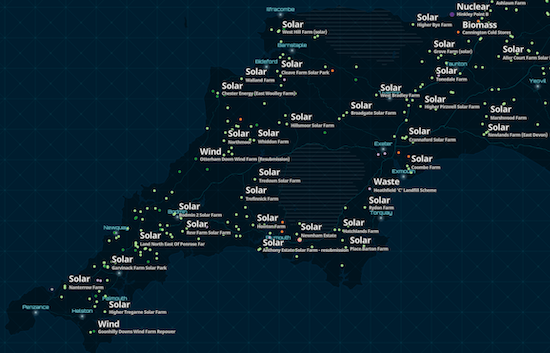
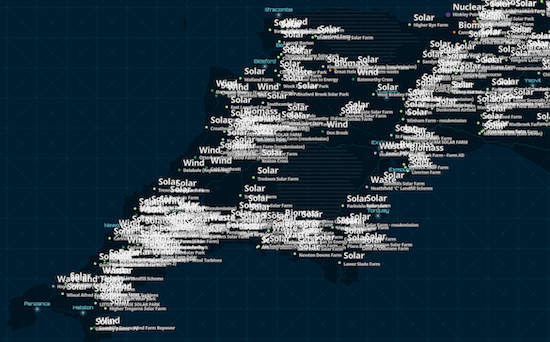
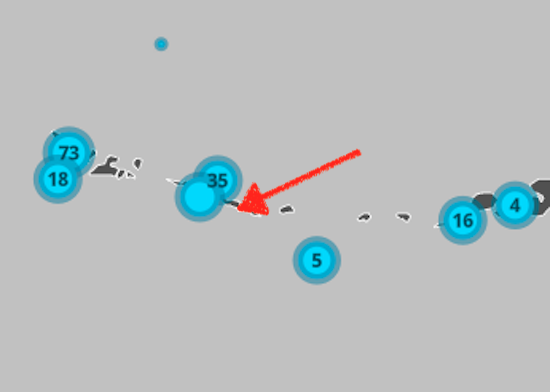
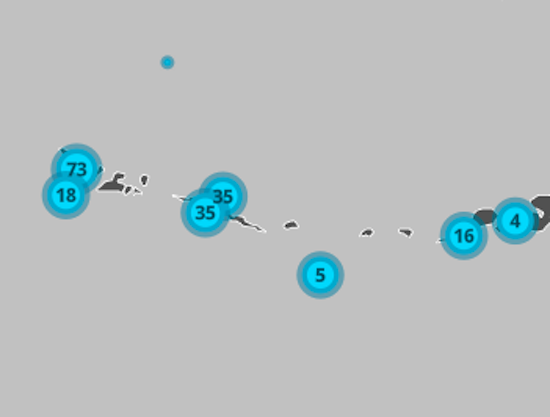
The following images illustrate when you may, or may not, want labels to deconflict.
When labeling dense layers, the default deconfliction strategy (static) is preferable since
labeling all features causes significant overlap, making the labels illegible. Keeping the
default setting allows some labels to render. As the user zooms in, all labels will eventually come into view.
| static (default) | none |
|---|---|
 |  |
When labeling clusters (or even sparsely distributed features) with small labels, it may be preferable to allow
labels to slightly overlap since the information is still legible and doesn't significantly occlude the visualization.
In the clustering scenario, a label deconfliction setting of static may actually cause more confusion, making some features not appear to be clusters.
| static (default) | none |
|---|---|
 |  |
Known Limitations
Currently, this property only applies to FeatureLayer, CSVLayer, and StreamLayer in 2D MapViews.
- Default value
- "static"
Example
// Ensures all labels are displayed regardless// of whether they overlaplabelClass.deconflictionStrategy = "none"; labelExpression
Defines the labels for a MapImageLayer.
If working with a MapImageLayer that supports Arcade, you can also use
labelExpressionInfo instead. To determine this,
check the supportsArcadeExpressionForLabeling
property. If true, then labelExpression or labelExpressionInfo can be used.
If false, then only labelExpression can be used.
If working with FeatureLayer, use labelExpressionInfo instead.
Attribute values may be included in labels using SQL syntax. To include an
attribute value in a label, wrap the name of the field in square brackets [].
See the example snippet below.
Example
// For Spokane County, WA, label will display: "Spokane County, Washington"labelClass.labelExpression = '[COUNTY_NAME] CONCAT " County, " CONCAT [STATE_NAME]'; labelExpressionInfo
- Type
- LabelExpressionInfo | null | undefined
Defines the labels for a FeatureLayer.
If working with a MapImageLayer that supports Arcade, you can also use
labelExpressionInfo. To determine this, check the
supportsArcadeExpressionForLabeling
property. If true, then labelExpression or labelExpressionInfo can be used.
If false, then only labelExpression can be used.
- See also
Example
// For Spokane County, WA, label will display: "Spokane County, Washington"labelClass.labelExpressionInfo = { expression: "$feature.COUNTY_NAME + ' County, ' + $feature.STATE_NAME"}; labelPlacement
The position of the label. Possible values are based on the feature type. This property requires a value.
| Feature Type | Possible Values |
|---|---|
| Points | above-center, above-left, above-right, below-center, below-left, below-right, center-center, center-left, center-right |
| Polylines | above-after, above-along, above-before, above-start, above-end, below-after, below-along, below-before, below-start, below-end, center-after, center-along, center-before, center-start, center-end |
| Polygons | always-horizontal |
Known Limitations
Currently, if the label has a line callout
or vertical offset in a 3D SceneView, then only above-center is supported.
Label placement only applies to Point layers in 3D SceneViews.
FeatureLayer Polylines only support above-along, below-along, and center-along label placement in 2D MapViews.
Example
labelClass.labelPlacement = "above-right"; labelPosition
- Type
- LabelPosition
- Since
- ArcGIS Maps SDK for JavaScript 4.22
Specifies the orientation of the label position of a single line polyline label.
If "curved", this means the characters follow the curve of the polyline,
while "parallel" means the characters will always be straight, and the
orientation will be based on the angle of the polyline's curve at the
label's position.
- Default value
- "curved"
maxScale
- Type
- number
The maximum scale (most zoomed in) at which labels are visible in the view.
A value of 0 means the label's visibility does not have a maximum scale.
The maxScale value should always be smaller than the minScale value,
and greater than or equal to the service specification.
- Default value
- 0
minScale
- Type
- number
The minimum scale (most zoomed out) at which labels are visible in the view.
A value of 0 means the label's visibility does not have a minimum scale.
The minScale value should always be larger than the maxScale value,
and lesser than or equal to the service specification.
- Default value
- 0
repeatLabel
- Type
- boolean
- Since
- ArcGIS Maps SDK for JavaScript 4.22
Indicates whether or not to repeat the label along the polyline feature.
If true, the label will be repeated according to the repeatLabelDistance.
If false, the label will display once per polyline segment.
Known Limitations
Currently, this property only applies to Polyline FeatureLayer, CSVLayer, and StreamLayer in 2D MapViews.
- Default value
- true
repeatLabelDistance
- Since
- ArcGIS Maps SDK for JavaScript 4.22
The size in points of the distance between labels on a polyline. This value may be autocast
with a string expressing size in points or pixels (e.g. 100, or "64pt", or "128px").
The repeatLabel property must be true for this property to
be honored.
Known Limitations
Currently, this property only applies to Polyline FeatureLayer, CSVLayer, and StreamLayer in 2D MapViews.
Example
const labelClass = { // autocasts as new LabelClass() symbol: { type: "text", // autocasts as new TextSymbol() color: "white", font: { // autocast as new Font() family: "Orbitron", size: 12, weight: "bold" } }, labelExpressionInfo: { expression: "$feature.rte_num1" }, labelPlacement: "center-along", repeatLabel: true, repeatDistanceLabel: 100}; symbol
- Type
- TextSymbol | LabelSymbol3D
Defines the symbol used for rendering the label. If not set, the default symbol will be used. See the example below.
Example
// If not set, this default symbol will be usedlabelClass.symbol = { type: "text", color: [255, 255, 255, 255], // white font: { family: "Arial Unicode MS", size: 10, weight: "bold" }, haloColor: [0, 0, 0, 255], // black haloSize: 1}; useCodedValues
- Type
- boolean
Indicates whether to use domain names if the fields in the labelExpression or labelExpressionInfo have domains.
Known Limitations
This property only applies to 3D SceneViews.
where
A SQL where clause used to determine the features to which the label class should be applied.
When specified, only features evaluating to true based on this expression will be labeled.
Examples
labelClass.where = "CITYNAME = 'Redlands'";labelClass.where = "MARKER_ACTIVITY IN ('Picnicking', 'Group Camping')";Methods
fromJSON
- Signature
-
fromJSON (json: any): any
Creates a new instance of this class and initializes it with values from a JSON object
generated from an ArcGIS product. The object passed into the input json
parameter often comes from a response to a query operation in the REST API or a
toJSON()
method from another ArcGIS product. See the Using fromJSON()
topic in the Guide for details and examples of when and how to use this function.
Parameters
| Parameter | Type | Description | Required |
|---|---|---|---|
| json | A JSON representation of the instance in the ArcGIS format. See the ArcGIS REST API documentation for examples of the structure of various input JSON objects. | |
- Returns
- any
Returns a new instance of this class.
clone
- Signature
-
clone (): LabelClass
Creates a deep clone of the LabelClass.
- Returns
- LabelClass
A deep clone of the object that invoked this method.
Example
// Creates a deep clone of the layer's first labelClasslet label = layer.labelingInfo[0].clone(); toJSON
- Signature
-
toJSON (): any
Converts an instance of this class to its ArcGIS portal JSON representation. See the Using fromJSON() guide topic for more information.
- Returns
- any
The ArcGIS portal JSON representation of an instance of this class.