import TextContent from "@arcgis/core/popup/content/TextContent.js";const TextContent = await $arcgis.import("@arcgis/core/popup/content/TextContent.js");- Since
- ArcGIS Maps SDK for JavaScript 4.11
A TextContent popup element is used to define descriptive text as an element within a PopupTemplate's
content. The text may reference values returned from a field attribute or an
Arcade expression defined in a PopupTemplate's PopupTemplate.expressionInfos property.
 .
.
Examples
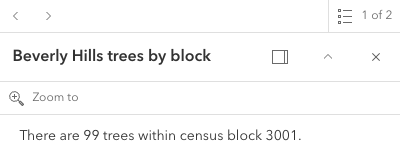
// Create the Text Content Element// This element uses an attribute from the featurelayer which displays a sentence// giving the total amount of trees value within a specified census block.let textElement = new TextContent();textElement.text = "There are {Point_Count} trees within census block {BLOCKCE10}";
// // Create the PopupTemplatelet template = new PopupTemplate({ title: "Beverly Hills trees by block", outFields: ["*"], content: [textElement]});layer.popupTemplate = { content: [{ type: "text", // Autocasts as new TextContent text: "The {expression/predominance-tree} species occurs more often" + " than other tree species in the area." }]};Constructors
Constructor
Parameters
| Parameter | Type | Description | Required |
|---|---|---|---|
| properties | | |
Properties
text
The formatted string content to display. This may contain a field
name enclosed in {} (e.g. {FIELDNAME}), or an Arcade
expression ExpressionInfo.name (e.g. {expression/EXPRESSIONNAME}).
Text content may also leverage HTML tags such as <b></b>,
<p></p>, and <table></table> for formatting the look and feel
of the content.
Set the PopupTemplate.fieldInfos property for any fields that need to have number formatting within the text.
- See also
Methods
fromJSON
- Signature
-
fromJSON (json: any): any
Creates a new instance of this class and initializes it with values from a JSON object
generated from an ArcGIS product. The object passed into the input json
parameter often comes from a response to a query operation in the REST API or a
toJSON()
method from another ArcGIS product. See the Using fromJSON()
topic in the Guide for details and examples of when and how to use this function.
Parameters
| Parameter | Type | Description | Required |
|---|---|---|---|
| json | A JSON representation of the instance in the ArcGIS format. See the ArcGIS REST API documentation for examples of the structure of various input JSON objects. | |
- Returns
- any
Returns a new instance of this class.
clone
- Signature
-
clone (): TextContent
Creates a deep clone of the TextContent class.
- Returns
- TextContent
A deep clone of the TextContent instance.
toJSON
- Signature
-
toJSON (): any
Converts an instance of this class to its ArcGIS portal JSON representation. See the Using fromJSON() guide topic for more information.
- Returns
- any
The ArcGIS portal JSON representation of an instance of this class.