import DictionaryRenderer from "@arcgis/core/renderers/DictionaryRenderer.js";const DictionaryRenderer = await $arcgis.import("@arcgis/core/renderers/DictionaryRenderer.js");- Since
- ArcGIS Maps SDK for JavaScript 4.13
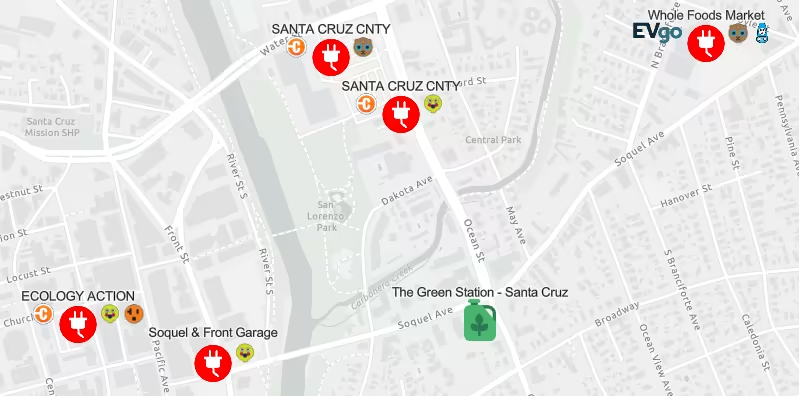
Dictionary Renderer is used to symbolize layers using a dictionary of CIMSymbols configured with multiple attributes. This renderer should be used when individual features need to be visualized based on multiple data attributes. This may lead to many symbol permutations that would be inappropriate for using a UniqueValueRenderer.
A dictionary renderer applies symbols to features through an associated dictionary symbol web style. The web style contains all the symbol components as well as rules for displaying the symbol.
Known Limitations
- DictionaryRenderer may only be used to create visualizations for the following layer types:
- DictionaryRenderer is not supported in the Legend.
Best Practices
- Dictionary symbol styles can be created manually or from ArcGIS Pro (since ArcGIS Pro 2.5). It is recommended to use ArcGIS Pro to create and publish your styles. See Share a web style for details. Instructions on creating dictionary symbol style manually are available at: Creating Dictionary Symbol Style.
- DictionaryRenderer works best when visualizing data at large scales (zoomed in closer to the ground). Because theses symbols can be complex, containing multiple icons and varied text per feature, layers rendered with DictionaryRenderer can be illegible when many features overlap one another and clutter the view. We suggest setting FeatureLayer.minScale and FeatureLayer.maxScale on layers rendered with DictionaryRenderer to avoid displaying too much information at small scales.
- Example
- let renderer = new DictionaryRenderer({url: "./alternative-fuel-stations",fieldMap: {fuel_type: "Fuel_Type_Code",name: "Station_Name"},config: {show_label: "false"}});let layer = new FeatureLayer({url: "http://url.to.service",renderer: renderer});
Constructors
Constructor
Parameters
| Parameter | Type | Description | Required |
|---|---|---|---|
| properties | | |
- Example
- // Typical usagelet renderer = new DictionaryRenderer({url: "./alternative-fuel-stations",fieldMap: {fuel_type: "Fuel_Type_Code",name: "Station_Name"},config: {show_label: "false"}});
Properties
| Property | Type | Class |
|---|---|---|
| inherited | ||
| | ||
| readonly inherited | ||
| | ||
| | ||
| | ||
| readonly | | |
| readonly | | |
| readonly | | |
| readonly | | |
| readonly | | |
| readonly | | |
| readonly | "dictionary" | |
| | ||
| inherited | VisualVariable[] | null | undefined |
authoringInfo
- Type
- AuthoringInfo | null | undefined
Authoring metadata only included in renderers generated from one of the Smart Mapping creator methods, such as sizeRendererCreator.createContinuousRenderer() or colorRendererCreator.createContinuousRenderer(). This includes information from UI elements such as sliders and selected classification methods and themes. This allows the authoring clients to save specific overridable settings so that next time it is accessed via the UI, their selections can be remembered.
config
- Type
- DictionaryUserConfig | null | undefined
This property allows you to set display options that can be configured on the dictionary symbol style. For example, if the dictionary symbol style provides a display option to turn on/off a symbol/text, you could set it here.
- Example
- renderer.config = {show_label: "true"}
fieldMap
- Type
- DictionaryFieldMap | null | undefined
Defines a field mapping that maps input fields from the feature to the dictionary symbol style's expected fields for symbols and text. Each key identifies an expected field (defined in the dictionary's symbol and text properties). The value identifies the corresponding mapped field from the dataset. Field names are case sensitive.
- Example
- renderer.fieldMap = {fuel_type: "Fuel_Type_Code",connector_types: "EV_Connector_Types",network: "EV_Network",name: "Station_Name"};
scaleExpression
A scaling expression can be set to increase or decrease the size of the dictionary symbols.
The scaling expression can be a constant value for all symbols or an Arcade expression following the specification
defined by the Arcade Visualization Profile. Expressions
in DictionaryRenderer may reference field values using the $feature profile variable and must return a number.
- See also
- Examples
- renderer.scaleExpression = "2"; //Make the symbols two times bigger.renderer.scaleExpression = "IIF($feature.symbolset == 10, 2, 1)"; //If the value of "symbolset" field of a feature is 10, make the symbols two times bigger.
scaleExpressionTitle
The title identifying and describing the associated Arcade expression as defined in the scaleExpression property.
- Example
- renderer.scaleExpression = "IIF($feature.symbolset == 10, 2, 1)";renderer.scaleExpressionTitle = "Scale by symbol set";
styleConfigProperties
- Type
- DictionaryConfigItem[] | null | undefined
- Since
- ArcGIS Maps SDK for JavaScript 5.0
The properties of the dictionary style configuration.
visualVariables
- Type
- VisualVariable[] | null | undefined
An array of VisualVariable objects. Each object must indicate the type of visual variable to apply (e.g. ColorVisualVariable, SizeVisualVariable, OpacityVisualVariable, RotationVisualVariable), the numeric field or expression from which to drive the visualization, and the visual values to map to the data. The following list identifies each visual variable type and provides a link to the specification table of each.
| Type | Object Specification | Legend Example |
|---|---|---|
| color | ColorVisualVariable |  |
| size | SizeVisualVariable |  |
| opacity | OpacityVisualVariable |  |
| rotation | RotationVisualVariable | - |
Visual variables are primarily be used in two ways.
1. Thematic mapping
In most cases, visual variables are used to create visualizations based on a thematic attribute (e.g. population, education, rank, money, magnitude, etc.) in either 2D or 3D.
renderer.visualVariables = [{ type: "size", field: "POP_POVERTY", normalizationField: "TOTPOP_CY", legendOptions: { title: "% population in poverty by county" }, stops: [ { value: 0.15, size: 4, label: "<15%" }, { value: 0.25, size: 12, label: "25%" }, { value: 0.35, size: 24, label: ">35%" } ]}];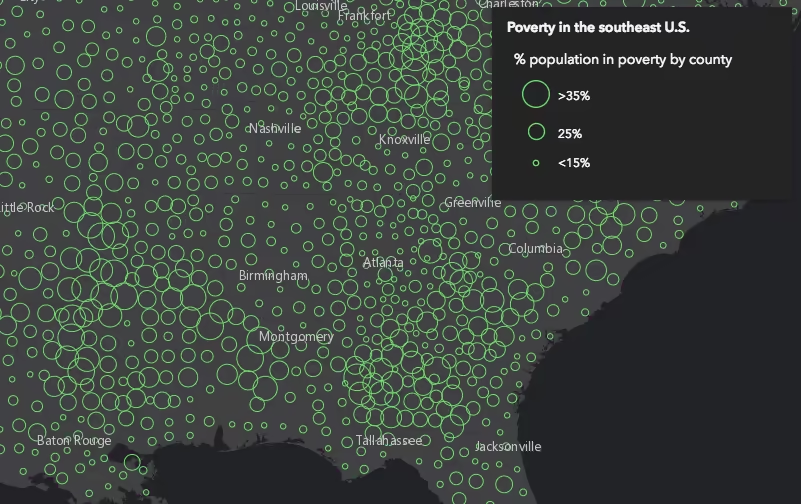
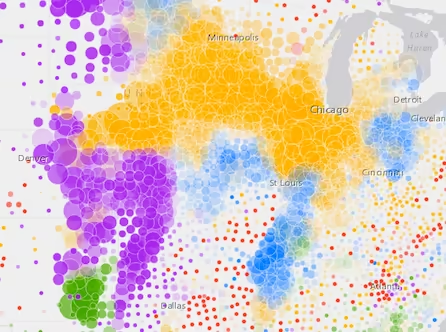
You can take the visualization a step further and use multiple visual variables in the same renderer. The sample below uses three visual variables (size, color, and opacity).
2. Mapping real-world sizes
The size visual variable can be used to visualize the true sizes of features (e.g. tree canopy, road width, building height, etc.) based on their size in the real world. This can be particularly powerful when working in a 3D SceneView. The image below shows a layer of trees that uses visual variables to size each feature to the true dimensions of each tree based on data stored in multiple attribute fields.

See the Thematic visualization with realistic 3D symbols for an example of using multiple visual variables to visualize your data.
Known Limitations
Color and opacity visual variables must not have more than 8 stops and size visual variables must not have more than 6 stops. This does not apply to variables driven by view scale.
For apps where users can interactively change the field or valueExpression of a visual variable, we suggest
you include all potential fields referenced by visual variables in the FeatureLayer.outFields
of the layer. This ensures the best user experience when switching or updating fields in renderers.
- See also
Methods
| Method | Signature | Class |
|---|---|---|
| inherited static | fromJSON(json: any): any | |
| clone(): DictionaryRenderer | | |
| getSymbolAsync(graphic: Graphic): Promise<CIMSymbol | null | undefined> | | |
| inherited | toJSON(): any |
fromJSON
- Signature
-
fromJSON (json: any): any
Creates a new instance of this class and initializes it with values from a JSON object
generated from an ArcGIS product. The object passed into the input json
parameter often comes from a response to a query operation in the REST API or a
toJSON()
method from another ArcGIS product. See the Using fromJSON()
topic in the Guide for details and examples of when and how to use this function.
Parameters
| Parameter | Type | Description | Required |
|---|---|---|---|
| json | A JSON representation of the instance in the ArcGIS format. See the ArcGIS REST API documentation for examples of the structure of various input JSON objects. | |
- Returns
- any
Returns a new instance of this class.
clone
- Signature
-
clone (): DictionaryRenderer
Creates a deep clone of the renderer.
- Returns
- DictionaryRenderer
A deep clone of the object that invoked this method.
- Example
- // Creates a deep clone of the first layer's rendererconst renderer = view.map.layers.at(0).renderer.clone();
toJSON
- Signature
-
toJSON (): any
Converts an instance of this class to its ArcGIS portal JSON representation. See the Using fromJSON() guide topic for more information.
- Returns
- any
The ArcGIS portal JSON representation of an instance of this class.