import SimpleLineSymbol from "@arcgis/core/symbols/SimpleLineSymbol.js";const SimpleLineSymbol = await $arcgis.import("@arcgis/core/symbols/SimpleLineSymbol.js");- Inheritance:
- SimpleLineSymbol→
LineSymbol→ Symbol→ Accessor
- Since
- ArcGIS Maps SDK for JavaScript 4.0
SimpleLineSymbol is used for rendering 2D polyline geometries in a 2D MapView. SimpleLineSymbol is also used for rendering outlines for marker symbols and fill symbols.
SimpleLineSymbol may also be used to symbolize 2D polyline features in a SceneView. However, it is recommended you use LineSymbol3D instead.
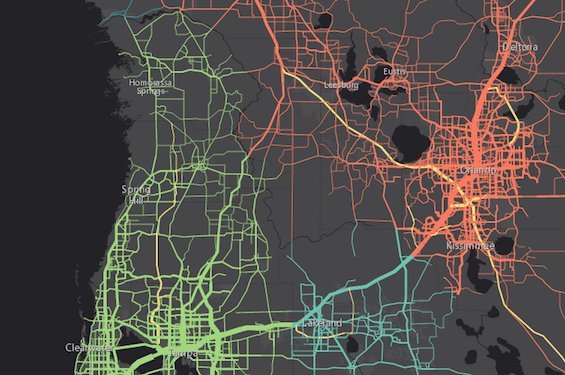
The image below depicts a FeatureLayer whose graphics are styled with SimpleLineSymbols.
Example
// this symbol can be used to visualize polyline// features or the outline of a fill symbollet symbol = { type: "simple-line", // autocasts as new SimpleLineSymbol() color: "lightblue", width: "2px", style: "short-dot"};Constructors
Constructor
Parameters
| Parameter | Type | Description | Required |
|---|---|---|---|
| properties | | |
Properties
cap
- Type
- LineCap
Specifies the cap style. The cap is the end node of a polyline, or the end of a line segment that does not connect with another segment of the same polyline.
See the table below for possible values.
| Possible Value | Example |
|---|---|
| butt | 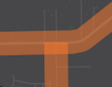 |
| round | 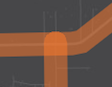 |
| square | 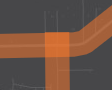 |
Known Limitations
This property does not persist when applied to a symbol used in a layer saved to a web map or portal item. See the web map specification for more details about properties that persist when a SimpleLineSymbol is saved to an ArcGIS Online or Portal item.
- Default value
- "round"
Example
symbol.cap = "square"; color
The color of the symbol.
This can be autocast with an array of rgb(a) values, named string, hex string or an hsl(a) string,
an object with r, g, b, and a properties, or a Color object.
- Default value
- "black"
Examples
// CSS color stringsymbol.color = "dodgerblue";// HEX stringsymbol.color = "#33cc33";// array of RGBA valuessymbol.color = [51, 204, 51, 0.3];// object with rgba propertiessymbol.color = { r: 51, g: 51, b: 204, a: 0.7}; join
- Type
- LineJoin
Specifies the join style. A join refers to the joint of a polyline, or the end of a line segment that connects to another segment of the same polyline.
See the table below for possible values.
| Possible Value | Example |
|---|---|
| bevel | 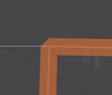 |
| miter | 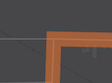 |
| round | 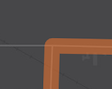 |
- Default value
- "round"
Example
symbol.join = "bevel"; marker
- Type
- LineSymbolMarker | null | undefined
- Since
- ArcGIS Maps SDK for JavaScript 4.16
Specifies the color, style, and placement of a symbol marker on the line.
Known Limitations
- This is not currently supported within a 3D SceneView.
Example
// Places a blue diamond marker at the beginning of the line symbolsimpleLineSymbol.marker = { color: "blue", placement: "begin", style: "diamond"} miterLimit
- Type
- number
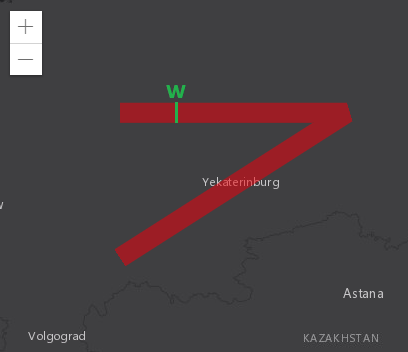
Maximum allowed ratio of the width of a miter join to the line width. Miter joins can get very wide at sharp line angles; this can be visually unpleasant or interfere with cartography. In the example below, the width of the miter join is about 3.6 times the width of the line.
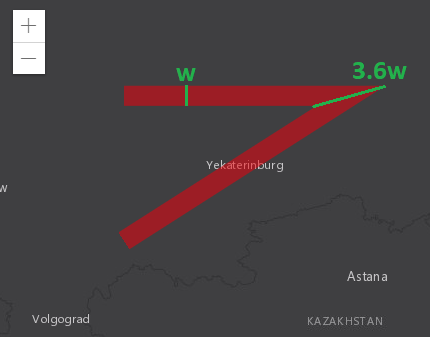
A miter limit of X means that a miter join can be at most X times
as wide as the line itself. Beyond that threshold, it is replaced with
a bevel join. Referring to the previous example, setting the miter limit
to 3.6 or greater has no effect on the generated visuals; setting the miter
limit to 3.5 or smaller causes the replacement with a bevel join.
Known Limitations
This property is currently not supported in 3D SceneViews.
- Default value
- 2
Example
// Miter joins that would be twice as wide as the line itself are// replaced by bevel joins.symbol.miterLimit = 2; style
- Type
- LineStyle
Specifies the line style. Possible values are listed in the table below:
| Value | Description |
|---|---|
| dash |  |
| dash-dot |  |
| dot |  |
| long-dash |  |
| long-dash-dot |  |
| long-dash-dot-dot |  |
| none | The line has no symbol. |
| short-dash |  |
| short-dash-dot |  |
| short-dash-dot-dot |  |
| short-dot |  |
| solid |  |
- Default value
- "solid"
Example
symbol.style = "short-dash-dot"; width
- Type
- number
The width of the symbol in points. This value may be autocast with a string
expressing size in points or pixels (e.g. 12px).
- Default value
- 0.75
Examples
// width in pointssymbol.width = 4;// width in pixelssymbol.width = "2px";// width in pointssymbol.width = "4pt";Methods
fromJSON
- Signature
-
fromJSON (json: any): any
Creates a new instance of this class and initializes it with values from a JSON object
generated from an ArcGIS product. The object passed into the input json
parameter often comes from a response to a query operation in the REST API or a
toJSON()
method from another ArcGIS product. See the Using fromJSON()
topic in the Guide for details and examples of when and how to use this function.
Parameters
| Parameter | Type | Description | Required |
|---|---|---|---|
| json | A JSON representation of the instance in the ArcGIS format. See the ArcGIS REST API documentation for examples of the structure of various input JSON objects. | |
- Returns
- any
Returns a new instance of this class.
clone
- Signature
-
clone (): SimpleLineSymbol
Creates a deep clone of the symbol.
- Returns
- SimpleLineSymbol
A deep clone of the object that invoked this method.
Example
// Creates a deep clone of the graphic's symbollet symLyr = graphic.symbol.clone(); toJSON
- Signature
-
toJSON (): any
Converts an instance of this class to its ArcGIS portal JSON representation. See the Using fromJSON() guide topic for more information.
- Returns
- any
The ArcGIS portal JSON representation of an instance of this class.