import BaseLayerViewGL2D from "@arcgis/core/views/2d/layers/BaseLayerViewGL2D.js";const BaseLayerViewGL2D = await $arcgis.import("@arcgis/core/views/2d/layers/BaseLayerViewGL2D.js");- Since
- ArcGIS Maps SDK for JavaScript 4.11
Represents the LayerView of a Layer after it has been added to a Map with a MapView. In contrast to the related class BaseLayerView2D, this one exposes WebGL rendering capabilities.
Important notes
This interface is experimental. Please read the following information carefully before using it in a product.
Due to the nature of WebGL it is not possible to fully sandbox user-supplied code, and its malfunctions can affect the performance, visual quality and even stability of the entire MapView. For this reason, Esri does not provide any support for issues related to WebGL rendering in custom rendering code, or for issues that arise in MapView rendering while using custom rendering code.
This class may be extended to create a custom LayerView for a Layer. A LayerView is created on demand by the MapView when a layer is added the to list of layers of its map.
The subclass can implement multiple functions of the LayerView lifecycle.
- First, the attach() method is called when the LayerView is about to start drawing the layer's content; it is usually responsible for resource allocation.
- Then during the life of the LayerView the render() method is called once per frame; it must complete drawing before returning.
- Finally the detach() method is called after the layer is removed from the map; it releases all allocated resources and stops on-going requests.
Each of these functions has access to the MapView's WebGL context through the instance property this.context. The developer must provide own shaders, meshes and textures, and is responsible for setting the required GL states on the context.
As a convenience for the developer, starting with version 4.14 of the API, BaseLayerViewGL2D includes tessellation
helper methods; the developer can supply Point, Multipoint,
Polyline, Extent, or Polygon
geometries and have them converted to abstract descriptions of triangle meshes that can be easily fed to the GPU as
vertex and index buffers. The SDK sample
explains in detail how to use the tessellation helpers and how to write compatible shaders.
Example
let CustomLayerView2D = BaseLayerViewGL2D.createSubclass({   render(renderParameters) {     const gl = this.context;
     ...   }
   attach() {     const gl = this.context;
     ...   }
   detach() {     const gl = this.context;
     ...   } });
 let CustomTileLayer = Layer.createSubclass({   tileInfo: TileInfo.create({ spatialReference: { wkid: 3857 }}),
   createLayerView(view) {     if (view.type === "2d") {       return new CustomLayerView2D({         view: view,         layer: this       });     }   } });
Constructors
Constructor
Parameters
| Parameter | Type | Description | Required |
|---|---|---|---|
| properties | | |
Properties
| Property | Type | Class |
|---|---|---|
context readonly | | |
declaredClass readonly inherited | ||
layer readonly | | |
spatialReferenceSupported readonly inherited | ||
suspended readonly inherited | ||
Tile[] | | |
uid readonly inherited | ||
updating readonly inherited | ||
view readonly | | |
visible inherited | ||
visibleAtCurrentScale readonly inherited | ||
visibleAtCurrentTimeExtent readonly inherited |
spatialReferenceSupported
- Type
- boolean
- Since
- ArcGIS Maps SDK for JavaScript 4.23
Indicates if the spatialReference of the MapView or
Map component is supported by the layer view.
When false layer view will be suspended.
Known Limitations
This property is not supported for layer views of a 3D SceneView or Scene component.
- See also
tiles
- Type
- Tile[]
The array of Tile objects computed to cover the MapView's visible area. This array is updated when the view is animating or the user is interacting with it. Then if tiles have been added or removed, tilesChanged() is called.
- See also
uid
- Type
- string
- Since
- ArcGIS Maps SDK for JavaScript 4.33
An automatically generated unique identifier assigned to the instance. The unique id is generated each time the application is loaded.
updating
- Type
- boolean
Indicates if the layer view is making any updates that will impact what is displayed on the map.
For example, this value is true when renderer, definitionExpression, filter or effect is changed or
if the layer view is in the process of the fetching data.
Watch FeatureLayerView.dataUpdating property instead to only know when the data has been updated (e.g. to run statistics query on all feature available in the layer view).
- Default value
- false
Example
// Check for the first time layerView.updating becomes false. Then query for// features that are visible within the view associated with the layer view.await reactiveUtils.whenOnce(() => !layerView.updating);const query = layerView.createQuery();query.geometry = layerView.view.extent;const result = layerView.queryFeatures(query); view
- Type
- MapView
Example
// Check for the first time layerView.updating becomes false. Then query for// features that are visible within the view associated with the layer view.await reactiveUtils.whenOnce(() => !layerView.updating);const query = layerView.createQuery();query.geometry = layerView.view.extent;const result = layerView.queryFeatures(query); visibleAtCurrentScale
- Type
- boolean
- Since
- ArcGIS Maps SDK for JavaScript 4.30
When true, the layer is visible in the view at the current scale. This applies to layers that have minScale and maxScale properties set.
Known Limitations
This property isn’t supported for tiled layers in 3D SceneView or in the Scene component
- Default value
- true
visibleAtCurrentTimeExtent
- Type
- boolean
- Since
- ArcGIS Maps SDK for JavaScript 4.30
When true, the layer is visible in the view's View.timeExtent. This applies to layers that have a Layer.visibilityTimeExtent.
- See also
- Default value
- true
Methods
| Method | Signature | Class |
|---|---|---|
attach(): void | | |
bindRenderTarget(): void | | |
detach(): void | | |
emit inherited | emit<Type extends EventNames<this>>(type: Type, event?: this["@eventTypes"][Type]): boolean | |
getRenderTarget(): RenderTarget | | |
hasEventListener inherited | hasEventListener<Type extends EventNames<this>>(type: Type): boolean | |
hitTest(mapPoint: Point, screenPoint: ScreenPoint): Promise<ViewHit[] | null | undefined> | | |
isFulfilled inherited | isFulfilled(): boolean | |
isRejected inherited | isRejected(): boolean | |
isResolved inherited | isResolved(): boolean | |
on inherited | on<Type extends EventNames<this>>(type: Type, listener: EventedCallback<this["@eventTypes"][Type]>): ResourceHandle | |
render(renderParameters: RenderParameters): void | | |
requestRender(): void | | |
tessellateExtent(extent: Extent): Promise<TessellatedMesh> | | |
tessellateMultipoint(multipoint: Multipoint, footprint: Rect): Promise<TessellatedMesh> | | |
tessellatePoint(point: Point, footprint: Rect): Promise<TessellatedMesh> | | |
tessellatePolygon(polygon: Polygon): Promise<TessellatedMesh> | | |
tessellatePolyline(polyline: Polyline, width: number): Promise<TessellatedMesh> | | |
tilesChanged(added: Tile[], removed: Tile[]): void | | |
when inherited | when<TResult1 = this, TResult2 = never>(onFulfilled?: OnFulfilledCallback<this, TResult1> | null | undefined, onRejected?: OnRejectedCallback<TResult2> | null | undefined): Promise<TResult1 | TResult2> |
attach
- Signature
-
attach (): void
Method called after the LayerView is created and right before it starts drawing the layer's content. Typically this method is implemented to start watching property changes on the layer and to initialize WebGL objects such as shaders.
- See also
- Returns
- void
Example
// Create a shader program and a property watcherattach() {  let gl = this.context;
  this._shaderProgram = gl.createProgram();  ...
  this._propertyHandle = reactiveUtils.watch(    () => this.layer.opacity,    () => this.requestRender()  );}
bindRenderTarget
- Signature
-
bindRenderTarget (): void
Bind the designated rendering output surface and restore the correct viewport.
This method can be used after the WebGL state has been altered by a call to
gl.bindFramebuffer() to restore the framebuffer that contains the final,
composited frame, i.e. the one that is guaranteed to be bound right before
control is handed over to render(). Note that this may or may not be the default framebuffer;
MapView can use various surfaces for frame compositing and there is no
guarantee that when render() is called, the bound framebuffer is
the default one.
Together with the framebuffer, also a matching full-size viewport is restored.
- Returns
- void
Example
render() {  let gl = this.context;
  ...
  // Bind a temporary offscreen surface  gl.bindFramebuffer(gl.FRAMEBUFFER, this.myOffscreenSurface);
  ...
  // Render to the offscreen surface
  ...
  // Bind the original render surface so that the image stored  // into the temporary one can be blitted/composited with the  // actual frame data  this.bindRenderTarget();
  ...
  // Your own frame composition logic
  ...}
detach
- Signature
-
detach (): void
Method called after the layer is removed and the LayerView is about to be removed. Typically, this method is implemented to free resources like watchers and destroy WebGL objects such as shader programs.
- See also
- Returns
- void
Example
// Remove the watchers and destroy the shader program created in attach()detach() {  this._propertyHandle.remove();  this._propertyHandle = null;
  const gl = this.context;
  gl.deleteProgram(this._shaderProgram);  this._shaderProgram = null;}
emit
- Signature
-
emit <Type extends EventNames<this>>(type: Type, event?: this["@eventTypes"][Type]): boolean
- Type parameters
- <Type extends EventNames<this>>
Emits an event on the instance. This method should only be used when creating subclasses of this class.
getRenderTarget
- Signature
-
getRenderTarget (): RenderTarget
Get the designated rendering output surface and corresponding viewport configuration.
The returned object is the same render target that is restored by a call to bindRenderTarget().
- Returns
- RenderTarget
hasEventListener
- Signature
-
hasEventListener <Type extends EventNames<this>>(type: Type): boolean
- Type parameters
- <Type extends EventNames<this>>
Indicates whether there is an event listener on the instance that matches the provided event name.
Parameters
| Parameter | Type | Description | Required |
|---|---|---|---|
| type | Type | The name of the event. | |
- Returns
- boolean
Returns true if the class supports the input event.
hitTest
- Signature
-
hitTest (mapPoint: Point, screenPoint: ScreenPoint): Promise<ViewHit[] | null | undefined>
Method to implement that is responsible for providing objects hit at the specified screen coordinates. This method is called internally by the MapView each time its MapView.hitTest() method is called.
isFulfilled
- Signature
-
isFulfilled (): boolean
isFulfilled() may be used to verify if creating an instance of the class is fulfilled (either resolved or rejected).
If it is fulfilled, true will be returned.
- Returns
- boolean
Indicates whether creating an instance of the class has been fulfilled (either resolved or rejected).
isRejected
- Signature
-
isRejected (): boolean
isRejected() may be used to verify if creating an instance of the class is rejected.
If it is rejected, true will be returned.
- Returns
- boolean
Indicates whether creating an instance of the class has been rejected.
isResolved
- Signature
-
isResolved (): boolean
isResolved() may be used to verify if creating an instance of the class is resolved.
If it is resolved, true will be returned.
- Returns
- boolean
Indicates whether creating an instance of the class has been resolved.
on
- Signature
-
on <Type extends EventNames<this>>(type: Type, listener: EventedCallback<this["@eventTypes"][Type]>): ResourceHandle
- Type parameters
- <Type extends EventNames<this>>
Registers an event handler on the instance. Call this method to hook an event with a listener.
Parameters
| Parameter | Type | Description | Required |
|---|---|---|---|
| type | Type | An event or an array of events to listen for. | |
| listener | EventedCallback<this["@eventTypes"][Type]> | The function to call when the event fires. | |
- Returns
- ResourceHandle
Returns an event handler with a
remove()method that should be called to stop listening for the event(s).Property Type Description remove Function When called, removes the listener from the event.
Example
view.on("click", function(event){ // event is the event handle returned after the event fires. console.log(event.mapPoint);}); render
- Signature
-
render (renderParameters: RenderParameters): void
The method to implement that is responsible of drawing the content of the layer. This method is called every time the MapView's state changes, or if requestRender() has been called.
Parameters
| Parameter | Type | Description | Required |
|---|---|---|---|
| renderParameters | | |
- Returns
- void
Example
// Example of a render implementation that draws using a custom shader programrender(renderParameters) { const gl = this.context; gl.bindBuffer(gl.ARRAY_BUFFER, this._vertexBuffer); gl.vertexAttribPointer(0, 2, gl.SHORT, false, 10, 0); gl.vertexAttribPointer(1, 3, gl.SHORT, true, 10, 4); gl.bindBuffer(gl.ARRAY_BUFFER, null); gl.enableVertexAttribArray(0); gl.enableVertexAttribArray(1); ... // Update uniforms as needed by calling gl.uniform... ... gl.useProgram(this._shaderProgram); gl.drawArrays(gl.TRIANGLES, 0, this._vertexCount); gl.disableVertexAttribArray(0); gl.disableVertexAttribArray(1); gl.useProgram(null);} requestRender
- Signature
-
requestRender (): void
The LayerView can call this method to ask the MapView to schedule a new rendering frame.
- Returns
- void
Example
// Call requestRender whenever the layer opacity has changedattach() { this._propertyHandle = reactiveUtils.watch( () => this.layer.opacity, () => this.requestRender() );} tessellateExtent
- Signature
-
tessellateExtent (extent: Extent): Promise<TessellatedMesh>
- Since
- ArcGIS Maps SDK for JavaScript 4.14
Tessellate an Extent into a rectangle.
Parameters
| Parameter | Type | Description | Required |
|---|---|---|---|
| extent | The input geometry. | |
- Returns
- Promise<TessellatedMesh>
A promise to a TessellatedMesh. The output mesh is composed of two triangles.
Example
this.tessellateExtent(g.geometry).then(function (mesh) { // do something with mesh }); tessellateMultipoint
- Signature
-
tessellateMultipoint (multipoint: Multipoint, footprint: Rect): Promise<TessellatedMesh>
- Since
- ArcGIS Maps SDK for JavaScript 4.14
Tessellate a Multipoint into quads (markers).
Parameters
| Parameter | Type | Description | Required |
|---|---|---|---|
| multipoint | The input geometry. These are the geographic points where each marker will me anchored. | | |
| footprint | The rectangle that describes the geometry of each marker. Coordinates x and y can be thought as being in screen-space, relative to the screen-space projection of the geographic point. | |
- Returns
- Promise<TessellatedMesh>
A promise to a TessellatedMesh. Each marker is represented by two triangles.
Example
this.tessellateMultipoint(g.geometry, {x: 0, : -12, width: 34, height: 10}).then(function (mesh) { // do something with mesh }); tessellatePoint
- Signature
-
tessellatePoint (point: Point, footprint: Rect): Promise<TessellatedMesh>
- Since
- ArcGIS Maps SDK for JavaScript 4.14
Tessellate a Point into a quad (marker).
Parameters
| Parameter | Type | Description | Required |
|---|---|---|---|
| point | The input geometry. This is the geographic point where the marker will me anchored. | | |
| footprint | The rectangle that describes the geometry of the marker.
Coordinates | |
- Returns
- Promise<TessellatedMesh>
A promise to a TessellatedMesh. The output mesh is composed of two triangles.
Example
this.tessellatePoint(g.geometry, {x: 0, : -12, width: 34, height: 10}).then(function (mesh) { // do something with mesh }); tessellatePolygon
- Signature
-
tessellatePolygon (polygon: Polygon): Promise<TessellatedMesh>
- Since
- ArcGIS Maps SDK for JavaScript 4.14
Tessellate a Polygon into triangles.
Parameters
| Parameter | Type | Description | Required |
|---|---|---|---|
| polygon | The input geometry. The geometry must be simple;
if the input geometry is not simple, you must first create a simplified version of it using
simplifyOperator, and pass the simplified geometry to | |
- Returns
- Promise<TessellatedMesh>
A promise to a TessellatedMesh.
Example
this.tessellatePolygon(g.geometry).then(function (mesh) { // do something with mesh }); tessellatePolyline
- Signature
-
tessellatePolyline (polyline: Polyline, width: number): Promise<TessellatedMesh>
- Since
- ArcGIS Maps SDK for JavaScript 4.14
Tessellate a Polyline into triangles.
Parameters
| Parameter | Type | Description | Required |
|---|---|---|---|
| polyline | The input geometry. The geometry must be simple;
if the input geometry is not simple, you must first create a simplified version of it using
simplifyOperator, and pass the simplified geometry to | | |
| width | The width of the line; this will be used to scale xOffset and yOffset. | |
- Returns
- Promise<TessellatedMesh>
A promise to a TessellatedMesh.
Example
this.tessellatePolyline(g.geometry, 10).then(function (mesh) { // do something with mesh }); when
- Signature
-
when <TResult1 = this, TResult2 = never>(onFulfilled?: OnFulfilledCallback<this, TResult1> | null | undefined, onRejected?: OnRejectedCallback<TResult2> | null | undefined): Promise<TResult1 | TResult2>
when() may be leveraged once an instance of the class is created. This method takes two input parameters: an onFulfilled function and an onRejected function.
The onFulfilled executes when the instance of the class loads. The
onRejected executes if the instance of the class fails to load.
Parameters
| Parameter | Type | Description | Required |
|---|---|---|---|
| onFulfilled | OnFulfilledCallback<this, TResult1> | null | undefined | The function to call when the promise resolves. | |
| onRejected | The function to execute when the promise fails. | |
- Returns
- Promise<TResult1 | TResult2>
Returns a new promise for the result of
onFulfilledthat may be used to chain additional functions.
Example
// Although this example uses MapView, any class instance that is a promise may use when() in the same waylet view = new MapView();view.when(function(){ // This function will execute once the promise is resolved}, function(error){ // This function will execute if the promise is rejected due to an error});Type definitions
Rect
A rectangle in screen-space.
An instance of Rect is used to specify the screen-space geometry of the resulting marker when calling
tessellatePoint() or tessellateMultipoint().
The exact interpretation of "screen-space" is ultimately implemented through a custom vertex shader;
a common convention is to interpret the values in the rect as being expressed in pixels or points.
See TessellatedMesh for more details.
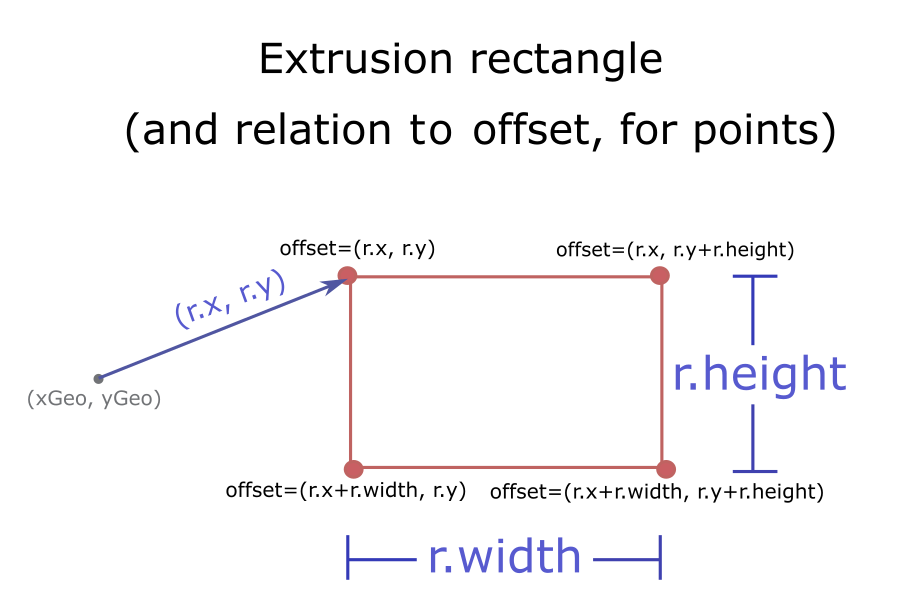
x
- Type
- number
The x-coordinate of the upper-left corner of the rectangle, relative to the anchor of the marker.
y
- Type
- number
The y-coordinate of the upper-left corner of the rectangle, relative to the anchor of the marker.
RenderTarget
The destination to which render() should direct its output.
Rendering output is saved into a framebuffer, possibly but not necessarily the default one, at a location defined by the viewport.
An instance of this class is mantained internally by BaseLayerViewGL2D and can be accessed by a call to
getRenderTarget(). It is the same instance that is restored to the WebGL context by
calling bindRenderTarget().
When control is handed over to render(), the WebGL context is guaranteed to be in a default state
except for the currently bound framebuffer and the configured viewport. Implementations of render()
are free to change these parameters using gl.bindFramebuffer() and gl.viewport(), but they must send the
output of the rendering process to the render target.
framebuffer
- Type
- WebGLFramebuffer | null
The framebuffer where the render() method should direct its output.
RenderParameters
context
The
WebGL or WebGL 2 context. Its concrete type depends on system configuration.
Every time that render() is called, the API automatically resets WebGL to a conventional
state which is almost the default one; the only two things that may be non-default are
the bound framebuffer and the viewport, which is set to match the entire framebuffer.
The body of render() must not change these settings.
Tile
Represents a tile reference.
world
- Type
- number
When the projection allows world wrapping (e.g. Web Mercator), identifies the instance of the world this tile's level/row/col.