import View from "@arcgis/core/views/View.js";const View = await $arcgis.import("@arcgis/core/views/View.js");- Inheritance:
- View→
Accessor
- Since
- ArcGIS Maps SDK for JavaScript 4.0
A view provides the means of viewing and interacting with the components of a Map. The Map is merely a container, storing the geographic information contained in base layers and operational layers. The View renders the Map and its various Map.layers, making them visible to the user.
There are two types of views: MapView and SceneView. The MapView renders a Map and its layers in 2D. The SceneView renders these elements in 3D. View is the base class of MapView and SceneView and has no constructor. To create a view, you must do so by directly creating an instance of either MapView or SceneView.
| MapView (2D) | SceneView (3D) |
|---|---|
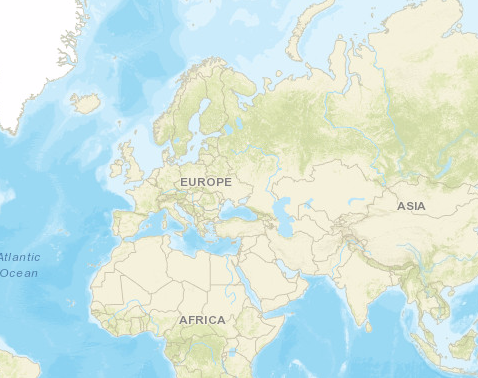 | 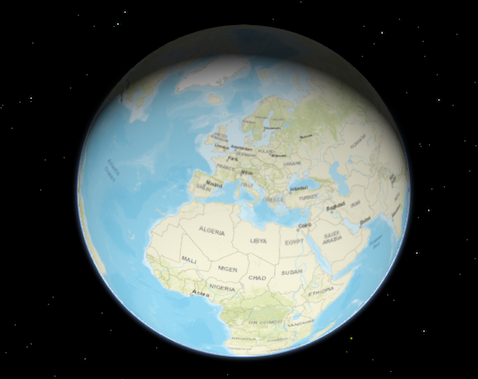 |
To associate a view with a map, you must set the map property to an instance of Map.
// Load the Map and MapView modulesconst [Map, MapView] = await $arcgis.import(["@arcgis/core/Map.js", "@arcgis/core/views/MapView.js"]);// Create a Map instanceconst map = new Map({  basemap: "topo-vector"});
// Create a MapView instance (for 2D viewing) and set its map property to// the map instance we just createdconst view = new MapView({  map: map,  container: "viewDiv"});
In the snippet above, you'll notice a container property set on the view. The container
property is the reference to the DOM node that contains the view. This is commonly a <div> element. The container
referenced in the example above might look something like:
<body> <div id="viewDiv"></div></body>You can observe the view's relationship to the HTML container in the Create a 2D map tutorial and any of the available samples.
Other properties may be set on the view, such as the rotation, scale, popup, and padding. See MapView and SceneView for additional properties specific to creating views in 2D and 3D.
A Map may have multiple views associated with it, including a combination of MapViews and SceneViews. See the Geodesic buffers and 2D overview map in SceneView samples to learn how a MapView and a SceneView can display the same map in a single application. While multiple views can reference the same map, a view may not associate itself with more than one Map instance.
The View also allows users to interact with components of the map. For example, when a user clicks or touches the location of a
feature in a map, they are not touching the feature nor the map; the event is actually handled with the View that references the map and
the LayerView that references the layer. Therefore, events such as click are not
handled on the Map or the Layer, but rather on the View. See MapView and
SceneView for additional details.
Constructors
Constructor
Parameters
| Parameter | Type | Description | Required |
|---|---|---|---|
| properties | | |
Properties
| Property | Type | Class |
|---|---|---|
views readonly static | | |
allLayerViews readonly | | |
| | ||
| | ||
attributionItems readonly | ReadonlyArray<AttributionItem> | |
| | ||
| | ||
canZoomIn readonly | | |
canZoomOut readonly | | |
declaredClass readonly inherited | ||
| | ||
| | ||
| | ||
| | ||
input readonly | | |
interacting readonly | | |
layerViews readonly | | |
magnifier readonly | | |
| | ||
navigating readonly | | |
| | ||
| | ||
ready readonly | | |
readyState readonly | "loading" | "missing-map" | "missing-container" | "empty-map" | "map-content-error" | "rendering-error" | "ready" | |
resolution readonly | | |
selectionManager readonly | | |
| | ||
stationary readonly | | |
| | ||
TimeExtent | null | undefined | | |
type readonly | "2d" | "3d" | |
updating readonly | |
views
- Type
- Collection<View<any>>
- Since
- ArcGIS Maps SDK for JavaScript 4.11
Contains the collection of active views on the page. Only views that are ready appear in the collection.
allLayerViews
- Type
- ReadonlyCollection
Collection containing a flat list of all the created LayerViews related to the basemap, operational layers, and group layers in this view.
- See also
animation
- Type
- ViewAnimation | null | undefined
Represents an ongoing view animation initialized by View2D.goTo(). You may watch this property to be notified when the view's extent changes .
- See also
animationsEnabled
- Type
- boolean
- Since
- ArcGIS Maps SDK for JavaScript 4.34
Indicates whether animations are enabled in the view. This includes animated symbols (animated
CIMSymbol, PictureMarkerSymbol from a GIF/animated PNG),
animated renderers (FlowRenderer), animated layers
(MediaLayer, VideoLayer), and animations triggered by view
navigation (for example, MapView.goTo()). Setting this property to false disables
all animations in the view.
- Default value
- true
attributionItems
- Type
- ReadonlyArray<AttributionItem>
- Since
- ArcGIS Maps SDK for JavaScript 5.0
The array of attribution items to be displayed in the view's attribution. This property is populated once the view has finished updating. Items are ordered based on descending score with higher scored items appearing first in the attribution.

Example
// Access the attributionItems property after the view is finished updating to get the array of attribution items to be displayed in the view's attributionreactiveUtils.when( () => !view.updating, () => { const attributionText = view.attributionItems .map((item) => item.text) .join(" | "); console.log(attributionText); }); attributionVisible
- Type
- boolean
- Since
- ArcGIS Maps SDK for JavaScript 5.0
Indicates whether the attribution is visible in the view.
Esri requires that when you use an ArcGIS Online basemap in your app, the map must include Esri attribution and you must be licensed to use the content. For detailed guidelines on working with attribution, please visit the official attribution in your app documentation. For information, see the Terms of Use documentation.
- Default value
- true
basemapView
- Type
- BasemapView
Represents the view for a single basemap after it has been added to the map.
canZoomIn
- Type
- boolean
- Since
- ArcGIS Maps SDK for JavaScript 5.0
Indicates if the view can zoom in.
canZoomOut
- Type
- boolean
- Since
- ArcGIS Maps SDK for JavaScript 5.0
Indicates if the view can zoom out.
displayFilterEnabled
- Type
- boolean
- Since
- ArcGIS Maps SDK for JavaScript 4.32
Indicates whether displayFilters are honored across all layers
in the view. If false, display filters are ignored on all layers and all features are rendered. To ignore display
filters on a per-layer basis, set the layer's displayFilterEnabled property to false.
- Default value
- true
fatalError
- Since
- ArcGIS Maps SDK for JavaScript 4.12
A fatal Error returned when the view loses its WebGL context. watch() this property to properly handle the error and attempt to recover the WebGL context.
- See also
Example
reactiveUtils.when( () => view.fatalError, () => { console.error("Fatal Error! View has lost its WebGL context. Attempting to recover..."); view.tryFatalErrorRecovery(); }); graphics
- Type
- Collection<Graphic>
Allows for adding graphics directly to the default graphics in the View.
Examples
// Adds a graphic to the Viewview.graphics.add(pointGraphic);// Removes a graphic from the Viewview.graphics.remove(pointGraphic); highlights
- Type
- Collection<HighlightOptions>
- Since
- ArcGIS Maps SDK for JavaScript 4.32
Represents a collection of HighlightOptions objects which can be used to highlight features throughout an application. Highlighting works by applying highlight options to one or more features. You can configure these options (such as color or opacity) to define how a feature will be visually emphasized.
A maximum of six HighlightOptions objects are supported in the collection, and they can be added, removed, and reordered freely. Their order in the collection determines priority, with the last object having the highest priority. If you apply more than one highlight to a feature, the one that is last within the collection will be applied. The HighlightOptions object must be part of this collection in order to be applied to features.
To highlight a feature, use the highlight method on
the relevant LayerView instance. To apply specific
HighlightOptions, include the
name in the highlight() method's options parameter. If
no name is provided, the feature will use the default highlight options.
The table below shows the default highlight options in the View's highlights collection if the collection has not been modified:
| Highlight options name | Description | Default settings |
|---|---|---|
| default | The default highlight options. Used when layerView.highlight() is called without specifying any particular highlight options. | { name: "default", color: "cyan", haloOpacity: 1, fillOpacity: 0.25, shadowColor: "black", shadowOpacity: 0.4, shadowDifference: 0.2} |
| temporary | The temporary highlight options, pre-configured for common use cases such as hovering over a feature in the view. | { name: "temporary", color: "yellow", haloOpacity: 1, fillOpacity: 0.25, shadowColor: "black", shadowOpacity: 0.4, shadowDifference: 0.2 } |
Examples
// Use the default highlights collection to apply a highlight to features when you hover over them
// A handler can be used to remove any previous highlight when applying a new onelet hoverHighlight;
view.on("pointer-move", (event) => {  // Search for the first feature in the featureLayer at the hovered location  view.hitTest(event, { include: featureLayer }).then((response) => {    if (response.results[0]) {       const graphic = response.results[0].graphic;       view.whenLayerView(graphic.layer).then((layerView) => {         // Remove any previous highlight, if it exists         hoverHighlight?.remove();         // Highlight the hit features with the temporary highlight options, which are pre-configured for this use case         hoverHighlight = layerView.highlight(graphic, { name: "temporary"});       });    }  });});
// Override the default highlights collection
const view = new MapView({ map: map, container: "viewDiv",
// Set the highlight options to be used in the view highlights: [ { name: "default", color: "orange" }, { name: "temporary", color: "magenta" }, { name: "table", color: "cyan", fillOpacity: 0.5, haloOpacity: 0} ]});// Add highlight options to the collection after initialization
const selectionHighlightOptions = { name: "selection", color: "#ff00ff", // bright fuchsia haloOpacity: 0.8, fillOpacity: 0.2};
// Add the options to the highlights collection at the first positionview.highlights.add(selectionGroup, 0); input
- Type
- Input
- Since
- ArcGIS Maps SDK for JavaScript 4.9
Options to configure input handling of the View.
Example
// Make gamepad events to emit independently of focus.view.input.gamepad.enabledFocusMode = "none"; interacting
- Type
- boolean
Indication whether the view is being interacted with (for example when panning or by an interactive tool).
- Default value
- false
layerViews
- Type
- Collection
A collection containing a hierarchical list of all the created LayerViews of the operational layers in the map.
- See also
magnifier
- Type
- Magnifier
- Since
- ArcGIS Maps SDK for JavaScript 4.19
The magnifier allows for showing a portion of the view as a magnifier image on top of the view.
map
An instance of a Map object to display in the view. A view may only display one map at a time. On the other hand, one Map may be viewed by multiple MapViews and/or SceneViews simultaneously.
This property is typically set in the constructor of the MapView or SceneView. See the class description for examples demonstrating the relationship between the map and the view.
navigating
- Type
- boolean
Indication whether the view is being navigated (for example when panning).
- Default value
- false
navigation
- Type
- Navigation
- Since
- ArcGIS Maps SDK for JavaScript 4.9
Options to configure the navigation behavior of the View.
Example
// Disable the gamepad usage, single touch panning, panning momentum and mouse wheel zooming.const view = new MapView({ container: "viewDiv", map: new Map({ basemap: "satellite" }), center: [176.185, -37.643], zoom: 13, navigation: { gamepad: { enabled: false }, actionMap: { dragSecondary: "none", // Disable rotating the view with the right mouse button mouseWheel: "none" // Disable zooming with the mouse wheel }, browserTouchPanEnabled: false, momentumEnabled: false, }}); padding
- Type
- ViewPadding
Use the padding property to make the center, and extent, etc. work off a subsection of the full view. This is particularly useful when layering UI elements or semi-transparent content on top of portions of the view.
- Default value
- {left: 0, top: 0, right: 0, bottom: 0}
ready
- Type
- boolean
When true, this property indicates whether the view successfully satisfied all dependencies,
signaling that the following conditions are met.
- The view has a map. If map is a WebMap or a WebScene, then the map or scene must be loaded.
- The view has a container with a size greater than
0. - The view has a spatialReference, a
center, and ascale. These also can be inferred by setting anextent.
When a view becomes ready it will resolve itself and invoke
the callback defined in when() where code can execute on a working view. Subsequent
changes to a view's readiness would typically be handled by watching view.ready and providing
logic for cases where the map or container change.
- See also
- Default value
- false
readyState
- Type
- "loading" | "missing-map" | "missing-container" | "empty-map" | "map-content-error" | "rendering-error" | "ready"
- Since
- ArcGIS Maps SDK for JavaScript 4.32
Provides more granular information about the view's process of becoming ready. This property helps manage view properties when the view fails to become ready, such as when the basemap fails to load.
The following are the possible expected values and their descriptions:
| Value | Description |
|---|---|
loading | The view is currently loading information from the map. |
ready | The view is ready. This is similar to the ready property. |
missing-map | The view is missing a map. Set the view's map property. |
missing-container | The view is missing a container. Set the view's container property. |
empty-map | The view's map has no layers. Add layers to the map. |
rendering-error | The view failed to render. This is similar to the fatalError property. |
map-content-error | The view failed to find information from the map and couldn't derive the spatialReference. Verify that the map correctly loaded with the loadError property, as well as its basemap, and the first layer in the map's layers collection. Alternatively, set a valid center, scale, and spatialReference. |
- Default value
- "loading"
Examples
// Watch the view's readyState immediately after its initialization.reactiveUtils.watch( () => view.readyState, (state) => { switch (state) { case "missing-map": // Map is missing. Set a default map. view.map = new Map({ basemap: "streets" }); break; } }, { initial: true // fire the callback immediately after initialization. });const view = new MapView({ container: "viewDiv",
map: new Map({ basemap: { baseLayers: [ new TileLayer({ url: "my-failing-tiled-service" }) ] }});
reactiveUtils.watch(() => view.readyState, (state) => { switch (state) { case "map-content-error": // Defaults to a different map in case of failure view.map = new Map({ basemap: "streets" }); break; case "rendering-error": view.tryFatalErrorRecovery(); break; default: console.log("View is not ready:", state); }}); resolution
- Type
- number
- Since
- ArcGIS Maps SDK for JavaScript 4.9
Represents the current value of one pixel in the unit of the view's spatialReference. The value of resolution is calculated by dividing the view's extent width by its width.
selectionManager
- Type
- SelectionManager
- Since
- ArcGIS Maps SDK for JavaScript 5.0
The default SelectionManager for this view. Used to manage selections of features across layers.
spatialReference
- Type
- SpatialReference
The spatial reference of the view. This indicates the projected or geographic coordinate system used to locate geographic features in the map.
stationary
- Type
- boolean
Indication whether the view is animating, being navigated with or resizing.
theme
- Since
- ArcGIS Maps SDK for JavaScript 4.28
This property specifies the base colors used by some widgets and components to render graphics and labels. This only affects those components that would otherwise use the default orange pattern.
Example
// Update the theme to use purple graphics// and slightly transparent green textview.theme = new Theme({ accentColor: "purple", textColor: [125, 255, 13, 0.9]}); timeExtent
- Type
- TimeExtent | null | undefined
- Since
- ArcGIS Maps SDK for JavaScript 4.12
The view's time extent. Time-aware layers display their temporal data that falls within the view's time extent. Setting the view's time extent is similar to setting the spatial extent because once the time extent is set, the view updates automatically to conform to the change.
Example
// Create a csv layer from an online spreadsheet.let csvLayer = new CSVLayer({  url: "http://test.com/daily-magazines-sold-in-new-york.csv",  timeInfo: {    startField: "SaleDate" // The csv field contains date information.  }});
// Create a mapview showing sales for the last week of March 2019 only.const view = new MapView({ map: map, container: "viewDiv", timeExtent: { start: new Date("2019, 2, 24"), end: new Date("2019, 2, 31") }}); updating
- Type
- boolean
Indicates whether the view is being updated by additional data requests to the network, or by processing received data.
- Default value
- false
Methods
| Method | Signature | Class |
|---|---|---|
destroy(): void | | |
emit inherited | emit<Type extends EventNames<this>>(type: Type, event?: this["@eventTypes"][Type]): boolean | |
hasEventListener inherited | hasEventListener<Type extends EventNames<this>>(type: Type): boolean | |
isFulfilled inherited | isFulfilled(): boolean | |
isRejected inherited | isRejected(): boolean | |
isResolved inherited | isResolved(): boolean | |
on inherited | on<Type extends EventNames<this>>(type: Type, listener: EventedCallback<this["@eventTypes"][Type]>): ResourceHandle | |
tryFatalErrorRecovery(): void | | |
when inherited | when<TResult1 = this, TResult2 = never>(onFulfilled?: OnFulfilledCallback<this, TResult1> | null | undefined, onRejected?: OnRejectedCallback<TResult2> | null | undefined): Promise<TResult1 | TResult2> | |
whenLayerView(layer: Layer): Promise<TLayerView> | |
destroy
- Signature
-
destroy (): void
- Since
- ArcGIS Maps SDK for JavaScript 4.17
Destroys the view, and any associated resources, including its map, popup, and ui elements.
These can no longer be used once the view has been destroyed. To prevent these components from being destroyed,
remove them from the view before calling destroy().
// remove popup and legend from the view so that they are not destroyedconst popup = view.popup;view.popup = null;view.ui.remove(legend);
// unset map from the view so that it is not destroyedconst map = view.map;view.map = null;
// destroy the view and any remaining associated resourcesview.destroy();- Returns
- void
emit
- Signature
-
emit <Type extends EventNames<this>>(type: Type, event?: this["@eventTypes"][Type]): boolean
- Type parameters
- <Type extends EventNames<this>>
- Since
- ArcGIS Maps SDK for JavaScript 4.5
Emits an event on the instance. This method should only be used when creating subclasses of this class.
hasEventListener
- Signature
-
hasEventListener <Type extends EventNames<this>>(type: Type): boolean
- Type parameters
- <Type extends EventNames<this>>
Indicates whether there is an event listener on the instance that matches the provided event name.
Parameters
| Parameter | Type | Description | Required |
|---|---|---|---|
| type | Type | The name of the event. | |
- Returns
- boolean
Returns true if the class supports the input event.
isFulfilled
- Signature
-
isFulfilled (): boolean
isFulfilled() may be used to verify if creating an instance of the class is fulfilled (either resolved or rejected).
If it is fulfilled, true will be returned.
- Returns
- boolean
Indicates whether creating an instance of the class has been fulfilled (either resolved or rejected).
isRejected
- Signature
-
isRejected (): boolean
isRejected() may be used to verify if creating an instance of the class is rejected.
If it is rejected, true will be returned.
- Returns
- boolean
Indicates whether creating an instance of the class has been rejected.
isResolved
- Signature
-
isResolved (): boolean
isResolved() may be used to verify if creating an instance of the class is resolved.
If it is resolved, true will be returned.
- Returns
- boolean
Indicates whether creating an instance of the class has been resolved.
on
- Signature
-
on <Type extends EventNames<this>>(type: Type, listener: EventedCallback<this["@eventTypes"][Type]>): ResourceHandle
- Type parameters
- <Type extends EventNames<this>>
Registers an event handler on the instance. Call this method to hook an event with a listener.
Parameters
| Parameter | Type | Description | Required |
|---|---|---|---|
| type | Type | An event or an array of events to listen for. | |
| listener | EventedCallback<this["@eventTypes"][Type]> | The function to call when the event fires. | |
- Returns
- ResourceHandle
Returns an event handler with a
remove()method that should be called to stop listening for the event(s).Property Type Description remove Function When called, removes the listener from the event.
Example
view.on("click", function(event){ // event is the event handle returned after the event fires. console.log(event.mapPoint);}); tryFatalErrorRecovery
- Signature
-
tryFatalErrorRecovery (): void
- Since
- ArcGIS Maps SDK for JavaScript 4.12
Call this method to clear any fatal errors resulting from a lost WebGL context.
- See also
- Returns
- void
Example
reactiveUtils.when( () => view.fatalError, () => view.tryFatalErrorRecovery()); when
- Signature
-
when <TResult1 = this, TResult2 = never>(onFulfilled?: OnFulfilledCallback<this, TResult1> | null | undefined, onRejected?: OnRejectedCallback<TResult2> | null | undefined): Promise<TResult1 | TResult2>
- Since
- ArcGIS Maps SDK for JavaScript 4.6
when() may be leveraged once an instance of the class is created. This method takes two input parameters: an onFulfilled function and an onRejected function.
The onFulfilled executes when the instance of the class loads. The
onRejected executes if the instance of the class fails to load.
Parameters
| Parameter | Type | Description | Required |
|---|---|---|---|
| onFulfilled | OnFulfilledCallback<this, TResult1> | null | undefined | The function to call when the promise resolves. | |
| onRejected | The function to execute when the promise fails. | |
- Returns
- Promise<TResult1 | TResult2>
Returns a new promise for the result of
onFulfilledthat may be used to chain additional functions.
Example
// Although this example uses MapView, any class instance that is a promise may use when() in the same waylet view = new MapView();view.when(function(){ // This function will execute once the promise is resolved}, function(error){ // This function will execute if the promise is rejected due to an error}); whenLayerView
- Signature
-
whenLayerView (layer: Layer): Promise<TLayerView>
Gets the LayerView created on the view for the given layer. The returned promise resolves when the layer view for the given layer has been created, or rejects with an error (for example if the layer is not part of the view, or if the layer type is not supported in this view).
- See also
Parameters
| Parameter | Type | Description | Required |
|---|---|---|---|
| layer | The layer for which to obtain its LayerView. | |
Example
// Create a feature layer from a url pointing to a Feature Servicelet layer = new FeatureLayer(url);
map.add(layer);
view.whenLayerView(layer)    .then(function(layerView) {      // The layerview for the layer    })    .catch(function(error) {      // An error occurred during the layerview creation    });
Events
| Name | Type |
|---|---|
analysis-view-create inherited | |
analysis-view-create-error inherited | |
analysis-view-destroy inherited | |
blur inherited | |
click inherited | |
double-click inherited | |
double-tap-drag inherited | |
drag inherited | |
focus inherited | |
hold inherited | |
immediate-click inherited | |
immediate-double-click inherited | |
key-down inherited | |
key-up inherited | |
layerview-create inherited | |
layerview-create-error inherited | |
layerview-destroy inherited | |
mouse-wheel inherited | |
pointer-down inherited | |
pointer-enter inherited | |
pointer-leave inherited | |
pointer-move inherited | |
pointer-up inherited | |
resize inherited | |
vertical-two-finger-drag inherited |
analysis-view-create
analysis-view-create: CustomEvent<AnalysisViewCreateEvent> - Since
- ArcGIS Maps SDK for JavaScript 5.0
Fires when the view for an Analysis is created.
analysis-view-create-error
analysis-view-create-error: CustomEvent<AnalysisViewCreateErrorEvent> - Since
- ArcGIS Maps SDK for JavaScript 5.0
Fires when an error occurs during the creation of an Analysis after an analysis is added to the view.
analysis-view-destroy
analysis-view-destroy: CustomEvent<AnalysisViewDestroyEvent> - Since
- ArcGIS Maps SDK for JavaScript 5.0
Fires after an analysis view is destroyed.
blur
blur: CustomEvent<ViewBlurEvent> Fires when browser focus is moved away from the view.
click
click: CustomEvent<ClickEvent> - Since
- ArcGIS Maps SDK for JavaScript 5.0
Fires after a user clicks on the view. This event emits slightly slower than an View.@immediate-click event to make sure that a View.@double-click event isn't triggered instead. The View.@immediate-click event can be used for responding to a click event without delay.
Examples
view.on("click", function(event){  // event is the event object returned after the event fires
  // Prints the map coordinates of the clicked location  console.log(event.mapPoint);});
// Set up a click event handler and retrieve the screen pointview.on("click", function(event) { // the hitTest() checks to see if any graphics in the view // intersect the given screen x, y coordinates view.hitTest(event) .then(getGraphics);});view.on("click", function(event) { // you must overwrite default click-for-popup // behavior to display your own popup view.popupEnabled = false;
// Get the coordinates of the click on the view let lat = Math.round(event.mapPoint.latitude * 1000) / 1000; let lon = Math.round(event.mapPoint.longitude * 1000) / 1000;
view.popup.open({ // Set the popup's title to the coordinates of the location title: "Reverse geocode: [" + lon + ", " + lat + "]", location: event.mapPoint // Set the location of the popup to the clicked location content: "This is a point of interest" // content displayed in the popup });}); double-click
double-click: CustomEvent<DoubleClickEvent> - Since
- ArcGIS Maps SDK for JavaScript 5.0
Fires after double-clicking on the view.
Example
view.on("double-click", function(event) { // The event object contains the mapPoint and the screen coordinates of the location // that was clicked. console.log("screen point", event.x, event.y); console.log("map point", event.mapPoint);}); double-tap-drag
double-tap-drag: CustomEvent<DoubleTapDragEvent> - Since
- ArcGIS Maps SDK for JavaScript 5.0
Fires while the pointer is drag following a double-tap gesture on the view.
Example
view.on("double-tap-drag", (event) => { // Display the distance moved from the drag origin. console.log("x distance:", event.x, "y distance:", event.y);}); drag
drag: CustomEvent<DragEvent> - Since
- ArcGIS Maps SDK for JavaScript 5.0
Fires during a pointer drag on the view.
Example
view.on("drag", function(event){ // Print out the current state of the // drag event. console.log("drag state", event.action);}); focus
focus: CustomEvent<ViewFocusEvent> Fires when browser focus is on the view.
hold
hold: CustomEvent<HoldEvent> - Since
- ArcGIS Maps SDK for JavaScript 5.0
Fires after holding either a mouse button or a single finger on the view for a short amount of time.
Example
view.on("hold", function(event) { // The event object contains the mapPoint and the screen coordinates of the location // that was clicked. console.log("hold at screen point", event.x, event.y); console.log("hold at map point", event.mapPoint);}); immediate-click
immediate-click: CustomEvent<ImmediateClickEvent> Fires right after a user clicks on the view. In contrast to the View.@click event,
the immediate-click event is emitted as soon as the user clicks on
the view, and is not inhibited by a View.@double-click event. This event
is useful for interactive experiences that require feedback without delay.
Example
// Set up an immediate-click event handler and retrieve the screen pointview.on("immediate-click", function(event) { // the hitTest() checks to see if any graphics in the view // intersect the given screen x, y coordinates view.hitTest(event) .then(getGraphics);}); immediate-double-click
immediate-double-click: CustomEvent<ImmediateDoubleClickEvent> Is emitted after two consecutive View.@immediate-click events.
In contrast to View.@double-click, an immediate-double-click cannot
be prevented by use of stopPropagation on the View.@immediate-click
event and can therefore be used to react to double-clicking independently of usage of the
View.@immediate-click event.
key-down
key-down: CustomEvent<KeyDownEvent> - Since
- ArcGIS Maps SDK for JavaScript 5.0
Fires after a keyboard key is pressed.
Example
// Zoom in when user clicks on "a" button// Zoom out when user clicks on "s" buttonview.on("key-down", function(event){ console.log("key-down", event);
 if (event.key === "a"){   let zm = view.zoom + 1;
   view.goTo({     target: view.center,     zoom: zm   }); } else if(event.key == "s"){   let zm = view.zoom - 1;
   view.goTo({     target: view.center,     zoom: zm   }); }});
key-up
key-up: CustomEvent<KeyUpEvent> - Since
- ArcGIS Maps SDK for JavaScript 5.0
Fires after a keyboard key is released.
layerview-create
layerview-create: CustomEvent<LayerViewCreateEvent> - Since
- ArcGIS Maps SDK for JavaScript 5.0
Fires after each layer in the map has a corresponding LayerView created and rendered in the view.
- See also
Example
// This function fires each time a layer view is created for a layer in// the map of the view.view.on("layerview-create", function(event) { // The event contains the layer and its layer view that has just been // created. Here we check for the creation of a layer view for a layer with // a specific id, and log the layer view if (event.layer.id === "satellite") { // The LayerView for the desired layer console.log(event.layerView); }}); layerview-create-error
layerview-create-error: CustomEvent<LayerViewCreateErrorEvent> - Since
- ArcGIS Maps SDK for JavaScript 5.0
Fires when an error occurs during the creation of a LayerView after a layer has been added to the map.
- See also
Example
// This function fires each time an error occurs during the creation of a layerviewview.on("layerview-create-error", function(event) { console.error("LayerView failed to create for layer with the id: ", event.layer.id);}); layerview-destroy
layerview-destroy: CustomEvent<LayerViewDestroyEvent> - Since
- ArcGIS Maps SDK for JavaScript 5.0
Fires after a LayerView is destroyed and is no longer rendered in the view. This happens for example when a layer is removed from the map of the view.
mouse-wheel
mouse-wheel: CustomEvent<ViewMouseWheelEvent> - Since
- ArcGIS Maps SDK for JavaScript 5.0
Fires when a wheel button of a pointing device (typically a mouse) is scrolled on the view.
Example
view.on("mouse-wheel", function(event){ // deltaY value is positive when wheel is scrolled up // and it is negative when wheel is scrolled down. console.log(event.deltaY);}); pointer-down
pointer-down: CustomEvent<PointerDownEvent> - Since
- ArcGIS Maps SDK for JavaScript 5.0
Fires after a mouse button is pressed, or a finger touches the display.
pointer-enter
pointer-enter: CustomEvent<PointerEnterEvent> - Since
- ArcGIS Maps SDK for JavaScript 5.0
Fires after a mouse cursor enters the view, or a display touch begins.
pointer-leave
pointer-leave: CustomEvent<PointerLeaveEvent> - Since
- ArcGIS Maps SDK for JavaScript 5.0
Fires after a mouse cursor leaves the view, or a display touch ends.
pointer-move
pointer-move: CustomEvent<PointerMoveEvent> - Since
- ArcGIS Maps SDK for JavaScript 5.0
Fires after the mouse or a finger on the display moves.
Example
// Fires `pointer-move` event when user clicks on "Shift"// key and moves the pointer on the view.view.on('pointer-move', ["Shift"], function(event){ let point = view.toMap({x: event.x, y: event.y}); bufferPoint(point);}); pointer-up
pointer-up: CustomEvent<PointerUpEvent> - Since
- ArcGIS Maps SDK for JavaScript 5.0
Fires after a mouse button is released, or a display touch ends.
resize
resize: CustomEvent<ViewResizeEvent> - Since
- ArcGIS Maps SDK for JavaScript 5.0
Fires when the view's size changes.
vertical-two-finger-drag
vertical-two-finger-drag: CustomEvent<VerticalTwoFingerDragEvent> - Since
- ArcGIS Maps SDK for JavaScript 5.0
Fires while the two pointers are dragged on the view.
Example
view.on("vertical-two-finger-drag", (event) => { // Display the distance moved vertically from the drag origin. console.log("y distance:", event.y);});