import FeatureForm from "@arcgis/core/widgets/FeatureForm.js";const FeatureForm = await $arcgis.import("@arcgis/core/widgets/FeatureForm.js");- Since
- ArcGIS Maps SDK for JavaScript 4.9
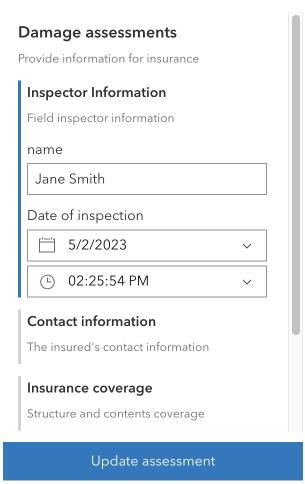
The FeatureForm widget displays attributes of a feature. This widget renders FeatureFormViewModel.inputs based on the feature's attributes and whether the field allows editing. It is possible to configure FormTemplate.elements for fields and groups of other elements. The latter is useful for organizing how your form data displays. All of the properties and configurations set on the form are handled via the formTemplate property.
This widget is intended to be used with FeatureLayer.applyEdits() method. This enables an end user to update a feature's attribute on an editable feature layer. The UI to submit and apply any updates should be wired up within the application's code.
Known Limitations
This widget is not yet at full parity with the functionality provided in the 3.x AttributeInspector widget. There is currently no support for editing attachments or related records solely within this widget, although it is possible to edit attachments and relationship data via the Editor widget. Please refer to the Editor documentation for any known limitations regarding this.
Example
const featureForm = new FeatureForm({ container: "formDiv", map: map, // Required if using Arcade expressions that use the global $map variable feature: graphic, formTemplate: template});Constructors
Constructor
Parameters
| Parameter | Type | Description | Required |
|---|---|---|---|
| properties | | |
Example
// Typical usageconst featureForm = new FeatureForm({ container: "formDiv", // HTML div map: map, // Required if using Arcade expressions that use the global $map variable feature: graphic, // Pass in feature // Specify the form's template for how it is configured formTemplate: template});Properties
| Property | Type | Class |
|---|---|---|
container inherited | HTMLElement | null | undefined | |
declaredClass readonly inherited | ||
destroyed readonly inherited | ||
| | ||
| | ||
| | ||
"all" | "sequential" | | |
| | ||
Icon["icon"] | | |
id inherited | ||
| | ||
FeatureFormViewModel["layer"] | | |
| | ||
| | ||
| | ||
visible inherited | ||
| |
container
- Type
- HTMLElement | null | undefined
The ID or node representing the DOM element containing the widget. This property can only be set once. The following examples are all valid use case when working with widgets.
Examples
// Create the HTML div element programmatically at runtime and set to the widget's containerconst basemapGallery = new BasemapGallery({  view: view,  container: document.createElement("div")});
// Add the widget to the top-right corner of the viewview.ui.add(basemapGallery, {  position: "top-right"});
// Specify an already-defined HTML div element in the widget's container
const basemapGallery = new BasemapGallery({ view: view, container: basemapGalleryDiv});
// Add the widget to the top-right corner of the viewview.ui.add(basemapGallery, { position: "top-right"});
// HTML markup<body> <div id="viewDiv"></div> <div id="basemapGalleryDiv"></div></body>// Specify the widget while adding to the view's UIconst basemapGallery = new BasemapGallery({ view: view});
// Add the widget to the top-right corner of the viewview.ui.add(basemapGallery, { position: "top-right"}); disabled
- Type
- boolean
- Since
- ArcGIS Maps SDK for JavaScript 4.25
When true, sets the widget to a disabled state so the user cannot interact with it.
- Default value
- false
feature
The associated feature containing the editable attributes.
A common way to access this is via the MapView.hitTest()
or SceneView's hitTest()
method.
Example
// Check if a user clicked on an incident feature.view.on("click", function(event) { view.hitTest(event).then(function(response) { // Display the attributes of selected incident feature in the form if (response.results[0].graphic && response.results[0].graphic.layer.id == "incidentsLayer") { formVM.feature = result.results[0].graphic } });}); formTemplate
- Type
- FormTemplate | null | undefined
- Since
- ArcGIS Maps SDK for JavaScript 4.16
The associated template used for the form.
The FormTemplate is used to configure how the form should display and set any associated properties for the form, e.g. title, description, field elements, etc.
Example
// Create the Form template and pass in elementsconst formTemplate = new FormTemplate({  title: "Inspector report",  description: "Enter all relevant information below",  elements: [groupElement] // Add the grouped elements to the template});
// Add a new feature form with grouped fieldsconst form = new FeatureForm({  container: "form",  groupDisplay: "sequential", // only display one group at a time  formTemplate: formTemplate // set it to template created above});
groupDisplay
- Type
- "all" | "sequential"
- Since
- ArcGIS Maps SDK for JavaScript 4.10
String indicating the groupDisplay and how they will be displayed to the end user. This only applies if using grouped field elements configured in the Editor's layer infos.
Possible Values
| Value | Description |
|---|---|
| all | All groups will be expanded. |
| sequential | A single group will be expanded at a time. |
- Default value
- "all"
headingLevel
- Type
- HeadingLevel
- Since
- ArcGIS Maps SDK for JavaScript 4.20
Indicates the heading level to use for the FormTemplate.title of the form.
By default, the title is rendered as a level 2 heading (e.g. <h2>Form title</h2>).
In addition, group element labels default to a level 3 heading (e.g. <h3>Group element label</h3>).
Depending on the widget's placement
in your app, you may need to adjust this heading for proper semantics. This is
important for meeting accessibility standards.
- See also
- Default value
- 2
Example
// form title will render as an <h3>// group element labels will render as an <h4>featureForm.headingLevel = 3; icon
- Type
- Icon["icon"]
- Since
- ArcGIS Maps SDK for JavaScript 4.27
Icon displayed in the widget's button.
- Default value
- "form-field"
layer
- Type
- FeatureFormViewModel["layer"]
Layer containing the editable feature attributes. If this layer is not specified, it is the same as the graphic's layer.
Example
const form = new FeatureForm({ container: "formDiv", // HTML div layer: featureLayer // Feature layer}); map
- Since
- ArcGIS Maps SDK for JavaScript 4.27
A reference to the associated Map.
This property is required if working with Arcade expressions in the FeatureForm that make use of the $map global variable.
timeZone
- Type
- TimeZone
- Since
- ArcGIS Maps SDK for JavaScript 4.28
The timezone displayed within the form. If unknown, it first checks if the layer has a FeatureLayer.preferredTimeZone. If so, it displays this. If not, it will default to UTC.
viewModel
- Type
- FeatureFormViewModel
The view model for this widget. This is a class that contains all the logic (properties and methods) that controls this widget's behavior. See the FeatureFormViewModel class to access all properties and methods on the widget.
visible
- Type
- boolean
Indicates whether the widget is visible.
If false, the widget will no longer be rendered in the web document. This may affect the layout of other elements or widgets in the document. For example, if this widget is
the first of three widgets associated to the upper right hand corner of the DefaultUI, then the other widgets will reposition when this widget is made invisible.
For more information, refer to the css display value of "none".
- Default value
- true
Example
// Hides the widget in the viewwidget.visible = false; visibleElements
- Type
- VisibleElements
- Since
- ArcGIS Maps SDK for JavaScript 4.33
Defines which elements are visible in the widget.
Methods
| Method | Signature | Class |
|---|---|---|
classes inherited | classes(...classNames: ((string | null | undefined) | ((string[] | Record<string, boolean>) | null | undefined) | false | null | undefined)[]): string | |
destroy inherited | destroy(): void | |
emit inherited | emit<Type extends EventNames<this>>(type: Type, event?: this["@eventTypes"][Type]): boolean | |
getValues(): any | | |
hasEventListener inherited | hasEventListener<Type extends EventNames<this>>(type: Type): boolean | |
isFulfilled inherited | isFulfilled(): boolean | |
isRejected inherited | isRejected(): boolean | |
isResolved inherited | isResolved(): boolean | |
on inherited | on<Type extends EventNames<this>>(type: Type, listener: EventedCallback<this["@eventTypes"][Type]>): ResourceHandle | |
postInitialize inherited | postInitialize(): void | |
render inherited | render(): any | null | |
renderNow inherited | renderNow(): void | |
scheduleRender inherited | scheduleRender(): void | |
submit(): void | | |
when inherited | when<TResult1 = this, TResult2 = never>(onFulfilled?: OnFulfilledCallback<this, TResult1> | null | undefined, onRejected?: OnRejectedCallback<TResult2> | null | undefined): Promise<TResult1 | TResult2> |
classes
- Signature
-
classes (...classNames: ((string | null | undefined) | ((string[] | Record<string, boolean>) | null | undefined) | false | null | undefined)[]): string
A utility method used for building the value for a widget's class property.
This aids in simplifying css class setup.
Parameters
- Returns
- string
The computed class name.
Example
// .tsx syntax showing how to set css classes while rendering the widget
render() {  const dynamicClasses = {    [css.flip]: this.flip,    [css.primary]: this.primary  };
return ( <div class={classes(css.root, css.mixin, dynamicClasses)} /> );} emit
- Signature
-
emit <Type extends EventNames<this>>(type: Type, event?: this["@eventTypes"][Type]): boolean
- Type parameters
- <Type extends EventNames<this>>
Emits an event on the instance. This method should only be used when creating subclasses of this class.
getValues
- Signature
-
getValues (): any
- Returns
- any
An object of key-value pairs of field names with their values.
Example
function updateFeature() { // Get the updated field values const attributes = form.getValues(); // Call applyEdits on the featurelayer layer.applyEdits({ // Pass in the updated field values updateFeatures: [{ attributes }] });} hasEventListener
- Signature
-
hasEventListener <Type extends EventNames<this>>(type: Type): boolean
- Type parameters
- <Type extends EventNames<this>>
Indicates whether there is an event listener on the instance that matches the provided event name.
Parameters
| Parameter | Type | Description | Required |
|---|---|---|---|
| type | Type | The name of the event. | |
- Returns
- boolean
Returns true if the class supports the input event.
isFulfilled
- Signature
-
isFulfilled (): boolean
isFulfilled() may be used to verify if creating an instance of the class is fulfilled (either resolved or rejected).
If it is fulfilled, true will be returned.
- Returns
- boolean
Indicates whether creating an instance of the class has been fulfilled (either resolved or rejected).
isRejected
- Signature
-
isRejected (): boolean
isRejected() may be used to verify if creating an instance of the class is rejected.
If it is rejected, true will be returned.
- Returns
- boolean
Indicates whether creating an instance of the class has been rejected.
isResolved
- Signature
-
isResolved (): boolean
isResolved() may be used to verify if creating an instance of the class is resolved.
If it is resolved, true will be returned.
- Returns
- boolean
Indicates whether creating an instance of the class has been resolved.
on
- Signature
-
on <Type extends EventNames<this>>(type: Type, listener: EventedCallback<this["@eventTypes"][Type]>): ResourceHandle
- Type parameters
- <Type extends EventNames<this>>
Registers an event handler on the instance. Call this method to hook an event with a listener.
Parameters
| Parameter | Type | Description | Required |
|---|---|---|---|
| type | Type | An event or an array of events to listen for. | |
| listener | EventedCallback<this["@eventTypes"][Type]> | The function to call when the event fires. | |
- Returns
- ResourceHandle
Returns an event handler with a
remove()method that should be called to stop listening for the event(s).Property Type Description remove Function When called, removes the listener from the event.
Example
view.on("click", function(event){ // event is the event handle returned after the event fires. console.log(event.mapPoint);}); submit
- Signature
-
submit (): void
Fires the @submit event.
- Returns
- void
Example
// Listen for when 'submit' is called on the FeatureForm.// Once it is fired, update the feature.form.on("submit", updateFeature);// When the DOM's button (btnUpdate) is clicked,// execute the 'submit()' method.on(dom.byId("btnUpdate"), "click", form.submit()); when
- Signature
-
when <TResult1 = this, TResult2 = never>(onFulfilled?: OnFulfilledCallback<this, TResult1> | null | undefined, onRejected?: OnRejectedCallback<TResult2> | null | undefined): Promise<TResult1 | TResult2>
when() may be leveraged once an instance of the class is created. This method takes two input parameters: an onFulfilled function and an onRejected function.
The onFulfilled executes when the instance of the class loads. The
onRejected executes if the instance of the class fails to load.
Parameters
| Parameter | Type | Description | Required |
|---|---|---|---|
| onFulfilled | OnFulfilledCallback<this, TResult1> | null | undefined | The function to call when the promise resolves. | |
| onRejected | The function to execute when the promise fails. | |
- Returns
- Promise<TResult1 | TResult2>
Returns a new promise for the result of
onFulfilledthat may be used to chain additional functions.
Example
// Although this example uses MapView, any class instance that is a promise may use when() in the same waylet view = new MapView();view.when(function(){ // This function will execute once the promise is resolved}, function(error){ // This function will execute if the promise is rejected due to an error});Events
| Name | Type |
|---|---|
submit inherited | |
value-change inherited |
submit
submit: CustomEvent<SubmitEvent> Fires when the FeatureForm.submit() method is called. Call FeatureLayer.applyEdits() method to update a feature's attributes.
Example
// Listen to the feature form's submit event.featureForm.on("submit", function(){  if (editFeature) {    // Grab updated attributes from the form.    const updated = featureForm.getValues();
    // Loop through updated attributes and assign    // the updated values to feature attributes.    Object.keys(updated).forEach(function(name) {      editFeature.attributes[name] = updated[name];    });
    // Setup the applyEdits parameter with updates.    const edits = {      updateFeatures: [editFeature]    };    applyEdits(edits);  }});
value-change
value-change: CustomEvent<ValueChangeEvent> Fires when a field value is updated.