import FeatureTableViewModel from "@arcgis/core/widgets/FeatureTable/FeatureTableViewModel.js";const FeatureTableViewModel = await $arcgis.import("@arcgis/core/widgets/FeatureTable/FeatureTableViewModel.js");- Since
- ArcGIS Maps SDK for JavaScript 4.15
Provides the logic for the FeatureTable widget and component, which allows users to view content from feature attributes in a tabular format.
- See also
Example
const featureTable = new FeatureTable({ viewModel: { // autocasts as new FeatureTableViewModel layer: featureLayer, tableTemplate: tableTemplate //autocasts as new TableTemplate }});Properties
actionColumn
- Type
- ActionColumn | null | undefined
- Since
- ArcGIS Maps SDK for JavaScript 4.33
Reference to the current action column. This column is only generated if a configuration has been provided.
- See also
actionColumnConfig
- Type
- ActionColumnConfig | null | undefined
- Since
- ArcGIS Maps SDK for JavaScript 4.30
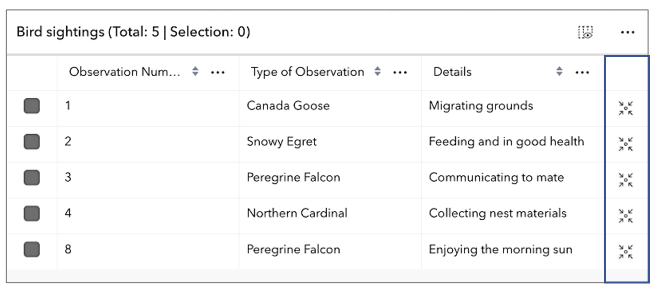
Configuration for the ActionColumn. This property allows for customizing the action column's appearance and behavior. The action column is a column that contains interactive buttons for each row. These buttons can be used to perform actions such as editing, deleting, or viewing additional information about a feature. This column is displayed as the last column in the table and is only displayed if this property is set.
- See also
Example
// The following snippet demonstrates how to configure an action column that adds a button// to each row which allows the user to zoom to the associated row's feature within the view.featureTable.viewModel.actionColumnConfig = { label: "Go to feature", icon: "zoom-to-object", callback: (params) => { view.goTo(params.feature); }} activeFilters
- Type
- Collection<SupportedFilters>
- Since
- ArcGIS Maps SDK for JavaScript 4.23
A read-only property indicating the type of filter used by the table. It returns either filters by geometry or selections using a row's object ID.
activeSortOrders
- Type
- ColumnSortOrder[]
- Since
- ArcGIS Maps SDK for JavaScript 4.25
Use this read-only property if needing to query features while retaining a column's sort order. It returns an array of ColumnSortOrder which contains a column's name and its sort direction. The sort priority is honored in the returned ColumnSortOrder if multiSortEnabled is true with a set FieldColumnTemplate.initialSortPriority.
- Default value
- []
allColumns
- Type
- GridSupportedColumns[]
- Since
- ArcGIS Maps SDK for JavaScript 4.33
A flattened array of all columns within the table, including nested columns. Take note that group columns are separate entries. This property is useful when applying updates to all columns, including nested columns, as it provides ease of use when iterating through all columns in the table.
allRelatedTablesVisible
- Type
- boolean
- Since
- ArcGIS Maps SDK for JavaScript 4.31
Indicates the table is displaying all related tables in show all mode.
allVisibleColumns
- Type
- GridSupportedColumns[]
- Since
- ArcGIS Maps SDK for JavaScript 4.33
A flattened array of all visible columns within the table, including nested columns. Group columns are separate entries.
attachmentsColumns
- Type
- AttachmentsColumn[]
- Since
- ArcGIS Maps SDK for JavaScript 4.33
A flattened array of all attachment columns within the table, including nested columns.
attachmentsEnabled
- Type
- boolean
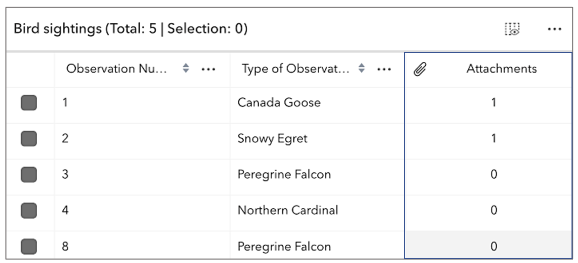
Indicates whether to display the Attachments field in the table. It displays the count of attachments per feature and is only applicable if the feature layer supports attachments.
- Default value
- false
attributeTableTemplate
- Type
- AttributeTableTemplate | null | undefined
- Since
- ArcGIS Maps SDK for JavaScript 4.31
Use this property to configure how columns display within the table in regard to visibility, column order, and sorting.
This property differs from the tableTemplate property. The tableTemplate property provides more fine-grained control over how the table is rendered within the application by offering more advanced configurations such as custom cell rendering, column formatting, and more. It is useful for application-level development that remains within an application. Use the attributeTableTemplate property to access the table's settings across different applications. By using this property, the settings can be saved within a webmap or layer. Please refer to the AttributeTableTemplate and TableTemplate documentation for more information.
- See also
autoRefreshEnabled
- Type
- boolean
- Since
- ArcGIS Maps SDK for JavaScript 4.23
Indicates whether the table should automatically refresh when the underlying data changes. This property is useful when the table is displaying data from a feature layer that is being updated by other clients.
- Default value
- true
autoSaveEnabled
- Type
- boolean
- Since
- ArcGIS Maps SDK for JavaScript 5.0
Indicates whether the table should automatically save edits, or cache all edits until the 'savePendingEdits' or 'discardPendingEdits' methods are called.
- Default value
- true
canAddRelatedFeature
- Type
- boolean
- Since
- ArcGIS Maps SDK for JavaScript 5.0
Indicates whether the table supports adding a related record based on the current relationship configuration. This accounts for whether table is currently configured to show related features. If the table is not displaying related features, then the value of this property is always false.
- Default value
- false
columnPerformanceModeEnabled
- Type
- boolean
- Since
- ArcGIS Maps SDK for JavaScript 4.33
Indicates whether to enable the table's column performance mode. This mode is designed to improve the performance of the table when working with a large number of columns.
- Default value
- true
columnReorderingEnabled
- Type
- boolean
- Since
- ArcGIS Maps SDK for JavaScript 4.33
Indicates if columns can be reordered by dragging the column's header.
- Default value
- true
columns
- Type
- Collection<SupportedColumn>
A read-only collection of Column, field, group, action, attachment, and relationship columns that are displayed within the table.
By default fields such as CreationDate, Creator, EditDate, Editor, and GlobalID do not show. If these fields are needed, set them via TableTemplate.columnTemplates. In this scenario, it is also necessary to set the column template's visible property to true.
- See also
definitionExpression
- Since
- ArcGIS Maps SDK for JavaScript 4.33
The SQL where clause used to filter features visible in the table. Only the features that satisfy the definition expression are displayed in the table. This value takes priority over any definition expression set on the associated layer.
editingEnabled
- Type
- boolean
- Since
- ArcGIS Maps SDK for JavaScript 4.16
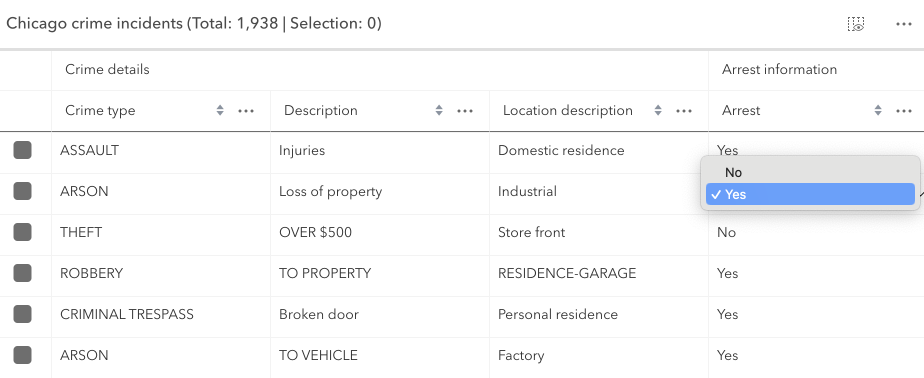
Indicates whether editing is enabled on the data within the feature table. Double-clicking in a cell will enable editing for that value.
Editing permissions can be separated into the following levels of priority:
- FeatureLayer.editingEnabled - This is derived from the layer's FeatureLayer.editingEnabled property. This must always be
truefor editing to be enabled. - Field - This is derived from the FeatureLayer. It takes what is set in the Field.editable property. This must always be
truefor editing to be enabled, although it can be overridden tofalse(not vice-versa) via a field column template. - FeatureTable - The FeatureTable.editingEnabled property must be set on the table in order for any type of editing to be enabled.
- Template - The editable permissions on a field can be configured by setting the FieldColumnTemplate.editable property of the FieldColumnTemplate.
If the service's field is not editable, it is not possible to override its permissions using any of the options above. FieldColumnTemplate.editable can never override what is set on the layer, field, or table.
- Default value
- false
effectiveSize
- Type
- number
- Since
- ArcGIS Maps SDK for JavaScript 4.31
The total number of records displayed in the table's current view. Normally, this is equivalent to size for default configurations.
If paginationEnabled is true, effectiveSize reflects the total number of visible rows for the current page.
This value is usually equivalent to pageSize unless viewing the last page of data. The last page may display less features
than the maximum number for a single page. This property also takes into account all active filters and the current value
of maxSize.
fieldColumns
- Type
- FieldColumn[]
- Since
- ArcGIS Maps SDK for JavaScript 4.33
A flattened array of all field columns within the table, including nested columns.
filterBySelectionEnabled
- Type
- boolean
- Since
- ArcGIS Maps SDK for JavaScript 4.30
Indicates whether the table only displays rows that are considered selected. Row selection can be modified by adding or removing associated object IDs from FeatureTable.highlightIds. This will cause the store to fetch fresh features to ensure the expected sort order is honored.
- Default value
- false
filterGeometry
- Type
- GeometryUnion | null | undefined
- Since
- ArcGIS Maps SDK for JavaScript 4.19
Set this property to filter the features displayed in the table. It accepts a Geometry, e.g. Extent, and uses it as a spatial filter. When modifying this property, the FeatureTable will completely refresh and re-query for all features.
Example
// Listen for when the view is updated. If so, pass the new// view.extent into the table's filterGeometry.
await whenOnce(() => featureLayer.loaded);
reactiveUtils.when(  () => view.stationary === false && !!view.extent,  () => {    // Filter and show only the visible features in the feature table    featureTable.viewModel.filterGeometry = view.extent;  },  { initial: true });
groupColumns
- Type
- GroupColumn[]
- Since
- ArcGIS Maps SDK for JavaScript 4.33
A flattened array of all group columns within the table.
hasContingentValues
- Type
- boolean
- Since
- ArcGIS Maps SDK for JavaScript 5.0
Convenience property indicating the data set contains contingent values. This includes contingent values in a related table.
- Default value
- false
hasInvalidPendingEdits
- Type
- boolean
- Since
- ArcGIS Maps SDK for JavaScript 5.0
Indicates there are unsaved edits and that they are invalid. This includes invalid pending edits in a related table.
- Default value
- false
hasPendingEdits
- Type
- boolean
- Since
- ArcGIS Maps SDK for JavaScript 5.0
Indicates there are unsaved edits. This includes edits in a related table. This does not account for whether the edits are valid or not.
- Default value
- false
hiddenFields
- Type
- Collection<string>
- Since
- ArcGIS Maps SDK for JavaScript 4.16
A collection of string field.names that are to remain hidden within the table. By default fields such as CreationDate, Creator, EditDate, Editor, and GlobalID do not show. If these fields are needed, set them via TableTemplate.columnTemplates. In this case, it is also required that the column template's FieldColumnTemplate.visible property is set to true.
- Default value
- true
Examples
const featureTableVM = new FeatureTableViewModel({ layer: featureLayer, hiddenFields: ["Primary_Type", "incident_date"], // will not show these two fields within the table }, container: document.getElementById("tableDiv")});// Set this syntax if needing to display a default hidden field, e.g. 'CreationDate`const featureTableVM = new FeatureTableViewModel({ layer: featureLayer, tableTemplate: { // autocasts to TableTemplate customTemplates: [ // takes an array of FieldColumnTemplate and GroupColumnTemplate { //autocasts to FieldColumnTemplate type: "field", fieldName: "CreationDate", label: "Date created", visible: true }] }, container: document.getElementById("tableDiv")}); highlightEnabled
- Type
- boolean
- Since
- ArcGIS Maps SDK for JavaScript 4.25
Indicates whether to highlight the associated feature when a row is selected by checking the corresponding checkbox. This property is only applicable when working with a map and the FeatureTable.view property is set.
This property has no effect if syncViewSelection is true or a custom selectionManager has been provided.
- Default value
- true
highlightIds
- Type
- Collection<ObjectId>
- Since
- ArcGIS Maps SDK for JavaScript 4.25
This property accepts and returns a collection of feature object IDs. Use this to access and control which features are currently selected in the table and subsequently highlighted within the map. Once an application sets a collection of object IDs, the table will select the corresponding row and highlight its feature within the map.
Example
// This example instantiates the table with highlighted featuresconst featureTable = new FeatureTable({  view: view,  layer: featureLayer,  container: "tableDiv",  highlightIds});
// Push the object ids into a collection and selectfeatureTable.viewModel.highlightIds.push(2, 3, 4);
// Listen for changes in the collection of highlighted featuresfeatureTable.viewModel.highlightIds.on("change", (event) => {  console.log("features selected", event.added);  console.log("features deselected", event.removed);});
initialSize
- Since
- ArcGIS Maps SDK for JavaScript 4.31
The user-provided number of total features accessed from the data source. This is used for initial load of the data store as opposed to querying a specified layer. Additionally, the table will query data counts to verify the data's integrity, or when requested via refresh().
isEditing
- Type
- boolean
- Since
- ArcGIS Maps SDK for JavaScript 4.33
Indicates the table is displaying an editable input in one of its cells.
isQuerying
- Type
- boolean
- Since
- ArcGIS Maps SDK for JavaScript 4.33
Indicates if the table is querying data. This is useful when determining if the table is busy. This can be especially helpful when the table is querying a large amount of features.
isQueryingOrSyncing
- Type
- boolean
- Since
- ArcGIS Maps SDK for JavaScript 4.31
Indicates the table is querying or syncing data. This is useful when determining if the table is busy. This can be especially helpful when the table is querying a large amount of features.
isSyncing
- Type
- boolean
- Since
- ArcGIS Maps SDK for JavaScript 4.33
Indicates if the table is syncing data. This is useful when determining if the table is busy.
isSyncingAttachments
- Type
- boolean
- Since
- ArcGIS Maps SDK for JavaScript 4.31
Indicates the table is syncing attachment edits.
layer
- Type
- FeatureTableSupportedLayer | null | undefined
The associated CatalogFootprintLayer, CSVLayer, FeatureLayer, GeoJSONLayer,
ImageryLayer, KnowledgeGraphSublayer, SceneLayer, or WFSLayer containing
the fields and attributes to display within the widget. The table's pagination defaults to 50 records at a time. It is possible to set the default pagination using the FeatureTable's FeatureTable.pageSize property.
- Support for CatalogFootprintLayer was added at version 4.30.
- Support for GeoJSONLayer, CSVLayer, ImageryLayer, and WFSLayer was added at version 4.21.
- For an ImageryLayer to work with FeatureTable, it must have mosaic dataset. Currently, Map and FeatureTable interaction for ImageryLayers is not supported.
- See also
layers
- Type
- FeatureTableSupportedLayer[] | null | undefined
- Since
- ArcGIS Maps SDK for JavaScript 4.30
An array of layers listed within the dropdown component of the table's header. This component allows changing which table layer it should display. Typically, the dropdown component will display all supported layers within the FeatureTable.view unless a specific set of layers is set. The table supports CatalogFootprintLayer, CSVLayer, FeatureLayer, GeoJSONLayer, ImageryLayer, KnowledgeGraphSublayer, SceneLayer, and WFSLayer layers.
maxSize
- Since
- ArcGIS Maps SDK for JavaScript 4.31
This property is applicable when working with layers that contain a large number of features, as it provides the ability to limit the displayed total feature count. If paginationEnabled is true, and maxSize is greater than the current value of pageSize, multiple pages usually display. If maxSize is less than pageSize, a single page shows the total number of features limited to maxSize.
menuConfig
- Type
- TableMenuConfig | null | undefined
Set this object to customize the feature table's menu content.
multipleSelectionEnabled
- Type
- boolean
- Since
- ArcGIS Maps SDK for JavaScript 4.30
Controls whether the table allows multiple selected rows.
- Default value
- true
multiSortEnabled
- Type
- boolean
- Since
- ArcGIS Maps SDK for JavaScript 4.23
Indicates whether sorting multiple columns is supported within the table. Use this in combination with the FieldColumnTemplate.initialSortPriority and FieldColumnTemplate.direction properties to set sorting functionality for multiple columns.
- Default value
- false
Example
const featureTableVM = new FeatureTableViewModel({ layer: featureLayer, multiSortEnabled: true, tableTemplate: { // autocastable to TableTemplate columnTemplates: [ // takes an array of FieldColumnTemplate and GroupColumnTemplate { // autocastable to FieldColumnTemplate fieldName: "ObjectId", direction: "asc", // In order to use initialSortPriority, make sure direction is set initialSortPriority: 1, // This field's sort order takes second-highest priority. }, { fieldName: "Name", direction: "asc", // In order to use initialSortPriority, make sure direction is set initialSortPriority: 0, // This field's sort order takes the highest priority. }, { fieldName: "Status", direction: "asc", // In order to use initialSortPriority, make sure direction is set initialSortPriority: 2 // This field's sort order is prioritized after Name and ObjectId, respectively. }] }, container: "tableDiv"}); objectIds
- Type
- Collection<ObjectId>
- Since
- ArcGIS Maps SDK for JavaScript 4.30
This property accepts and returns a collection of feature object IDs. Use this to access and control which features are currently visible in the table.
When the collection is empty, all potential rows are displayed. Modifying object IDs is not supported while filterBySelectionEnabled is true as these properties are mutually exclusive.
This filter can also be combined with filterGeometry to display features that satisfy both conditions.
outFields
- Since
- ArcGIS Maps SDK for JavaScript 4.31
An array of field names from the table's data source to include when the table requests data. By default, all fields are requested. This property is useful when working with many fields and only a subset of them is needed for the table. Take note that doing so can improve the table's load time.
pageCount
- Type
- number
- Since
- ArcGIS Maps SDK for JavaScript 4.31
Number of pages of features to be displayed in the table, based on the total number of features and configured pageSize.
pageIndex
- Type
- number
- Since
- ArcGIS Maps SDK for JavaScript 4.31
Represents the index of the page of the feature currently being displayed. The number of features per page can be adjusted by modifying the pageSize. Pagination must be enabled or the value of this property may not be not reliable due to virtualization of visible pages.
pageSize
- Type
- number
- Since
- ArcGIS Maps SDK for JavaScript 4.19
The default page size used when displaying features within the table. By default, the page loads the first 50 features returned by the service. It can be used with paginationEnabled to display a subset of features.
It is not possible to overwrite the maximum page size on the server, ie. maxRecordCount, as this property only applies to set values less than the maximum page size, i.e. maxRecordCount, set on the service.
- Default value
- 50
paginationEnabled
- Type
- boolean
- Since
- ArcGIS Maps SDK for JavaScript 4.31
Controls whether the table should only display a single page of features at any time. Current page can be determined via the pageIndex property. The current page can be modified by calling the goToPage() method and passing in the desired page index.
- Default value
- false
pendingEditsCount
- Type
- number
- Since
- ArcGIS Maps SDK for JavaScript 5.0
Total number of individual cells with pending edits.
relatedRecordsEnabled
- Type
- boolean
- Since
- ArcGIS Maps SDK for JavaScript 4.30
Indicates whether to display any related records associated with rows within the table. Take note that related layers must be provided via the FeatureTable.layers property when there is no associated FeatureTable.view.
- Default value
- false
relatedTable
- Type
- FeatureTable | null | undefined
- Since
- ArcGIS Maps SDK for JavaScript 4.31
A nested table instance which represents a relationship to another table. This is a reference to the most recently generated table when multiple related tables exist. It is only applicable if the table instance manages all nested tables.
relatedTableHasContingentValues
- Type
- boolean
- Since
- ArcGIS Maps SDK for JavaScript 5.0
Indicates a nested table has contingent values.
relatedTableHasInvalidPendingEdits
- Type
- boolean
- Since
- ArcGIS Maps SDK for JavaScript 5.0
Indicates a nested table has invalid pending edits.
relatedTableHasPendingEdits
- Type
- boolean
- Since
- ArcGIS Maps SDK for JavaScript 5.0
Indicates a nested table has pending edits.
relatedTables
- Type
- Collection<FeatureTable>
- Since
- ArcGIS Maps SDK for JavaScript 4.31
A collection of nested table instances. This is typically used to represent relationships between each other. These are configured and managed by a single table widget instance. Only applies if this particular table instance is responsible for managing all nested tables. Nested tables reference the main table controller via the tableController property.
relationship
- Type
- Relationship | null | undefined
- Since
- ArcGIS Maps SDK for JavaScript 5.0
Reference to the relationship represented by the table.
relationshipColumns
- Type
- RelationshipColumn[]
- Since
- ArcGIS Maps SDK for JavaScript 4.33
A flattened array of all relationship columns within the table, including nested columns.
relationships
- Type
- Relationship[] | null | undefined
An array of relationships that exist on the layer. This is only applicable if relationships are supported.
returnGeometryEnabled
- Type
- boolean
- Since
- ArcGIS Maps SDK for JavaScript 4.27
Indicates whether to fetch geometries for the corresponding features displayed in the table.
Setting this to true can impact performance of the widget.
- Default value
- false
returnMEnabled
- Type
- boolean
- Since
- ArcGIS Maps SDK for JavaScript 4.30
Indicates whether geometries fetched for the corresponding features contain M values, if supported. The FeatureTable.returnGeometryEnabled property must also be true.
Setting this to true can impact performance of the widget.
- Default value
- false
returnZEnabled
- Type
- boolean
- Since
- ArcGIS Maps SDK for JavaScript 4.30
Indicates whether the fetched features' geometries contain Z values. This is only applicable if Z-values are supported. The FeatureTable.returnGeometryEnabled property must also be true.
Setting this to true can impact performance of the widget.
- Default value
- false
rowHighlightIds
- Type
- Collection<ObjectId>
- Since
- ArcGIS Maps SDK for JavaScript 4.30
This property accepts and returns a collection of feature object IDs. It is used to access and control which rows display a darker background, i.e., highlighted. Take note that highlighted rows are not considered selected as this property is independent of the table's selection state. Use the highlightIds property to choose rows. Setting rowHighlightIds applies an alternative highlight style to an entire row or rows.
- See also
selectionManager
- Type
- SelectionManager | null | undefined
- Since
- ArcGIS Maps SDK for JavaScript 5.0
Use this property to supply a custom selection manager that overrides the default selection manager.
This is useful when applications want to share selection sets between components, without relying on the view's selection manager. This property is ignored if syncViewSelection is true.
state
- Type
- FeatureTableState
The state of the widget.
| Value | Description |
|---|---|
| disabled | Dependencies are missing and therefore the widget is disabled. |
| error | Widget failed to load (added at version 4.30). |
| loaded | Widget is ready to use. |
| loading | Widget is busy loading its resources. |
| ready | Dependencies are met and has valid property values but hasn't started the load process. |
- Default value
- "disabled"
supportsAddAttachments
- Type
- boolean
- Since
- ArcGIS Maps SDK for JavaScript 4.31
Indicates whether the table and associated layer support adding attachments with the current configuration.
supportsAttachments
- Type
- boolean
- Since
- ArcGIS Maps SDK for JavaScript 4.31
Indicates whether the table supports viewing attachments with the current configuration.
supportsDeleteAttachments
- Type
- boolean
- Since
- ArcGIS Maps SDK for JavaScript 4.31
Indicates whether the table and associated layer support deleting attachments with the current configuration.
supportsResizeAttachments
- Type
- boolean
- Since
- ArcGIS Maps SDK for JavaScript 4.31
Defines whether or not the feature supports resizing
attachments. This depends on whether the
feature layer's capabilities.attachment.supportsResize is set to true.
supportsUpdateAttachments
- Type
- boolean
- Since
- ArcGIS Maps SDK for JavaScript 4.31
Indicates whether the table and associated layer support updating attachments with the current configuration.
syncTemplateOnChangesEnabled
- Type
- boolean
- Since
- ArcGIS Maps SDK for JavaScript 4.33
Indicates whether the table should synchronize the current attributeTableTemplate being used based on changes made to the table's UI.
- Default value
- true
syncViewSelection
- Type
- boolean
- Since
- ArcGIS Maps SDK for JavaScript 5.0
Indicates whether the FeatureTable should sync with the view's selection manager. Enabling this does not automatically inherit the selection sources from the SelectionManager, (e.g. which layers or graphics collections the view listens to for selections). If you need specific selection sources, configure them separately via SelectionManager.sources.
Setting this property takes precedence over the selectionManager property.
- Default value
- false
tableController
- Type
- FeatureTable | null | undefined
- Since
- ArcGIS Maps SDK for JavaScript 4.31
A reference to top-level controller table. This property is applicable if this table is a related table, nested within and controlled by another table widget.
tableParent
- Type
- FeatureTable | null | undefined
- Since
- ArcGIS Maps SDK for JavaScript 5.0
A reference to the instance of a table widget that is directly associated with this table. This only applies if this table is nested within another table widget. The parent table is responsible for creating this child table instance. The child table reacts to state changes on the parent table, including row selection.
The parent table that this property references may also be nested, meaning it would refer to a different parent table. The top-level table can always be referenced via the tableController property. If only one nested table exists, then the values of tableController and tableParent are the same.
tableTemplate
- Type
- TableTemplate | null | undefined
- Since
- ArcGIS Maps SDK for JavaScript 4.24
The associated template used for the feature table.
The TableTemplate is where you configure how the feature table should display and set any associated properties for the table and its columns.
The TableTemplate provides more fine-grained control over how the table is rendered within the application by offering more advanced configurations such as custom cell rendering, column formatting, and more. TableTemplate is useful for application-level development that remains within an application. This property differs from the attributeTableTemplate property as that property should be used to access the table's settings across different applications. By using attributeTableTemplate, the settings can be saved within a webmap or layer. Please refer to the AttributeTableTemplate and TableTemplate documentation for more information.
Take note that it is required to set the type property when creating column templates.
Example
const tableTemplate = new TableTemplate({ columnTemplates: [ // takes an array of FieldColumnTemplate and GroupColumnTemplate { // autocasts to FieldColumnTemplate type: "field", fieldName: "ObjectId", direction: "asc", // In order to use initialSortPriority, make sure direction is set initialSortPriority: 1 // This field's sort order takes the second-highest priority. }, { type: "field", fieldName: "NAME", label: "Name", asc: "asc", // In order to use initialSortPriority, make sure direction is set initialSortPriority: 0 // This field's sort order takes the highest priority }, { type: "field", fieldName: "STATUS", label: "Status", direction: "asc", // In order to use initialSortPriority, make sure direction is set initialSortPriority: 2 // This field's sort order is prioritized after Name and ObjectId, respectively. } ]}); timeExtent
- Type
- TimeExtent | null | undefined
- Since
- ArcGIS Maps SDK for JavaScript 4.30
The TimeExtent in which to filter and display data within the FeatureTable widget. Setting this property directly on the viewModel or its widget takes precedence over the layer's FeatureLayer.timeExtent. If this property is set directly on the widget, the table will not refresh when the layer's TimeExtent changes.
- See also
Example
// Filters the table to display only features that fit within the time extentreactiveUtils.watch( () => timeSlider.timeExtent, (extent) => { featureTable.viewModel.timeExtent = extent; }); timeZone
- Since
- ArcGIS Maps SDK for JavaScript 4.28
Dates and times displayed in the widget will be in terms of this time zone. If not supplied, the view's time zone
is typically used (if available). Depending on the field type, individual columns may have their own unique
time zone behavior when the time zone itself is unknown.
The following considerations apply when working with date, time, and big integer field types:
By default, the FeatureTable displays timezones for date and timestamp-offset field types reflecting the MapView's timezone. This timezone can be overridden by setting the view's timeZone property.
If the table's FeatureTable.view isn't set, and the table's Feature.timeZone isn't set, the table defaults to system time. The only time that this is not the case is when there is a FeatureLayer.preferredTimeZone set on the table's layer. If the latter is true, the preferred time zone is used as opposed to system.
view
- Type
- MapViewOrSceneView | LinkChartView | null | undefined
visibleColumns
- Type
- GridSupportedColumns[]
- Since
- ArcGIS Maps SDK for JavaScript 4.33
A flattened array of all top-level visible columns. Take note that this does not include nested columns.
Methods
| Method | Signature | Class |
|---|---|---|
addPendingEdits(edits: FeatureStoreEdits[]): void | | |
deleteSelection(): Promise<void> | | |
discardPendingEdits(edits?: DiscardPendingEditsParameters[] | null | undefined): Promise<boolean> | | |
emit inherited | emit<Type extends EventNames<this>>(type: Type, event?: this["@eventTypes"][Type]): boolean | |
exportSelectionToCSV(includeGeometry?: boolean): Promise<void> | | |
getFeatureStoreItemByObjectId(objectId: ObjectId): FeatureStoreItem | null | undefined | | |
getObjectIdIndex(objectId: ObjectId): number | | |
getValue(objectId: ObjectId, fieldName: string): FieldValue | | |
goToPage(index: number): void | | |
hasEventListener inherited | hasEventListener<Type extends EventNames<this>>(type: Type): boolean | |
hideAttachmentsView(): void | | |
nextPage(): void | | |
on inherited | on<Type extends EventNames<this>>(type: Type, listener: EventedCallback<this["@eventTypes"][Type]>): ResourceHandle | |
previousPage(): void | | |
refresh(): Promise<void> | | |
refreshCellContent(): void | | |
refreshPageCache(): void | | |
reset(): Promise<void> | | |
savePendingEdits(): Promise<void> | | |
scrollLeft(): void | | |
scrollToBottom(): void | | |
scrollToIndex(index: number): void | | |
scrollToRow(objectId: ObjectId): void | | |
scrollToTop(): void | | |
syncAttributeTableTemplate(): void | | |
toggleColumnVisibility(fieldName: string): void | | |
zoomToSelection(): Promise<void> | |
addPendingEdits
- Signature
-
addPendingEdits (edits: FeatureStoreEdits[]): void
- Since
- ArcGIS Maps SDK for JavaScript 5.0
Creates a pending edit with the specified parameters. A pending edit is not immediately saved to the layer.
Parameters
| Parameter | Type | Description | Required |
|---|---|---|---|
| edits | Pending edits to be cached. Edits must include a valid objectId and field name. | |
- Returns
- void
Example
// Add pending edits for two cells in a single rowtable.addPendingEdits( [ { objectId: 1, updates: [ { fieldName: "Hotel_Name", value: "My Hotel" }, { fieldName: "Address", value: "123 Hotel Street" }, ] } ]); deleteSelection
- Signature
-
deleteSelection (): Promise<void>
- Since
- ArcGIS Maps SDK for JavaScript 4.25
Deletes all the selected rows from the table.
There must be at least one selected row within the table for this to work. Also, make sure that editingEnabled is set to true and the underlying service data supports deletion.
discardPendingEdits
- Signature
-
discardPendingEdits (edits?: DiscardPendingEditsParameters[] | null | undefined): Promise<boolean>
- Since
- ArcGIS Maps SDK for JavaScript 5.0
Cancels any pending edits. This might be edits for a specific field or column, or all pending edits for a specific feature. If no parameters are supplied, all pending edits for all features are discarded.
Parameters
| Parameter | Type | Description | Required |
|---|---|---|---|
| edits | Information about which pending edits should be canceled. | |
Example
// Discard pending edits for single cell in a given rowtable.discardPendingEdits([{ objectId: 1, fieldName: "Address" }]);
// Discard pending edits for all cells in a given rowtable.discardPendingEdits([{ objectId: 1 }]);
// Discard all pending editstable.discardPendingEdits();
emit
- Signature
-
emit <Type extends EventNames<this>>(type: Type, event?: this["@eventTypes"][Type]): boolean
- Type parameters
- <Type extends EventNames<this>>
Emits an event on the instance. This method should only be used when creating subclasses of this class.
exportSelectionToCSV
- Signature
-
exportSelectionToCSV (includeGeometry?: boolean): Promise<void>
- Since
- ArcGIS Maps SDK for JavaScript 4.31
Exports features associated with currently selected rows to a CSV file and displays a download prompt. When invoked from the table's menu, it automatically includes geometry for features with a point geometry type. Geometry information is excluded on all other layer types.
This method must be used on selected rows within the table.
getFeatureStoreItemByObjectId
- Signature
-
getFeatureStoreItemByObjectId (objectId: ObjectId): FeatureStoreItem | null | undefined
- Since
- ArcGIS Maps SDK for JavaScript 5.0
Returns information about the feature with the provided object ID.
Parameters
| Parameter | Type | Description | Required |
|---|---|---|---|
| objectId | The | |
- Returns
- FeatureStoreItem | null | undefined
Information about the associated feature.
getValue
- Signature
-
getValue (objectId: ObjectId, fieldName: string): FieldValue
Returns a field value given the specified feature object and an associated fieldName.
Parameters
- Returns
- FieldValue
Associated value for the specified feature, as provided using its object ID, under the given field value.
Example
// Gets the field value for the specified field name, "OPENSTATUS" with the given feature ObjectIdconst featureValue = featureTable.viewModel.getValue(feature.attributes.ObjectId, "OPENSTATUS");console.log(featureValue); hasEventListener
- Signature
-
hasEventListener <Type extends EventNames<this>>(type: Type): boolean
- Type parameters
- <Type extends EventNames<this>>
Indicates whether there is an event listener on the instance that matches the provided event name.
Parameters
| Parameter | Type | Description | Required |
|---|---|---|---|
| type | Type | The name of the event. | |
- Returns
- boolean
Returns true if the class supports the input event.
hideAttachmentsView
- Signature
-
hideAttachmentsView (): void
- Since
- ArcGIS Maps SDK for JavaScript 4.31
Internal method used to hide the attachments view.
- Returns
- void
nextPage
- Signature
-
nextPage (): void
- Since
- ArcGIS Maps SDK for JavaScript 4.31
Instructs the table to scroll to or display the next page of data.
- Returns
- void
on
- Signature
-
on <Type extends EventNames<this>>(type: Type, listener: EventedCallback<this["@eventTypes"][Type]>): ResourceHandle
- Type parameters
- <Type extends EventNames<this>>
Registers an event handler on the instance. Call this method to hook an event with a listener.
Parameters
| Parameter | Type | Description | Required |
|---|---|---|---|
| type | Type | An event or an array of events to listen for. | |
| listener | EventedCallback<this["@eventTypes"][Type]> | The function to call when the event fires. | |
- Returns
- ResourceHandle
Returns an event handler with a
remove()method that should be called to stop listening for the event(s).Property Type Description remove Function When called, removes the listener from the event.
Example
view.on("click", function(event){ // event is the event handle returned after the event fires. console.log(event.mapPoint);}); previousPage
- Signature
-
previousPage (): void
- Since
- ArcGIS Maps SDK for JavaScript 4.31
Instructs the table to scroll to or display the previous page of data.
- Returns
- void
refreshCellContent
- Signature
-
refreshCellContent (): void
- Since
- ArcGIS Maps SDK for JavaScript 4.30
Re-renders the cell's content. Generally, this is only required if using a custom function for FieldColumnTemplate.formatFunction or ColumnTemplate.formatFunction. If the render function is dependent on external data or its state, and that data or state changes, calling this method will re-render the cell content. If the render function is dependent on the feature's attributes, calling this method is not necessary as the cell content will automatically update when the feature's attributes change. If the render function is dependent on the feature's geometry, calling this method is not necessary as the cell content will automatically update when the feature's geometry changes.
- Returns
- void
refreshPageCache
- Signature
-
refreshPageCache (): void
- Since
- ArcGIS Maps SDK for JavaScript 4.31
Performs a light refresh of cell content, emptying the store and fetching fresh data. Scroll position is maintained. Unlike the refresh() method, this method does not query the layer for an updated total feature count.
- Returns
- void
scrollLeft
- Signature
-
scrollLeft (): void
- Since
- ArcGIS Maps SDK for JavaScript 4.31
Resets the horizontal scroll position of the table to the default view.
- Returns
- void
scrollToBottom
- Signature
-
scrollToBottom (): void
- Since
- ArcGIS Maps SDK for JavaScript 4.31
Scrolls the table to the bottom row. If pagination is enabled, the table scrolls to the bottom row of the current page.
- Returns
- void
scrollToTop
- Signature
-
scrollToTop (): void
- Since
- ArcGIS Maps SDK for JavaScript 4.31
Scrolls the table to the top row. If pagination is enabled, the table scrolls to the top row of the current page.
- Returns
- void
syncAttributeTableTemplate
- Signature
-
syncAttributeTableTemplate (): void
- Since
- ArcGIS Maps SDK for JavaScript 4.32
Manually sync the provided layer's attributeTableTemplate with the current state of the FeatureTable. This is useful if 'syncTemplateOnChangesEnabled' is set to false.
- Returns
- void
zoomToSelection
- Signature
-
zoomToSelection (): Promise<void>
- Since
- ArcGIS Maps SDK for JavaScript 4.23
Zooms the view to the extent of the current row selection. This can also be triggered as a menu item within the table. This item will display if at least one row is selected and the FeatureTable.view is set on the FeatureTable.
Events
| Name | Type |
|---|---|
cell-click
cell-click: CustomEvent<TableInteractionCellClickEvent> - Since
- ArcGIS Maps SDK for JavaScript 4.30
Fires when a cell within the table is clicked.
Example
// This snippet removes the selection column and adds an event listener// which toggles the selection of a feature when a cell is clicked.featureTable.visibleElements.selectionColumn = false;featureTable.on("cell-click", (event) => { if (featureTable.highlightIds.includes(event.objectId)) { featureTable.highlightIds.remove(event.objectId); } else { featureTable.highlightIds.push(event.objectId); }}); cell-dblclick
cell-dblclick: CustomEvent<TableInteractionCellDblclickEvent> - Since
- ArcGIS Maps SDK for JavaScript 4.31
Fires when a cell within the table is double-clicked.
cell-keydown
cell-keydown: CustomEvent<TableInteractionCellKeydownEvent> - Since
- ArcGIS Maps SDK for JavaScript 4.30
Fires when a key is pressed down within a cell within the table.
Example
// The following snippet listens for the Enter key to be pressed within a cell and zooms// to the feature associated with the row.featureTable.on("cell-keydown", (event) => { if (event.native.key === "Enter") { view.goTo(event.feature); }}); cell-pointerout
cell-pointerout: CustomEvent<TableInteractionCellPointeroutEvent> - Since
- ArcGIS Maps SDK for JavaScript 4.30
Fires when the mouse pointer is moved out of a cell within the table. This event is useful for scenarios highlighting for things like highlighting a feature in the view, while hovering, without requiring manual interaction to select a row. Another example: these events can also be used to show information about the cell in a tooltip attached to the mouse.
cell-pointerover
cell-pointerover: CustomEvent<TableInteractionCellPointeroverEvent> - Since
- ArcGIS Maps SDK for JavaScript 4.30
Fires when the mouse pointer is moved over a cell within the table.
column-reorder
column-reorder: CustomEvent<TableInteractionColumnReorderEvent> - Since
- ArcGIS Maps SDK for JavaScript 4.31
Fires when a column is reordered via drag-and-drop.