Associations.png file) or a document, that is associated with individual features in a geodatabase or feature layer.
| Association | Description | Geometry supported |
|---|---|---|
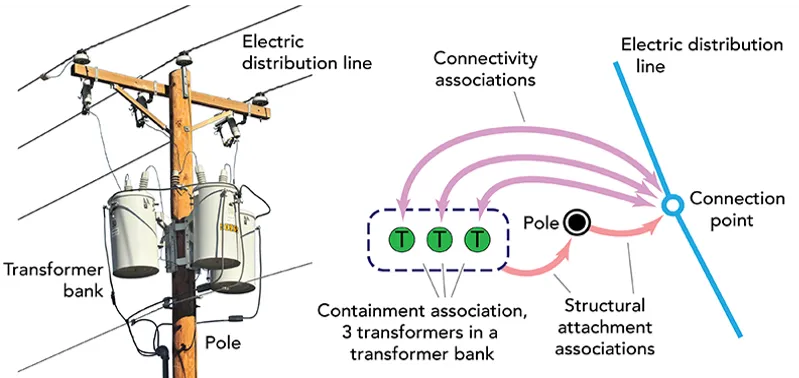
| Connectivity | Models the connectivity between two junctions that don’t have geometric coincidence (are not in the same x, y and z location). A transformer may be connected to a fuse, for example. | Yes |
| Structural attachment | Models equipment attached to structures. A transformer bank may be attached to a pole, for example. | Yes |
| Containment | Models assets that contain other assets. A vault may contain valves and pipes, for example. | No |
// Get the elements associated (by containment) with a specified utility element. val utilityAssociations = utilityNetwork.getAssociations( element = utilityElement, type = UtilityAssociationType.Containment ).getOrElse { error -> return showError("Error getting associations: ${error.message}") } // Iterate all associations for this element. utilityAssociations.forEach { utilityAssociation -> // Get the first ("from") and second ("to") elements in the association. val fromElement = utilityAssociation.fromElement val toElement = utilityAssociation.toElement }You can also provide an envelope to find all valid associations within the specified extent.
The following example creates a new graphics overlay to display all associations within the map extent using a unique symbol
        // Get the current viewpoint's extent.        val extent = currentViewpoint.targetGeometry.extent
        // Create symbols for structural attachment and connectivity associations.        val attachmentSymbol = SimpleLineSymbol(SimpleLineSymbolStyle.Dot, Color.green, 5F)        val connectivitySymbol = SimpleLineSymbol(SimpleLineSymbolStyle.Dot, Color.red, 5F)        // Create a unique value renderer for the associations and apply it to the graphics overlay.        val attachmentValue = UniqueValue(            description = "Attachment",            symbol = attachmentSymbol,            values = listOf(UtilityAssociationType.Attachment.javaClass.simpleName)        )        val connectivityValue = UniqueValue(            description = "Connectivity",            symbol = connectivitySymbol,            values = listOf(UtilityAssociationType.Connectivity.javaClass.simpleName)        )        graphicsOverlay.renderer = UniqueValueRenderer(            fieldNames = listOf("AssociationType"),            uniqueValues = listOf(attachmentValue, connectivityValue)        )
        // Get all of the associations in the current extent.        val utilityAssociations = utilityNetwork.getAssociations(extent).getOrElse { error ->            return showError("Error getting associations: ${error.message}")        }        utilityAssociations.forEach { utilityAssociation ->            // If it's not a containment relationship, add a graphic for the association.            if (utilityAssociation.associationType != UtilityAssociationType.Containment) {                val graphic = Graphic(utilityAssociation.geometry).apply {                    attributes["GlobalId"] = utilityAssociation.globalId                    attributes["AssociationType"] = utilityAssociation.associationType.javaClass.simpleName                }                graphicsOverlay.graphics.add(graphic)            }        }
Specifying a utility element
Specifying an extent will return all its connectivity or structural attachment associations with geometry. The geometry value (polyline) represents the connection relationship between a from element and a to element. You can use the geometry to visualize the association as a graphic