import FeatureReductionBinning from "@arcgis/core/layers/support/FeatureReductionBinning.js";const FeatureReductionBinning = await $arcgis.import("@arcgis/core/layers/support/FeatureReductionBinning.js");- Inheritance:
- FeatureReductionBinning→
Accessor
- Since
- ArcGIS Maps SDK for JavaScript 4.24
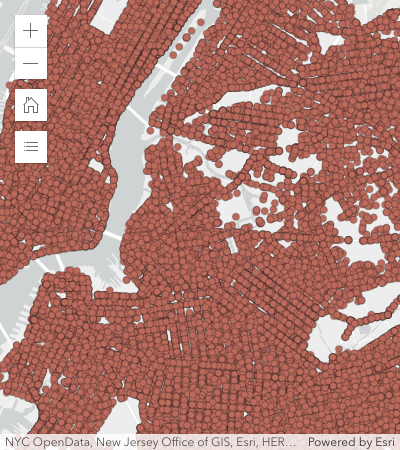
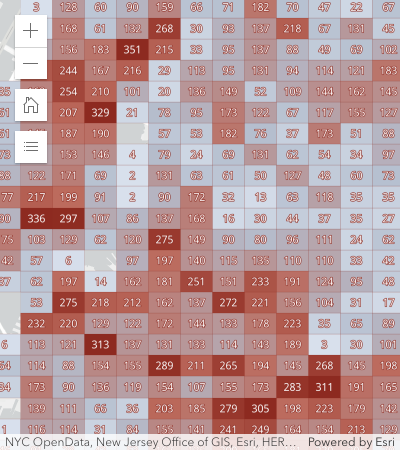
Aggregates and summarizes dense features in a layer to bins in geographic space based on predefined geohashes. Binning is a method of representing the density of features in a grid of equally sized cells, or bins.
Binning should only be used as a visualization technique to reduce visual clutter because of many overlapping features or to provide a quick preview of feature density. It should not be used as a means of performing statistical analysis of data. As opposed to clustering, binning aggregates features in geographic space at a fixed level of detail. This means that the size of the bins does not change as the user zooms in and out of the map.
| Display all features | Features aggregated to bins |
|---|---|
 |  |
Binning is typically used to visualize large point layers, but may be used with any geometry type (since version 4.31). In the case of binning polyline or polygon features, the centroid of the line or polygon is used to determine the bin in which it is placed. Individual parts comprising the intersection of line or polygon features to bins are not represented in the final bin statistics.
Usage guidelines
Use discretion when binning polygon and polyline features, as the underlying data could be misrepresented by the binning process.
Binning works best when features have a regular size smaller than the bin size. Irregularly shaped features may be misrepresented as some features may be placed in bins that do not contain the majority of the feature. As a result, some areas covered by large features may show no bins at all even though the area is completely covered by large features. As a guideline, small features like parcels, buildings, culverts, or connectors are well-suited for binning. Large, irregularly shaped features like counties, states, or countries do not need to be aggregated.
Known Limitations
- Not supported in 3D SceneView.
- Supported in FeatureLayer, CSVLayer, GeoJSONLayer, WFSLayer, and OGCFeatureLayer.
- Not supported in all other layer types, including MapImageLayer.
- Layer views with an applied FeatureEffect cannot be binned.
Example
layer.featureReduction = { type: "binning", fields: [{ name: "aggregateCount", statisticType: "count" }] renderer: { type: "simple", // autocasts as new SimpleRenderer() symbol: { type: "simple-fill", // autocasts as new SimpleFillSymbol() outline: { // autocasts as new SimpleLineSymbol() width: 0.5, color: "white" } }, visualVariables: [{ type: "color", field: "aggregateCount", stops: [ { value: 1, color: "white" }, { value: 1000, color: "blue" } ] }] }, popupTemplate: { content: "This bin contains <b>{aggregateCount}</b> features.", fieldInfos: [{ fieldName: "aggregateCount", format: { digitSeparator: true, places: 0 } }] }};Constructors
Constructor
Parameters
| Parameter | Type | Description | Required |
|---|---|---|---|
| properties | | |
Properties
| Property | Type | Class |
|---|---|---|
declaredClass readonly inherited | ||
FieldConfiguration[] | null | undefined | | |
| | ||
| | ||
LabelClass[] | null | undefined | | |
| | ||
| | ||
| | ||
| | ||
| | ||
type readonly | "binning" | |
fieldConfigurations
- Type
- FieldConfiguration[] | null | undefined
- Since
- ArcGIS Maps SDK for JavaScript 5.0
An array of FieldConfiguration objects that control how fields are displayed in popups and other UI elements. Each object specifies options for an individual field, such as its display name, via alias, and formatting rules, via fieldFormat. For more information, see the FieldConfiguration documentation. These configurations will only be honored if the parent layer is a service-based FeatureLayer.
Support is limited in version 5.0. For details, see the FieldConfiguration documentation.
fields
- Type
- AggregateField[]
An array of aggregate fields that summarize layer FeatureLayer.fields from features contained within each bin. These fields may be used by the popupTemplate, labelingInfo, and renderer.
Example
featureReduction.fields = [{ name: "aggregateCount", statisticType: "count"}, { name: "SUM_population", onStatisticField: "population", statisticType: "sum"}, { name: "AVG_age", onStatisticField: "age", statisticType: "avg"}, { name: "AVG_population_density", alias: "Average population density", onStatisticExpression: { expression: "$feature.population / AreaGeodetic($feature, 'square-miles')", title: "population density", returnType: "number" }, statisticType: "avg"}]; fixedBinLevel
The fixed geohash level used to create bins. Currently, bin sizes do not dynamically change as the user zooms in and out of the map. Larger numbers will create smaller bins. Levels range from 1 - 9. The following table suggests which bin level to use depending on the approximate view scale.
| fixedBinLevel | view.scale |
|---|---|
| 1 | > 120,000,000 |
| 2 | ~88,000,000 |
| 3 | ~14,000,000 |
| 4 | ~3,000,000 |
| 5 | ~500,000 |
| 6 | ~84,000 |
| 7 | ~10,000 |
| 8 | ~3,000 |
| 9 | ~400 |
- Default value
- 3
Example
featureReduction.fixedBinLevel = 4; labelingInfo
- Type
- LabelClass[] | null | undefined
Defines labels for bins as an array of LabelClass. When set, labels independent of the layer.labelingInfo are used to convey information about each bin. This can include the count of all features in the bin, the average, or sum of a numeric attribute.
Any aggregate field defined in fields can be referenced in the label.
Multiple Label classes with different where clauses can be used to define several
labels with varying styles on the same feature. Likewise, multiple label classes
may be used to label different types of bins (e.g. blue labels
for bins with few features and red labels for bins with many features).
Example
// Displays the count inside the binlayer.featureReduction = { type: "binning", fields: [{ name: "aggregateCount", statisticType: "count" }], labelingInfo: [{ labelExpressionInfo: { expression: "$feature.aggregateCount" }, symbol: { type: "text", color: "white", font: { size: "12px" }, haloSize: 1, haloColor: "black" } }]}; labelsVisible
- Type
- boolean
Indicates whether to display labels for the bins. If true, labels will
appear as defined in the labelingInfo property.
- Default value
- true
Example
// Turns off bin labels, but preserves labelingInfoconst featureReduction = layer.featureReduction.clone();featureReduction.labelsVisible = false;layer.featureReduction = featureReduction; maxScale
- Type
- number
- Since
- ArcGIS Maps SDK for JavaScript 4.26
Defines the maximum view scale at which binning is enabled.
If the user zooms in beyond the scale specified here, binning will be disabled and only individual features
will be displayed in the view.
Once the user zooms out past this scale, binning will be re-enabled.
A value of 0 means binning is always enabled, and therefore binning will be visible at
all view scales.
- Default value
- 0
Example
// binning is disabled when the user zooms// in beyond a 1:50,000 view scalelayer.featureReduction = { type: "binning", maxScale: 50000}; popupEnabled
- Type
- boolean
Indicates whether to display a popup when a user clicks or touches a bin. If false, the popup as defined
in the popupTemplate will be persisted, but won't be displayed
on click/tap.
- Default value
- true
Example
// Turns off popups, but preserves popupTemplateconst featureReduction = layer.featureReduction.clone();featureReduction.popupEnabled = false;layer.featureReduction = featureReduction; popupTemplate
- Type
- PopupTemplate | null | undefined
The PopupTemplate to apply to bins. When set, a popupTemplate independent of the layer.popupTemplate is used. This popup can display summary information for each bin, such as feature count or any other field defined in fields.
The PopupTemplate may contain one or more Arcade expressions following
the specification defined by the Arcade Feature Reduction Popup Profile.
Expressions must return a string or a number and may access data values from the bin and its aggregated features
with the $feature and $aggregatedFeatures profile variables.
Examples
// enables binning on the layer with a// popup describing the number of features represented by each binlayer.featureReduction = { type: "binning", fields: [{ name: "aggregateCount", statisticType: "count" }], popupTemplate: { content: "This bin contains <b>{aggregateCount}</b> features." fieldInfos: [{ fieldName: "aggregateCount", format: { digitSeparator: true, places: 0 } }] }};// enables binning on the layer with a// popup describing the average value of// the temperature fieldlayer.featureReduction = { type: "binning", fields: [{ name: "avg_temperature", alias: "Average temperature", onStatisticField: "temperature", statisticType: "avg" }, { name: "aggregateCount", statisticType: "count" }], popupTemplate: { content: [{ type: "text", text: "This bin contains <b>{aggregateCount}</b> features." }, { type: "text", text: "The average temperature in this bin is <b>{avg_temperature}° F</b>." }], fieldInfos: [{ fieldName: "aggregateCount", format: { digitSeparator: true, places: 0 } }, { fieldName: "avg_temperature", format: { places: 1 } }] }};// Displays an ordered list of the top 5 categories// of features contained within the binlayer.popupTemplate = { title: "Power plant summary", content: [{ type: "expression", // lists the top 5 most common fuel types in the bin expressionInfo: { expression: ` Expects($aggregatedFeatures, "fuel1")
var statsFS = GroupBy($aggregatedFeatures, [ { name: 'Type', expression: 'fuel1'}, ], [ { name: 'num_features', expression: '1', statistic: 'COUNT' } ] ); var ordered = Top(OrderBy(statsFs, 'num_features DESC'), 5);
// create an HTML ordered list as a string and return in a rich text element var list = "<ol>";
for (var group in ordered){ list += \`<li>\${group.Type} (\${Text(group.num_features, "#,###")})</li>\` } list += "</ol>";
return { type: "text", text: list } `, title: "List of fuel types" } }]}; renderer
- Type
- RendererUnion | null | undefined
The renderer used to style the bins. Depending on the renderer type, features may be visualized with the same symbol or with varying symbols based on the values of the provided fields. Since bins are defined geometrically as polygons, only renderer and symbol types suited for polygon geometries are supported (e.g. HeatmapRenderer is not supported).
Any aggregate field defined in fields may be used by the renderer. Typically, binning visualizations use a field for aggregate count in a color visual variable to visualize the total count of features within each bin.
Example
featureReduction.renderer = { type: "simple", // autocasts as new SimpleRenderer() symbol: { type: "simple-fill", // autocasts as new SimpleFillSymbol() outline: { // autocasts as new SimpleLineSymbol() width: 0.5, color: "white" } }, visualVariables: [{ type: "color", field: "aggregateCount", stops: [ { value: 1, color: "white" }, { value: 1000, color: "blue" } ] }]};Methods
| Method | Signature | Class |
|---|---|---|
fromJSON inherited static | fromJSON(json: any): any | |
clone inherited | clone(): this | |
getField(fieldName: string): AggregateField | null | undefined | | |
getFieldAlias(fieldName: string): string | null | undefined | | |
getFieldConfiguration(fieldName: string): FieldConfiguration | null | undefined | | |
toJSON inherited | toJSON(): any |
fromJSON
- Signature
-
fromJSON (json: any): any
Creates a new instance of this class and initializes it with values from a JSON object
generated from an ArcGIS product. The object passed into the input json
parameter often comes from a response to a query operation in the REST API or a
toJSON()
method from another ArcGIS product. See the Using fromJSON()
topic in the Guide for details and examples of when and how to use this function.
Parameters
| Parameter | Type | Description | Required |
|---|---|---|---|
| json | A JSON representation of the instance in the ArcGIS format. See the ArcGIS REST API documentation for examples of the structure of various input JSON objects. | |
- Returns
- any
Returns a new instance of this class.
clone
- Signature
-
clone (): this
Creates a deep clone of this object. Any properties that store values by reference will be assigned copies of the referenced values on the cloned instance.
- Returns
- this
A deep clone of the class instance that invoked this method.
getField
- Signature
-
getField (fieldName: string): AggregateField | null | undefined
- Since
- ArcGIS Maps SDK for JavaScript 5.0
Returns the AggregateField instance for a field name (case-insensitive).
- See also
Parameters
| Parameter | Type | Description | Required |
|---|---|---|---|
| fieldName | The name of the field. | |
- Returns
- AggregateField | null | undefined
The matching field or
undefined.
getFieldAlias
- Signature
-
getFieldAlias (fieldName: string): string | null | undefined
- Since
- ArcGIS Maps SDK for JavaScript 5.0
Returns the alias of the specified field.
The alias is resolved in the following order:
- Field configuration alias
- AggregateField.alias defined on the field.
getFieldConfiguration
- Signature
-
getFieldConfiguration (fieldName: string): FieldConfiguration | null | undefined
- Since
- ArcGIS Maps SDK for JavaScript 5.0
Returns the FieldConfigurations for the specified field. The field configuration provides optional formatting and display information for the field.
Previously, field formatting was commonly retrieved from FeatureLayer.popupTemplate.fieldInfos[x].format. This is no longer needed, instead use FeatureReductionBinning.getFieldConfiguration(fieldname).fieldFormat to retrieve the field configuration formatting.
Parameters
| Parameter | Type | Description | Required |
|---|---|---|---|
| fieldName | The name of the field. | |
- Returns
- FieldConfiguration | null | undefined
The field configuration of the specified field.
toJSON
- Signature
-
toJSON (): any
Converts an instance of this class to its ArcGIS portal JSON representation. See the Using fromJSON() guide topic for more information.
- Returns
- any
The ArcGIS portal JSON representation of an instance of this class.