import CIMSymbol from "@arcgis/core/symbols/CIMSymbol.js";const CIMSymbol = await $arcgis.import("@arcgis/core/symbols/CIMSymbol.js");- Since
- ArcGIS Maps SDK for JavaScript 4.12
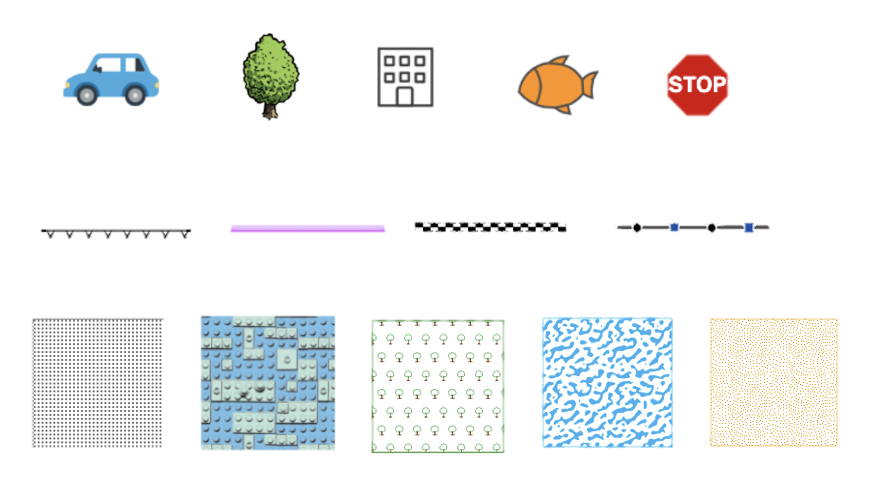
CIMSymbols are high quality, scalable, multi-layer vector symbols for features and graphics. They allow the user to add more customizations to their symbols, using one or more symbol layers to create unique symbols. CIMSymbols can be created from CIMSymbolReference JSON that complies with the CIM specification by passing the JSON to the data property. Not everything in the CIM specification is currently supported in the ArcGIS Maps SDK for JavaScript. The documentation on this page details the current support in the API.
Symbol and symbol layer types
The symbol property in the CIMSymbolReference can be of type CIMPointSymbol, CIMLineSymbol, or CIMPolygonSymbol.
Each symbol is made up of one or more symbolLayers. Symbol layers are the building blocks of CIM symbols,
they combine to make rich graphical depictions. You can configure the shape, color, texture, size, position, etc of each symbol layer,
and combine multiple symbol layers to create your desired symbol. The Symbol Builder provides a simple user interface
to experiment with symbol layers and their properties.
All CIMSymbols have at least one symbol layer, but can have more, as outlined in the following table:
| Symbol type | Typical symbol layers | Role |
|---|---|---|
| CIMPointSymbol | Marker layers: CIMVectorMarker, CIMPictureMarker | Draw relative to the point geometry |
| CIMLineSymbol | Marker layers: CIMVectorMarker, CIMPictureMarker | Draw at specified locations relative to the line geometry. |
| Stroke layers: CIMSolidStroke, CIMPictureStroke, CIMGradientStroke | Draw relative to the line geometry. | |
| CIMPolygonSymbol | Marker layers: CIMVectorMarker, CIMPictureMarker | Draw relative to the polygon outline or within the polygon interior, depending on the marker placement setting. |
| Stroke layers: CIMSolidStroke, CIMPictureStroke, CIMGradientStroke | Draw relative to the polygon outline. | |
| Fill layers: CIMSolidFill, CIMHatchFill, CIMPictureFill, CIMGradientFill | Draw relative to the polygon interior. |
Primitive overrides
Primitive overrides allow you to use Arcade expressions to dynamically change many symbol layer properties
from attribute values in your data. Primitive overrides are defined on the primitiveOverrides property in the CIMSymbolReference - this property takes in an array of objects,
each object representing a primitive override on a specific symbol layer.
Read More
Below is an example of a CIMSymbol with a primitive override that changes the color of a symbol layer based on the value of the DailyTraffic attribute on each feature.
const symbol = new CIMSymbol({ data: { type: "CIMSymbolReference", primitiveOverrides: [{ type: "CIMPrimitiveOverride", // primitiveName matches the primitiveName on the symbol layer primitiveName: "symbol-layer-1", propertyName: "Color", // property to be overridden valueExpressionInfo: { type: "CIMExpressionInfo", // colors the symbol layer red if the DailyTraffic is greater than 10,000, orange otherwise expression: `IIF($feature.DailyTraffic > 10000, "rgba(255,0,0,1)", "rgba(255,165,0,1)")`, returnType: "Default" } }], symbol: { type: "CIMLineSymbol", symbolLayers: [ { type: "CIMSolidStroke", // primitiveName matches the primitiveName on the primitive override primitiveName: "symbol-layer-1", enable: true, // the property to be overridden color: [0, 0, 0, 255], width: 2 }, // other symbol layers ] } }});See Primitive overrides for more information.
Animations
Since 4.31
Symbol animations can be used to highlight freshness of data or draw attention to specific features. In CIMSymbol, animations can be defined on the symbol level (global animations) or on the symbol layer level. Global animations are applied to the entire symbol, while symbol layer animations are applied to a specific symbol layer in the symbol. Similar to other symbol properties, animation properties can be overridden based on attribute values using primitive overrides.
The following animation types are supported:
Global animations
Global animations are currently only supported on CIMPointSymbols. They are defined on the animations property of the CIMPointSymbol and are applied to the entire symbol.
const symbol = new CIMSymbol({ data: { type: "CIMSymbolReference", symbol: { type: "CIMPointSymbol", animations: [{ ... }], // global animation applied to the entire symbol symbolLayers: [{ ... }], } }});Symbol layer animations
Symbol layer animations are defined on the animations property of the symbol layer and only apply to a specific symbol layer in the symbol. All symbol layer animations are supported on CIMVectorMarker and CIMPictureMarker symbol layers. Color and transparency animations are also supported on CIMSolidFill and CIMSolidStroke symbol layers.
const symbol = new CIMSymbol({ data: { type: "CIMSymbolReference", symbol: { type: "CIMPointSymbol", symbolLayers: [{ type: "CIMVectorMarker", enable: true, animations: [{ ... }], // animation applied to this symbol layer // other props for the symbol layer }] } }});Known Limitations for CIMSymbol animations
- Animations are not currently supported in 3D SceneView.
- Animated symbols are not currently supported in the Legend.
- Global animations are currently only supported on CIMPointSymbols.
- Symbol layer animations are not fully supported within a CIMLineSymbol or CIMPolygonSymbol. If you use an animated marker within a line or polygon symbol, the marker placement will not be properly honored at this time. We will improve this behavior at a future release.
Utility functions for working with CIMSymbol
To get or set the values for color, rotation, and size on the CIMSymbol, use the utility functions found in [cimSymbolUtils](https://developers.arcgis.com/javascript/latest/references/core/symbols/support/cimSymbolUtils/).
The symbolService can be used to create a CIMSymbol from SVG.
Known Limitations
- Not currently supported
- CIMLineSymbol and CIMPolygonSymbol in 3D SceneView
- The
colorLockedproperty in 3D SceneView - The following markerPlacements on CIMMarker:
CIMMarkerPlacementAlongLineRandomSize,CIMMarkerPlacementAlongLineVariableSize, andCIMMarkerPlacementAtMeasuredUnits. - CIMMeshSymbol
- Limited support
- CIMTextSymbol is only supported when it is embedded in a CIMVectorMarker symbol layer. It is not currently supported as a standalone symbol.
- Currently, CIMGeometricEffects are not supported with labels.
- The possible values for fontFamilyName property on CIMTextSymbol are dependent upon if you working with a MapView or SceneView. See the Labeling guide page for detailed explanation.
Unsupported fonts will fall back to
Arial Unicode MS Regularin MapView andsans-serifin SceneView. - Currently,
colorproperty expects an array of numbers [r, g, b, a] which is different from the CIM Specification. - Symbols with CIMPictureMarkers, CIMPictureStroke, or CIMPictureFill with geometric effects are not currently supported in the Legend.
- Symbols with primitive overrides are not currently supported in the Legend.
- Primitive overrides on geometric effects embedded in a CIMVectorMarker symbol layer's marker graphics are not supported at this time.
Constructors
Constructor
Parameters
| Parameter | Type | Description | Required |
|---|---|---|---|
| properties | | |
Properties
| Property | Type | Class |
|---|---|---|
| | ||
| | ||
declaredClass readonly inherited | ||
type readonly | "cim" | |
color
- Type
- Color
The color property on CIMSymbol has no effect. CIMSymbols are a reference to a symbol defined in the data property, and the symbol's color should be set by configuring the color on the symbol layers within the data property.
The color property is present for consistency with other
symbol types.
Examples
// CSS color stringsymbol.color = "dodgerblue";// HEX stringsymbol.color = "#33cc33";// array of RGBA valuessymbol.color = [51, 204, 51, 0.3];// object with rgba propertiessymbol.color = { r: 51, g: 51, b: 204, a: 0.7}; data
- Type
- CIMSymbolReference
The JSON payload of the CIMSymbolReference. The CIMSymbolReference is comprised of the symbol, primitive overrides, and scale.
Symbol:
The symbol property can be of type CIMPointSymbol, CIMLineSymbol, or CIMPolygonSymbol.
Each symbol is made up of one or more symbolLayers. Symbol layers are the building blocks of CIM symbols,
they combine to make rich graphical depictions. You can configure the shape, color, texture, size, position, etc of each symbol layer,
and combine multiple symbol layers to create your desired symbol. The Symbol Builder provides a simple user interface
to experiment with symbol layers and their properties.
Primitive overrides: Primitive overrides allow you to use Arcade expressions to dynamically change many symbol layer properties of objects, each object representing a primitive override on a specific symbol layer.
Minimum and maximum scale:
(Since version 4.20)
The minScale and maxScale values will determine the scale values at which your symbol will be visible in the view.
To show your symbol at all scales, these properties can either be ignored or set to 0.
Example
const cimSymbol = new CIMSymbol({ data: { type: "CIMSymbolReference", minScale: 750000, // only allow the symbol to be shown at certain scales maxScale: 80000, symbol: { type: "CIMLineSymbol", symbolLayers: [{ ... }] }, primitiveOverrides: [{ type: "CIMPrimitiveOverride", primitiveName: "symbol-layer-1", // the name of the symbol layer we want to override propertyName: "Size", // the name of the property on the symbol layer we want to override valueExpressionInfo: { type: "CIMExpressionInfo", title: "Size override", expression: "..." // the expression to change the size of the symbol } }] }});Methods
fromJSON
- Signature
-
fromJSON (json: any): any
Creates a new instance of this class and initializes it with values from a JSON object
generated from an ArcGIS product. The object passed into the input json
parameter often comes from a response to a query operation in the REST API or a
toJSON()
method from another ArcGIS product. See the Using fromJSON()
topic in the Guide for details and examples of when and how to use this function.
Parameters
| Parameter | Type | Description | Required |
|---|---|---|---|
| json | A JSON representation of the instance in the ArcGIS format. See the ArcGIS REST API documentation for examples of the structure of various input JSON objects. | |
- Returns
- any
Returns a new instance of this class.
clone
- Signature
-
clone (): CIMSymbol
Creates a deep clone of the symbol.
- Returns
- CIMSymbol
A deep clone of the object that invoked this method.
Example
// Creates a deep clone of the graphic's symbollet symLyr = graphic.symbol.clone(); toJSON
- Signature
-
toJSON (): any
Converts an instance of this class to its ArcGIS portal JSON representation. See the Using fromJSON() guide topic for more information.
- Returns
- any
The ArcGIS portal JSON representation of an instance of this class.