import "@arcgis/map-components/components/arcgis-basemap-layer-list";- Inheritance:
- ArcgisBasemapLayerList→
PublicLitElement
- Since
- ArcGIS Maps SDK for JavaScript 4.28
The Basemap Layer List component provides a way to display a list of Basemap layers and switch on/off their visibility. Base layers and reference layers are divided into separate sections. When editing is enabled, layers can be reordered by dragging and dropping between the lists and the title can be edited.
Demo
Properties
| Property | Attribute | Type |
|---|---|---|
auto-destroy-disabled | ||
| ||
base-filter-text | ||
baseItems readonly | | |
| ||
basemap-title | ||
catalogLayerList readonly | | |
| ||
closed | ||
collapsed reflected | collapsed | |
drag-enabled | ||
editing-title | ||
filter-placeholder | ||
heading-level | ||
hide-base-layers | ||
hide-heading | ||
hide-reference-layers | ||
hide-status-indicators | ||
icon | Icon["icon"] | |
label | ||
min-filter-items | ||
reference-element | ||
| ||
reference-filter-text | ||
referenceItems readonly | | |
| ||
| ||
selection-mode | "multiple" | "single" | "none" | "single-persist" | |
show-close-button | ||
show-collapse-button | ||
show-edit-title-button | ||
show-errors | ||
show-filter | ||
show-temporary-layer-indicators | ||
state readonly | | |
| ||
visibility-appearance |
autoDestroyDisabled
- Type
- boolean
If true, the component will not be destroyed automatically when it is disconnected from the document. This is useful when you want to move the component to a different place on the page, or temporarily hide it. If this is set, make sure to call the destroy() method when you are done to prevent memory leaks.
- Attribute
- auto-destroy-disabled
- Default value
- false
baseFilterPredicate
- Type
- FilterPredicate | null | undefined
- Since
- ArcGIS Maps SDK for JavaScript 4.32
Specifies a function to handle filtering base layer list items.
Example
basemapLayerListElement.baseFilterPredicate = (item) => item.title.toLowerCase().includes("streets"); baseFilterText
- Type
- string
- Since
- ArcGIS Maps SDK for JavaScript 4.29
The value of the filter input text string if showFilter is true.
- See also
- Attribute
- base-filter-text
- Default value
- ""
Example
reactiveUtils.watch( () => basemapLayerListElement.baseFilterText, (baseFilterText) => console.log(baseFilterText)); baseItems
- Type
- Collection<ListItem>
A collection of ListItems representing the baseLayers.
baseListItemCreatedFunction
- Type
- ListItemModifier | null | undefined
Specifies a function that accesses each ListItem representing a base layer. Each list item's modifiable properties can be updated within. Actions can be added to list items using the ListItem#actionsSections property of the ListItem.
Example
basemapLayerListElement.baseListItemCreatedFunction = (event) => { const baseListItem = event.item; if(baseListItem.title === "World Imagery_01"){ // clean up title baseListItem.title = "World Imagery"; // open the baseList item baseListItem.open = true; }} catalogLayerList
- Type
- CatalogLayerList | null | undefined
The CatalogLayerList that displays a catalog layer's dynamic group layer.
catalogOptions
- Type
- CatalogLayerListProperties | null | undefined
- Since
- ArcGIS Maps SDK for JavaScript 4.30
CatalogLayer specific properties. Catalog layers will display their dynamicGroupLayer as an expandable catalogLayerList in the BasemapLayerList widget. This list item will only be displayed when catalog layers with dynamic group layers are loaded in the map. These are the properties that are used to configure the catalogLayerList.
- See also
Example
basemapLayerListElement.catalogOptions = { listItemCreatedFunction: (event) => { const { item } = event; item.actionsSections = [ [ { title: "Add layer to map", icon: "add-layer", id: "add-layer" } ] ]; }, selectionMode: "single", visibleElements: { filter: true temporaryLayerIndicators: true }}; closed
- Type
- boolean
- Since
- ArcGIS Maps SDK for JavaScript 4.33
Indicates whether a component is closed. When true, the component will be hidden.
- Attribute
- closed
- Default value
- false
collapsed
- Type
- boolean
- Since
- ArcGIS Maps SDK for JavaScript 4.29
Indicates whether the component is collapsed. When collapsed, only the collapse button and heading are displayed.
- See also
- Attribute
- collapsed
- Default value
- false
Example
basemapLayerListElement.collapsed = true; dragEnabled
- Type
- boolean
- Since
- ArcGIS Maps SDK for JavaScript 4.29
Indicates whether list items may be reordered within the list by dragging and dropping. MapImageLayer sublayers can be reordered only within their parent MapImageLayer and can not be dragged out as a separate layer.
- Attribute
- drag-enabled
- Default value
- false
Example
basemapLayerListElement.dragEnabled = true; editingTitle
- Type
- boolean
- Since
- ArcGIS Maps SDK for JavaScript 4.29
Indicates whether the form to edit the basemap's title is currently visible. Any edits made will only be shown locally and will not be saved.
- See also
- Attribute
- editing-title
- Default value
- false
Example
basemapLayerListElement.editingTitle = true; filterPlaceholder
- Type
- string
- Since
- ArcGIS Maps SDK for JavaScript 4.29
Placeholder text used in the filter input if showFilter is true.
- See also
- Attribute
- filter-placeholder
- Default value
- ""
Example
basemapLayerListElement.filterPlaceholder = "Filter layers"; headingLevel
- Type
- HeadingLevel
Indicates the heading level to use for the component's title (i.e. "Navigation").
By default, the basemap's title is rendered
as a level 2 heading (e.g. <h2>Navigation</h2>). Depending on the component's placement
in your app, you may need to adjust this heading for proper semantics. This is
important for meeting accessibility standards.
- See also
- Attribute
- heading-level
- Default value
- 2
Example
// the component title will render as an <h3>basemapLayerListElement.headingLevel = 3; hideBaseLayers
- Type
- boolean
- Since
- ArcGIS Maps SDK for JavaScript 5.0
Indicates whether the base layers will be displayed.
- Attribute
- hide-base-layers
- Default value
- false
hideHeading
- Type
- boolean
- Since
- ArcGIS Maps SDK for JavaScript 5.0
Indicates whether the basemap layer list displays a heading. The heading text is the title of the basemap. The heading level can be set with the BasemapLayerList#headingLevel.
- Attribute
- hide-heading
- Default value
- false
hideReferenceLayers
- Type
- boolean
- Since
- ArcGIS Maps SDK for JavaScript 5.0
Indicates whether to the reference layers will be displayed.
- Attribute
- hide-reference-layers
- Default value
- false
hideStatusIndicators
- Type
- boolean
- Since
- ArcGIS Maps SDK for JavaScript 5.0
Indicates whether the status indicators will be displayed.
- Attribute
- hide-status-indicators
- Default value
- false
icon
- Type
- Icon["icon"]
Icon which represents the component. Typically used when the component is controlled by another component (e.g. by the Expand component).
- See also
- Attribute
- icon
- Default value
- "layers"
minFilterItems
- Type
- number
- Since
- ArcGIS Maps SDK for JavaScript 4.29
The minimum number of list items required to display the showFilter input box.
- See also
- Attribute
- min-filter-items
- Default value
- 10
Example
basemapLayerListElement.showFilter = true;basemapLayerListElement.minFilterItems = 5; referenceElement
- Type
- ArcgisReferenceElement | string | undefined
By assigning the id attribute of the Map or Scene component to this property, you can position a child component anywhere in the DOM while still maintaining a connection to the Map or Scene.
- Attribute
- reference-element
referenceFilterPredicate
- Type
- FilterPredicate | null | undefined
- Since
- ArcGIS Maps SDK for JavaScript 4.32
Specifies a function to handle filtering reference layer list items.
Example
layerList.referenceFilterPredicate = (item) => item.title.toLowerCase().includes("streets"); referenceFilterText
- Type
- string
- Since
- ArcGIS Maps SDK for JavaScript 4.29
The value of the filter input text string if showFilter is true.
- See also
- Attribute
- reference-filter-text
- Default value
- ""
Example
reactiveUtils.watch( () => basemapLayerListElement.referenceFilterText, (referenceFilterText) => console.log(referenceFilterText)); referenceItems
- Type
- Collection<ListItem>
A collection of ListItems representing the referenceLayers.
referenceListItemCreatedFunction
- Type
- ListItemModifier | null | undefined
Specifies a function that accesses each ListItem representing a reference layer. Each list item's modifiable properties can be updated within. Actions can be added to list items using the ListItem#actionsSections.
Example
basemapLayerListElement.referenceListItemCreatedFunction = (event) => { referenceListItem = event.item; if(referenceListItem.title === "World Imagery_01_reference_layer"){ // clean up title referenceListItem.title = "Reference layer"; // open the baseList item referenceListItem.open = true; }} selectedItems
- Type
- Collection<ListItem>
A collection of selected ListItems representing basemap layers selected by the user.
- See also
selectionMode
- Type
- "multiple" | "single" | "none" | "single-persist"
- Since
- ArcGIS Maps SDK for JavaScript 4.29
Specifies the selection mode. Selected items are available in the selectedItems property.
| Value | Description |
|---|---|
| multiple | Allows any number of items to be selected at once. This is useful when you want to apply an operation to multiple items at the same time. |
| none | Disables selection. Use this when you want to prevent selecting items. |
| single | Allows only one item to be selected at a time. If another item is selected, the previous selection is cleared. This is useful when you want to ensure that a maximum of one item is selected at a time. |
| single-persist | Allows only one item to be selected at a time and prevents de-selection. Once an item is selected, it remains selected until another item is selected. This is useful when you want to ensure that there is always exactly one selected item. |
- See also
- Attribute
- selection-mode
- Default value
- "none"
Example
basemapLayerListElement.selectionMode = "multiple"; showCloseButton
- Type
- boolean
- Since
- ArcGIS Maps SDK for JavaScript 5.0
Indicates whether to display a close button in the header.
- Attribute
- show-close-button
- Default value
- false
showCollapseButton
- Type
- boolean
- Since
- ArcGIS Maps SDK for JavaScript 5.0
Indicates whether to display a collapse button in the header.
- Attribute
- show-collapse-button
- Default value
- false
showEditTitleButton
- Type
- boolean
- Since
- ArcGIS Maps SDK for JavaScript 5.0
Indicates whether to display a button in the header to edit the basemap title.
- Attribute
- show-edit-title-button
- Default value
- false
showErrors
- Type
- boolean
- Since
- ArcGIS Maps SDK for JavaScript 5.0
Indicates whether to display layers with load errors.
- Attribute
- show-errors
- Default value
- false
showFilter
- Type
- boolean
- Since
- ArcGIS Maps SDK for JavaScript 5.0
Indicates whether to display a filter input box when then number of list items is equal to or greater than the value set in BasemapLayerList#minFilterItems, allowing users to filter layers by their title.
- Attribute
- show-filter
- Default value
- false
showTemporaryLayerIndicators
- Type
- boolean
- Since
- ArcGIS Maps SDK for JavaScript 5.0
Indicates whether temporary layer indicators will be displayed for layers with Layer#persistenceEnabled set to false. A temporary icon will be displayed on the near side of the layer title.
- Attribute
- show-temporary-layer-indicators
- Default value
- false
view
- Type
- MapViewOrSceneView | null | undefined
The view associated with the component.
Note: The recommended approach is to fully migrate applications to use map and scene components and avoid using MapView and SceneView directly. However, if you are migrating a large application from widgets to components, you might prefer a more gradual transition. To support this use case, the SDK includes this
viewproperty which connects a component to a MapView or SceneView. Ultimately, once migration is complete, the arcgis-basemap-layer-list component will be associated with a map or scene component rather than using theviewproperty.
visibilityAppearance
- Type
- VisibilityAppearance
- Since
- ArcGIS Maps SDK for JavaScript 4.29
Determines the icons used to indicate visibility.
| Value | Description | Example |
|---|---|---|
| default | Displays view icons on the far side. Icons are hidden except on hover or if they have keyboard focus. See view-visible and view-hide calcite icons. | 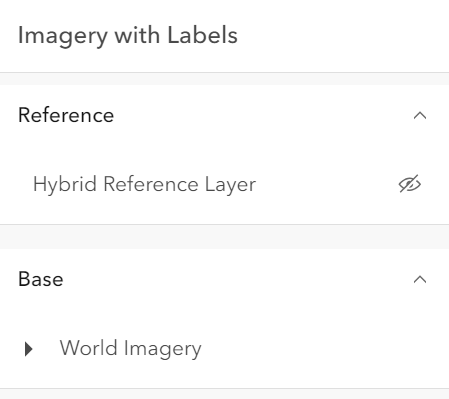 |
| checkbox | Displays checkbox icons on the near side. See check-square-f and square calcite icons. | 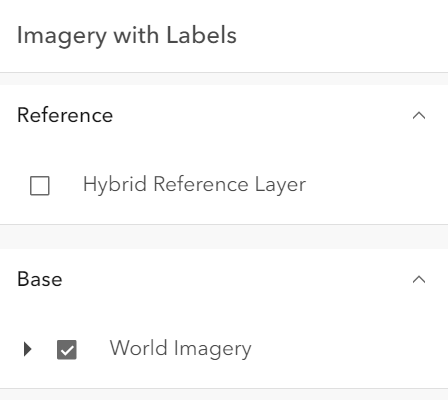 |
- Attribute
- visibility-appearance
- Default value
- "default"
Example
basemapLayerListElement.visibilityAppearance = "checkbox";Methods
| Method | Signature |
|---|---|
componentOnReady inherited | componentOnReady(): Promise<this> |
destroy(): Promise<void> |
componentOnReady
- Signature
-
componentOnReady (): Promise<this>
Creates a promise that resolves once the component is fully loaded.
- Returns
- Promise<this>
Example
const arcgisBasemapLayerList = document.querySelector("arcgis-basemap-layer-list");document.body.append(arcgisBasemapLayerList);await arcgisBasemapLayerList.componentOnReady();console.log("arcgis-basemap-layer-list is ready to go!");Events
| Name | Type |
|---|---|
| CustomEvent<{ name: "state"; }> | |
arcgisClose
arcgisClose: CustomEvent<void> - Since
- ArcGIS Maps SDK for JavaScript 4.33
Emitted when the component's close button is clicked.
arcgisPropertyChange
arcgisPropertyChange: CustomEvent<{ name: "state"; }> Emitted when the value of a property is changed. Use this to listen to changes to properties.
arcgisReady
arcgisReady: CustomEvent<void> Emitted when the component associated with a map or scene view is ready to be interacted with.
arcgisTriggerAction
arcgisTriggerAction: CustomEvent<LayerListViewModelTriggerActionEvent> Emitted when an action is triggered on the component.