import "@arcgis/map-components/components/arcgis-direct-line-measurement-3d";- Inheritance:
- ArcgisDirectLineMeasurement3d→
PublicLitElement
- Since
- ArcGIS Maps SDK for JavaScript 4.33
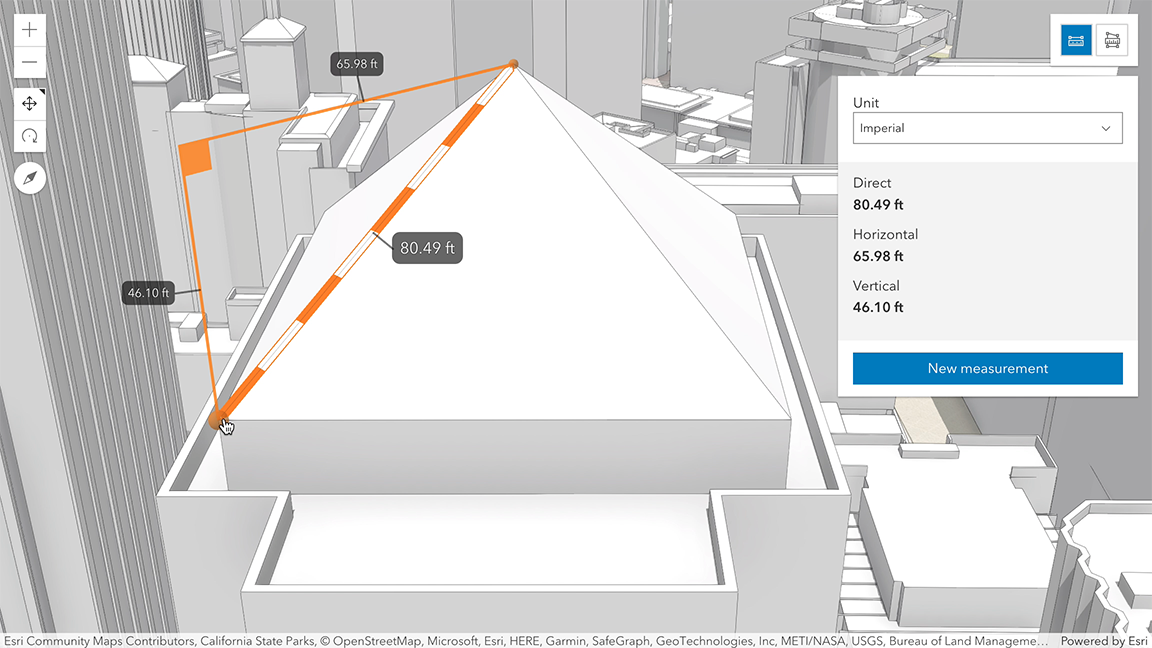
The Direct Line Measurement 3D component can be added to an arcgis-scene component to calculate and display vertical, horizontal, and direct distances between two points.
How distances are computed depends on the scene's spatial reference.
In geographic coordinate systems (GCS) and in Web Mercator:
- Direct distance is computed in a Euclidean manner, in an ECEF coordinate system (or equivalent on other planets);
- Horizontal distance is computed geodetically, taking into consideration the curvature of the planet;
- Vertical distance is computed as an elevation difference.
In projected coordinate systems (PCS), apart from Web Mercator, all three distances (direct, horizontal, and vertical) are computed in a Euclidean manner (in their respective PCS).
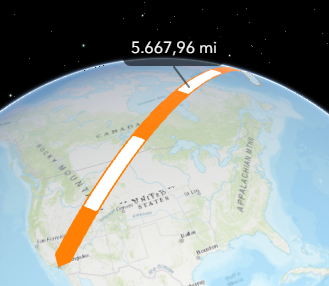
Direct Line Measurement 3D component visualizes and labels the direct, horizontal, and vertical distances and displays the same values in the UI panel. When the distance between the points is greater than 100 kilometers, the measurement visualization is simplified, and only the horizontal and vertical distances are calculated. The direct distance option becomes unavailable.
When the component is active, a horizontal "laser" line is drawn which indicates the height at the current mouse position. This line can help in analyzing the heights of objects relative to each other and the terrain. A second laser line shows the intersection of the scene with the vertical plane that passes through the checkered line.
Things to consider
- Direct Line Measurement 3D is designed to work in the Scene component. For measurements in the arcgis-map component, use arcgis-distance-measurement-2d.
- Snapping is enabled by default. This can be temporarily disabled by holding the
CTRLkey. - Layer types currently supported for snapping are: FeatureLayer, GraphicsLayer (except Mesh geometries), GeoJSONLayer, WFSLayer, CSVLayer, 3D Object SceneLayer, and BuildingSceneLayer.
See also
Demo
Properties
analysis
The DirectLineMeasurementAnalysis created or modified by the component.
When connecting the Direct Line Measurement 3D component to an arcgis-scene component, it automatically creates an empty analysis and adds it to the Scene's arcgis-scene.analyses collection. You can then wait for the DirectLineMeasurementAnalysisView3D to be created before accessing the analysis results.
// Get the Scene component and the Direct Line Measurement 3D component, and wait until both are ready.const viewElement = document.querySelector("arcgis-scene");await viewElement.viewOnReady();const directLineMeasurement3dElement = document.querySelector("arcgis-direct-line-measurement-3d");await directLineMeasurement3dElement.componentOnReady();
// Get the DirectLineMeasurementAnalysis created by the Direct Line Measurement 3D component.const analysis = directLineMeasurement3dElement.analysis;
// Get the DirectLineMeasurementAnalysisView3D and watch for results.const analysisView = await viewElement.whenAnalysisView(analysis);const handle = reactiveUtils.watch(  () => analysisView?.result,  () => {    console.log("Analysis results:", analysisView.result);  },);
Whenever the component is destroyed, the analysis is automatically removed from the collection.
Alternatively, a programmatically created DirectLineMeasurementAnalysis can be provided to the component. Then, the application itself needs to add it to and later remove it from the analyses collection of the Scene component.
// Create the DirectLineMeasurementAnalysis.const directLineAnalysis = new DirectLineMeasurementAnalysis({   startPoint: new Point({     spatialReference: { latestWkid: 3857, wkid: 102100 },     x: -13624995.61798748,     y: 4550334.030096778,     z: 63.378210234455764   }),   endPoint: new Point({     spatialReference: { latestWkid: 3857, wkid: 102100 },     x: -13624921.53589075,     y: 4550407.42357004,     z: 63.3783810287714   }),});// Get the Scene component and the Direct Line Measurement 3D component, and wait until both are ready.const viewElement = document.querySelector("arcgis-scene");await viewElement.viewOnReady();const directLineMeasurement3dElement = document.querySelector("arcgis-direct-line-measurement-3d");await directLineMeasurement3dElement.componentOnReady();
// Add the analysis to the analyses collection of the Scene component.viewElement.analyses.add(directLineAnalysis);
// Connect the analysis to the measurement component:directLineMeasurement3dElement.analysis = directLineAnalysis;
autoDestroyDisabled
- Type
- boolean
If true, the component will not be destroyed automatically when it is disconnected from the document. This is useful when you want to move the component to a different place on the page, or temporarily hide it. If this is set, make sure to call the destroy() method when you are done to prevent memory leaks.
- Attribute
- auto-destroy-disabled
- Default value
- false
hideStartButton
- Type
- boolean
- Since
- ArcGIS Maps SDK for JavaScript 5.0
If true, the button that starts a new measurement will be hidden.
- Attribute
- hide-start-button
- Default value
- false
hideUnitSelect
- Type
- boolean
- Since
- ArcGIS Maps SDK for JavaScript 5.0
If true, the unit selection dropdown will be hidden.
- Attribute
- hide-unit-select
- Default value
- false
hideVisualization
- Type
- boolean
- Since
- ArcGIS Maps SDK for JavaScript 5.0
Indicates whether the component's visualization is hidden in the view.
- Attribute
- hide-visualization
- Default value
- false
icon
- Type
- Icon["icon"] | undefined
Icon which represents the component. Typically used when the component is controlled by another component (e.g. by the Expand component).
- See also
- Attribute
- icon
- Default value
- "measure-line"
referenceElement
- Type
- ArcgisReferenceElement | string | undefined
By assigning the id attribute of the Map or Scene component to this property, you can position a child component anywhere in the DOM while still maintaining a connection to the Map or Scene.
- Attribute
- reference-element
unit
- Type
- SystemOrLengthUnit
Unit system (imperial, metric) or specific unit used for displaying the distance values. Possible values are listed in unitOptions.
- Attribute
- unit
unitOptions
- Type
- Array<SystemOrLengthUnit>
List of available units and unit systems (imperial, metric) that are shown in the component's dropdown.
By default, the following units are included: metric, imperial, inches, feet, us-feet, yards, miles, nautical-miles, meters, kilometers.
Possible unit values can only be a subset of this list.
view
The view associated with the component.
Note: The recommended approach is to fully migrate applications to use map and scene components and avoid using MapView and SceneView directly. However, if you are migrating a large application from widgets to components, you might prefer a more gradual transition. To support this use case, the SDK includes this
viewproperty which connects a component to a MapView or SceneView. Ultimately, once migration is complete, the arcgis-direct-line-measurement-3d component will be associated with a map or scene component rather than using theviewproperty.
Methods
| Method | Signature |
|---|---|
clear(): Promise<void> | |
componentOnReady inherited | componentOnReady(): Promise<this> |
destroy(): Promise<void> | |
start(): Promise<void> |
componentOnReady
- Signature
-
componentOnReady (): Promise<this>
Creates a promise that resolves once the component is fully loaded.
- Returns
- Promise<this>
Example
const arcgisDirectLineMeasurement3d = document.querySelector("arcgis-direct-line-measurement-3d");document.body.append(arcgisDirectLineMeasurement3d);await arcgisDirectLineMeasurement3d.componentOnReady();console.log("arcgis-direct-line-measurement-3d is ready to go!");Events
| Name | Type |
|---|---|
| CustomEvent<{ name: "analysis" | "state"; }> | |
arcgisPropertyChange
arcgisPropertyChange: CustomEvent<{ name: "analysis" | "state"; }> Emitted when the value of a property is changed. Use this to listen to changes to properties.
arcgisReady
arcgisReady: CustomEvent<void> Emitted when the component associated with a map or scene view is ready to be interacted with.