import "@arcgis/map-components/components/arcgis-slider-heatmap-legacy";- Inheritance:
- ArcgisSliderHeatmapLegacy→
PublicLitElement
- Since
- ArcGIS Maps SDK for JavaScript 5.0
This is a legacy component. It relies on an underlying widget as part of our migration to native web components.
A fully native replacement for this component is in development. Once it reaches feature parity, the legacy component will be deprecated and no longer maintained. At that point, development should use the native component.
The Heatmap Slider component is intended for authoring and exploring data-driven visualizations in any layer that can be rendered with a HeatmapRenderer.
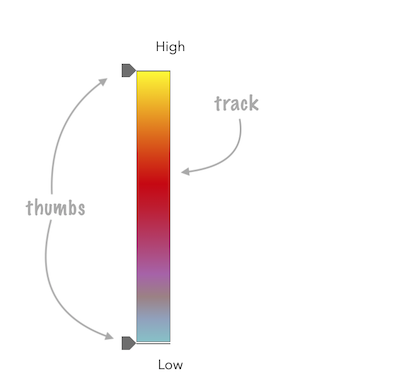
See the image below for a summary of the configurable options available on this slider.
const viewElement = document.querySelector("arcgis-map")!;const heatmapSlider = document.querySelector("arcgis-slider-heatmap-legacy")!;
const layer = new CSVLayer({  url: "https://earthquake.usgs.gov/earthquakes/feed/v1.0/summary/2.5_week.csv",});
await viewElement.viewOnReady();viewElement.map?.add(layer);
const params = {  layer,  valueExpression: "($feature.mag)",  view: viewElement.view,};
const rendererResult = await heatmapRendererCreator.createRenderer(params);
layer.renderer = rendererResult.renderer;
heatmapSlider.stops = rendererResult.renderer.colorStops;
This slider should be used to update the colorStops property in a HeatmapRenderer. It is the responsibility of the app developer to set up event listeners on this slider to update the renderer's colorStops based on how the stops property was recalculated.
const updateRendererFromSlider = () => {  const renderer = layer.renderer?.clone();  if (!renderer || !("colorStops" in renderer)) {    return;  }  renderer.colorStops = heatmapSlider.stops;  layer.renderer = renderer;};
heatmapSlider.addEventListener("arcgisThumbChange", updateRendererFromSlider);heatmapSlider.addEventListener("arcgisThumbDrag", updateRendererFromSlider);heatmapSlider.addEventListener("arcgisPropertyChange", updateRendererFromSlider);- See also
Demo
Properties
autoDestroyDisabled
- Type
- boolean
If true, the component will not be destroyed automatically when it is disconnected from the document. This is useful when you want to move the component to a different place on the page, or temporarily hide it. If this is set, make sure to call the destroy() method when you are done to prevent memory leaks.
- Attribute
- auto-destroy-disabled
- Default value
- false
icon
- Type
- IconName
Icon which represents the component. Typically used when the component is controlled by another component (e.g. by the Expand component).
- See also
- Attribute
- icon
precision
- Type
- number
Defines how slider thumb values should be rounded. This number indicates the number of decimal places slider thumb values should round to when they have been moved.
Keep in mind this property rounds thumb values and shouldn't be used exclusively for formatting purposes.
- Attribute
- precision
- Default value
- 4
Example
// Rounds slider thumb values to 7 decimal placesslider.precision = 7; referenceElement
- Type
- ArcgisReferenceElement | string | undefined
By assigning the id attribute of the Map or Scene component to this property, you can position a child component anywhere in the DOM while still maintaining a connection to the Map or Scene.
- Attribute
- reference-element
stops
- Type
- Array<HeatmapColorStop>
The color stops of the HeatmapRenderer to associate with the slider.
Example
heatmapSlider.stops = rendererResult.renderer.colorStops;Methods
| Method | Signature |
|---|---|
componentOnReady inherited | componentOnReady(): Promise<this> |
destroy(): Promise<void> |
componentOnReady
- Signature
-
componentOnReady (): Promise<this>
Creates a promise that resolves once the component is fully loaded.
- Returns
- Promise<this>
Example
const arcgisSliderHeatmapLegacy = document.querySelector("arcgis-slider-heatmap-legacy");document.body.append(arcgisSliderHeatmapLegacy);await arcgisSliderHeatmapLegacy.componentOnReady();console.log("arcgis-slider-heatmap-legacy is ready to go!");Events
| Name | Type |
|---|---|
| CustomEvent<{ name: "precision" | "state" | "stops"; }> | |
arcgisPropertyChange
arcgisPropertyChange: CustomEvent<{ name: "precision" | "state" | "stops"; }> Emitted when the value of a property is changed. Use this to listen to changes to properties.
arcgisReady
arcgisReady: CustomEvent<void> Emitted when the component associated with a map or scene view is ready to be interacted with.
arcgisThumbChange
arcgisThumbChange: CustomEvent<ThumbChangeEvent> Fires when a user changes the value of a thumb via the arrow keys or by keyboard editing of the label on the slider.
arcgisThumbDrag
arcgisThumbDrag: CustomEvent<ThumbDragEvent> Fires when a user drags a thumb on the component.