import "@arcgis/map-components/components/arcgis-video-player";- Inheritance:
- ArcgisVideoPlayer→
PublicLitElement
- Since
- ArcGIS Maps SDK for JavaScript 4.33
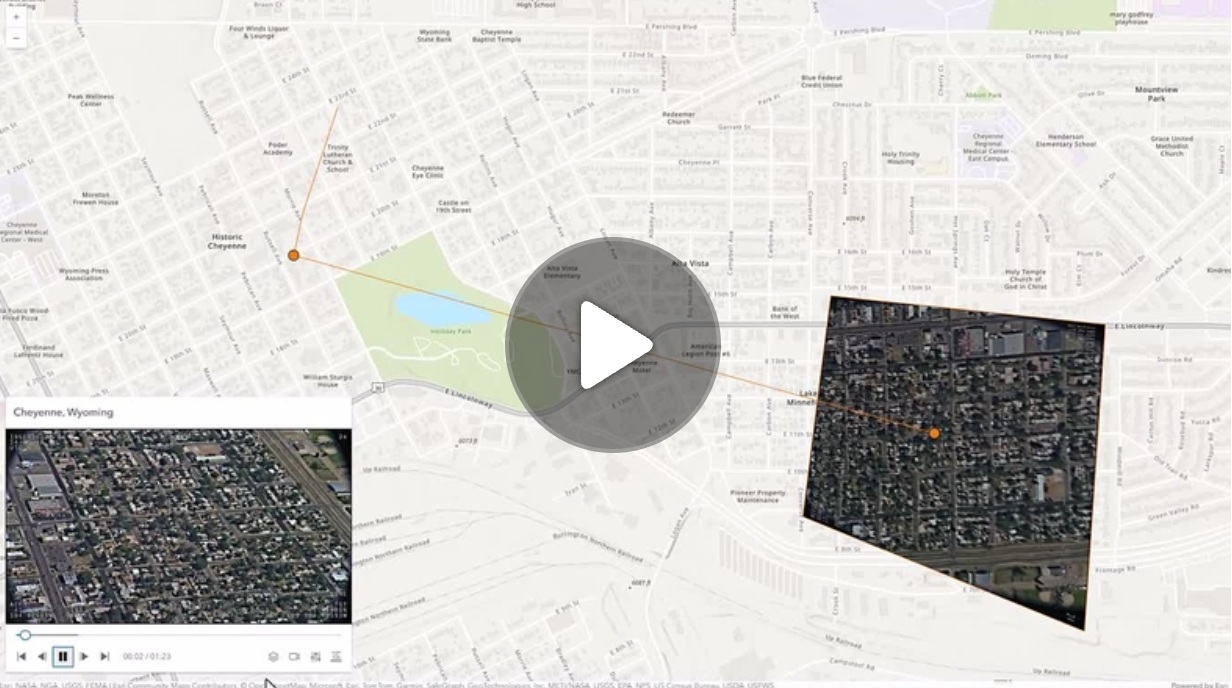
The Video Player component provides a user interface for interacting with a VideoLayer. It displays the original video content and provides controls for playing, pausing, seeking, and changing the video speed and quality.
The Video Player component provides the following capabilities:
- Control operations (play, pause, seek)
- Time and duration display
- Customizable graphics colors
- Following options (sensor, frame, video)
- Adjustable speed and quality
- Access to frame metadata
The VideoPlayerViewModel class provides the logic for the Video Player.
Known limitations
- Not supported in 3D arcgis-scene.
- Not supported on macOS and iOS devices.
Example
<arcgis-map>  <arcgis-video-player slot="top-right"></arcgis-video-player></arcgis-map>
<script type="module">  const [Map, VideoLayer] = await $arcgis.import([    "@arcgis/core/Map.js",    "@arcgis/core/layers/VideoLayer.js",  ]);  const viewElement = document.querySelector("arcgis-map");  const videoPlayerElement = document.querySelector("arcgis-video-player");  const videoLayer = new VideoLayer({    url: "YOUR_VIDEO_LAYER_URL",  });  viewElement.map = new Map({    basemap: "topo-vector",    layers: [videoLayer],  });  await viewElement.viewOnReady();  await videoLayer.load();  if (videoLayer.loaded) {    videoPlayerElement.layer = videoLayer;  }  await viewElement.whenLayerView(videoLayer);  viewElement.goTo(videoLayer.fullExtent);</script>
Properties
| Property | Attribute | Type |
|---|---|---|
auto-destroy-disabled | ||
following-mode | VideoPlayerViewModel["followingMode"] | |
hide-header | ||
icon | ||
inline reflected | inline | |
label reflected | label | |
| VideoLayer | null | undefined | |
| ||
reference-element | ||
show-fullscreen-toggle | ||
state readonly | | "error" | VideoState |
|
autoDestroyDisabled
- Type
- boolean
If true, the component will not be destroyed automatically when it is disconnected from the document. This is useful when you want to move the component to a different place on the page, or temporarily hide it. If this is set, make sure to call the destroy() method when you are done to prevent memory leaks.
- Attribute
- auto-destroy-disabled
- Default value
- false
followingMode
- Type
- VideoPlayerViewModel["followingMode"]
Determines which telemetry elements to follow when the video layer is playing.
- Attribute
- following-mode
- Default value
- "follow-both"
hideHeader
- Type
- boolean
Indicates whether to display the video player's header information.
- Attribute
- hide-header
- Default value
- false
layer
- Type
- VideoLayer | null | undefined
The VideoLayer to use as the data source for the video player.
- Default value
- null
Example
// Create a new Video Player with a VideoLayervideoPlayer.layer = videoLayer; referenceElement
- Type
- ArcgisReferenceElement | string | undefined
By assigning the id attribute of the Map or Scene component to this property, you can position a child component anywhere in the DOM while still maintaining a connection to the Map or Scene.
- Attribute
- reference-element
view
The view associated with the component.
Note: The recommended approach is to fully migrate applications to use map and scene components and avoid using MapView and SceneView directly. However, if you are migrating a large application from widgets to components, you might prefer a more gradual transition. To support this use case, the SDK includes this
viewproperty which connects a component to a MapView or SceneView. Ultimately, once migration is complete, the arcgis-video-player component will be associated with a map or scene component rather than using theviewproperty.
Example
// Set the video player view model's view to a map view.videoPlayerViewModel.view = mapView;Methods
| Method | Signature |
|---|---|
componentOnReady inherited | componentOnReady(): Promise<this> |
destroy(): Promise<void> |
componentOnReady
- Signature
-
componentOnReady (): Promise<this>
Creates a promise that resolves once the component is fully loaded.
- Returns
- Promise<this>
Example
const arcgisVideoPlayer = document.querySelector("arcgis-video-player");document.body.append(arcgisVideoPlayer);await arcgisVideoPlayer.componentOnReady();console.log("arcgis-video-player is ready to go!");Events
| Name | Type |
|---|---|
| CustomEvent<{ name: "state" | "layer"; }> | |
arcgisPropertyChange
arcgisPropertyChange: CustomEvent<{ name: "state" | "layer"; }> Emitted when the value of a property is changed. Use this to listen to changes to properties.
arcgisReady
arcgisReady: CustomEvent<void> Emitted when the component associated with a map or scene view is ready to be interacted with.