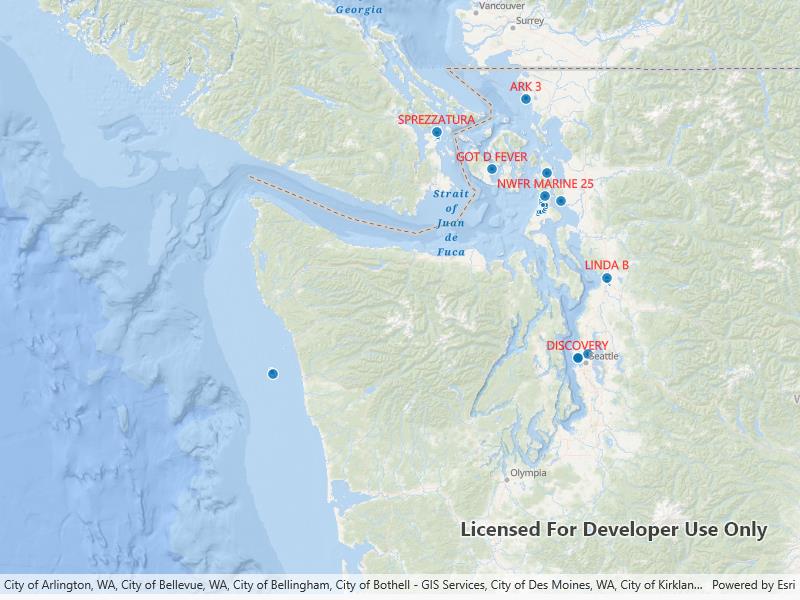
Create a custom dynamic entity data source and display it using a dynamic entity layer.
Use case
Developers can create a custom
to be able to visualize data from a variety of different feeds as dynamic entities using a . An example of this is in a mobile situational awareness app, where a custom can be used to connect to peer-to-peer feeds in order to visualize real-time location tracks from teammates in the field.How to use the sample
Run the sample to view the map and the dynamic entity layer displaying the latest observation from the custom data source. Tap on a dynamic entity to view its attributes in a callout.
How it works
Configure the custom data source:
- Create a custom data source implementation of a .
- Override to specify the for a given unique entity ID field and a list of objects matching the fields in the data source.
- Override to begin processing observations from the custom data source.
- Loop through the observations and deserialize each observation into a object and a containing the attributes.
- Use to add each observation to the custom data source.
Configure the map view:
- Create a using the custom data source implementation.
- Update values in the layer’s to customize the layer’s appearance.
- Set up the layer’s to display labels for each dynamic entity.
- Configure a event handler on the to select a dynamic entity and display the entity’s attributes in a callout.
Relevant API
- DynamicEntity
- DynamicEntityDataSource
- DynamicEntityLayer
- LabelDefinition
- TrackDisplayProperties
About the data
This sample uses a .json file containing observations of marine vessels in the Pacific North West hosted on ArcGIS Online.
Additional information
In this sample, we iterate through features in a GeoJSON file to mimic messages coming from a real-time feed. You can create a custom dyamic entity data source to process any data that contains observations which can be translated into
objects with associated attributes.Tags
data, dynamic, entity, label, labeling, live, real-time, stream, track
Sample Code
<UserControl x:Class="ArcGIS.WinUI.Samples.AddCustomDynamicEntityDataSource.AddCustomDynamicEntityDataSource" xmlns="http://schemas.microsoft.com/winfx/2006/xaml/presentation" xmlns:x="http://schemas.microsoft.com/winfx/2006/xaml" xmlns:esri="using:Esri.ArcGISRuntime" xmlns:esriUI="using:Esri.ArcGISRuntime.UI.Controls"> <Grid> <esriUI:MapView x:Name="MyMapView" GeoViewTapped="GeoViewTapped" /> </Grid></UserControl>// Copyright 2023 Esri.//// Licensed under the Apache License, Version 2.0 (the "License"); you may not use this file except in compliance with the License.// You may obtain a copy of the License at: http://www.apache.org/licenses/LICENSE-2.0//// Unless required by applicable law or agreed to in writing, software distributed under the License is distributed on an// "AS IS" BASIS, WITHOUT WARRANTIES OR CONDITIONS OF ANY KIND, either express or implied. See the License for the specific// language governing permissions and limitations under the License.
using ArcGIS.Samples.Managers;using Esri.ArcGISRuntime.ArcGISServices;using Esri.ArcGISRuntime.Data;using Esri.ArcGISRuntime.Mapping;using Esri.ArcGISRuntime.Mapping.Labeling;using Esri.ArcGISRuntime.RealTime;using Esri.ArcGISRuntime.Symbology;using Esri.ArcGISRuntime.UI;using Esri.ArcGISRuntime.UI.Controls;using System;using System.Linq;using System.Text;
namespace ArcGIS.WinUI.Samples.AddCustomDynamicEntityDataSource{ [ArcGIS.Samples.Shared.Attributes.Sample( name: "Add custom dynamic entity data source", category: "Layers", description: "Create a custom dynamic entity data source and display it using a dynamic entity layer.", instructions: "Run the sample to view the map and the dynamic entity layer displaying the latest observation from the custom data source. Tap on a dynamic entity to view its attributes in a callout.", tags: new[] { "data", "dynamic", "entity", "label", "labeling", "live", "real-time", "stream", "track" })] [ArcGIS.Samples.Shared.Attributes.OfflineData("a8a942c228af4fac96baa78ad60f511f")] public partial class AddCustomDynamicEntityDataSource { // Path to AIS Traffic Data json file. private readonly string _localJsonFile = DataManager.GetDataFolder("a8a942c228af4fac96baa78ad60f511f", "AIS_MarineCadastre_SelectedVessels_CustomDataSource.jsonl");
public AddCustomDynamicEntityDataSource() { InitializeComponent(); Initialize(); }
private void Initialize() { // Create a new map with the navigation basemap style. MyMapView.Map = new Map(BasemapStyle.ArcGISOceans);
// Set the initial viewpoint. MyMapView.SetViewpoint(new Viewpoint(47.984, -123.657, 3e6));
// Create a new custom file source. // This takes the path to the simulation file, field name that will be used as the entity id, and the delay between each observation that is processed. // In this example we are using a json file as our custom data source. // This field value should be a unique identifier for each entity. // Adjusting the value for the delay will change the speed at which the entities and their observations are displayed. var customSource = new SimulatedDataSource(_localJsonFile, "MMSI", TimeSpan.FromMilliseconds(10));
// Create the dynamic entity layer using the custom data source. var dynamicEntityLayer = new DynamicEntityLayer(customSource);
// Set up the track display properties. SetupTrackDisplayProperties(dynamicEntityLayer);
// Set up the dynamic entity labeling. SetupLabeling(dynamicEntityLayer);
// Add the dynamic entity layer to the map. MyMapView.Map.OperationalLayers.Add(dynamicEntityLayer); }
private void SetupTrackDisplayProperties(DynamicEntityLayer layer) { // Set up the track display properties, these properties will be used to configure the appearance of the track line and previous observations. layer.TrackDisplayProperties.ShowPreviousObservations = true; layer.TrackDisplayProperties.ShowTrackLine = true; layer.TrackDisplayProperties.MaximumObservations = 20; }
private void SetupLabeling(DynamicEntityLayer layer) { // Define the label expression to be used, in this case we will use the "VesselName" for each of the dynamic entities. var simpleLabelExpression = new SimpleLabelExpression("[VesselName]");
// Set the text symbol color and size for the labels. var labelSymbol = new TextSymbol() { Color = System.Drawing.Color.Red, Size = 12d };
// Set the label position. var labelDef = new LabelDefinition(simpleLabelExpression, labelSymbol) { Placement = LabelingPlacement.PointAboveCenter };
// Add the label definition to the dynamic entity layer and enable labels. layer.LabelDefinitions.Add(labelDef); layer.LabelsEnabled = true; }
private async void GeoViewTapped(object sender, GeoViewInputEventArgs e) { e.Handled = true; try { MyMapView.DismissCallout();
// If no dynamic entity layer is present in the map, return. var layer = MyMapView.Map?.OperationalLayers.OfType<DynamicEntityLayer>().FirstOrDefault(); if (layer is null) return;
// Identify the tapped observation. IdentifyLayerResult results = await MyMapView.IdentifyLayerAsync(layer, e.Position, 2d, false); DynamicEntityObservation observation = results.GeoElements.FirstOrDefault() as DynamicEntityObservation; if (observation is null) return;
// Get the dynamic entity from the observation. var dynamicEntity = observation.GetDynamicEntity(); if (dynamicEntity is null) return;
// Build a string for observation attributes. var stringBuilder = new StringBuilder(); foreach (var attribute in new string[] { "VesselName", "CallSign", "COG", "SOG" }) { var value = dynamicEntity.Attributes[attribute].ToString();
// Account for when an attribue has an empty value. if (!string.IsNullOrEmpty(value)) { stringBuilder.AppendLine(attribute + ": " + value); } }
// The standard callout takes care of moving when the dynamic entity changes. var calloutDef = new CalloutDefinition(stringBuilder.ToString().TrimEnd()); if (layer.Renderer?.GetSymbol(dynamicEntity) is Symbol symbol) { await calloutDef.SetIconFromSymbolAsync(symbol); }
// Show the callout for the tapped dynamic entity. MyMapView.ShowCalloutForGeoElement(dynamicEntity, e.Position, calloutDef); } catch (Exception ex) { await new MessageDialog2(ex.ToString(), "Error identifying dynamic entity.").ShowAsync(); } } }}// Copyright 2023 Esri.//// Licensed under the Apache License, Version 2.0 (the "License"); you may not use this file except in compliance with the License.// You may obtain a copy of the License at: http://www.apache.org/licenses/LICENSE-2.0//// Unless required by applicable law or agreed to in writing, software distributed under the License is distributed on an// "AS IS" BASIS, WITHOUT WARRANTIES OR CONDITIONS OF ANY KIND, either express or implied. See the License for the specific// language governing permissions and limitations under the License.
using Esri.ArcGISRuntime.Data;using Esri.ArcGISRuntime.Geometry;using Esri.ArcGISRuntime.RealTime;using System;using System.Collections.Generic;using System.Diagnostics;using System.IO;using System.Linq;using System.Text.Json;using System.Threading;using System.Threading.Tasks;
namespace ArcGIS.WinUI.Samples.AddCustomDynamicEntityDataSource{#nullable enable public class SimulatedDataSource : DynamicEntityDataSource { // Hold a reference to the file stream reader, the process task, and the cancellation token source. private Task? _processTask; private StreamReader? _streamReader; private CancellationTokenSource? _cancellationTokenSource; private List<Field>? _fields;
public SimulatedDataSource(string filePath, string entityIdField, TimeSpan delay) { FilePath = filePath; EntityIdField = entityIdField; Delay = delay; }
#region Properties
// Expose the file path, entity ID field, and delay length as properties. public string FilePath { get; } public string EntityIdField { get; } public TimeSpan Delay { get; }
#endregion
protected override async Task<DynamicEntityDataSourceInfo> OnLoadAsync() { return await Task.Run(() => { // Derive schema from the first row in the custom data source. _fields = GetSchema();
// Open the file for processing. Stream stream = File.OpenRead(FilePath); _streamReader = new StreamReader(stream);
// Create a new DynamicEntityDataSourceInfo using the entity ID field and the fields derived from the attributes of each observation in the custom data source. return new DynamicEntityDataSourceInfo(EntityIdField, _fields) { SpatialReference = SpatialReferences.Wgs84 }; }); }
protected override Task OnConnectAsync(CancellationToken cancellationToken) { // On connecting to the custom data source begin processing the file. _cancellationTokenSource = new(); _processTask = Task.Run(() => ObservationProcessLoopAsync(), _cancellationTokenSource.Token); return Task.CompletedTask; }
protected override async Task OnDisconnectAsync() { // On disconnecting from the custom data source, stop processing the file. _cancellationTokenSource?.Cancel();
if (_processTask is not null) await _processTask;
_cancellationTokenSource = null; _processTask = null; }
private async Task ObservationProcessLoopAsync() { try { while (!_cancellationTokenSource!.IsCancellationRequested) { // Process the next observation. var processed = await ProcessNextObservation();
// If the end of the file has been reached, break out of the loop. if (_streamReader != null && _streamReader.EndOfStream) break;
// If the observation was not processed, continue to the next observation. if (!processed) continue;
// If there is no delay, yield to the UI thread otherwise delay for the specified amount of time. if (Delay == TimeSpan.Zero) { await Task.Yield(); } else { await Task.Delay(Delay, _cancellationTokenSource.Token); } } } catch (Exception ex) { Debug.WriteLine(ex.ToString()); } }
private async Task<bool> ProcessNextObservation() { _ = _streamReader ?? throw new ArgumentNullException("File stream not available.");
// Read the next observation. var json = await _streamReader.ReadLineAsync();
// If there is no json to read or the schema is not available, return false. if (string.IsNullOrEmpty(json) || _fields is null) return false;
try { JsonElement jsonElement = JsonSerializer.Deserialize<JsonElement>(json);
// Create a new MapPoint from the x and y coordinates of the observation. MapPoint? point = null; if (jsonElement.TryGetProperty("geometry", out JsonElement jsonGeometry)) { point = new MapPoint( jsonGeometry.GetProperty("x").GetDouble(), jsonGeometry.GetProperty("y").GetDouble(), SpatialReferences.Wgs84); }
// Get the dictionary of attributes from the observation using the field names as keys. Dictionary<string, object?> attributes = new(); if (jsonElement.TryGetProperty("attributes", out JsonElement jsonAttributes)) { foreach (var field in _fields) { if (jsonAttributes.TryGetProperty(field.Name, out JsonElement prop)) { object? value = null; if (prop.ValueKind != JsonValueKind.Null) { if (prop.ValueKind == JsonValueKind.Number && field.FieldType == FieldType.Float64) { value = prop.GetDouble(); } else if (prop.ValueKind == JsonValueKind.Number && field.FieldType == FieldType.Int32) { value = prop.GetInt32(); } else if (prop.ValueKind == JsonValueKind.String) { value = prop.GetString(); } } attributes.Add(field.Name, value); } } }
// Add the observation to the custom data source. AddObservation(point, attributes); return true; } catch (Exception ex) { Debug.WriteLine($"{ex}"); return false; } }
private static List<Field> GetSchema() { // Return a list of fields matching the attributes of each observation in the custom data source. return new List<Field>() { new Field(FieldType.Text, "MMSI", string.Empty, 256), new Field(FieldType.Float64, "BaseDateTime", string.Empty, 8), new Field(FieldType.Float64, "LAT", string.Empty, 8), new Field(FieldType.Float64, "LONG", string.Empty, 8), new Field(FieldType.Float64, "SOG", string.Empty, 8), new Field(FieldType.Float64, "COG", string.Empty, 8), new Field(FieldType.Float64, "Heading", string.Empty, 8), new Field(FieldType.Text, "VesselName", string.Empty, 256), new Field(FieldType.Text, "IMO", string.Empty, 256), new Field(FieldType.Text, "CallSign", string.Empty, 256), new Field(FieldType.Text, "VesselType", string.Empty, 256), new Field(FieldType.Text, "Status", string.Empty, 256), new Field(FieldType.Float64, "Length", string.Empty, 8), new Field(FieldType.Float64, "Width", string.Empty, 8), new Field(FieldType.Text, "Cargo", string.Empty, 256), new Field(FieldType.Text, "globalid", string.Empty, 256) }; } }#nullable disable}