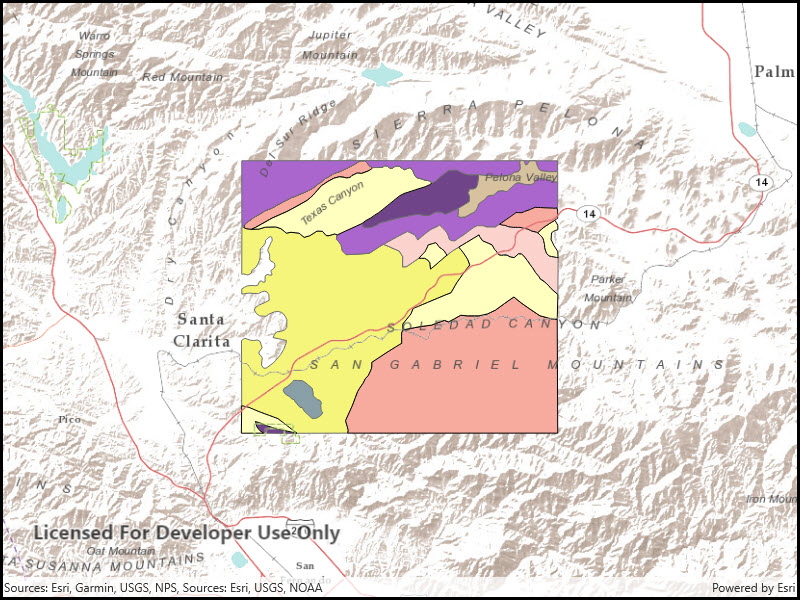
Show features from an online feature service.
Use case
Feature services are useful for sharing vector GIS data with clients so that individual features can be queried, displayed, and edited.
How to use the sample
Run the sample and view the feature service as an operational layer on top of the basemap. Zoom and pan around the map to see the features in greater detail.
How it works
- Create a from a URL.
- Create a feature layer from the service feature table.
- Add the feature layer to your ArcGISMap using .
Relevant API
- Basemap
- FeatureLayer
- Map
- MapView
- ServiceFeatureTable
Tags
feature table, layer, layers, service
Sample Code
<UserControl x:Class="ArcGIS.WinUI.Samples.FeatureLayerUrl.FeatureLayerUrl" xmlns="http://schemas.microsoft.com/winfx/2006/xaml/presentation" xmlns:x="http://schemas.microsoft.com/winfx/2006/xaml" xmlns:esriUI="using:Esri.ArcGISRuntime.UI.Controls"> <Grid> <esriUI:MapView x:Name="MyMapView" /> </Grid></UserControl>// Copyright 2016 Esri.//// Licensed under the Apache License, Version 2.0 (the "License"); you may not use this file except in compliance with the License.// You may obtain a copy of the License at: http://www.apache.org/licenses/LICENSE-2.0//// Unless required by applicable law or agreed to in writing, software distributed under the License is distributed on an// "AS IS" BASIS, WITHOUT WARRANTIES OR CONDITIONS OF ANY KIND, either express or implied. See the License for the specific// language governing permissions and limitations under the License.
using Esri.ArcGISRuntime.Geometry;using Esri.ArcGISRuntime.Mapping;using System;
namespace ArcGIS.WinUI.Samples.FeatureLayerUrl{ [ArcGIS.Samples.Shared.Attributes.Sample( name: "Feature layer (feature service)", category: "Layers", description: "Show features from an online feature service.", instructions: "Run the sample and view the feature service as an operational layer on top of the basemap. Zoom and pan around the map to see the features in greater detail.", tags: new[] { "feature table", "layer", "layers", "service" })] public partial class FeatureLayerUrl { public FeatureLayerUrl() { InitializeComponent();
// Setup the control references and execute initialization Initialize(); }
private void Initialize() { // Create new Map with basemap Map myMap = new Map(BasemapStyle.ArcGISTerrain);
// Create and set initial map location MapPoint initialLocation = new MapPoint( -13176752, 4090404, SpatialReferences.WebMercator); myMap.InitialViewpoint = new Viewpoint(initialLocation, 300000);
// Create uri to the used feature service Uri serviceUri = new Uri( "https://sampleserver6.arcgisonline.com/arcgis/rest/services/Energy/Geology/FeatureServer/9");
// Create new FeatureLayer from service uri and FeatureLayer geologyLayer = new FeatureLayer(serviceUri);
// Add created layer to the map myMap.OperationalLayers.Add(geologyLayer);
// Assign the map to the MapView MyMapView.Map = myMap; } }}