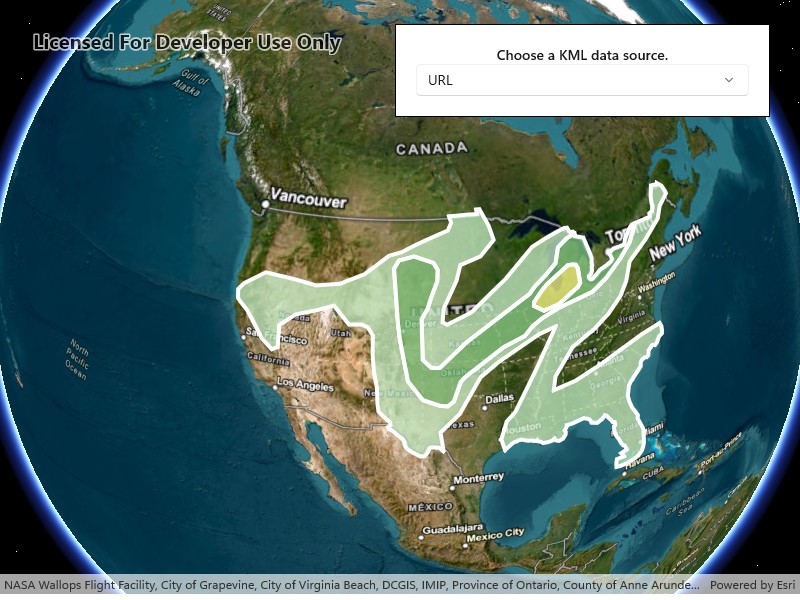
Display KML from a URL, portal item, or local KML file.
Use case
Keyhole Markup Language (KML) is a data format used by Google Earth. KML is popular as a transmission format for consumer use and for sharing geographic data between apps. You can use Runtime to display KML files, with full support for a variety of features, including network links, 3D models, screen overlays, and tours.
How to use the sample
Use the UI to select a source. A KML file from that source will be loaded and displayed in the scene.
How it works
- To create a KML layer from a URL, create a using the URL to the KML file. Then pass the dataset to the constructor.
- To create a KML layer from a portal item, construct a with a and the KML portal item ID. Pass the portal item to the constructor.
- To create a KML layer from a local file, create a using the absolute file path to the local KML file. Then pass the dataset to the constructor.
- Add the layer as an operational layer to the scene with .
Relevant API
- KmlDataset
- KmlLayer
Offline data
| Link | Local Location |
|---|---|
| US State Capitals |
About the data
This sample displays three different KML files:
- From URL - this is a map of the convective outlook produced by NOAA/NWS Storm Prediction Center. It uses KML network links to always show the latest data.
- From local file - this is a map of U.S. state capitals. It doesn’t define an icon, so the default pushpin is used for the points.
- From portal item - this is a map of U.S. states.
Tags
keyhole, KML, KMZ, OGC
Sample Code
<UserControl x:Class="ArcGIS.WinUI.Samples.DisplayKml.DisplayKml" xmlns="http://schemas.microsoft.com/winfx/2006/xaml/presentation" xmlns:x="http://schemas.microsoft.com/winfx/2006/xaml" xmlns:esriUI="using:Esri.ArcGISRuntime.UI.Controls"> <Grid> <esriUI:SceneView x:Name="MySceneView" /> <Border Style="{StaticResource BorderStyle}"> <StackPanel Orientation="Vertical"> <TextBlock FontWeight="SemiBold" HorizontalTextAlignment="Center" Text="Choose a KML data source." /> <ComboBox x:Name="LayerPicker" HorizontalAlignment="Stretch" IsEnabled="False" /> </StackPanel> </Border> </Grid></UserControl>// Copyright 2018 Esri.//// Licensed under the Apache License, Version 2.0 (the "License"); you may not use this file except in compliance with the License.// You may obtain a copy of the License at: http://www.apache.org/licenses/LICENSE-2.0//// Unless required by applicable law or agreed to in writing, software distributed under the License is distributed on an// "AS IS" BASIS, WITHOUT WARRANTIES OR CONDITIONS OF ANY KIND, either express or implied. See the License for the specific// language governing permissions and limitations under the License.
using ArcGIS.Samples.Managers;using Esri.ArcGISRuntime.Geometry;using Esri.ArcGISRuntime.Mapping;using Esri.ArcGISRuntime.Portal;using Microsoft.UI.Xaml.Controls;using System;
namespace ArcGIS.WinUI.Samples.DisplayKml{ [ArcGIS.Samples.Shared.Attributes.Sample( name: "Display KML", category: "Layers", description: "Display KML from a URL, portal item, or local KML file.", instructions: "Use the UI to select a source. A KML file from that source will be loaded and displayed in the scene.", tags: new[] { "KML", "KMZ", "OGC", "keyhole" })] [ArcGIS.Samples.Shared.Attributes.OfflineData("324e4742820e46cfbe5029ff2c32cb1f")] public partial class DisplayKml { private readonly Envelope _usEnvelope = new Envelope(-144.619561355187, 18.0328662832097, -66.0903762761083, 67.6390975806745, SpatialReferences.Wgs84);
public DisplayKml() { InitializeComponent(); Initialize(); }
private void Initialize() { // Set up the basemap. MySceneView.Scene = new Scene(BasemapStyle.ArcGISImagery);
// Update the UI. LayerPicker.IsEnabled = true; LayerPicker.ItemsSource = new[] { "URL", "Local file", "Portal item" }; LayerPicker.SelectionChanged += LayerPicker_SelectionChanged; LayerPicker.SelectedIndex = 0; }
private async void LayerPicker_SelectionChanged(object sender, SelectionChangedEventArgs e) { // Clear existing layers. MySceneView.Scene.OperationalLayers.Clear();
// Get the name of the selected layer. string name = e.AddedItems[0].ToString();
try { // Create the layer using the chosen constructor. KmlLayer layer; switch (name) { case "URL": default: layer = new KmlLayer(new Uri("https://www.spc.noaa.gov/products/outlook/SPC_outlooks.kml")); break;
case "Local file": string filePath = DataManager.GetDataFolder("324e4742820e46cfbe5029ff2c32cb1f", "US_State_Capitals.kml"); layer = new KmlLayer(new Uri(filePath)); break;
case "Portal item": ArcGISPortal portal = await ArcGISPortal.CreateAsync(); PortalItem item = await PortalItem.CreateAsync(portal, "9fe0b1bfdcd64c83bd77ea0452c76253"); layer = new KmlLayer(item); break; }
// Add the selected layer to the map. MySceneView.Scene.OperationalLayers.Add(layer);
// Zoom to the extent of the United States. await MySceneView.SetViewpointAsync(new Viewpoint(_usEnvelope)); } catch (Exception ex) { await new MessageDialog2(ex.ToString(), "Error").ShowAsync(); } } }}