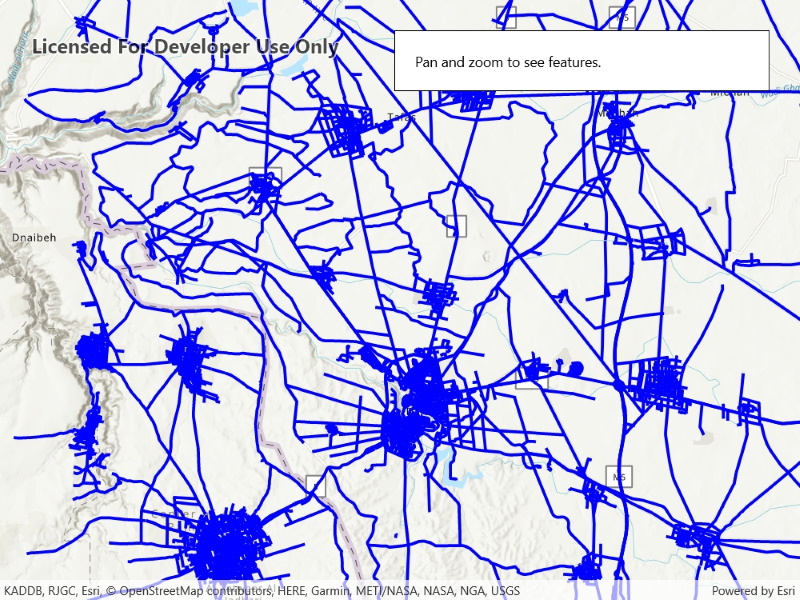
Display an OGC API feature collection and query features while navigating the map view.
Use case
When panning the map view, it may be necessary to query the OGC API feature table for additional features within the new visible extent.
How to use the sample
Pan the map and observe how new features are loaded from the OGC API feature service.
How it works
- Create an object using a URL to an OGC API feature service and a collection ID.
- Set the feature table’s property to .
- Call
- Create a using the feature table and add it to the map view.
- Every time the map view navigation completes:
- Create .
- Set the parameter’s to the current extent of the map view.
- Set the parameter’s property to .
- Set the property to 5000 (some services have a low default value for maximum features).
- Call using the query parameters from the previous steps.
Relevant API
- OgcFeatureCollectionTable
- QueryParameters
About the data
The Daraa, Syria test data is OpenStreetMap data converted to the Topographic Data Store schema of NGA.
Additional information
See the OGC API website for more information on the OGC API family of standards.
Tags
feature, feature layer, feature table, OGC, OGC API, service, table, web
Sample Code
<UserControl x:Class="ArcGIS.WinUI.Samples.DisplayOACollection.DisplayOACollection" xmlns="http://schemas.microsoft.com/winfx/2006/xaml/presentation" xmlns:x="http://schemas.microsoft.com/winfx/2006/xaml" xmlns:esriUI="using:Esri.ArcGISRuntime.UI.Controls"> <Grid> <esriUI:MapView x:Name="MyMapView" /> <Border Style="{StaticResource BorderStyle}"> <StackPanel> <TextBlock Text="Pan and zoom to see features." /> <ProgressBar x:Name="LoadingProgressBar" Margin="5" IsIndeterminate="True" /> </StackPanel> </Border> </Grid></UserControl>// Copyright 2021 Esri.//// Licensed under the Apache License, Version 2.0 (the "License"); you may not use this file except in compliance with the License.// You may obtain a copy of the License at: http://www.apache.org/licenses/LICENSE-2.0//// Unless required by applicable law or agreed to in writing, software distributed under the License is distributed on an// "AS IS" BASIS, WITHOUT WARRANTIES OR CONDITIONS OF ANY KIND, either express or implied. See the License for the specific// language governing permissions and limitations under the License.
using Esri.ArcGISRuntime.Data;using Esri.ArcGISRuntime.Geometry;using Esri.ArcGISRuntime.Mapping;using Esri.ArcGISRuntime.Symbology;using Microsoft.UI.Xaml;using System;using System.Drawing;using System.Threading.Tasks;
namespace ArcGIS.WinUI.Samples.DisplayOACollection{ [ArcGIS.Samples.Shared.Attributes.Sample( name: "Display OGC API collection", category: "Layers", description: "Display an OGC API feature collection and query features while navigating the map view.", instructions: "Pan the map and observe how new features are loaded from the OGC API feature service.", tags: new[] { "OGC", "OGC API", "feature", "feature layer", "feature table", "service", "table", "web" })] [ArcGIS.Samples.Shared.Attributes.OfflineData()] public partial class DisplayOACollection { // Hold a reference to the OGC feature collection table. private OgcFeatureCollectionTable _featureTable;
// Constants for the service URL and collection id. private const string ServiceUrl = "https://demo.ldproxy.net/daraa";
// Note that the service defines the collection id which can be accessed via OgcFeatureCollectionInfo.CollectionId. private const string CollectionId = "TransportationGroundCrv";
public DisplayOACollection() { InitializeComponent(); _ = Initialize(); }
private async Task Initialize() { // Create the map with topographic basemap. MyMapView.Map = new Map(BasemapStyle.ArcGISTopographic);
try { // Create the feature table from URI and collection id. _featureTable = new OgcFeatureCollectionTable(new Uri(ServiceUrl), CollectionId);
// Set the feature request mode to manual (only manual is currently supported). // In this mode, you must manually populate the table - panning and zooming won't request features automatically. _featureTable.FeatureRequestMode = FeatureRequestMode.ManualCache;
// Load the table. await _featureTable.LoadAsync();
// Create a feature layer to visualize the OAFeat features. FeatureLayer ogcFeatureLayer = new FeatureLayer(_featureTable);
// Apply a renderer. ogcFeatureLayer.Renderer = new SimpleRenderer(new SimpleLineSymbol(SimpleLineSymbolStyle.Solid, Color.Blue, 3));
// Add the layer to the map. MyMapView.Map.OperationalLayers.Add(ogcFeatureLayer);
// Use the navigation completed event to populate the table with the features needed for the current extent. MyMapView.NavigationCompleted += MapView_NavigationCompleted;
// Zoom to a small area within the dataset by default. Envelope datasetExtent = _featureTable.Extent; if (datasetExtent != null && !datasetExtent.IsEmpty) { await MyMapView.SetViewpointGeometryAsync(new Envelope(datasetExtent.GetCenter(), datasetExtent.Width / 3, datasetExtent.Height / 3)); } } catch (Exception ex) { await new MessageDialog2(ex.Message, "Error").ShowAsync(); } }
private async void MapView_NavigationCompleted(object sender, EventArgs e) { // Show the loading bar. LoadingProgressBar.Visibility = Visibility.Visible;
// Get the current extent. Envelope currentExtent = MyMapView.VisibleArea.Extent;
// Create a query based on the current visible extent. QueryParameters visibleExtentQuery = new QueryParameters(); visibleExtentQuery.Geometry = currentExtent; visibleExtentQuery.SpatialRelationship = SpatialRelationship.Intersects;
// Set a limit of 5000 on the number of returned features per request, // because the default on some services could be as low as 10. visibleExtentQuery.MaxFeatures = 5000;
try { // Populate the table with the query, leaving existing table entries intact. // Setting outFields to null requests all fields. await _featureTable.PopulateFromServiceAsync(visibleExtentQuery, false, null); } catch (Exception ex) { await new MessageDialog2(ex.Message, "Couldn't populate table.").ShowAsync(); } finally { // Hide the loading bar. LoadingProgressBar.Visibility = Visibility.Collapsed; } } }}