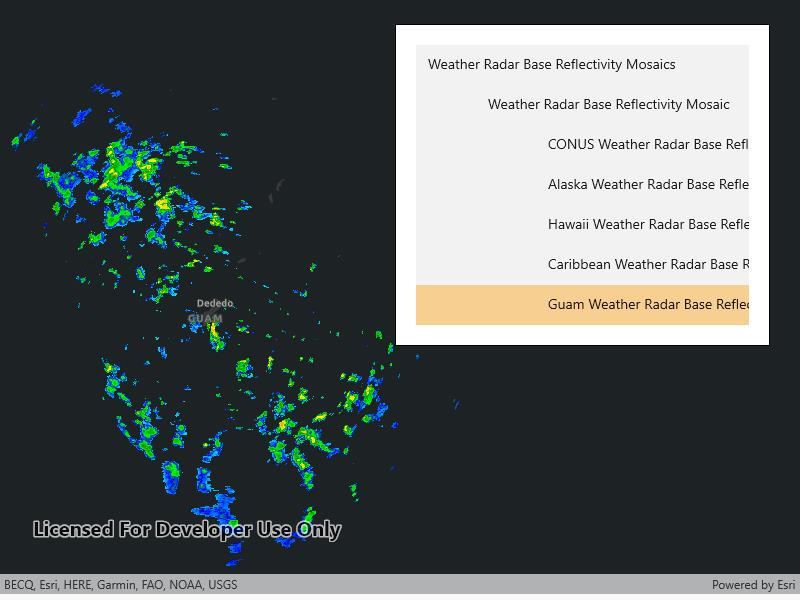
Connect to a WMS service and show the available layers and sublayers.
Use case
WMS services often contain many layers and sublayers. Presenting the layers and sublayers in a UI allows you to explore what is available in the service and add individual layers to a map.
How to use the sample
- Open the sample. A hierarchical list of layers and sublayers will appear.
- Select a layer to enable it for display. If the layer has any children, the children will also be selected.
How it works
- A is created and loaded.
- has a property, which is a . has a object for each layer (excluding sublayers) in the collection.
- A method is called to recursively discover sublayers for each layer. Layers are wrapped in a view model and added to a list.
- The view model has a method which recursively selects or deselects itself and sublayers.
- The view model tracks the children and parent of each layer.
- Once the layer selection has been updated, another method is called to create a new from a list of selected .
Relevant API
- WmsLayer(List
) - WmsLayerInfo
- WmsService
- WmsServiceInfo
About the data
This sample shows Weather Radar Base Reflectivity Mosaics produced by the US NOAA National Weather Service. The service provides weather radar data from the NWS & OAR Multi-Radar/Multi-Sensor (MRMS) System.
Tags
catalog, OGC, web map service, WMS
Sample Code
<UserControl x:Class="ArcGIS.WinUI.Samples.WmsServiceCatalog.WmsServiceCatalog" xmlns="http://schemas.microsoft.com/winfx/2006/xaml/presentation" xmlns:x="http://schemas.microsoft.com/winfx/2006/xaml" xmlns:esriUI="using:Esri.ArcGISRuntime.UI.Controls"> <Grid> <esriUI:MapView x:Name="MyMapView" /> <Border Style="{StaticResource BorderStyle}"> <Grid> <Grid.RowDefinitions> <RowDefinition Height="auto" /> <RowDefinition Height="*" /> </Grid.RowDefinitions> <TextBlock Grid.Row="0" FontWeight="Bold" Text="Select a WMS layer from the list for display:" /> <ScrollViewer Grid.Row="1" HorizontalScrollBarVisibility="Visible" HorizontalScrollMode="Enabled"> <ListBox x:Name="MyDisplayList" SelectionChanged="ListSelectionChanged" SelectionMode="Single" /> </ScrollViewer> </Grid> </Border> </Grid></UserControl>// Copyright 2017 Esri.//// Licensed under the Apache License, Version 2.0 (the "License"); you may not use this file except in compliance with the License.// You may obtain a copy of the License at: http://www.apache.org/licenses/LICENSE-2.0//// Unless required by applicable law or agreed to in writing, software distributed under the License is distributed on an// "AS IS" BASIS, WITHOUT WARRANTIES OR CONDITIONS OF ANY KIND, either express or implied. See the License for the specific// language governing permissions and limitations under the License.
using Esri.ArcGISRuntime.Mapping;using Esri.ArcGISRuntime.Ogc;using System;using System.Collections.Generic;using System.Collections.ObjectModel;using System.Linq;using System.Threading.Tasks;
namespace ArcGIS.WinUI.Samples.WmsServiceCatalog{ [ArcGIS.Samples.Shared.Attributes.Sample( name: "WMS service catalog", category: "Layers", description: "Connect to a WMS service and show the available layers and sublayers.", instructions: "1. Open the sample. A hierarchical list of layers and sublayers will appear.", tags: new[] { "OGC", "WMS", "catalog", "web map service" })] public partial class WmsServiceCatalog { // Hold the URL to the WMS service providing the US NOAA National Weather Service forecast weather chart. private readonly Uri _wmsUrl = new Uri( "https://nowcoast.noaa.gov/geoserver/weather_radar/wms?SERVICE=WMS&VERSION=1.3.0&REQUEST=GetCapabilities");
// Hold a list of LayerDisplayVM; this is the ViewModel. private ObservableCollection<LayerDisplayVM> _viewModelList = new ObservableCollection<LayerDisplayVM>();
public WmsServiceCatalog() { InitializeComponent();
_ = Initialize(); }
private async Task Initialize() { // Apply an imagery basemap to the map. MyMapView.Map = new Map(BasemapStyle.ArcGISDarkGray);
// Create the WMS Service. var service = new WmsService(_wmsUrl);
try { // Load the WMS Service. await service.LoadAsync();
// Get the service info (metadata) from the service. WmsServiceInfo info = service.ServiceInfo;
// Get the list of layer infos. foreach (var layerInfo in info.LayerInfos) { LayerDisplayVM.BuildLayerInfoList(new LayerDisplayVM(layerInfo, null), _viewModelList); }
// Update the map display based on the viewModel. UpdateMapDisplay(_viewModelList);
// Update the list of layers. MyDisplayList.ItemsSource = _viewModelList; } catch (Exception e) { await new MessageDialog2(e.ToString(), "Error").ShowAsync(); } }
/// <summary> /// Updates the map with the latest layer selection. /// </summary> private void UpdateMapDisplay(ObservableCollection<LayerDisplayVM> displayList) { // Remove all existing layers. MyMapView.Map.OperationalLayers.Clear();
// Get a list of selected LayerInfos. List<WmsLayerInfo> selectedLayers = displayList.Where(vm => vm.IsEnabled).Select(vm => vm.Info).ToList();
// Only WMS layer infos without sub layers can be used to construct a WMS layer. // Group layers that have sub layers must be excluded. selectedLayers = selectedLayers.Where(info => info.LayerInfos.Count == 0).ToList();
// Return if no layers selected. if (!selectedLayers.Any()) { return; }
// Create a new WmsLayer from the selected layers. var myLayer = new WmsLayer(selectedLayers);
// Add the layer to the map. MyMapView.Map.OperationalLayers.Add(myLayer); }
/// <summary> /// Takes action once a new layer selection is made. /// </summary> private void ListSelectionChanged(object sender, Microsoft.UI.Xaml.Controls.SelectionChangedEventArgs e) { // Deselect removed layers. foreach (LayerDisplayVM item in e.RemovedItems) { item.Select(false); }
// Select added layers. foreach (LayerDisplayVM item in e.AddedItems) { item.Select(); }
// Update the map. UpdateMapDisplay(_viewModelList); } }
/// <summary> /// This is a ViewModel class for maintaining the state of a layer selection. /// Typically, this would go in a separate file, but it is included here for clarity. /// </summary> public class LayerDisplayVM { public WmsLayerInfo Info { get; }
// True if layer is selected for display. public bool IsEnabled { get; set; }
// Keeps track of how much indentation should be added (to simulate a tree view in a list). private int NestLevel { get { if (Parent == null) { return 0; }
return Parent.NestLevel + 1; } }
private List<LayerDisplayVM> Children { get; set; }
private LayerDisplayVM Parent { get; }
public LayerDisplayVM(WmsLayerInfo info, LayerDisplayVM parent) { Info = info; Parent = parent; }
// Select this layer and all child layers. public void Select(bool isSelected = true) { IsEnabled = isSelected; if (Children == null) { return; }
foreach (var child in Children) { child.Select(isSelected); } }
// Override ToString to enhance display formatting. public override string ToString() { return new String('\t', NestLevel) + Info.Title; }
public static void BuildLayerInfoList(LayerDisplayVM root, IList<LayerDisplayVM> result) { // Add the root node to the result list. result.Add(root);
// Initialize the child collection for the root. root.Children = new List<LayerDisplayVM>();
// Recursively add sublayers. foreach (WmsLayerInfo layer in root.Info.LayerInfos) { // Create the view model for the sublayer. var layerVM = new LayerDisplayVM(layer, root);
// Add the sublayer to the root's sublayer collection. root.Children.Add(layerVM);
// Recursively add children. BuildLayerInfoList(layerVM, result); } } }}