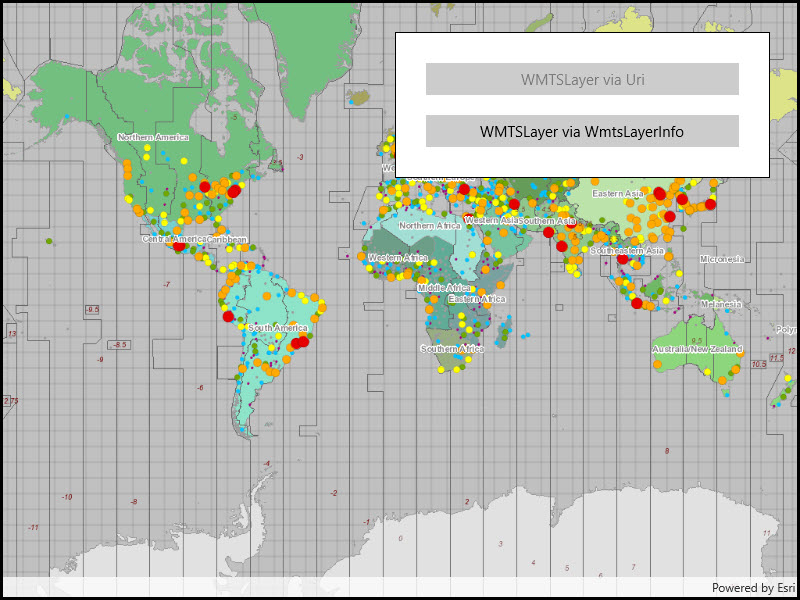
Display a layer from a Web Map Tile Service.
Use case
WMTS services can have several layers. You can use Runtime to explore the layers available from a service. This would commonly be used to enable a browsing experience where users can choose which layers they want to display at run time.
How to use the sample
The layer will be displayed automatically. Use the buttons to choose a different method of loading the layer.
How it works
To display a WMTS layer directly from a URL:
- Create a object using the URL of the WMTS service.
- Create a object with the ID of the layer to display.
To explore layers from a WMTS service:
- Create a object using the URL of the WMTS service.
- After loading the WMTS service, get the list of objects from the service info of the WMTS service.
- Use one of the layer infos to create the WMTS layer.
- Create a basemap with the WMTS layer and set it to the map.
Relevant API
- WmtsLayer
- WmtsLayerInfo
- WmtsService
- WmtsServiceInfo
About the data
We acknowledge the use of imagery provided by services from the Global Imagery Browse Services (GIBS), operated by the NASA/GSFC/Earth Science Data and Information System (ESDIS) with funding provided by NASA/HQ.
Tags
layer, OGC, raster, tiled, web map tile service
Sample Code
<UserControl x:Class="ArcGIS.WinUI.Samples.WMTSLayer.WMTSLayer" xmlns="http://schemas.microsoft.com/winfx/2006/xaml/presentation" xmlns:x="http://schemas.microsoft.com/winfx/2006/xaml" xmlns:esriUI="using:Esri.ArcGISRuntime.UI.Controls"> <Grid> <esriUI:MapView x:Name="MyMapView" /> <Border Style="{StaticResource BorderStyle}"> <StackPanel> <Button x:Name="UriButton" Margin="10" HorizontalAlignment="Stretch" Click="UriButton_Click" Content="WMTSLayer via Uri" IsEnabled="false" /> <Button x:Name="InfoButton" Margin="10" HorizontalAlignment="Stretch" Click="InfoButton_Click" Content="WMTSLayer via WmtsLayerInfo" /> </StackPanel> </Border> </Grid></UserControl>// Copyright 2017 Esri.//// Licensed under the Apache License, Version 2.0 (the "License"); you may not use this file except in compliance with the License.// You may obtain a copy of the License at: http://www.apache.org/licenses/LICENSE-2.0//// Unless required by applicable law or agreed to in writing, software distributed under the License is distributed on an// "AS IS" BASIS, WITHOUT WARRANTIES OR CONDITIONS OF ANY KIND, either express or implied. See the License for the specific// language governing permissions and limitations under the License.
using Esri.ArcGISRuntime.Mapping;using Esri.ArcGISRuntime.Ogc;using Microsoft.UI.Xaml;using System;using System.Linq;using System.Threading.Tasks;
namespace ArcGIS.WinUI.Samples.WMTSLayer{ [ArcGIS.Samples.Shared.Attributes.Sample( name: "WMTS layer", category: "Layers", description: "Display a layer from a Web Map Tile Service.", instructions: "The layer will be displayed automatically. Use the buttons to choose a different method of loading the layer.", tags: new[] { "OGC", "layer", "raster", "tiled", "web map tile service" })] public partial class WMTSLayer { public WMTSLayer() { InitializeComponent(); _ = LoadWMTSLayer(true); }
private void UriButton_Click(object sender, RoutedEventArgs e) { //Load the WMTS layer using Uri method. _ = LoadWMTSLayer(true);
// Disable and enable the appropriate buttons. UriButton.IsEnabled = false; InfoButton.IsEnabled = true; }
private void InfoButton_Click(object sender, RoutedEventArgs e) { //Load the WMTS layer using layer info. _ = LoadWMTSLayer(false);
// Disable and enable the appropriate buttons. UriButton.IsEnabled = true; InfoButton.IsEnabled = false; }
private async Task LoadWMTSLayer(bool uriMode) { try { // Create a new map. Map myMap = new Map();
// Get the basemap from the map. Basemap myBasemap = myMap.Basemap;
// Get the layer collection for the base layers. LayerCollection myLayerCollection = myBasemap.BaseLayers;
// Create an instance for the WMTS layer. WmtsLayer myWmtsLayer;
// Define the Uri to the WMTS service. Uri wmtsUri = new Uri("https://gibs.earthdata.nasa.gov/wmts/epsg4326/best");
if (uriMode) { // Create a WMTS layer using a Uri and provide an Id value. myWmtsLayer = new WmtsLayer(wmtsUri, "SRTM_Color_Index"); } else { // Define a new instance of the WMTS service. WmtsService myWmtsService = new WmtsService(wmtsUri);
// Load the WMTS service. await myWmtsService.LoadAsync();
// Get the service information (i.e. metadata) about the WMTS service. WmtsServiceInfo myWmtsServiceInfo = myWmtsService.ServiceInfo;
// Obtain the read only list of WMTS layer info objects, and select the one with the desired Id value. WmtsLayerInfo info = myWmtsServiceInfo.LayerInfos.Single(l => l.Id == "SRTM_Color_Index");
// Create a WMTS layer using WMTS layer info. myWmtsLayer = new WmtsLayer(info); }
// Add the WMTS layer to the layer collection of the map. myLayerCollection.Add(myWmtsLayer);
// Assign the map to the MapView. MyMapView.Map = myMap; } catch (Exception ex) { var messageDlg = new MessageDialog2(ex.ToString(), "Error"); await messageDlg.ShowAsync(); } } }}