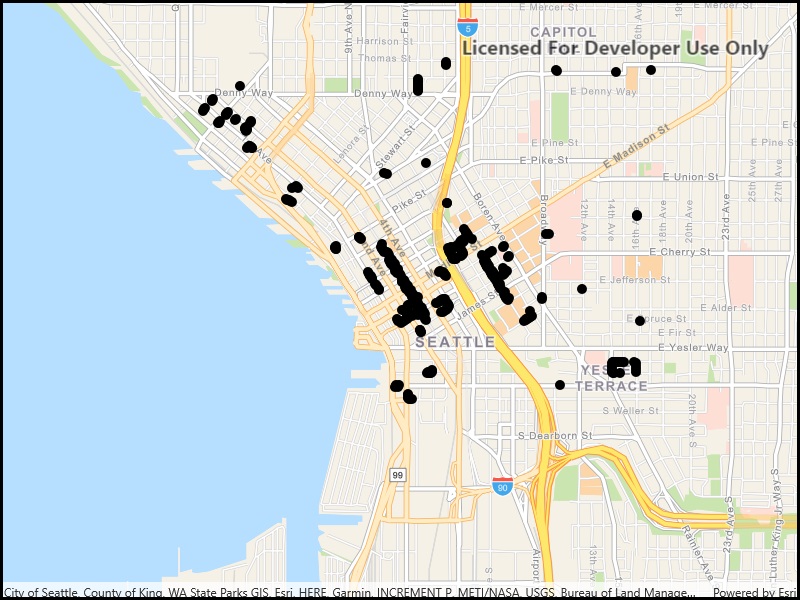
Load a WFS feature table using an XML query.
Use case
Runtime
objects can’t represent all possible queries that can be made against a WFS feature service. For example, Runtime query parameters don’t support wildcard searches. You can provide queries as raw XML strings, allowing you to access query functionality not available with .How to use the sample
Run the sample and view the data loaded from the the WFS feature table.
How it works
- Create a and a to visualize the table.
- Set the feature request mode to .
- Call to populate the table with only those features returned by the XML query.
Relevant API
- FeatureLayer
- WfsFeatureTable
- WfsFeatureTable.AxisOrder
- WfsFeatureTable.PopulateFromServiceAsync
About the data
This service shows trees in downtown Seattle and the surrounding area. An XML-encoded
request is used to limit results to only trees of the genus Tilia.For additional information, see the underlying service on ArcGIS Online.
Tags
feature, OGC, query, service, web, WFS, XML
Sample Code
<UserControl x:Class="ArcGIS.WinUI.Samples.WfsXmlQuery.WfsXmlQuery" xmlns="http://schemas.microsoft.com/winfx/2006/xaml/presentation" xmlns:x="http://schemas.microsoft.com/winfx/2006/xaml" xmlns:esriUI="using:Esri.ArcGISRuntime.UI.Controls"> <Grid> <esriUI:MapView x:Name="MyMapView" /> </Grid></UserControl>// Copyright 2019 Esri.//// Licensed under the Apache License, Version 2.0 (the "License"); you may not use this file except in compliance with the License.// You may obtain a copy of the License at: http://www.apache.org/licenses/LICENSE-2.0//// Unless required by applicable law or agreed to in writing, software distributed under the License is distributed on an// "AS IS" BASIS, WITHOUT WARRANTIES OR CONDITIONS OF ANY KIND, either express or implied. See the License for the specific// language governing permissions and limitations under the License.
using Esri.ArcGISRuntime.Data;using Esri.ArcGISRuntime.Mapping;using System;using System.Diagnostics;using System.Threading.Tasks;
namespace ArcGIS.WinUI.Samples.WfsXmlQuery{ [ArcGIS.Samples.Shared.Attributes.Sample( name: "Load WFS with XML query", category: "Layers", description: "Load a WFS feature table using an XML query.", instructions: "Run the sample and view the data loaded from the the WFS feature table.", tags: new[] { "OGC", "WFS", "XML", "feature", "query", "service", "web" })] public partial class WfsXmlQuery { // Constants for the service URL, table name, and the query. // To learn more about specifying filters in OGC technologies, see https://www.opengeospatial.org/standards/filter. private const string XmlQuery = @"<wfs:GetFeature service=""WFS"" version=""2.0.0"" xmlns:Seattle_Downtown_Features=""https://dservices2.arcgis.com/ZQgQTuoyBrtmoGdP/arcgis/services/Seattle_Downtown_Features/WFSServer"" xmlns:wfs=""http://www.opengis.net/wfs/2.0"" xmlns:fes=""http://www.opengis.net/fes/2.0"" xmlns:gml=""http://www.opengis.net/gml/3.2""> <wfs:Query typeNames=""Seattle_Downtown_Features:Trees""> <fes:Filter> <fes:PropertyIsLike wildCard=""*"" escapeChar=""\""> <fes:ValueReference>Trees:SCIENTIFIC</fes:ValueReference> <fes:Literal>Tilia *</fes:Literal> </fes:PropertyIsLike> </fes:Filter> </wfs:Query></wfs:GetFeature>";
// Constants for the table name and URL. private const string TableUrl = "https://dservices2.arcgis.com/ZQgQTuoyBrtmoGdP/arcgis/services/Seattle_Downtown_Features/WFSServer?service=wfs&request=getcapabilities";
// Note that the layer name is defined by the service. The layer name can be accessed via WfsLayerInfo.Name. private const string LayerName = "Seattle_Downtown_Features:Trees";
public WfsXmlQuery() { InitializeComponent(); _ = Initialize(); }
private async Task Initialize() { // Create the map with basemap. MyMapView.Map = new Map(BasemapStyle.ArcGISNavigation);
try { // Create the WFS feature table from URL and name. WfsFeatureTable wfsTable = new WfsFeatureTable(new Uri(TableUrl), LayerName);
// Set the feature request mode to manual. Only calls to PopulateFromService will load features. // Features will not be populated automatically when the user pans and zooms the layer. wfsTable.FeatureRequestMode = FeatureRequestMode.ManualCache;
// Load the WFS feature table. await wfsTable.LoadAsync();
// Create a feature layer to visualize the WFS feature table. FeatureLayer statesLayer = new FeatureLayer(wfsTable);
// Add the layer to the map. MyMapView.Map.OperationalLayers.Add(statesLayer);
// Populate the WFS feature table with the XML query. await wfsTable.PopulateFromServiceAsync(XmlQuery, true);
// Zoom to the extent of the query results. await MyMapView.SetViewpointGeometryAsync(wfsTable.Extent, 50); } catch (Exception e) { Debug.WriteLine(e.ToString()); await new MessageDialog2(e.ToString(), "Couldn't populate table with XML query.").ShowAsync(); } } }}