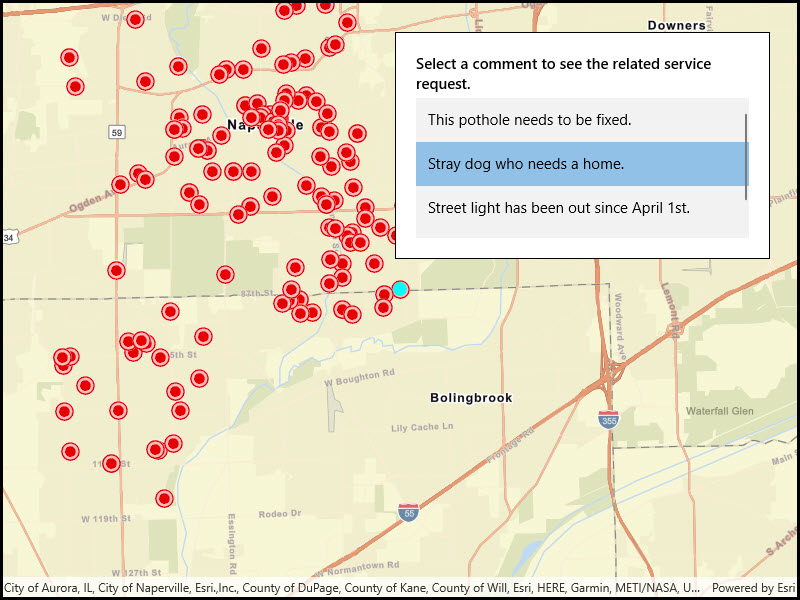
Find features in a spatial table related to features in a non-spatial table.
Use case
The non-spatial tables contained by a map service may contain additional information about sublayer features. Such information can be accessed by traversing table relationships defined in the service.
How to use the sample
Once the map image layer loads, a list view will be populated with comment data from non-spatial features. Click on one of the comments to query related spatial features and display the first result on the map.
How it works
- Create an with the URL of a map image service.
- Load the layer and get one of its tables with .
- To query the table, create a object.You can set to filter the request features.
- Use to get a object.
- The is an iterable, so simply loop through it to get each result .
- To query for related features, get the table’s relationship info with . This returns a list of objects. Choose which one to base your query on.
- Now create passing in the . To query related features, use .
- This returns a list of objects, each containing a set of related features.
Relevant API
- ArcGISFeature
- ArcGISMapImageLayer
- Feature
- FeatureQueryResult
- QueryParameters
- RelatedFeatureQueryResult
- RelatedQueryParameters
- RelationshipInfo
- ServiceFeatureTable
About the data
This sample uses the ServiceRequests map image server, which is used to collect non-emergency requests for service from the general public.
Additional information
You can use
to recursively load all sublayers and tables associated with a map image layer.Tags
features, query, related features, search
Sample Code
<UserControl x:Class="ArcGIS.WinUI.Samples.QueryRelatedFeaturesFromNonSpatialTable.QueryRelatedFeaturesFromNonSpatialTable" xmlns="http://schemas.microsoft.com/winfx/2006/xaml/presentation" xmlns:x="http://schemas.microsoft.com/winfx/2006/xaml" xmlns:esriUI="using:Esri.ArcGISRuntime.UI.Controls"> <Grid> <esriUI:MapView x:Name="MyMapView" /> <Border Style="{StaticResource BorderStyle}"> <Grid> <Grid.RowDefinitions> <RowDefinition Height="auto" /> <RowDefinition Height="*" /> </Grid.RowDefinitions> <TextBlock Grid.Row="0" FontWeight="SemiBold" Text="Select a comment to see the related service request." TextWrapping="Wrap" /> <ListBox x:Name="CommentsListBox" Grid.Row="1" MaxHeight="140" Margin="0,5,0,0" SelectionChanged="CommentsListBox_SelectionChanged" SelectionMode="Single"> <ListBox.ItemTemplate> <DataTemplate> <TextBlock Text="{Binding Attributes[comments]}" /> </DataTemplate> </ListBox.ItemTemplate> </ListBox> </Grid> </Border> </Grid></UserControl>// Copyright 2018 Esri.//// Licensed under the Apache License, Version 2.0 (the "License"); you may not use this file except in compliance with the License.// You may obtain a copy of the License at: http://www.apache.org/licenses/LICENSE-2.0//// Unless required by applicable law or agreed to in writing, software distributed under the License is distributed on an// "AS IS" BASIS, WITHOUT WARRANTIES OR CONDITIONS OF ANY KIND, either express or implied. See the License for the specific// language governing permissions and limitations under the License.
using Esri.ArcGISRuntime.ArcGISServices;using Esri.ArcGISRuntime.Data;using Esri.ArcGISRuntime.Geometry;using Esri.ArcGISRuntime.Mapping;using Esri.ArcGISRuntime.Symbology;using Esri.ArcGISRuntime.UI;using System;using System.Collections.Generic;using System.Drawing;using System.Linq;using System.Threading.Tasks;
namespace ArcGIS.WinUI.Samples.QueryRelatedFeaturesFromNonSpatialTable{ [ArcGIS.Samples.Shared.Attributes.Sample( name: "Query related features from non spatial table", category: "Layers", description: "Find features in a spatial table related to features in a non-spatial table.", instructions: "Once the map image layer loads, a list view will be populated with comment data from non-spatial features. Click on one of the comments to query related spatial features and display the first result on the map.", tags: new[] { "features", "query", "related features", "search" })] public partial class QueryRelatedFeaturesFromNonSpatialTable { // A graphics overlay for showing selected features. private GraphicsOverlay _selectedFeaturesOverlay;
public QueryRelatedFeaturesFromNonSpatialTable() { InitializeComponent();
// Initialize the map and show the list of comments. _ = Initialize(); }
private async Task Initialize() { // Create a new Map with a vector streets basemap. Map myMap = new Map(BasemapStyle.ArcGISStreets);
// Create the URI to the Service Requests map service. Uri serviceRequestUri = new Uri("https://sampleserver6.arcgisonline.com/arcgis/rest/services/ServiceRequest/MapServer");
// Create a new ArcGISMapImageLayer that uses the service URI. ArcGISMapImageLayer serviceRequestsMapImageLayer = new ArcGISMapImageLayer(serviceRequestUri);
try { // Load all sublayers and tables contained by the map image layer. await serviceRequestsMapImageLayer.LoadTablesAndLayersAsync();
// Set the initial map extent to the extent of all service request features. Envelope requestsExtent = serviceRequestsMapImageLayer.FullExtent; myMap.InitialViewpoint = new Viewpoint(requestsExtent);
// Add the layer to the map. myMap.OperationalLayers.Add(serviceRequestsMapImageLayer);
// Get the service request comments table from the map image layer. ServiceFeatureTable commentsTable = serviceRequestsMapImageLayer.Tables[0];
// Create query parameters to get all non-null service request comment records (features) from the table. QueryParameters queryToGetNonNullComments = new QueryParameters { WhereClause = "requestid <> '' AND comments <> ''" };
// Query the comments table to get the non-null records. FeatureQueryResult commentQueryResult = await commentsTable.QueryFeaturesAsync(queryToGetNonNullComments, QueryFeatureFields.LoadAll);
// Show the records from the service request comments table in the list view control. CommentsListBox.ItemsSource = commentQueryResult.ToList();
// Create a graphics overlay to show selected features and add it to the map view. _selectedFeaturesOverlay = new GraphicsOverlay(); MyMapView.GraphicsOverlays.Add(_selectedFeaturesOverlay);
// Assign the map to the MapView. MyMapView.Map = myMap; } catch (Exception e) { await new MessageDialog2(e.ToString(), "Error").ShowAsync(); } }
// Handle a new selected comment record in the table view. private async void CommentsListBox_SelectionChanged(object sender, Microsoft.UI.Xaml.Controls.SelectionChangedEventArgs e) { // Clear selected features from the graphics overlay. _selectedFeaturesOverlay.Graphics.Clear();
// Get the selected comment feature. If there is no selection, return. ArcGISFeature selectedComment = e.AddedItems[0] as ArcGISFeature; if (selectedComment == null) { return; }
// Get the map image layer that contains the service request sublayer and the service request comments table. ArcGISMapImageLayer serviceRequestsMapImageLayer = (ArcGISMapImageLayer)MyMapView.Map.OperationalLayers[0];
// Get the (non-spatial) table that contains the service request comments. ServiceFeatureTable commentsTable = serviceRequestsMapImageLayer.Tables[0];
// Get the relationship that defines related service request features for features in the comments table (this is the first and only relationship). RelationshipInfo commentsRelationshipInfo = commentsTable.LayerInfo.RelationshipInfos.FirstOrDefault();
// Create query parameters to get the related service request for features in the comments table. RelatedQueryParameters relatedQueryParams = new RelatedQueryParameters(commentsRelationshipInfo) { ReturnGeometry = true };
try { // Query the comments table to get the related service request feature for the selected comment. IReadOnlyList<RelatedFeatureQueryResult> relatedRequestsResult = await commentsTable.QueryRelatedFeaturesAsync(selectedComment, relatedQueryParams);
// Get the first result. RelatedFeatureQueryResult result = relatedRequestsResult.FirstOrDefault();
// Get the first feature from the result. If it's null, warn the user and return. ArcGISFeature serviceRequestFeature = result.FirstOrDefault() as ArcGISFeature; if (serviceRequestFeature == null) { var message = new MessageDialog2("Related feature not found.", "No Feature"); await message.ShowAsync();
return; }
// Load the related service request feature (so its geometry is available). await serviceRequestFeature.LoadAsync();
// Get the service request geometry (point). MapPoint serviceRequestPoint = serviceRequestFeature.Geometry as MapPoint;
// Create a cyan marker symbol to display the related feature. Symbol selectedRequestSymbol = new SimpleMarkerSymbol(SimpleMarkerSymbolStyle.Circle, Color.Cyan, 14);
// Create a graphic using the service request point and marker symbol. Graphic requestGraphic = new Graphic(serviceRequestPoint, selectedRequestSymbol);
// Add the graphic to the graphics overlay and zoom the map view to its extent. _selectedFeaturesOverlay.Graphics.Add(requestGraphic); await MyMapView.SetViewpointCenterAsync(serviceRequestPoint, 150000); } catch (Exception ex) { await new MessageDialog2(ex.ToString(), "Error").ShowAsync(); } } }}