import SceneLayer from "@arcgis/core/layers/SceneLayer.js";const SceneLayer = await $arcgis.import("@arcgis/core/layers/SceneLayer.js");- Since
- ArcGIS Maps SDK for JavaScript 4.0
- Overview
- Publishing a SceneLayer
- Data Visualization
- Filtering data
- Popups
- Querying
- Get geometry/extent of SceneLayers
- Editing
Overview
The SceneLayer is a layer type designed for on-demand streaming and displaying large amounts of data in a SceneView. SceneLayers support two geometry types: Point and 3D Objects (e.g. Buildings).
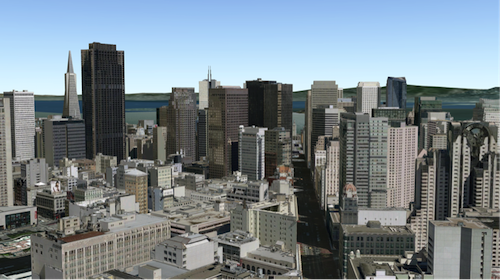
You can find many samples of SceneLayers in ArcGIS Online by searching the gallery.

Publishing a SceneLayer
The SceneLayer displays data coming from a Scene Service. Scene Services can hold large volumes of features in an open format that is suitable for web streaming. The SceneLayer loads these features progressively, starting from coarse representations and refines them to higher detail as necessary for close-up views.
Read More
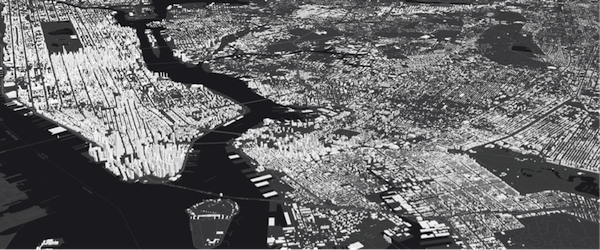
Scene Services can be hosted on ArcGIS Online or ArcGIS Enterprise by uploading a Scene Layer Package (.slpk) or by publishing it from ArcGIS Pro. Depending on how you publish a SceneLayer, there are two types of layers: SceneLayers with an associated feature layer and SceneLayers with cached attributes only. For more information see the Publishing section of the Scene layer guide topic.
The Scene Service is identified by the url or portalItem of the ArcGIS Server REST resource:
let sceneLayer = new SceneLayer({ url: "https://services.arcgis.com/V6ZHFr6zdgNZuVG0/arcgis/rest/services/Paris_3D_Local_WSL2/SceneServer/layers/0"});let sceneLayer = new SceneLayer({ portalItem: { id: "b8138adb2ba7479cadba52d382b34c3b" }});Most of the times it's better to create the SceneLayer from a portal item rather than a scene service url, because the information about an associated feature service is stored at the item level and not at the service level.
If the scene service is requested from a different domain, a CORS enabled server or a proxy is required.
Although the internal logic of displaying a SceneLayer is technically advanced, its usage within the API follows the same model as other layers. You can use renderers to style the SceneLayer and popups to retrieve attribute information and display it to the user.
Data Visualization
Just like other layers, SceneLayers can be visualized using renderers. 3D Objects in a SceneLayer can be styled using MeshSymbol3D with a FillSymbol3DLayer.
let symbol = {  type: "mesh-3d",  // autocasts as new MeshSymbol3D()  symbolLayers: [{    type: "fill",  // autocasts as new FillSymbol3DLayer()    material: { color: "red" }  }]};
sceneLayer.renderer = {  type: "simple",  // autocasts as new SimpleRenderer()  symbol: symbol};
Read More
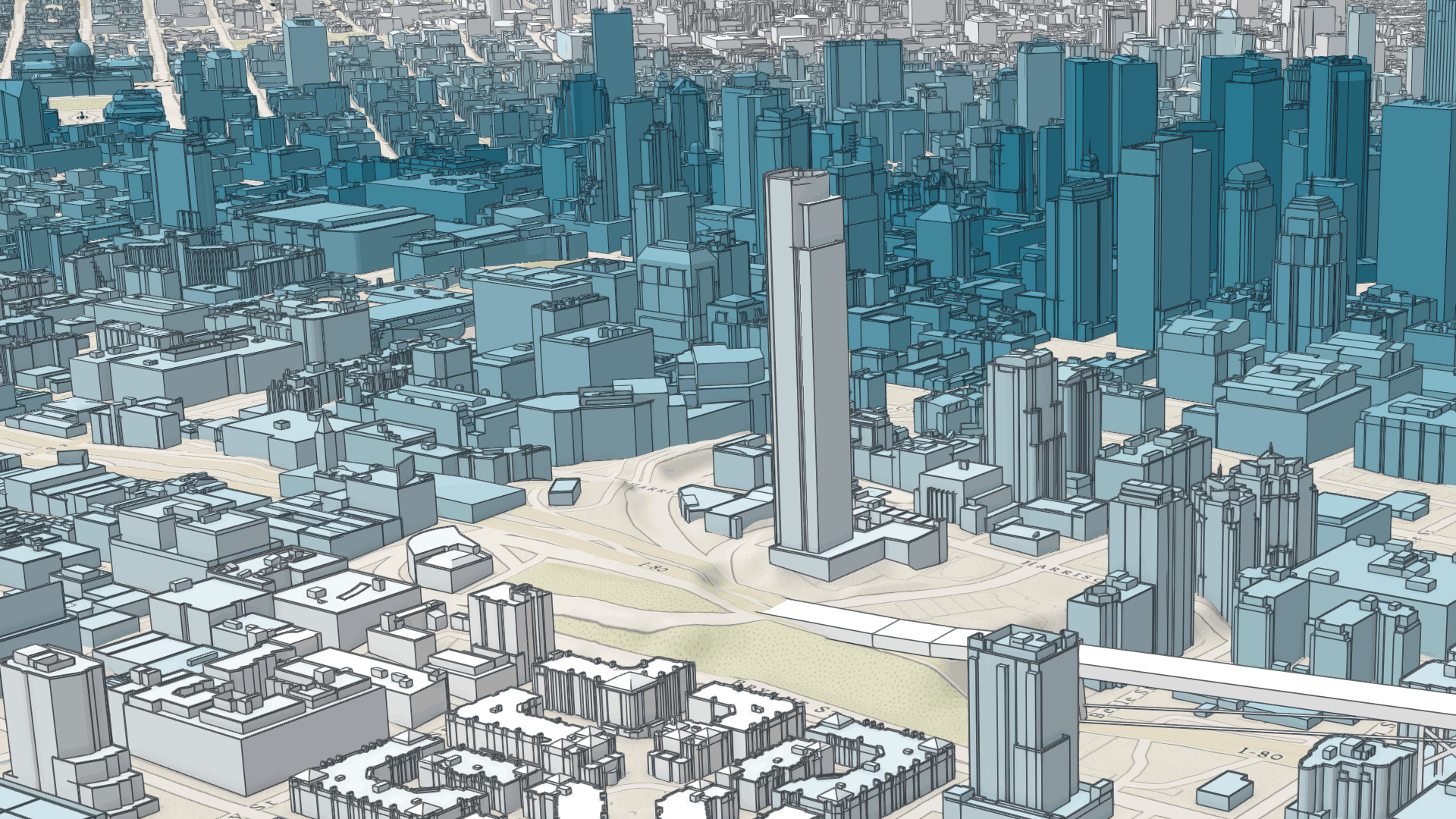
SceneLayers also support visual variables, which allow you to easily map continuous ramps of color, size, and/or opacity to minimum and maximum data values of one of the layer's numeric attribute fields. In the example below, the renderer for the layer uses the color visual variable to shade each feature along a continuous white to blue color ramp. White features represent buildings that are farther away from a public transport station and deep blue features represent buildings that are very close to one (less than 1 minute walking time). Buildings with values between the low and high values are assigned intermediate colors. To improve the perception of shapes of 3D Object SceneLayers, they can also be visualized with edges. See this sample to explore this example further, or read the visualization overview to learn more about data visualization techniques.
Attributes used in data-driven visualizations with visual variables must be accessible to a SceneLayer's cache. For both SceneLayers with cached attributes only and SceneLayer with associated feature layer the attribute values come from the cache. Therefore if the attributes on the feature layer change, the visualization will not update. Keeping the number of cached attributes to a minimum improves the performance of the SceneLayer. Therefore it is best practice to be judicious with the attributes you make available through the layer's cache.
Filtering data
SceneLayers can be filtered using an SQL where clause. Filtering is implemented with the definitionExpression property. This property is evaluated on the client using SceneLayer cached attributes and it only supports standardized SQL.
let layer = new SceneLayer({ url: "https://services.arcgis.com/V6ZHFr6zdgNZuVG0/arcgis/rest/services/Paris_3D_Local_WSL2/SceneServer/layers/0", definitionExpression: "Type_Toit = 'plat' AND H_MAX <= 20"});Another way to filter data is to use a FeatureFilter
on the SceneLayerView. This will only display the features that satisfy the filter conditions.
Setting a FeatureFilter.geometry and a
FeatureFilter.spatialRelationship allows you to filter
features based on the spatialRelationship with the geometry you pass in. Currently only spatial
relationships of type contains, intersects or disjoint are supported.
Alternatively you can also use a SceneFilter on the filter property directly on the layer. It works similar to the FeatureFilter, but you can define more than just one geometry object. This filter is also persisted in WebScenes and when the layer is saved.
For more information see the Filter SceneLayer with FeatureFilter or the Filter SceneLayer with SceneFilter sample.
Popups
Point and 3D Object SceneLayers can have customized popup content using the
popupTemplate property. A SceneLayer with associated feature layer
will query the associated feature layer for attributes. For a SceneLayer with cached attributes only, attributes come from the cache.
Arcade expressions for expressionInfo in a popupTemplate are also supported.

Querying
The SceneLayer and the SceneLayerView both support queries, but act differently.
Querying a SceneLayer retrieves results from the attributes in the associated feature layer.
If the layer doesn't have an associated feature layer, then the query will be rejected with an error. Queries on the layer are powerful because they
are made on all the features in the SceneLayer and they also support advanced queries. Spatial queries are supported when the
Query.spatialRelationship is set to intersects, contains, or disjoint.
Read More
For making attribute based queries on a SceneLayerView you need to specify the required fields in the outFields property of the SceneLayer to ensure that attribute values are available on the client for querying. You can use SceneLayerView.availableFields to inspect which fields are available on the client. On a SceneLayerView spatial queries are possible by setting the Query.geometry and the Query.spatialRelationship of the query. Note that for 3D Object SceneLayers these spatial relationships are evaluated based on the Extent and not the footprint of the feature. The queries on the SceneLayerView return results for features that are currently loaded in the view.
| Query method | queryExtent() (only works if it has an associated feature layer) | SceneLayerView.queryExtent() (works on all scene layers) |
|---|---|---|
| queryExtent | returns the 2D extent of all features that satisfy the query | returns the 3D extent of currently loaded features that satisfy the query |
| queryFeatureCount | returns the number of all features that satisfy the query | returns the number of currently loaded features that satisfy the query |
| queryFeatures | returns all the features that satisfy the query | returns the currently loaded features that satisfy the query |
| queryObjectIds | returns objectIds of all the features that satisfy the query | returns the objectIds of currently loaded features that satisfy the query |
Known Limitations
Spatial queries have the same limitations as those listed in the projectOperator
documentation.
Spatial queries use the Extent of the feature and
not the footprint when calculating the spatial relationship with the query geometry.
This means that a feature might be returned from the query, even though its footprint is not in a spatial relationship with the geometry.
Currently only intersects, contains, and disjoint spatialRelationships are supported on spatial
queries.
Spatial queries are not currently supported if the SceneLayer has any of the following SpatialReferences:
- GDM 2000 (4742) - Malaysia
- Gsterberg (Ferro) (8042) - Austria/Czech Republic
- ISN2016 (8086) - Iceland
- SVY21 (4757) - Singapore
Get geometry/extent of SceneLayers
3D Object SceneLayers do not return the raw geometry as this is a binary format. To obtain spatial information you can query the 2D extent or 3D extent of features in a SceneLayer. The 2D extent can be retrieved for all features (even the ones that are not loaded yet) with queryExtent() method on the SceneLayer. This method only succeeds if the layer has an associated feature layer. The 3D extent can only be queried for the features that are already loaded, by using the SceneLayerView.queryExtent() method on the SceneLayerView.
Point SceneLayers return geometry when setting Query.returnGeometry to true on any of the query methods.
Additionally, the 2D extent of multiple points can be retrieved using queryExtent() on the SceneLayer.
It is not possible to get the extent for a SceneLayer with cached attributes only.
Editing
Scene Layers support full editing of both attributes and geometry, including adding, updating, and deleting 3D models. For geometry editing operations, geometry is represented using Mesh objects.
The simplest way to use this functionality is with the Editor widget, which includes all the necessary workflows out of the box, see: Using the Editor widget.
Prerequisites
The prerequisite for an editable SceneLayer is an associated FeatureLayer with editing and change tracking enabled. Geometry can be edited when in global SceneView.viewingMode and the layer spatial reference is a GCS or when in local SceneView.viewingMode and the layer spatial reference is a PCS and matches the spatial reference of the view. For detailed information on publishing, sharing and working with 3D object layers, see the 3D Object Layer: A Comprehensive Overview blog post.
Applying Edits and Cache Management
For customized editing workflows, the applyEdits() methods can be called directly on the SceneLayer. For more details see the 3D object workflows in the SDK - Essential aspects of the editing workflow.
Edits to a scene layer are applied directly to its associated feature service. However, there are limits to how many live edits can be displayed before the scene layer cache must be rebuilt, see Caching 3D object layers
For example, features with edited attributes are rendered with the updates until the number of edited features exceeds 50,000. After that, the live edits are no longer retrieved, and features are rendered with the older, cached attributes until the cache is rebuilt. Similarly, limits for uploading new models to create features depend on the complexity and size of the models.
Samples and use cases
- Updating attributes such as status or type: Sample - SceneLayer attribute editing.
- Uploading and editing 3D models directly in the scene: Sample - SceneLayer upload 3D models and applyEdits.
Editing Feature Release History
| Version | Key Feature Introduced |
|---|---|
| 4.18 | introduced Attribute editing |
| 4.27 | introduced Geometry (model) add, update, and delete |
| 4.34 | introduced convertMesh for georeferenced models |
Read More
Troubleshooting mesh georeferencing
If meshes are not being displayed, then chances are that this is due a configuration which the API does not support for display and editing.
- First check the SceneView.viewingMode, Scene Layers spatialReference and vertex space of the mesh geometry involved and consult the console of the javascript debugger. If the API rejects display of SceneLayer edits, a warning message is printed.
- If it is determined that an unsupported configuration is used, consider switching the SceneView.viewingMode in your application.
- Alternatively, consider rebuilding the cache. Rebuilding the I3S cache will do some of the projects we won't allow on the client and extent the cases in which 3D object feature edits are displayed.
- If there is no other option, consider changing the data by switching to a supported spatial reference for the required SceneView.viewingMode.
Constructors
Constructor
Parameters
| Parameter | Type | Description | Required |
|---|---|---|---|
| properties | | |
Example
// Typical usagelet layer = new SceneLayer({ // URL to the service url: "https://services.arcgis.com/V6ZHFr6zdgNZuVG0/arcgis/rest/services/Paris_3D_Local_WSL2/SceneServer/layers/0"});modifications?: nil | SceneModifications;modifications?: nil | SceneModifications;modifications?: nil | SceneModifications;Properties
| Property | Type | Class |
|---|---|---|
apiKey inherited | ||
| | ||
capabilities readonly | | |
copyright inherited | ||
customParameters inherited | ||
declaredClass readonly inherited | ||
| | ||
effectiveCapabilities readonly | | |
| | ||
| | ||
| | ||
fields readonly | Field[] | |
fieldsIndex readonly | | |
SceneFilter | null | undefined | | |
| | ||
fullExtent inherited | ||
geometryType readonly | | |
id inherited | ||
LabelClass[] | null | undefined | | |
| | ||
layerId inherited | ||
| | ||
listMode inherited | ||
loaded readonly inherited | ||
loadError readonly inherited | ||
loadStatus readonly inherited | "not-loaded" | "loading" | "failed" | "loaded" | |
loadWarnings readonly inherited | any[] | |
maxScale inherited | ||
minScale inherited | ||
| | ||
opacity inherited | ||
| | ||
parent inherited | Map | Basemap | Ground | GroupLayer | CatalogDynamicGroupLayer | CatalogLayer | null | undefined | |
persistenceEnabled inherited | ||
| | ||
| | ||
portalItem inherited | PortalItem | null | undefined | |
relationships readonly | Relationship[] | null | undefined | |
| | ||
| | ||
spatialReference inherited | ||
TimeExtent | null | undefined | | |
| | ||
| | ||
| | ||
type readonly | "scene" | |
uid readonly inherited | ||
url inherited | ||
| | ||
version readonly inherited | ||
visibilityTimeExtent inherited | TimeExtent | null | undefined | |
visible inherited |
apiKey
- Since
- ArcGIS Maps SDK for JavaScript 4.20
An authorization string used to access a resource or service. This property will append the API key to all requests made by the layer to the service. API keys are generated and managed in the portal. An API key is tied explicitly to an ArcGIS account; it is also used to monitor service usage. Setting a fine-grained API key on a specific class overrides the global API key.
If loading a secure layer with API authentication via a PortalItem, the API key needs to be set on the layer's portalItem property.
Example
// set the api key to access a protected serviceconst layer = new FeatureLayer({ url: serviceUrl, apiKey: "YOUR_API_KEY"}); attributeTableTemplate
- Type
- AttributeTableTemplate | null | undefined
- Since
- ArcGIS Maps SDK for JavaScript 4.31
This property is used to configure the associated layer's FeatureTable. It is meant to configure how the columns display within the table in regard to visibility, column order, and sorting.
This property differs from a FeatureTable's tableTemplate property. The TableTemplate provides more fine-grained control over how the table is rendered within the application by offering more advanced configurations such as custom cell rendering, column formatting, and more. TableTemplate is useful for application-level development that remains within an application. Use the attributeTableTemplate property to access the table's settings across different applications. By using this property, the settings can be saved within a webmap or layer. Please refer to the AttributeTableTemplate and TableTemplate documentation for more information.
- See also
copyright
The copyright text as defined by the scene service.
customParameters
- Type
- CustomParameters | null | undefined
- Since
- ArcGIS Maps SDK for JavaScript 4.18
A list of custom parameters appended to the URL of all resources fetched by the layer.
It's an object with key-value pairs where value is a string.
The layer's refresh() method needs to be called if the customParameters are updated at runtime.
Example
// send a custom parameter to your special servicelet layer = new MapImageLayer({ url: serviceUrl, customParameters: { "key": "my-special-key" }}); definitionExpression
- Since
- ArcGIS Maps SDK for JavaScript 4.3
The SQL where clause used to filter features. Only the features that satisfy the definition expression are kept on the client and displayed in the View. Setting a definition expression is useful when only a subset of the data in the layer should be displayed.
Setting the definition expression of a layer automatically updates all layer views.
If the definition expression is set after the layer has been added to the map, the view will automatically refresh itself to display the features that satisfy the new definition expression.
Deprecation warning
In the future, setting definitionExpression will load all the nodes on the client
and discard the features that don't match the filter. This uses less memory, but the filter
updates will be slower than in the current version.
A definitionExpression should only be used if the filter changes rarely, and removing the filtered
features is desired to free up memory for other data in the scene.
For fast client-side filters use the where property of
SceneLayerView.filter instead.
Example
let layer = new SceneLayer({ url: "https://services.arcgis.com/V6ZHFr6zdgNZuVG0/arcgis/rest/services/Paris_3D_Local_WSL2/SceneServer/layers/0", definitionExpression: "Type_Toit = 'plat' AND H_MAX <= 20" }); elevationInfo
- Type
- ElevationInfo | null | undefined
Specifies how features are placed on the vertical axis (z). See the ElevationInfo sample for an example of how this property may be used.
The relative-to-scene mode does not affect 3D Object SceneLayers. SceneLayers with
Point geometries support all the elevation modes listed in the ElevationInfo.
ElevationInfo.featureExpressionInfo is not supported when the elevation info is specified for this class.
If the elevation info is not specified, the effective elevation depends on the context and could vary per point.
excludeObjectIds
- Type
- Collection<number>
- Since
- ArcGIS Maps SDK for JavaScript 4.23
List of ObjectIDs not being displayed in the view.
featureReduction
- Type
- FeatureReductionSelection | null | undefined
- Since
- ArcGIS Maps SDK for JavaScript 4.4
Configures the method for decluttering overlapping features in the view. If this property is not set (or set to null),
every feature is drawn individually.
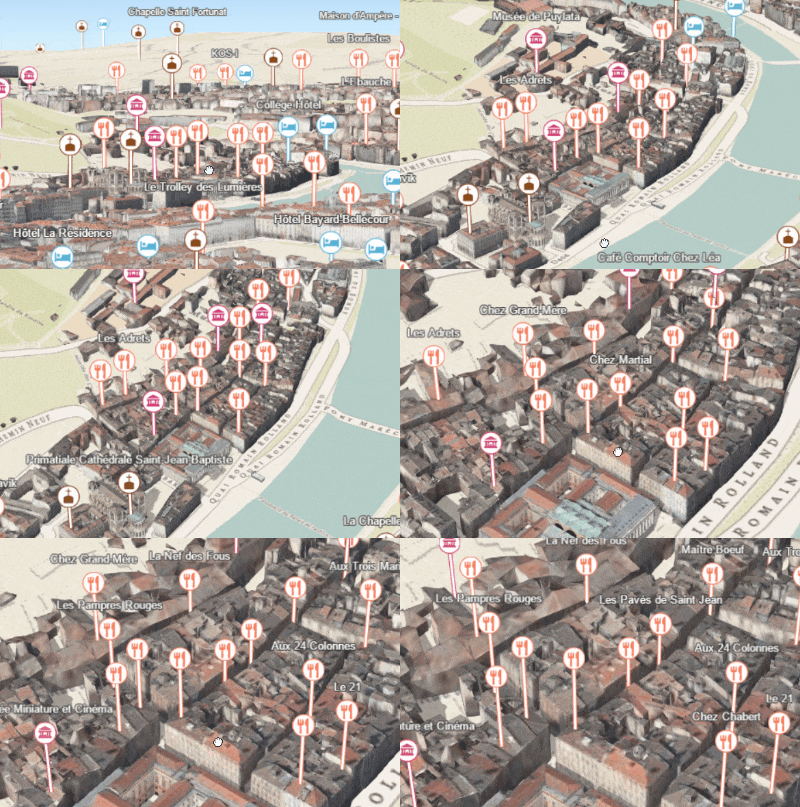
This property is only supported for point scene layers with non-draped Icon or Text symbol layers.
Known Limitation
When applying featureReduction on a point SceneLayer layer updates are slow. This will be addressed in upcoming releases.
- See also
Example
layer.featureReduction = { type: "selection"}; fields
- Type
- Field[]
An array of fields accessible in the layer. Depending on the scene service, fields may have limited support for certain capabilities. Use getFieldUsageInfo() to query the contexts (rendering, labeling, popups or querying) for which a particular field may be used.
fieldsIndex
- Type
- FieldsIndex<Field>
- Since
- ArcGIS Maps SDK for JavaScript 4.12
A convenient property that can be used to make case-insensitive lookups for a field by name. It can also provide a list of the date fields in a layer.
Example
// lookup a field by name. name is case-insensitiveconst field = layer.fieldsIndex.get("SoMeFiEld");
if (field) {  console.log(field.name); // SomeField}
filter
- Type
- SceneFilter | null | undefined
- Since
- ArcGIS Maps SDK for JavaScript 4.24
A collection of polygons SceneFilter.geometries which will mask out different parts of the layer. With the SceneFilter.spatialRelationship property you can define if the content inside or outside of the polygons should be masked.
- See also
Example
const layer = new SceneLayer({ ... })
// create a polygonconst polygon = new Polygon({ ... });
// create the maskingconst filter = new SceneFilter({ geometries: [polygon], spatialRelationship: "contains" });
// add the mask to the SceneLayerlayer.filter = filter;
floorInfo
- Type
- LayerFloorInfo | null | undefined
- Since
- ArcGIS Maps SDK for JavaScript 4.19
When a scene layer is configured as floor-aware, it has a floorInfo property defined. A floor-aware layer is a layer that contains indoor GIS data representing features that can be located on a specific floor of a building.
fullExtent
The full extent of the layer. By default, this is worldwide. This property may be used to set the extent of the view to match a layer's extent so that its features appear to fill the view. See the sample snippet below.
The fullExtent property is always null for GroupLayer.
Example
// Once the layer loads, set the view's extent to the layer's full extentlayer.when(function(){ view.extent = layer.fullExtent;}); labelingInfo
- Type
- LabelClass[] | null | undefined
The label definition for this layer, specified as an array of LabelClass. Use this property to specify labeling properties for the layer such as label expression, placement, and size.
Known Limitations
Each feature can have only one label. Multiple Label classes with different LabelClass.where clauses can be used to have different label styles on different features that belong to the same layer (for example blue labels for lakes and green labels for parks).
- See also
Example
let statesLabelClass = new LabelClass({  labelExpressionInfo: { expression: "$feature.NAME" },  symbol: {    type: "label-3d",  // autocasts as new LabelSymbol3D()    symbolLayers: [{      type: "text",  // autocasts as new TextSymbol3DLayer()      material: { color: [ 49,163,84 ] },      size: 12  // points    }]  }});
sceneLayer.labelingInfo = [ statesLabelClass ];
labelsVisible
- Type
- boolean
Indicates whether to display labels for this layer. If true, labels will
appear as defined in the labelingInfo property.
- See also
- Default value
- true
layerId
- Type
- number
The layer ID, or layer index, of a Scene Service layer. This is particularly useful when loading a single layer with the portalItem property from a service containing multiple layers. You can specify this value in one of two scenarios:
- When loading the layer via the portalItem property.
- When pointing the layer url directly to the Scene Service.
If a layerId is not specified in either of the above scenarios, then the first layer
in the service (layerId = 0) is selected.
Examples
// while these examples use a SceneLayer, the same pattern can be// used for other layers that may be loaded from portalItem ids
// loads the third layer in the given Portal Itemlet layer = new SceneLayer({  portalItem: {    id: "73df987984b24094b848d580eb83b0fb"  },  layerId: 2});
// If not specified, the first layer (layerId: 0) will be returnedlet layer = new SceneLayer({ portalItem: { id: "73df987984b24094b848d580eb83b0fb" }});// Can also be used if URL points to service and not layerlet layer = new SceneLayer({ url: "https://scenesampleserverdev.arcgis.com/arcgis/rest/services/Hosted/DevA_Trees/SceneServer", layerId: 0 // Notice that the url doesn't end with /2});// This code returns the same layer as the previous snippetlet layer = new SceneLayer({ url: "https://scenesampleserverdev.arcgis.com/arcgis/rest/services/Hosted/DevA_Trees/SceneServer/layers/0", // The layer id is specified in the URL}); legendEnabled
- Type
- boolean
Indicates whether the layer will be included in the legend.
- Default value
- true
listMode
- Type
- LayerListMode
Indicates how the layer should display in the Layer List component. The possible values are listed below.
| Value | Description |
|---|---|
| show | The layer is visible in the table of contents. |
| hide | The layer is hidden in the table of contents. |
| hide-children | If the layer is a GroupLayer, BuildingSceneLayer, KMLLayer, MapImageLayer, SubtypeGroupLayer, TileLayer, or WMSLayer, hide the children layers from the table of contents. |
- Default value
- "show"
loadError
The Error object returned if an error occurred while loading.
loadStatus
- Type
- "not-loaded" | "loading" | "failed" | "loaded"
Represents the status of a load() operation.
| Value | Description |
|---|---|
| not-loaded | The object's resources have not loaded. |
| loading | The object's resources are currently loading. |
| loaded | The object's resources have loaded without errors. |
| failed | The object's resources failed to load. See loadError for more details. |
- Default value
- "not-loaded"
loadWarnings
- Type
- any[]
A list of warnings which occurred while loading.
maxScale
- Type
- number
The maximum scale (most zoomed in) at which the layer is visible in the view.
If the map is zoomed in beyond this scale, the layer will not be visible.
A value of 0 means the layer does not have a maximum scale.
The maxScale value should always be smaller than the minScale value,
and greater than or equal to the service specification.
- Default value
- 0
Examples
// The layer will not be visible when the view is zoomed in beyond a scale of 1:1,000layer.maxScale = 1000;// The layer's visibility is not restricted to a maximum scale.layer.maxScale = 0; minScale
- Type
- number
The minimum scale (most zoomed out) at which the layer is visible in the view.
If the map is zoomed out beyond this scale, the layer will not be visible.
A value of 0 means the layer does not have a minimum scale.
The minScale value should always be larger than the maxScale value,
and lesser than or equal to the service specification.
- Default value
- 0
Examples
// The layer will not be visible when the view is zoomed out beyond a scale of 1:3,000,000layer.minScale = 3000000;// The layer's visibility is not restricted to a minimum scale.layer.minScale = 0; opacity
- Type
- number
The opacity of the layer. This value can range between 1 and 0, where 0 is 100 percent
transparent and 1 is completely opaque.
Known Limitations
In a 3D SceneView, modifying opacity is not supported for DimensionLayer, GaussianSplatLayer, IntegratedMesh3DTilesLayer, IntegratedMeshLayer, LineOfSightLayer, PointCloudLayer, ViewshedLayer, and VoxelLayer.
- Default value
- 1
Example
// Makes the layer 50% transparentlayer.opacity = 0.5; outFields
- Since
- ArcGIS Maps SDK for JavaScript 4.12
An array of field names from the service to include with each feature.
To fetch the values from all fields in the layer, use ["*"]. Fields specified in
outFields will be requested alongside with required fields for rendering,
labeling and setting the elevation info for the layer.
The required fields and outFields are used to populate
SceneLayerView.availableFields.
Set this property to include the fields that will be used for client-side
queries
if the fields are not part of required fields used for rendering.
Examples
// Includes all fields from the service in the layersl.outFields = ["*"];// Get the specified fields from the service in the layer// These fields will be added to SceneLayerView.availableFields// along with rendering and labeling fields. Use these fields// for client-side querying.sl.outFields = ["NAME", "POP_2010", "FIPS", "AREA"];// set the outFields for the layer coming from webscenewebscene.when(function () { layer = webscene.layers.at(1); layer.outFields = ["*"];}); parent
- Type
- Map | Basemap | Ground | GroupLayer | CatalogDynamicGroupLayer | CatalogLayer | null | undefined
- Since
- ArcGIS Maps SDK for JavaScript 4.27
The parent to which the layer belongs.
persistenceEnabled
- Type
- boolean
- Default value
- true
popupEnabled
- Type
- boolean
Indicates whether to display popups when features in the layer are clicked. The layer needs to have a popupTemplate to define what
information should be displayed in the popup. Alternatively, a default popup template may be automatically used if
Popup.defaultPopupTemplateEnabled is set to true.
- Default value
- true
popupTemplate
- Type
- PopupTemplate | null | undefined
The popup template for the layer. When set on the layer, the popupTemplate
allows users to access attributes and display their values in the
view's Popup when a feature is selected
using text and/or charts. See the PopupTemplate sample
for an example of how PopupTemplate interacts with a
FeatureLayer. Setting a PopupTemplate
on this layer type is done in the same way as a FeatureLayer.
A default popup template is automatically used if no popupTemplate has been defined when
Popup.defaultPopupTemplateEnabled
is set to true.
portalItem
- Type
- PortalItem | null | undefined
The portal item from which the layer is loaded. If the portal item references
a feature or scene service, then you can specify a single layer
to load with the layer's layerId property.
Loading non-spatial tables
Non-spatial tables can be loaded from service items hosted in ArcGIS Online and ArcGIS Enterprise. This only applies to:
- FeatureLayer if the layer's isTable returns
trueat version 4.17. - SubtypeGroupLayer if the layer's isTable returns
trueat version 4.32.
Examples
// While this example uses FeatureLayer, this same pattern can be// used for other layers that may be loaded from portalItem ids.const layer = new FeatureLayer({ portalItem: { // autocasts as new PortalItem() id: "caa9bd9da1f4487cb4989824053bb847" } // the first layer in the service is returned});// Set hostname when using an on-premise portal (default is ArcGIS Online)// esriConfig.portalUrl = "http://myHostName.esri.com/arcgis";
// While this example uses FeatureLayer, this same pattern can be// used for SceneLayers.const layer = new FeatureLayer({ portalItem: { // autocasts as new PortalItem() id: "8d26f04f31f642b6828b7023b84c2188" }, // loads the third item in the given feature service layerId: 2});// Initialize GeoJSONLayer by referencing a portalItem id pointing to geojson file.const layer = new GeoJSONLayer({ portalItem: new PortalItem({ id: "81e769cd7031482797e1b0768f23c7e1", // optionally define the portal, of the item. // if not specified, the default portal defined is used. // see https://developers.arcgis.com/javascript/latest/references/core/config/#portalUrl portal: new Portal({ url: "https://jsapi.maps.arcgis.com/" }) }});// This snippet loads a table hosted in ArcGIS Online.const table = new FeatureLayer({ portalItem: { // autocasts as esri/portal/PortalItem id: "123f4410054b43d7a0bacc1533ceb8dc" }});
// Before adding the table to the map, it must first be loaded and confirm it is the right type.table.load().then(() => { if (table.isTable) { map.tables.add(table); }});// While this example uses FeatureLayer, this same pattern can be// used for other layers that may be loaded from portalItem ids.const layer = new FeatureLayer({ portalItem: { // autocasts as esri/portal/PortalItem id: "caa9bd9da1f4487cb4989824053bb847", // Set an API key to access a secure portal item configured with API key authentication. apiKey: "APIKEY" }}); relationships
- Type
- Relationship[] | null | undefined
- Since
- ArcGIS Maps SDK for JavaScript 4.28
Array of relationships set up for the layer. Each object in the array describes the layer's Relationship with another layer or table. This property is read from the associated feature layer if available.
- See also
Example
// print out layer's relationship length and each relationship info to consolelayer.when(function () {  console.log("layer relationships", layer.relationships.length);
  layer.relationships.forEach(function (relationship) {    console.log("relationship id:", relationship.id)    console.log("relationship cardinality:", relationship.cardinality)    console.log("relationship key field:", relationship.keyField)    console.log("relationship name:", relationship.name)    console.log("relationship relatedTableId:", relationship.relatedTableId)  });});
renderer
- Type
- RendererUnion
The renderer assigned to the layer. The renderer defines how to visualize each feature in the layer. Depending on the renderer type, features may be visualized with the same symbol, or with varying symbols based on the values of provided attribute fields or functions.
- See also
Example
// all features in the layer will be visualized with// a blue colorlayer.renderer = { type: "simple", // autocasts as new SimpleRenderer() symbol: { type: "mesh-3d", // autocasts as new MeshSymbol3D() symbolLayers: [{ type: "fill", // autocasts as new FillSymbol3DLayer() material: { color: "blue" } }] }}; screenSizePerspectiveEnabled
- Type
- boolean
- Since
- ArcGIS Maps SDK for JavaScript 4.4
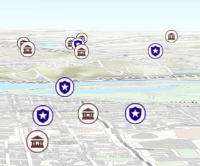
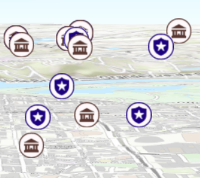
Apply perspective scaling to screen-size symbols in a SceneView.
When true, screen sized objects such as icons,
labels or callouts integrate
better in the 3D scene by applying a certain perspective projection to the
sizing of features. This only applies when using a SceneView.
layer.screenSizePerspectiveEnabled = true
layer.screenSizePerspectiveEnabled = false
Known Limitations
Screen size perspective is currently not optimized for situations where the camera is very near the ground, or for scenes with visual elements located far from the ground surface. In these cases it may be better to turn off screen size perspective. As screen size perspective changes the size based on distance to the camera, it should be set to false when using size visual variables.
- See also
- Default value
- true
spatialReference
- Type
- SpatialReference
The spatial reference of the layer.
timeExtent
- Type
- TimeExtent | null | undefined
- Since
- ArcGIS Maps SDK for JavaScript 4.30
The layer's time extent. When the layer's useViewTime is false, the layer
instructs the view to show data from the layer based on this time extent.
If the useViewTime is true, and both layer and view time extents are set, then features that fall within
the intersection of the view and layer time extents will be displayed.
For example, if the layer's time extent is set to display features between 1970 and 1975 and
the view has a time extent set to 1972-1980, the effective time on the feature layer will be 1972-1975.
Examples
if (!layer.useViewTime) { if (layer.timeExtent) { console.log("Current timeExtent:", layer.timeExtent.start, " - ", layer.timeExtent.end); } else { console.log("The layer will display data within the view's timeExtent."); console.log("Current view.timeExtent:", view.timeExtent.start, " - ", view.timeExtent.end); }}// set the timeExtent on the layer and useViewTime false// In this case, the layer will honor its timeExtent and ignore// the view's timeExtentconst layer = new SceneLayer({ url: "https://services.arcgis.com/V6ZHFr6zdgNZuVG0/arcgis/rest/services/Paris_3D_Local_WSL2/SceneServer", timeExtent: { start: new Date(2014, 4, 18), end: new Date(2014, 4, 19) }, useViewTime: false});// timeExtent is set on the layer and the view// In this case, the layer will display features that fall// within the intersection of view and layer time extents// features within Jan 1, 1976 - Jan 1, 1981 will be displayedconst view = new SceneView({ timeExtent: { start: new Date(1976, 0, 1), end: new Date(2002, 0, 1) }});const layer = new SceneLayer({ url: myUrl, timeExtent: { start: new Date(1974, 0, 1), end: new Date(1981, 0, 1) }}); timeInfo
- Since
- ArcGIS Maps SDK for JavaScript 4.30
TimeInfo provides information such as date fields that store start and end time for each feature and the TimeInfo.fullTimeExtent for the layer.
If timeInfo configuration exists on the service it gets read and used from there. A developer can overwrite or create a timeInfo configuration on initialization. The timeInfo parameters cannot be changed after the layer is loaded.
TimeInfo's startField and endField
can be date, date-only or timestamp-offset field type for SceneLayer
and BuildingComponentSublayer.
timeOffset
- Type
- TimeInterval | null | undefined
- Since
- ArcGIS Maps SDK for JavaScript 4.30
A temporary offset of the time data based on a certain TimeInterval. This allows users to overlay features from two or more time-aware layers with different time extents. For example, if a layer has data recorded for the year 1970, an offset value of 2 years would temporarily shift the data to 1972. You can then overlay this data with data recorded in 1972. A time offset can be used for display purposes only. The query and selection are not affected by the offset.
title
The title of the layer used to identify it in places such as the Legend and LayerList.
When loading a layer by service url, the title is derived from the service name. If the service has several layers, then the title of each layer will be the concatenation of the service name and the layer name. When the layer is loaded from a portal item, the title of the portal item will be used instead. Finally, if a layer is loaded as part of a webmap or a webscene, then the title of the layer as stored in the webmap/webscene will be used.
uid
- Type
- string
- Since
- ArcGIS Maps SDK for JavaScript 4.33
An automatically generated unique identifier assigned to the instance. The unique id is generated each time the application is loaded.
url
The URL of the REST endpoint of the layer or scene service. The URL may either point to a resource on ArcGIS Enterprise or ArcGIS Online.
The layer may be specified using the layerId property when the url points directly to a service and not a specific layer. If layerId is not specified, then it will default to the first layer in the service.
Examples
// Layer from Scene Service on ArcGIS Serverlet sceneLayer = new SceneLayer({ url: "https://services.arcgis.com/V6ZHFr6zdgNZuVG0/arcgis/rest/services/Paris_3D_Local_WSL2/SceneServer/layers/0"});// Can also be used if URL points to service and not layerlet layer = new SceneLayer({ // Notice that the url doesn't end with /0 url: "https://scenesampleserverdev.arcgis.com/arcgis/rest/services/Hosted/DevA_Trees/SceneServer", layerId: 0}); useViewTime
- Type
- boolean
- Since
- ArcGIS Maps SDK for JavaScript 4.30
Determines if the layer will update its temporal data based on the view's
View.timeExtent. When false, the layer will display its temporal
data based on the layer's timeExtent, regardless of changes to the view.
If both view and layer time extents are set while this property is true, then the features that fall within
the intersection of the view and layer time extents will be displayed.
For example, if a layer's time extent is set to display features between 1970 and 1975 and
the view has a time extent set to 1972-1980, the effective time on the feature layer will be 1972-1975.
- Default value
- true
Example
if (layer.useViewTime) { console.log("Displaying data between:", view.timeExtent.start, " - ", view.timeExtent.end);} version
- Type
- SceneServiceVersion
The version of the scene service specification used for this service.
- See also
Example
// Prints the version to the console - e.g. 1.4, 1.5, etc.console.log(layer.version.versionString); visibilityTimeExtent
- Type
- TimeExtent | null | undefined
- Since
- ArcGIS Maps SDK for JavaScript 4.30
Specifies a fixed time extent during which a layer should be visible. This property can be used to configure a layer that does not have time values stored in an attribute field to work with time. Once configured, the TimeSlider widget will display the layer within the set time extent. In the case that only one of the TimeExtent.start or TimeExtent.end date values are available, the layer remains visible indefinitely in the direction where there is no time value.
Aerial imagery can capture seasonal variations in vegetation, water bodies, and land use patterns. For example, in agricultural regions, aerial imageries taken during different growing seasons provide insights into crop health and productivity. Defining a fixed time extent on imageries from specific time periods provides temporal context and facilitates focused analysis based on specific time periods or events.
visible
- Type
- boolean
Indicates if the layer is visible in the View. When false,
the layer may still be added to a Map
instance that is referenced in a view, but its features will not be visible in the view.
- Default value
- true
Example
// The layer is no longer visible in the viewlayer.visible = false;
// Watch for changes in the layer's visibility// and set the visibility of another layer when it changesreactiveUtils.watch(  () => layer.visible,  (visible) => {    if (visible) {      anotherLayer.visible = true;    } else {      anotherLayer.visible = false;    }  });
Methods
| Method | Signature | Class |
|---|---|---|
fromArcGISServerUrl inherited static | fromArcGISServerUrl(params: string | FromArcGISServerUrlParameters): Promise<Layer> | |
fromPortalItem inherited static | fromPortalItem(params: LayerFromPortalItemParameters): Promise<Layer> | |
applyEdits(edits: Edits, options?: EditOptions): Promise<EditsResult> | | |
cancelLoad inherited | cancelLoad(): this | |
clone inherited | clone(): this | |
convertMesh(files: File[], options?: ConvertMeshOptions): Promise<ConvertMeshResult> | | |
createLayerView inherited | createLayerView<T extends LayerView = LayerView>(view: View<T>, options?: AbortOptions): Promise<T> | |
createPopupTemplate(options?: CreatePopupTemplateOptions): PopupTemplate | null | undefined | | |
createQuery(): Query | | |
destroy inherited | destroy(): void | |
emit inherited | emit<Type extends EventNames<this>>(type: Type, event?: this["@eventTypes"][Type]): boolean | |
fetchAttributionData inherited | fetchAttributionData(): Promise<any> | |
getField(fieldName: string): Field | null | undefined | | |
getFieldDomain(fieldName: string, options?: FieldDomainOptions): DomainUnion | null | undefined | | |
getFieldUsageInfo(fieldName: string): object | | |
hasEventListener inherited | hasEventListener<Type extends EventNames<this>>(type: Type): boolean | |
isFulfilled inherited | isFulfilled(): boolean | |
isRejected inherited | isRejected(): boolean | |
isResolved inherited | isResolved(): boolean | |
load inherited | load(options?: AbortOptions | null | undefined): Promise<this> | |
on inherited | on<Type extends EventNames<this>>(type: Type, listener: EventedCallback<this["@eventTypes"][Type]>): ResourceHandle | |
queryAttachments(query: AttachmentQueryProperties, options?: RequestOptions): Promise<Record<string, AttachmentInfo[]>> | | |
queryCachedStatistics(fieldName: string | null | undefined, options?: AbortOptions): Promise<object> | | |
 queryExtent(query?: QueryProperties | null | undefined, options?: AbortOptions): Promise<{
    count: number;
    extent: Extent | null;
}> | | |
queryFeatureCount(query?: QueryProperties | null | undefined, options?: AbortOptions): Promise<number> | | |
queryFeatures(query?: QueryProperties | null | undefined, options?: AbortOptions): Promise<FeatureSet> | | |
queryObjectIds(query?: QueryProperties | null | undefined, options?: AbortOptions): Promise<number[]> | | |
queryRelatedFeatures(relationshipQuery: RelationshipQueryProperties, options?: RequestOptions): Promise<Record<string, FeatureSet>> | | |
queryRelatedFeaturesCount(relationshipQuery: RelationshipQueryProperties, options?: RequestOptions): Promise<Record<string, number>> | | |
save(): Promise<PortalItem> | | |
saveAs(portalItem: PortalItem, options?: SaveAsOptions): Promise<PortalItem> | | |
when inherited | when<TResult1 = this, TResult2 = never>(onFulfilled?: OnFulfilledCallback<this, TResult1> | null | undefined, onRejected?: OnRejectedCallback<TResult2> | null | undefined): Promise<TResult1 | TResult2> |
fromArcGISServerUrl
- Signature
-
fromArcGISServerUrl (params: string | FromArcGISServerUrlParameters): Promise<Layer>
Creates a new layer instance from an ArcGIS Server URL. Depending on the URL, the returned layer type may be a BuildingSceneLayer, CatalogLayer, ElevationLayer, FeatureLayer, GroupLayer, ImageryLayer, ImageryTileLayer, IntegratedMeshLayer, KnowledgeGraphLayer, MapImageLayer, OrientedImageryLayer, PointCloudLayer, SceneLayer, StreamLayer, SubtypeGroupLayer, TileLayer, or VideoLayer.
This is useful when you work with various ArcGIS Server URLs, but you don't necessarily know which layer type(s) they create. This method creates the appropriate layer type for you. In case of a feature service or a scene service, when the URL points to the service and the service has multiple layers, the returned promise will resolve to a GroupLayer.
Beginning with version 4.17, it is possible to load tables from hosted feature services.
This only applies to feature layers, and will successfully load if FeatureLayer.isTable returns true.
The following table details what is returned when loading specific URL types.
| URL | Returns |
|---|---|
| Feature service with one layer | FeatureLayer where FeatureLayer.isTable returns false. |
| Feature service with one table | FeatureLayer where FeatureLayer.isTable returns true. |
| Feature service with more than one layer(s)/table(s) | GroupLayer with layers and tables. |
| Layers with type other than "Feature Layer" are discarded, e.g. Utility Network Layers | N/A |
- See also
Parameters
| Parameter | Type | Description | Required |
|---|---|---|---|
| params | Input parameters for creating the layer. | |
Examples
// This snippet shows how to add a feature layer from an ArcGIS Server URL// Get an ArcGIS Server URL from a custom functionconst arcgisUrl = getLayerUrl();
Layer.fromArcGISServerUrl({  url: arcgisUrl,  properties: {    // set any layer properties here    popupTemplate: new PopupTemplate()  }}).then(function(layer){  // add the layer to the map  map.add(layer);});
// This snippet shows how to add a table from an ArcGIS Server URL// Get an ArcGIS Server URL from a custom functionconst arcgisUrl = getLayerUrl();
Layer.fromArcGISServerUrl({ url: arcgisUrl}).then(function(layer){ // Load the table before it can be used layer.load().then(function() { // Check that it is the right type if (layer.isTable) { // Add table to map's tables collection map.tables.add(layer); } });}); fromPortalItem
- Signature
-
fromPortalItem (params: LayerFromPortalItemParameters): Promise<Layer>
Creates a new layer instance of the appropriate layer class from an ArcGIS Online or ArcGIS Enterprise portal item. If the item points to a feature service with multiple layers, then a GroupLayer is created. If the item points to a service with a single layer, then it resolves to a layer of the same type of class as the service.
Note
- At version 4.29, MediaLayer can be loaded from portal items.
- At version 4.28, GroupLayer and OrientedImageryLayer can be loaded from portal items.
- At version 4.25, CSVLayer and GeoJSONLayer can be loaded from CSV and GeoJSON portal items respectively.
- At version 4.17, it is possible to load tables from feature service items hosted in ArcGIS Online and ArcGIS Enterprise.
This only applies to feature layers, and will successfully load
if FeatureLayer.isTable returns
true.
The following table details what is returned when loading specific item types.
| Item(s) | Returns |
|---|---|
| Feature service with one layer | FeatureLayer where FeatureLayer.isTable returns false. |
| Feature service with one table | FeatureLayer where FeatureLayer.isTable returns true. |
| Feature service with more than one layer(s)/table(s) | GroupLayer with layers and tables. |
| Feature collection with one layer | FeatureLayer where FeatureLayer.isTable returns false. |
| Feature collection with one table | FeatureLayer where FeatureLayer.isTable returns true. |
| Feature collection with more than one layer(s)/table(s) | GroupLayer with layers and tables. |
Known Limitations
- This method does not currently work with OGCFeatureServer portal items.
Parameters
| Parameter | Type | Description | Required |
|---|---|---|---|
| params | The parameters for loading the portal item. | |
Examples
// Create a layer from a specified portal item and add to the mapLayer.fromPortalItem({ portalItem: { // autocasts new PortalItem() id: "8444e275037549c1acab02d2626daaee" }}).then(function(layer){ // add the layer to the map map.add(layer);});// Create a table from a specified portal item and add it to the map's tables collectionLayer.fromPortalItem({ portalItem: { // autocasts new PortalItem() id: "123f4410054b43d7a0bacc1533ceb8dc" // This is a hosted table stored in a feature service }}).then(function(layer) { // Necessary to load the table in order for it to be read correctly layer.load().then(function() { // Confirm this reads as a table if (layer.isTable) { // Add the new table to the map's table collection map.tables.add(layer); } });}); applyEdits
- Signature
-
applyEdits (edits: Edits, options?: EditOptions): Promise<EditsResult>
Applies edits to the features in the associated FeatureLayer. The prerequisite for an editable SceneLayer is an associated FeatureLayer with editing and change tracking enabled. Editing capabilities depend on the capabilities of the associated FeatureLayer. Adding, updating and deleting feature geometry is only available with an associated feature layer that has GLB format enabled.
Features with edits are rendered with updated geometry and attributes and deleted features are hidden when displaying the layer in a SceneView unless there are too many edits. In this case the scene layer cache should be updated to contain the latest changes. The following limitations apply:
- The number of features with attribute updates needs to be smaller than 50,000
- The time it takes to extract what has been edited exceeds 10 seconds
Support for Scene Layer geometry add/update/delete was released at version 4.27. (For an example see SceneLayer upload 3D models and applyEdits) Support for Scene Layer attribute editing was released at version 4.18.
Parameters
| Parameter | Type | Description | Required |
|---|---|---|---|
| edits | Object containing features to be updated. | | |
| options | Additional edit options to specify when editing features. | |
- Returns
- Promise<EditsResult>
When resolved, an EditsResult object is returned.
cancelLoad
- Signature
-
cancelLoad (): this
Cancels a load() operation if it is already in progress.
- Returns
- this
clone
- Signature
-
clone (): this
Creates a deep clone of this object. Any properties that store values by reference will be assigned copies of the referenced values on the cloned instance.
- Returns
- this
A deep clone of the class instance that invoked this method.
convertMesh
- Signature
-
convertMesh (files: File[], options?: ConvertMeshOptions): Promise<ConvertMeshResult>
- Since
- ArcGIS Maps SDK for JavaScript 4.29
Converts a file or list of files to a mesh geometry. These files can be of any file format supported by the
layer. The model will be located according to georeferencing information available in the model, or default to
[0, 0, 0]. The default origin can be overridden by providing a defaultOrigin in the options. You can also
completely override any intrinsic origin the model may have by directly providing an origin in the options.
See examples below for use of the various options.
Passing files which represent multiple meshes (e.g. multiple obj files) will result in an error as those cannot to be represented by a single mesh.
The resulting mesh is always in the spatial reference of the layer and has a vertex space appropriate for that spatial reference (local for geographic, georeferenced for projected).
If the model had intrinsic georeferencing information, then this information is returned in the georeferenceInfo
property of the result. The origin will be projected to the layer spatial reference if the intrinsic georeference
is in a different spatial reference. Note that full model (per vertex) reprojection is not supported which can lead
to inaccuracies. You can check the spatial reference of the origin in the returned georeferenceInfo.
Parameters
| Parameter | Type | Description | Required |
|---|---|---|---|
| files | File[] | The files from which to create the mesh. | |
| options | Options to configure the conversion. | |
- Returns
- Promise<ConvertMeshResult>
A promise that resolves to the conversion result.
Examples
// Convert and automatically place model according to its georeferencing information, with a fallback// to place it at the center of the current view.const { mesh: geometry } = await layer.convertMesh([file]. { defaultOrigin: view.center.clone() });const symbol = { type: "mesh-3d", symbolLayers: [{ type: "fill" }] };
const graphic = new Graphic({ geometry, symbol });
graphicsLayer.add(graphic);sketchViewModel.update(graphic);view.goTo(graphic);
// Convert model and either start a sketch update if the model has intrinsic georeferencing information,// or start an interactive placement if it does not.const { mesh, georeferenceInfo } = await layer.convertMesh([file]);
if (georeferenceInfo) { // Intrinsically georeferenced, frame model and start an update const graphic = new Graphic({ geometry: mesh, symbol: meshSymbol });
graphicsLayer.add(graphic); sketchViewModel.update(graphic); view.goTo(graphic);
if (!georeferenceInfo.origin.spatialReference.equals(mesh.spatialReference)) { // Inform the user that the model origin was reprojected which may lead to inaccuracies. // Alternatively, use this information to completely reject the model conversion }} else { // Not intrinsically georeferenced, use interactive place for initial placement sketchViewModel.place(mesh);} createLayerView
- Signature
-
createLayerView <T extends LayerView = LayerView>(view: View<T>, options?: AbortOptions): Promise<T>
Called by the views, such as MapView and SceneView, when the layer is added to the Map.layers collection and a layer view must be created for it. This method is used internally and there is no use case for invoking it directly.
- See also
Parameters
| Parameter | Type | Description | Required |
|---|---|---|---|
| view | The parent view. | | |
| options | An object specifying additional options. See the object specification table below for the required properties of this object. | |
createPopupTemplate
- Signature
-
createPopupTemplate (options?: CreatePopupTemplateOptions): PopupTemplate | null | undefined
- Since
- ArcGIS Maps SDK for JavaScript 4.11
Creates a default popup template for the layer, populated with all the fields of the layer.
Parameters
| Parameter | Type | Description | Required |
|---|---|---|---|
| options | Options for creating the popup template. | |
- Returns
- PopupTemplate | null | undefined
The popup template, or
nullif the layer does not have any fields.
createQuery
- Signature
-
createQuery (): Query
- Since
- ArcGIS Maps SDK for JavaScript 4.3
Creates a query object that can be used to fetch features that satisfy the layer's current definition expression. The query should only be used on the layer and not on the layer view.
- Returns
- Query
The query object representing the layer's definition expression.
destroy
- Signature
-
destroy (): void
- Since
- ArcGIS Maps SDK for JavaScript 4.17
Destroys the layer and any associated resources (including its portalItem, if it is a property on the layer). The layer can no longer be used once it has been destroyed.
The destroyed layer will be removed from its parent object like Map, WebMap, WebScene, Basemap, Ground, or GroupLayer.
- Returns
- void
emit
- Signature
-
emit <Type extends EventNames<this>>(type: Type, event?: this["@eventTypes"][Type]): boolean
- Type parameters
- <Type extends EventNames<this>>
- Since
- ArcGIS Maps SDK for JavaScript 4.5
Emits an event on the instance. This method should only be used when creating subclasses of this class.
getField
- Signature
-
getField (fieldName: string): Field | null | undefined
- Since
- ArcGIS Maps SDK for JavaScript 4.12
Returns the Field instance for a field name (case-insensitive).
- See also
getFieldDomain
- Signature
-
getFieldDomain (fieldName: string, options?: FieldDomainOptions): DomainUnion | null | undefined
- Since
- ArcGIS Maps SDK for JavaScript 4.12
Returns the Domain associated with the given field name. The domain can be either a CodedValueDomain or RangeDomain.
Parameters
| Parameter | Type | Description | Required |
|---|---|---|---|
| fieldName | Name of the field. | | |
| options | An object specifying additional options. See the object specification table below for the required properties of this object. | |
- Returns
- DomainUnion | null | undefined
The Domain object associated with the given field name for the given feature.
getFieldUsageInfo
- Signature
-
getFieldUsageInfo (fieldName: string): object
Gets field usage information. The usage of a field depends on whether it is stored as part of the scene service cache. The returned object contains the following usage information:
| Property | Type | Description |
|---|---|---|
| supportsRenderer | boolean | Indicates that a field can be used in a renderer (e.g. in visual variables), see renderer. |
| supportsLabelingInfo | boolean | Indicates that a field can be used for labeling, see labelingInfo. |
| supportsPopupTemplate | boolean | Indicates that a field can be used in a popup template, see popupTemplate. |
| supportsLayerQuery | boolean | Indicates that a field can be used in layer queries, see queryFeatures(). |
hasEventListener
- Signature
-
hasEventListener <Type extends EventNames<this>>(type: Type): boolean
- Type parameters
- <Type extends EventNames<this>>
Indicates whether there is an event listener on the instance that matches the provided event name.
Parameters
| Parameter | Type | Description | Required |
|---|---|---|---|
| type | Type | The name of the event. | |
- Returns
- boolean
Returns true if the class supports the input event.
isFulfilled
- Signature
-
isFulfilled (): boolean
isFulfilled() may be used to verify if creating an instance of the class is fulfilled (either resolved or rejected).
If it is fulfilled, true will be returned.
- Returns
- boolean
Indicates whether creating an instance of the class has been fulfilled (either resolved or rejected).
isRejected
- Signature
-
isRejected (): boolean
isRejected() may be used to verify if creating an instance of the class is rejected.
If it is rejected, true will be returned.
- Returns
- boolean
Indicates whether creating an instance of the class has been rejected.
isResolved
- Signature
-
isResolved (): boolean
isResolved() may be used to verify if creating an instance of the class is resolved.
If it is resolved, true will be returned.
- Returns
- boolean
Indicates whether creating an instance of the class has been resolved.
load
- Signature
-
load (options?: AbortOptions | null | undefined): Promise<this>
Loads the resources referenced by this class. This method automatically executes for a View and all of the resources it references in Map if the view is constructed with a map instance.
This method must be called by the developer when accessing a resource that will not be loaded in a View.
The load() method only triggers the loading of the resource the first time it is called. The subsequent calls return the same promise.
It's possible to provide a signal to stop being interested into a Loadable instance load status.
When the signal is aborted, the instance does not stop its loading process, only cancelLoad() can abort it.
on
- Signature
-
on <Type extends EventNames<this>>(type: Type, listener: EventedCallback<this["@eventTypes"][Type]>): ResourceHandle
- Type parameters
- <Type extends EventNames<this>>
Registers an event handler on the instance. Call this method to hook an event with a listener.
Parameters
| Parameter | Type | Description | Required |
|---|---|---|---|
| type | Type | An event or an array of events to listen for. | |
| listener | EventedCallback<this["@eventTypes"][Type]> | The function to call when the event fires. | |
- Returns
- ResourceHandle
Returns an event handler with a
remove()method that should be called to stop listening for the event(s).Property Type Description remove Function When called, removes the listener from the event.
Example
view.on("click", function(event){ // event is the event handle returned after the event fires. console.log(event.mapPoint);}); queryAttachments
- Signature
-
queryAttachments (query: AttachmentQueryProperties, options?: RequestOptions): Promise<Record<string, AttachmentInfo[]>>
- Since
- ArcGIS Maps SDK for JavaScript 4.28
Query information about attachments associated with features. It will return an error if the layer's
capabilities.data.supportsAttachment property is false.
Attachments for multiple features can be queried if the layer's capabilities.operations.supportsQueryAttachments
is true.
Known Limitations
When the layer'scapabilities.operations.supportsQueryAttachments property is
false, AttachmentQuery.objectIds property only accepts a single
objectId.
Parameters
| Parameter | Type | Description | Required |
|---|---|---|---|
| query | Specifies the attachment parameters for query. | | |
| options | An object with the following properties. | |
- Returns
- Promise<Record<string, AttachmentInfo[]>>
When resolved, returns an object containing AttachmentInfos grouped by the source feature objectIds.
queryCachedStatistics
- Signature
-
queryCachedStatistics (fieldName: string | null | undefined, options?: AbortOptions): Promise<object>
- Since
- ArcGIS Maps SDK for JavaScript 4.13
Queries cached statistics from the service for a given field. Check for the response details the I3S SceneLayer Specification
Parameters
| Parameter | Type | Description | Required |
|---|---|---|---|
| fieldName | The name of the field to query statistics for. | | |
| options | An object with the following properties. | |
Example
layer.queryCachedStatistics("FIELDNAME") .then(function(statistics) { console.log(statistics);}); queryExtent
- Signature
-
 queryExtent (query?: QueryProperties | null | undefined, options?: AbortOptions): Promise<{
    count: number;
    extent: Extent | null;
}>
Executes a Query against the associated feature service and returns the 2D
Extent of features that satisfy the query.
At the moment the 3D Extent can be returned by using
SceneLayerView.queryExtent(),
but this will return the 3D extent only for features currently in the view.
The query succeeds only if the SceneLayer has an associated feature layer.
If an associated feature layer is not available, then an error
with the name scenelayer:query-not-available is thrown. Read more about queries in the Querying
section of the class description above.
- See also
Parameters
| Parameter | Type | Description | Required |
|---|---|---|---|
| query | Specifies the query parameters. | | |
| options | An object with the following properties. | |
- Returns
- Promise<{
count: number;
extent: Extent | null;
}>
When resolved, returns the extent and count of the features that satisfy the input query. See the object specification table below for details.
Property Type Description count Number The number of features that satisfy the input query. extent Extent The extent of the features that satisfy the query.
queryFeatureCount
- Signature
-
queryFeatureCount (query?: QueryProperties | null | undefined, options?: AbortOptions): Promise<number>
Executes a Query against the associated feature service and returns the number of
features that satisfy the query. The query succeeds only if
the layer's supportsLayerQuery capability is enabled. Use the
getFieldUsageInfo() method to check if the layer supports queries.
If querying is not enabled, then an error
with the name scenelayer:query-not-available is thrown. Read more about queries in the Querying
section of the class description above.
- See also
Parameters
| Parameter | Type | Description | Required |
|---|---|---|---|
| query | Specifies the query parameters. | | |
| options | An object with the following properties. | |
queryFeatures
- Signature
-
queryFeatures (query?: QueryProperties | null | undefined, options?: AbortOptions): Promise<FeatureSet>
Executes a Query against the associated feature service and returns a
FeatureSet. The query succeeds only if
the layer's supportsLayerQuery capability is enabled. Use the
getFieldUsageInfo() method to check if the layer supports queries.
If querying is not enabled, then an error
with the name scenelayer:query-not-available is thrown. Read more about queries in the Querying
section of the class description above.
- See also
Parameters
| Parameter | Type | Description | Required |
|---|---|---|---|
| query | Specifies the query parameters. | | |
| options | An object with the following properties. | |
- Returns
- Promise<FeatureSet>
Resolves to a FeatureSet which contains the features satisfying the query.
queryObjectIds
- Signature
-
queryObjectIds (query?: QueryProperties | null | undefined, options?: AbortOptions): Promise<number[]>
Executes a Query against the associated feature service and returns an array of
ObjectIDs of the features that satisfy the input query. The query succeeds only if
the layer's supportsLayerQuery capability is enabled. Use the
getFieldUsageInfo() method to check if the layer supports queries.
If querying is not enabled, then an error
with the name scenelayer:query-not-available is thrown. Read more about queries in the Querying
section of the class description above.
- See also
Parameters
| Parameter | Type | Description | Required |
|---|---|---|---|
| query | Specifies the query parameters. | | |
| options | An object with the following properties. | |
queryRelatedFeatures
- Signature
-
queryRelatedFeatures (relationshipQuery: RelationshipQueryProperties, options?: RequestOptions): Promise<Record<string, FeatureSet>>
- Since
- ArcGIS Maps SDK for JavaScript 4.28
Executes a RelationshipQuery against the feature service associated with the scene layer and returns FeatureSets grouped by source layer or table objectIds.
- See also
Parameters
| Parameter | Type | Description | Required |
|---|---|---|---|
| relationshipQuery | Specifies relationship parameters for querying related features or records from a layer or a table. | | |
| options | An object with the following properties. | |
- Returns
- Promise<Record<string, FeatureSet>>
When resolved, returns FeatureSets grouped by source layer/table objectIds. Each FeatureSet contains an array of Graphic features including the values of the fields requested by the user.
Example
const objectIds = [385, 416];
// relationship query parameterconst query = {  outFields: ["*"],  relationshipId: relationshipId,  objectIds: objectIds}
// query related features for given objectIdslayer.queryRelatedFeatures(query).then(function (result) {  objectIds.forEach(function (objectId) {    // print out the attributes of related features if the result    // is returned for the specified objectId    if (result[objectId]) {      console.group("relationship for feature:", objectId)      result[objectId].features.forEach(function (feature) {        console.log("attributes", JSON.stringify(feature.attributes));      });      console.groupEnd();    }  });}).catch(function (error) {  console.log("error from queryRelatedFeatures", error);});
queryRelatedFeaturesCount
- Signature
-
queryRelatedFeaturesCount (relationshipQuery: RelationshipQueryProperties, options?: RequestOptions): Promise<Record<string, number>>
- Since
- ArcGIS Maps SDK for JavaScript 4.28
Executes a RelationshipQuery against the feature service associated
with the scene layer and when resolved, it returns an object containing key value pairs. Key in
this case is the objectId of the feature and value is the number of related features associated
with the feature.
- See also
Parameters
| Parameter | Type | Description | Required |
|---|---|---|---|
| relationshipQuery | Specifies relationship parameters for querying related features or records from a layer or a table. | | |
| options | An object with the following properties. | |
Example
const objectIds = [385, 416];
// relationship query parameterconst query = {  outFields: ["*"],  relationshipId: relationshipId,  objectIds: objectIds}
// query related features for given objectIdslayer.queryRelatedFeaturesCount(query).then(function (count) {  console.log("queryRelatedFeaturesCount", count);  // this will print out  // {385: 91, 416: 23}}).catch(function (error) {  console.log("error from queryRelatedFeatures", error);});
save
- Signature
-
save (): Promise<PortalItem>
- Since
- ArcGIS Maps SDK for JavaScript 4.31
Saves the layer to its existing portal item in the Portal authenticated within the user's current session. If the layer is not saved to a PortalItem, then you should use saveAs().
- See also
- Returns
- Promise<PortalItem>
When resolved, returns the portal item to which the layer is saved.
Example
const portalItem = await layer.save(); saveAs
- Signature
-
saveAs (portalItem: PortalItem, options?: SaveAsOptions): Promise<PortalItem>
- Since
- ArcGIS Maps SDK for JavaScript 4.31
Saves the layer to a new portal item in the Portal authenticated within the user's current session.
- See also
Parameters
| Parameter | Type | Description | Required |
|---|---|---|---|
| portalItem | The portal item to which the layer will be saved. | | |
| options | additional save options | |
- Returns
- Promise<PortalItem>
When resolved, returns the portal item to which the layer is saved.
Example
const portalItem = new PortalItem();await layer.saveAs(portalItem); when
- Signature
-
when <TResult1 = this, TResult2 = never>(onFulfilled?: OnFulfilledCallback<this, TResult1> | null | undefined, onRejected?: OnRejectedCallback<TResult2> | null | undefined): Promise<TResult1 | TResult2>
- Since
- ArcGIS Maps SDK for JavaScript 4.6
when() may be leveraged once an instance of the class is created. This method takes two input parameters: an onFulfilled function and an onRejected function.
The onFulfilled executes when the instance of the class loads. The
onRejected executes if the instance of the class fails to load.
Parameters
| Parameter | Type | Description | Required |
|---|---|---|---|
| onFulfilled | OnFulfilledCallback<this, TResult1> | null | undefined | The function to call when the promise resolves. | |
| onRejected | The function to execute when the promise fails. | |
- Returns
- Promise<TResult1 | TResult2>
Returns a new promise for the result of
onFulfilledthat may be used to chain additional functions.
Example
// Although this example uses MapView, any class instance that is a promise may use when() in the same waylet view = new MapView();view.when(function(){ // This function will execute once the promise is resolved}, function(error){ // This function will execute if the promise is rejected due to an error});Events
| Name | Type |
|---|---|
edits inherited | |
layerview-create inherited | |
layerview-create-error inherited | |
layerview-destroy inherited |
edits
edits: CustomEvent<EditsResultEvent> Fires after FeatureLayer.applyEdits() is completed successfully.
The event payload includes only successful edits, not the failed edits.
applyEdits() will pass in a sessionId during an active edit session.
- See also
Example
// This function will fire each time applyEdits() is completed successfullylayer.on("edits", function(event) {
  const extractObjectId = function(result) {    return result.objectId;  };
  const adds = event.addedFeatures.map(extractObjectId);  console.log("addedFeatures: ", adds.length, adds);
  const updates = event.updatedFeatures.map(extractObjectId);  console.log("updatedFeatures: ", updates.length, updates);
  const deletes = event.deletedFeatures.map(extractObjectId);  console.log("deletedFeatures: ", deletes.length, deletes);});
layerview-create
layerview-create: CustomEvent<LayerLayerviewCreateEvent> Fires after the layer's LayerView is created and rendered in a view.
- See also
Example
// This function will fire each time a layer view is created for this// particular view.layer.on("layerview-create", function(event){ // The LayerView for the layer that emitted this event event.layerView;}); layerview-create-error
layerview-create-error: CustomEvent<LayerLayerviewCreateErrorEvent> Fires when an error emits during the creation of a LayerView after a layer has been added to the map.
- See also
Example
// This function fires when an error occurs during the creation of the layer's layerviewlayer.on("layerview-create-error", function(event) { console.error("LayerView failed to create for layer with the id: ", layer.id, " in this view: ", event.view);}); layerview-destroy
layerview-destroy: CustomEvent<LayerLayerviewDestroyEvent> Fires after the layer's LayerView is destroyed and no longer renders in a view.
Type definitions
ConvertMeshOptions
Options used to configure mesh conversion.
- Supertypes
- AbortOptions
ConvertMeshResult
Convert mesh result.