import "@arcgis/map-components/components/arcgis-building-explorer";- Inheritance:
- ArcgisBuildingExplorer→
PublicLitElement
- Since
- ArcGIS Maps SDK for JavaScript 4.28
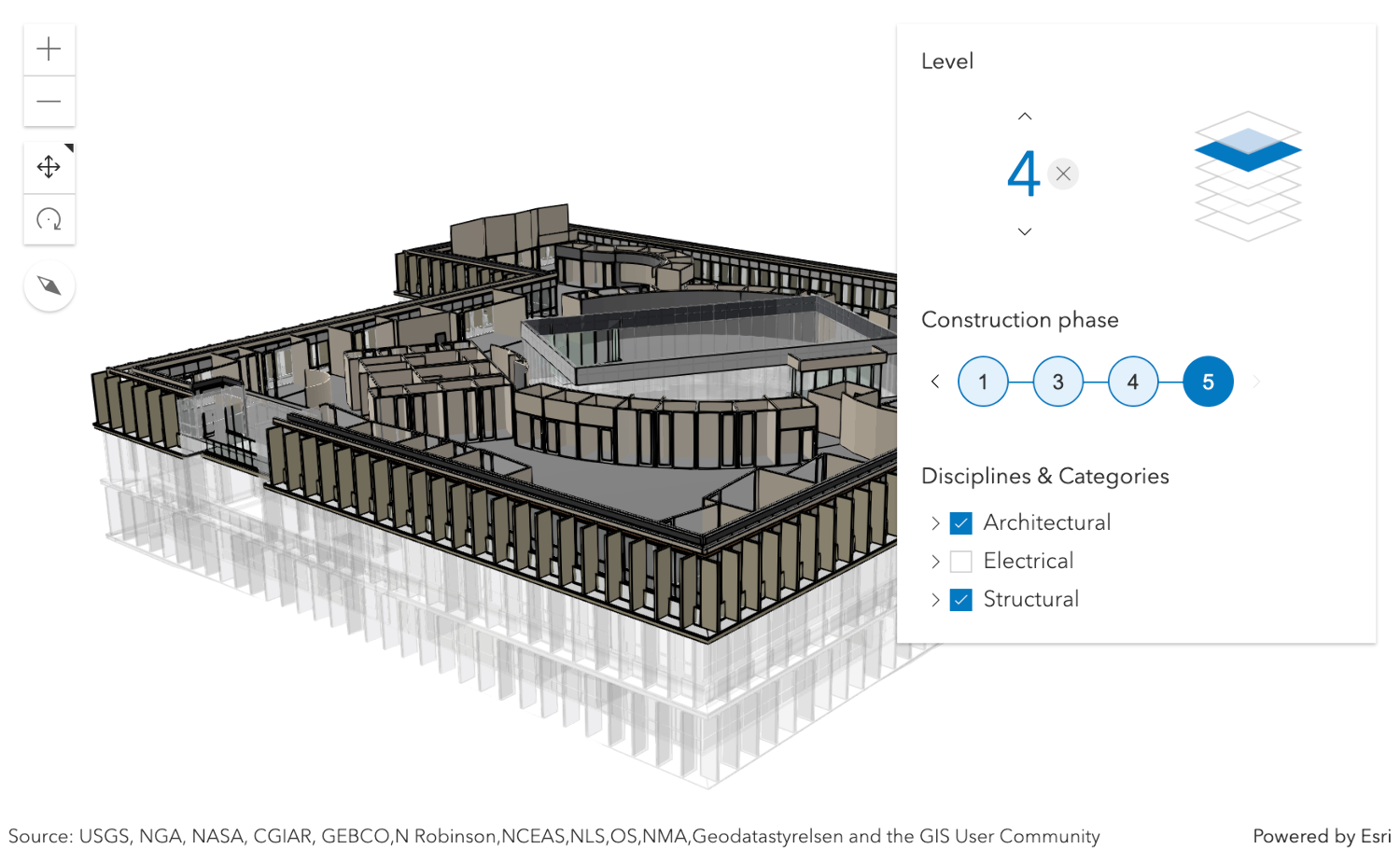
The Building Explorer component is used to filter and explore the various building elements of BuildingSceneLayers. BuildingSceneLayers are complex digital models of buildings and interiors and can contain thousands of building elements grouped in sublayers. Using the Building Explorer component, buildings can be filtered by level, phase or by disciplines and categories. The visibility of these elements can be configured using the component's hideLevels, hidePhases and hideDisciplines properties.
The BuildingSceneLayers to be explored have to be set on the layers property of the component. When setting multiple layers, the filters set by the Building Explorer component will be applied on all layers. The component doesn't allow the user to select between multiple layers present in a scene.
Often, BuildingSceneLayers contain an Overview BuildingComponentSublayer that serves as an exterior shell and views the building model as a single feature. When a layer is added to the Building Explorer component, the visibility of the Overview layer is turned off, so that the user can directly interact with the individual features in the Full Model BuildingGroupSublayer.
The Level element of the Building Explorer component allows to select a single level in one or several buildings. When selecting a level, the levels above it are hidden and the levels below it become semi-transparent for added visual context.
Some BuildingSceneLayers include information indicating the phase in which building elements, such as doors or pipes, were created and, optionally, when they were demolished. If a layer has multiple construction phases, these will be displayed in the Construction phases element. When selecting a construction phase, all the building elements created during or before the phase are selected. Demolished building elements aren't displayed.
Discipline layers are group layers that organize the BuildingSceneLayers content into architectural, structural, mechanical, or electrical groups. These layers contain a number of Category layers such as walls, windows, furniture, and lighting fixtures. These layers can be turned on and off in the Disciplines and Categories list.
The Building Explorer component can only display filters set by the component itself. Filters set by other applications will be ignored.
Known limitations
Building Explorer is only supported in a 3D arcgis-scene component.
See also
Demo
Properties
| Property | Attribute | Type |
|---|---|---|
auto-destroy-disabled | ||
heading-level | ||
hide-disciplines | ||
hide-levels | ||
hide-phases | ||
icon | ||
label | ||
| ||
level | ||
levelDisabled readonly | | |
| readonly number[] | |
phase | ||
phaseDisabled readonly | | |
| readonly number[] | |
reference-element | ||
|
autoDestroyDisabled
- Type
- boolean
If true, the component will not be destroyed automatically when it is disconnected from the document. This is useful when you want to move the component to a different place on the page, or temporarily hide it. If this is set, make sure to call the destroy() method when you are done to prevent memory leaks.
- Attribute
- auto-destroy-disabled
- Default value
- false
headingLevel
- Type
- HeadingLevel
Indicates the heading level to use for the component title.
- Attribute
- heading-level
- Default value
- 3
hideDisciplines
- Type
- boolean
- Since
- ArcGIS Maps SDK for JavaScript 5.0
If true, the disciplines tree will be hidden.
- Attribute
- hide-disciplines
- Default value
- false
hideLevels
- Type
- boolean
- Since
- ArcGIS Maps SDK for JavaScript 5.0
If true, the levels filter will be hidden.
- Attribute
- hide-levels
- Default value
- false
hidePhases
- Type
- boolean
- Since
- ArcGIS Maps SDK for JavaScript 5.0
If true, the phases filter will be hidden.
- Attribute
- hide-phases
- Default value
- false
icon
- Type
- IconName
Icon which represents the component. Typically used when the component is controlled by another component (e.g. by the Expand component).
- See also
- Attribute
- icon
- Default value
- "organization"
layers
- Type
- BuildingSceneLayer[]
- Since
- ArcGIS Maps SDK for JavaScript 5.0
A list of layers of type BuildingSceneLayer that are added to the component for exploration.
The component UI is only displayed when this property is set. In case of multiple layers, the component will display and apply the filters on all layers.
levelDisabled
- Type
- boolean
- Since
- ArcGIS Maps SDK for JavaScript 5.0
Indicates whether the level picker and filter is disabled. If true, the filters expression won't be used to filter a BuildingSceneLayer.
- Default value
- false
phase
- Type
- number
- Since
- ArcGIS Maps SDK for JavaScript 5.0
The currently selected value for the construction phase filter. Construction phases are used to track site development for a BuildingSceneLayers. Setting a construction phase in the Building Explorer selects everything in the layer which is already constructed at that phase (created phase <= selected phase) but not yet demolished (demolished phase > selected phase). The goal is to display what the building or construction site looks like at that selected phase.
- Attribute
- phase
phaseDisabled
- Type
- boolean
- Since
- ArcGIS Maps SDK for JavaScript 5.0
Indicates whether the phase picker and filter is disabled. If true, the filters expression won't be used to filter a BuildingSceneLayer.
- Default value
- false
referenceElement
- Type
- ArcgisReferenceElement | string | undefined
By assigning the id attribute of the Map or Scene component to this property, you can position a child component anywhere in the DOM while still maintaining a connection to the Map or Scene.
- Attribute
- reference-element
view
The view associated with the component.
Note: The recommended approach is to fully migrate applications to use map and scene components and avoid using MapView and SceneView directly. However, if you are migrating a large application from widgets to components, you might prefer a more gradual transition. To support this use case, the SDK includes this
viewproperty which connects a component to a MapView or SceneView. Ultimately, once migration is complete, the arcgis-building-explorer component will be associated with a map or scene component rather than using theviewproperty.
Methods
| Method | Signature |
|---|---|
componentOnReady inherited | componentOnReady(): Promise<this> |
destroy(): Promise<void> |
componentOnReady
- Signature
-
componentOnReady (): Promise<this>
Creates a promise that resolves once the component is fully loaded.
- Returns
- Promise<this>
Example
const arcgisBuildingExplorer = document.querySelector("arcgis-building-explorer");document.body.append(arcgisBuildingExplorer);await arcgisBuildingExplorer.componentOnReady();console.log("arcgis-building-explorer is ready to go!");Events
arcgisBuildingLevelChange
arcgisBuildingLevelChange: CustomEvent<void> - Since
- ArcGIS Maps SDK for JavaScript 5.0
Emitted when the user changes the selected building level, or when a new filter instance is loaded.
arcgisBuildingPhaseChange
arcgisBuildingPhaseChange: CustomEvent<void> - Since
- ArcGIS Maps SDK for JavaScript 5.0
Emitted when the user changes the selected construction phase, or when a new filter instance is loaded.
arcgisReady
arcgisReady: CustomEvent<void> Emitted when the component associated with a map or scene view is ready to be interacted with.