import "@arcgis/map-components/components/arcgis-line-of-sight";- Inheritance:
- ArcgisLineOfSight→
PublicLitElement
- Since
- ArcGIS Maps SDK for JavaScript 4.28
The Line Of Sight component is a 3D analysis tool that allows you to perform line of sight visibility analysis in an arcgis-scene. Visibility between a given observer and multiple target points is calculated against the currently displayed content in the view, including the ground, integrated meshes, and 3D objects such as buildings or trees.
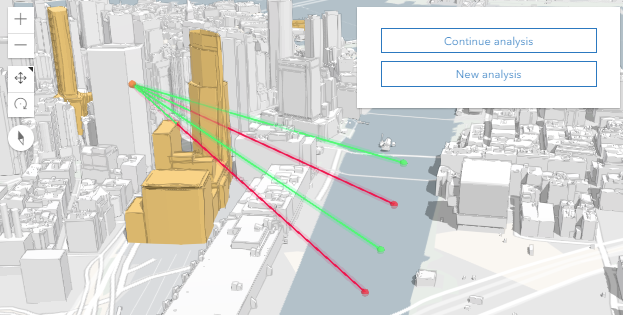
The analysis results are displayed as colored lines, where areas visible to the observer are shown green and occluded parts are marked in red. Also, the color of the target points indicates their visibility. When the line of sight cannot be calculated, it will be displayed with a gray color. This may happen if either the target or the observer is not in the view.
When creating a new line of sight analysis, the first click in the Scene creates the observer and subsequent clicks place the targets. Both the observer and target points can be moved by dragging. Additionally, the target points can be removed with a right click.
Known limitation
Line Of Sight is only supported in a 3D arcgis-scene component.
See also
Demo
Properties
analysis
- Type
- LineOfSightAnalysis
The LineOfSightAnalysis created or modified by the component.
When connecting the Line Of Sight component to the arcgis-scene component, it automatically creates an empty analysis and adds it to the Scene's arcgis-scene.analyses collection. You can then wait for the LineOfSightAnalysisView3D to be created before accessing the analysis results.
// Get the Scene component and the Line Of Sight component, and wait until both are ready.const viewElement = document.querySelector("arcgis-scene");await viewElement.viewOnReady();const lineOfSightElement = document.querySelector("arcgis-line-of-sight");await lineOfSightElement.componentOnReady();
// Get the LineOfSightAnalysis created by the Line Of Sight component.const analysis = lineOfSightElement.analysis;
// Get the LineOfSightAnalysisView3D and watch for updates.const analysisView = await viewElement.whenAnalysisView(analysis);const handle = reactiveUtils.watch(  () => analysisView?.results,  () => {    console.log("Analysis results:", analysisView.results);  },);
Whenever the component is destroyed, the analysis is automatically removed from the collection.
Alternatively, a programmatically created LineOfSightAnalysis can be provided to the component. Then, the application itself needs to add it to and later remove it from the analyses collection of the Scene component.
// Create the LineOfSightAnalysis.const lineOfSightAnalysis = new LineOfSightAnalysis({  observer: new LineOfSightAnalysisObserver({        position: new Point({        spatialReference: { latestWkid: 3857, wkid: 102100 },        x: -13624828.3377593,        y: 4550305.319405007,        z: 105.55410975124687        }),  }),  targets: [ new LineOfSightAnalysisTarget({        position: new Point({        spatialReference: { latestWkid: 3857, wkid: 102100 },        x: -13624944.17687458,        y: 4550420.577689567,        z: 0        }),  })]});
// Get the Scene component and the Line Of Sight component, and wait until both are ready.const viewElement = document.querySelector("arcgis-scene");await viewElement.viewOnReady();const lineOfSightElement = document.querySelector("arcgis-line-of-sight");await lineOfSightElement.componentOnReady();
// Add the analysis to the analyses collection of the Scene component.viewElement.analyses.add(lineOfSightAnalysis);
// Connect the analysis to the component:lineOfSightElement.analysis = lineOfSightAnalysis;
autoDestroyDisabled
- Type
- boolean
If true, the component will not be destroyed automatically when it is disconnected from the document. This is useful when you want to move the component to a different place on the page, or temporarily hide it. If this is set, make sure to call the destroy() method when you are done to prevent memory leaks.
- Attribute
- auto-destroy-disabled
- Default value
- false
hideContinueButton
- Type
- boolean
- Since
- ArcGIS Maps SDK for JavaScript 5.0
If true, the button that allows the user to continue placing more targets.
- Attribute
- hide-continue-button
- Default value
- false
hideDoneButton
- Type
- boolean
- Since
- ArcGIS Maps SDK for JavaScript 5.0
If true, the button that ends the current placement will be hidden.
- Attribute
- hide-done-button
- Default value
- false
hideStartButton
- Type
- boolean
- Since
- ArcGIS Maps SDK for JavaScript 5.0
If true, the button that starts a new analysis will be hidden.
- Attribute
- hide-start-button
- Default value
- false
hideVisualization
- Type
- boolean
- Since
- ArcGIS Maps SDK for JavaScript 5.0
Indicates whether the component's visualization is hidden in the view.
- Attribute
- hide-visualization
- Default value
- false
icon
- Type
- Icon["icon"] | undefined
Icon which represents the component. Typically used when the component is controlled by another component (e.g. by the Expand component).
- See also
- Attribute
- icon
- Default value
- "line-of-sight"
referenceElement
- Type
- ArcgisReferenceElement | string | undefined
By assigning the id attribute of the Map or Scene component to this property, you can position a child component anywhere in the DOM while still maintaining a connection to the Map or Scene.
- Attribute
- reference-element
view
The view associated with the component.
Note: The recommended approach is to fully migrate applications to use map and scene components and avoid using MapView and SceneView directly. However, if you are migrating a large application from widgets to components, you might prefer a more gradual transition. To support this use case, the SDK includes this
viewproperty which connects a component to a MapView or SceneView. Ultimately, once migration is complete, the arcgis-line-of-sight component will be associated with a map or scene component rather than using theviewproperty.
Methods
componentOnReady
- Signature
-
componentOnReady (): Promise<this>
Creates a promise that resolves once the component is fully loaded.
- Returns
- Promise<this>
Example
const arcgisLineOfSight = document.querySelector("arcgis-line-of-sight");document.body.append(arcgisLineOfSight);await arcgisLineOfSight.componentOnReady();console.log("arcgis-line-of-sight is ready to go!");Events
| Name | Type |
|---|---|
| CustomEvent<{ name: "analysis" | "state"; }> | |
arcgisPropertyChange
arcgisPropertyChange: CustomEvent<{ name: "analysis" | "state"; }> Emitted when the value of a property is changed. Use this to listen to changes to properties.
arcgisReady
arcgisReady: CustomEvent<void> Emitted when the component associated with a map or scene view is ready to be interacted with.