import "@arcgis/map-components/components/arcgis-shadow-cast";- Inheritance:
- ArcgisShadowCast→
PublicLitElement
- Since
- ArcGIS Maps SDK for JavaScript 4.28
The Shadow Cast component displays the cumulative shadows of 3D features in a arcgis-scene. This type of analysis is helpful in urban development, where new projects have to satisfy certain shadow duration constraints.
The component calculates the cumulative shadows for a time range during a single day. The user can configure the time range and select a calendar date. This time range and calendar date are only used for the shadow analysis and are not connected to the lighting in the scene. To control the lighting in the scene, use the arcgis-daylight component. Changing the timezone in the component updates the visualization by interpreting the time range as being in that timezone. This behavior is different from the arcgis-daylight component, where selecting a timezone updates the arcgis-scene.environment date and time according to the camera position.
The component provides three mode: minimum duration, total duration, and discrete mode.
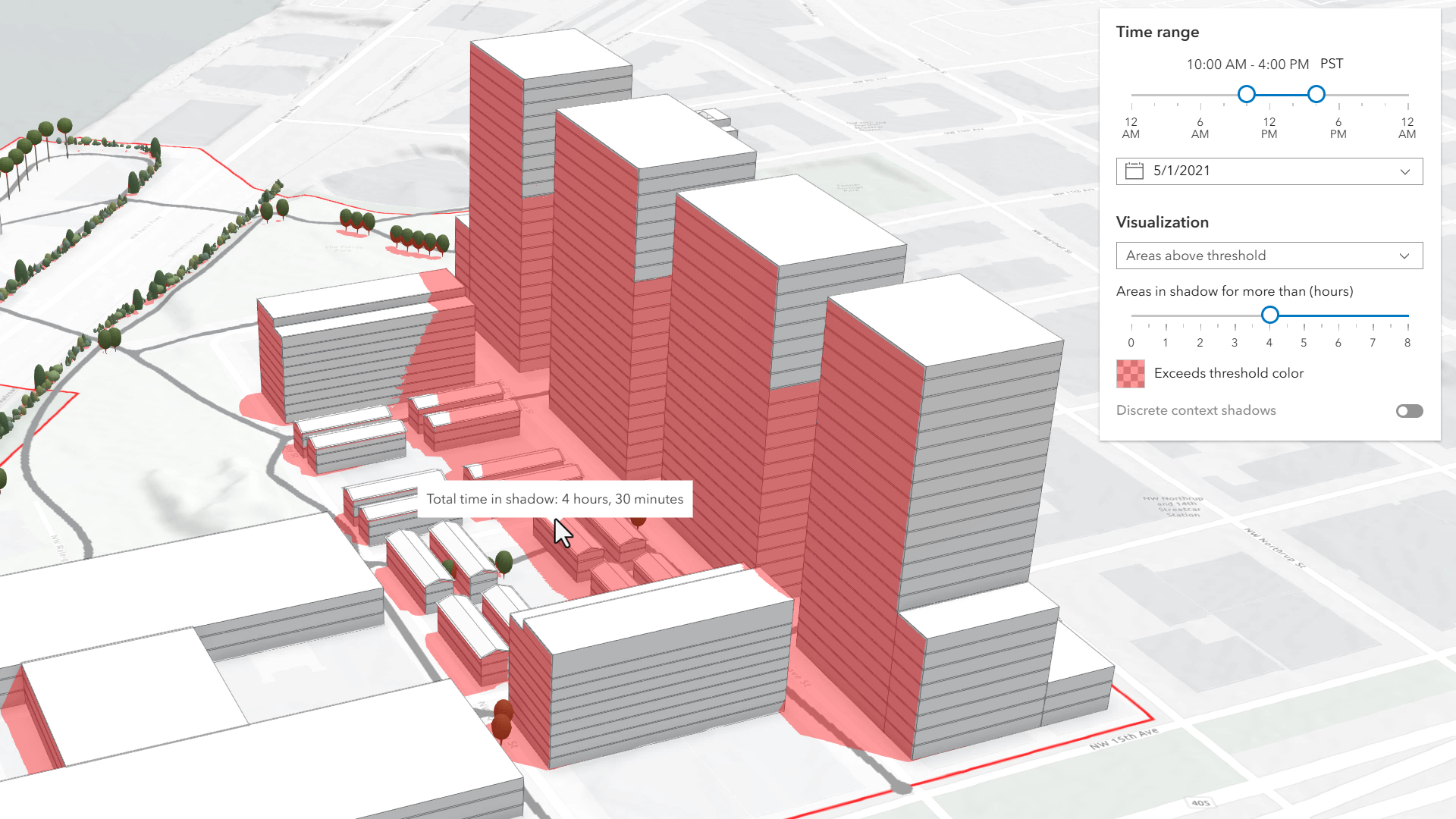
Minimum duration mode displays shadows only in areas where shading accumulates for longer than a specified duration within the selected time range. Areas that receive less shading than the minimum show no shadow. In the image below, on May 1, 2021, shadows are displayed only where shading exceeds 4 hours between 10AM and 4PM.
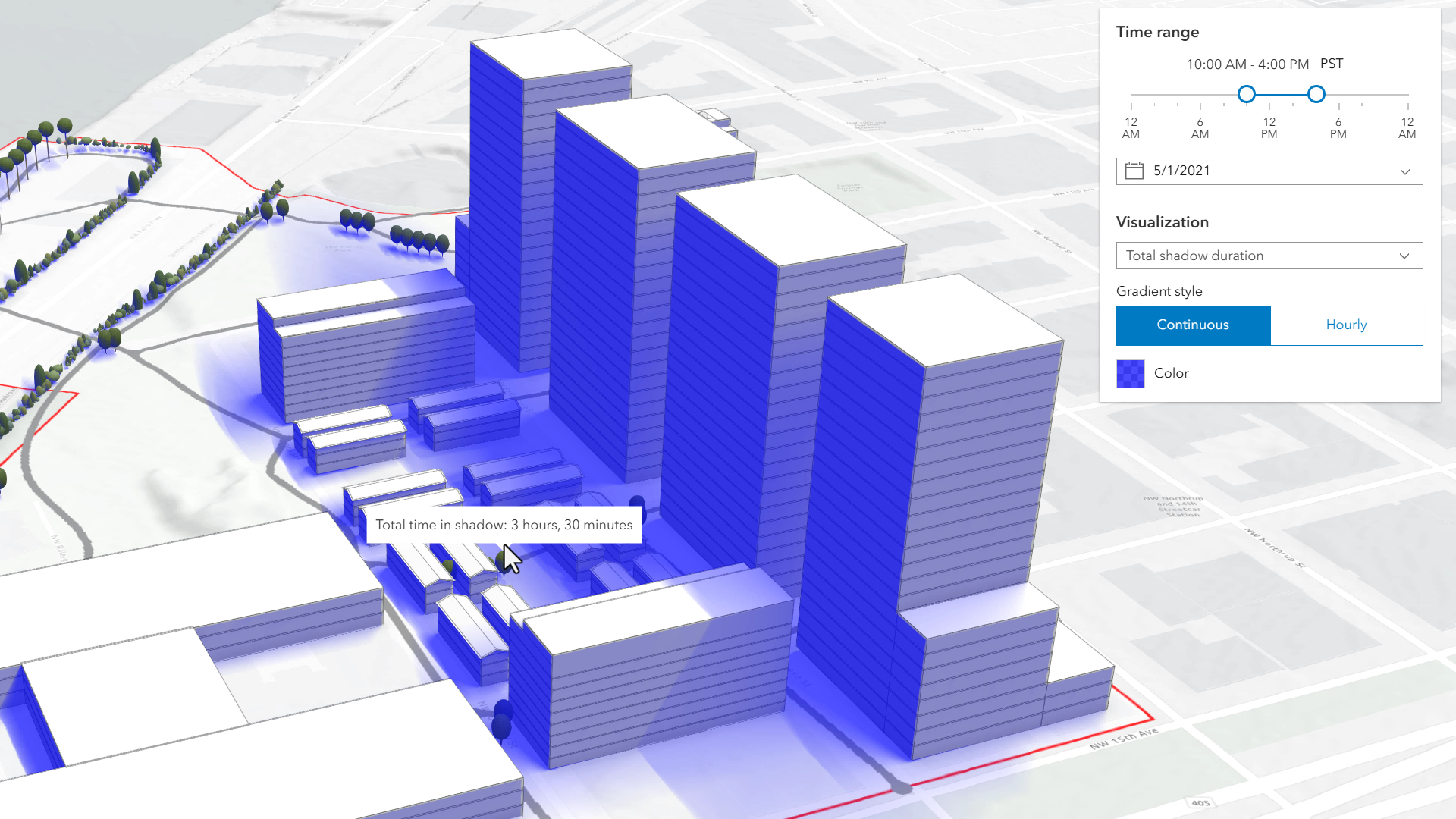
Total shadow duration mode displays the cumulative duration of shadow within the selected time range using opacity: areas that receive no shadow remain fully transparent, while areas receiving the highest accumulated shadow duration use a default opacity of 0.7. Intermediate values are interpolated. This mode can visualize shadows continuously or in 1-hour intervals.
Discrete shadows mode displays individual shadows at regular intervals within the selected time range. For example, with a time range from 10AM to 11AM and an interval set to 30 minutes, the shadows at 10AM, 10
and 11 will be displayed.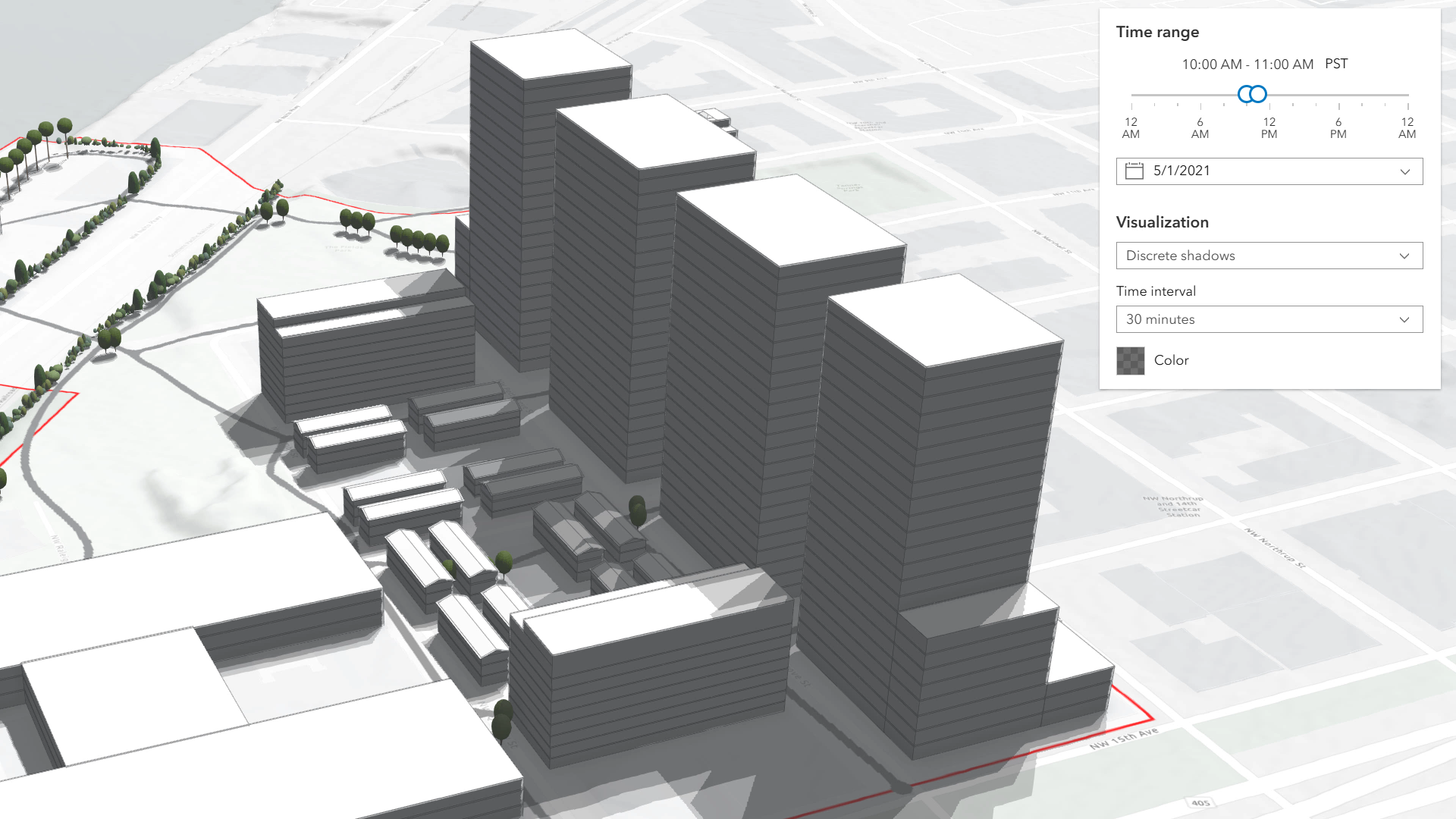
Hovering over the Scene will display a tooltip showing the amount of time that location is in shadow, rounded to 15-minute intervals.
The defaults for the time range and visualization settings can be changed using the startTimeOfDay, endTimeOfDay, and mode properties.
Known limitations
- Shadow Cast is only supported in a 3D arcgis-scene component.
- Terrain does not cast shadows in this analysis. As a result, to avoid incorrect shadow visualization,
startTimeOfDayshould be set after local sunrise andendTimeOfDaybefore local sunset. If these times fall outside daylight hours, shadows may be missing in areas where terrain would normally block sunlight. - The analysis does not take daylight savings into account. Use the timezone dropdown to adjust the offset from the Coordinated Universal Time (UTC) and account for the daylight saving time.
- The timezone is automatically detected by the component based on the camera location. In some situations, this might not be accurate. In case of an inaccurate timezone, users can set it manually using the timezone dropdown.
See also
Demo
Properties
| Property | Attribute | Type |
|---|---|---|
| ||
auto-destroy-disabled | ||
date | ||
| ||
discrete-interval | ||
end-time-of-day | ||
heading-level | ||
hide-date-picker | ||
hide-discrete-color-picker | ||
hide-discrete-interval | ||
hide-discrete-options | ||
hide-min-duration-color-picker | ||
hide-min-duration-context-color-picker | ||
hide-min-duration-context-interval | ||
hide-min-duration-context-options | ||
hide-min-duration-context-toggle | ||
hide-min-duration-options | ||
hide-min-duration-slider | ||
hide-shadow-duration-tooltip | ||
hide-time-range-slider | ||
hide-timezone | ||
hide-total-duration-color-picker | ||
hide-total-duration-mode-select | ||
hide-total-duration-options | ||
hide-visualization | ||
hide-visualization-options | ||
icon reflected | icon | Icon["icon"] | undefined |
label | ||
max-min-duration | ||
min-duration | ||
| ||
| ||
min-duration-context-enabled | ||
min-duration-context-interval | ||
min-min-duration | ||
mode | ||
reference-element | ||
start-time-of-day | ||
state readonly | | "disabled" | "ready" |
| ||
total-duration-mode | ||
utc-offset | ||
| ||
visualScale reflected | visual-scale | "l" | "m" | "s" |
analysis
- Type
- ShadowCastAnalysis
- Since
- ArcGIS Maps SDK for JavaScript 5.0
The ShadowCastAnalysis created or modified by the component.
When connecting the Shadow Cast component to the arcgis-scene component, it automatically creates an empty analysis and adds it to the arcgis-scene.analyses collection. You can then wait for the ShadowCastAnalysisView3D to be created before accessing the analysis results.
// Get the Scene component and the Shadow Cast component, and wait until both are ready.const viewElement = document.querySelector("arcgis-scene");await viewElement.viewOnReady();const shadowCastElement = document.querySelector("arcgis-shadow-cast");await shadowCastElement.componentOnReady();
// Get the ShadowCastAnalysis created by the Shadow Cast component.const analysis = shadowCastElement.analysis;
// Get the ShadowCastAnalysisView3D.const analysisView = await viewElement.whenAnalysisView(analysis);
// Click in the Scene and get the shadow duration in that specific point.viewElement.addEventListener("arcgisViewClick", async (event) => {  const screenPoint = { x: event.detail.x, y: event.detail.y };  const duration = await analysisView.getDurationAtScreen(screenPoint);  console.log("Shadow duration (minutes):", duration);});
Whenever the component is destroyed, the analysis is automatically removed from the collection.
Alternatively, a programmatically created ShadowCastAnalysis can be provided to the component. Then, the application itself needs to add it to and later remove it from the analyses collection of the Scene component.
// Create the ShadowCastAnalysis.const analysis = new ShadowCastAnalysis();
// Get the Scene component and the Shadow Cast component, and wait until both are ready.const viewElement = document.querySelector("arcgis-scene");await viewElement.viewOnReady();const shadowCastElement = document.querySelector("arcgis-shadow-cast");await shadowCastElement.componentOnReady();
// Add the analysis to the analyses collection of the Scene component.viewElement.analyses.add(analysis);
// Connect the analysis to the shadow cast component.shadowCastElement.analysis = analysis;
autoDestroyDisabled
- Type
- boolean
If true, the component will not be destroyed automatically when it is disconnected from the document. This is useful when you want to move the component to a different place on the page, or temporarily hide it. If this is set, make sure to call the destroy() method when you are done to prevent memory leaks.
- Attribute
- auto-destroy-disabled
- Default value
- false
date
- Type
- Date
The calendar date used to calculate the shadow cast. This date excludes the time. If a date with a time is set, the time value will be set to midnight (00:00:00) of that date in local system time.
If no date is set, then it defaults to the current date in local system time.
See also
- Attribute
- date
discreteColor
- Type
- Color
- Since
- ArcGIS Maps SDK for JavaScript 5.0
Color of the shadow visualization in "discrete" mode. The opacity of the visualization is mapped to the number of overlapping shadows. No shadow corresponds to opacity 0 and maximum number of shadows corresponds to the opacity set in this color value.
discreteInterval
- Type
- number
- Since
- ArcGIS Maps SDK for JavaScript 5.0
Individual shadows are displayed at this time interval in "discrete" mode, starting with the start time of day. The interval is expressed in milliseconds. If set to 0, we'll use the smallest possible interval, up to a maximum of 255 samples.
- Attribute
- discrete-interval
headingLevel
- Type
- HeadingLevel
Indicates the heading level to use for the component title.
- Attribute
- heading-level
- Default value
- 4
hideDatePicker
- Type
- boolean
If true, the date picker will be hidden.
- Attribute
- hide-date-picker
- Default value
- false
hideDiscreteColorPicker
- Type
- boolean
- Since
- ArcGIS Maps SDK for JavaScript 5.0
If true, the color picker will be hidden in the discrete mode options.
- Attribute
- hide-discrete-color-picker
- Default value
- false
hideDiscreteInterval
- Type
- boolean
- Since
- ArcGIS Maps SDK for JavaScript 5.0
If true, the interval selector will be hidden in the discrete mode options.
- Attribute
- hide-discrete-interval
- Default value
- false
hideDiscreteOptions
- Type
- boolean
- Since
- ArcGIS Maps SDK for JavaScript 5.0
If true, the visualization options will be hidden in discrete mode.
- Attribute
- hide-discrete-options
- Default value
- false
hideMinDurationColorPicker
- Type
- boolean
- Since
- ArcGIS Maps SDK for JavaScript 5.0
If true, the color picker will be hidden in the minimum duration mode options.
- Attribute
- hide-min-duration-color-picker
- Default value
- false
hideMinDurationContextColorPicker
- Type
- boolean
- Since
- ArcGIS Maps SDK for JavaScript 5.0
If true, the color picker will be hidden in the context options in minimum duration mode.
- Attribute
- hide-min-duration-context-color-picker
- Default value
- false
hideMinDurationContextInterval
- Type
- boolean
- Since
- ArcGIS Maps SDK for JavaScript 5.0
If true, the interval selector will be hidden in the context options in minimum duration mode.
- Attribute
- hide-min-duration-context-interval
- Default value
- false
hideMinDurationContextOptions
- Type
- boolean
- Since
- ArcGIS Maps SDK for JavaScript 5.0
If true, the context options will be hidden in the minimum duration mode options.
- Attribute
- hide-min-duration-context-options
- Default value
- false
hideMinDurationContextToggle
- Type
- boolean
- Since
- ArcGIS Maps SDK for JavaScript 5.0
If true, the toggle used to show or hide the context options will be hidden.
- Attribute
- hide-min-duration-context-toggle
- Default value
- false
hideMinDurationOptions
- Type
- boolean
- Since
- ArcGIS Maps SDK for JavaScript 5.0
If true, the visualization options will be hidden in minimum duration mode.
- Attribute
- hide-min-duration-options
- Default value
- false
hideMinDurationSlider
- Type
- boolean
- Since
- ArcGIS Maps SDK for JavaScript 5.0
If true, the minimum duration slider will be hidden in the minimum duration mode options.
- Attribute
- hide-min-duration-slider
- Default value
- false
hideShadowDurationTooltip
- Type
- boolean
- Since
- ArcGIS Maps SDK for JavaScript 5.0
If true, the tooltip which displays the amount of shadow at a certain location will be hidden.
- Attribute
- hide-shadow-duration-tooltip
- Default value
- false
hideTimeRangeSlider
- Type
- boolean
If true, the time range slider will be hidden.
- Attribute
- hide-time-range-slider
- Default value
- false
hideTimezone
- Type
- boolean
If true, the timezone picker will be hidden.
- Attribute
- hide-timezone
- Default value
- false
hideTotalDurationColorPicker
- Type
- boolean
- Since
- ArcGIS Maps SDK for JavaScript 5.0
If true, the color picker will be hidden in the total duration mode options.
- Attribute
- hide-total-duration-color-picker
- Default value
- false
hideTotalDurationModeSelect
- Type
- boolean
- Since
- ArcGIS Maps SDK for JavaScript 5.0
If true, the mode selector will be hidden in the total duration mode options.
- Attribute
- hide-total-duration-mode-select
- Default value
- false
hideTotalDurationOptions
- Type
- boolean
- Since
- ArcGIS Maps SDK for JavaScript 5.0
If true, the visualization options will be hidden in the total duration mode.
- Attribute
- hide-total-duration-options
- Default value
- false
hideVisualization
- Type
- boolean
- Since
- ArcGIS Maps SDK for JavaScript 5.0
Indicates whether the component's visualization is hidden in the view.
- Attribute
- hide-visualization
- Default value
- false
hideVisualizationOptions
- Type
- boolean
- Since
- ArcGIS Maps SDK for JavaScript 5.0
If true, the visualization options will be hidden.
- Attribute
- hide-visualization-options
- Default value
- false
icon
- Type
- Icon["icon"] | undefined
Icon which represents the component. Typically used when the component is controlled by another component (e.g. by the Expand component).
- See also
- Attribute
- icon
- Default value
- "measure-building-height-shadow"
maxMinDuration
- Type
- number
- Since
- ArcGIS Maps SDK for JavaScript 5.0
Maximum allowed value for the minDuration property, in milliseconds.
- Attribute
- max-min-duration
minDurationContextColor
- Type
- Color
- Since
- ArcGIS Maps SDK for JavaScript 5.0
The color used when showing additional context in "min-duration" mode when minDurationContextEnabled is true.
minDurationContextEnabled
- Type
- boolean
- Since
- ArcGIS Maps SDK for JavaScript 5.0
Whether to enable additional context showing discrete shadows at the same time as displaying shadows above a minimum duration when in the "min-duration" mode. The minDurationContextColor and minDurationContextInterval properties are used to configure the visualization of the discrete shadows when context is enabled.
- Attribute
- min-duration-context-enabled
- Default value
- false
minDurationContextInterval
- Type
- number
- Since
- ArcGIS Maps SDK for JavaScript 5.0
The interval in milliseconds used when showing additional context in "min-duration" mode when minDurationContextEnabled is true.
- Attribute
- min-duration-context-interval
minMinDuration
- Type
- number
- Since
- ArcGIS Maps SDK for JavaScript 5.0
Minimum allowed value for the minDuration property, in milliseconds.
- Attribute
- min-min-duration
- Default value
- 0
mode
- Type
- ShadowCastMode
- Since
- ArcGIS Maps SDK for JavaScript 5.0
Mode of analysis to use when computing and displaying the shadows. There are 3 types:
- "discrete": Displays individual shadow snapshots at regular time intervals within the selected time range.
- "min-duration": Displays shadows only in areas where accumulated shading exceeds a user‑defined minimum duration within the selected time range. Optional discrete shadow overlays can provide additional context.
- "total-duration": Displays total shadow accumulation within the selected time range using opacity: areas with longer shadow duration appear more opaque. Supports continuous or 1‑hour aggregated modes.
- Attribute
- mode
referenceElement
- Type
- ArcgisReferenceElement | string | undefined
By assigning the id attribute of the Map or Scene component to this property, you can position a child component anywhere in the DOM while still maintaining a connection to the Map or Scene.
- Attribute
- reference-element
totalDurationColor
- Type
- Color
- Since
- ArcGIS Maps SDK for JavaScript 5.0
Color of the shadow visualization in "total-duration" mode. The opacity is mapped to the time spent in shadow. Areas that don't receive any shadow are displayed with zero opacity and areas that receive shadows for the entire time range are displayed with the opacity specified in this property.
totalDurationMode
- Since
- ArcGIS Maps SDK for JavaScript 5.0
Mode in which the cumulative shadow duration should be displayed in "total-duration" mode: as a continuous surface or as an hourly aggregation of values.
- Attribute
- total-duration-mode
view
The view associated with the component.
Note: The recommended approach is to fully migrate applications to use map and scene components and avoid using MapView and SceneView directly. However, if you are migrating a large application from widgets to components, you might prefer a more gradual transition. To support this use case, the SDK includes this
viewproperty which connects a component to a MapView or SceneView. Ultimately, once migration is complete, the arcgis-shadow-cast component will be associated with a map or scene component rather than using theviewproperty.
Methods
| Method | Signature |
|---|---|
componentOnReady inherited | componentOnReady(): Promise<this> |
destroy(): Promise<void> | |
getDurationAtScreen(point: Point): Promise<number> |
componentOnReady
- Signature
-
componentOnReady (): Promise<this>
Creates a promise that resolves once the component is fully loaded.
- Returns
- Promise<this>
Example
const arcgisShadowCast = document.querySelector("arcgis-shadow-cast");document.body.append(arcgisShadowCast);await arcgisShadowCast.componentOnReady();console.log("arcgis-shadow-cast is ready to go!");Events
| Name | Type |
|---|---|
| CustomEvent<{ name: "state"; }> | |
arcgisPropertyChange
arcgisPropertyChange: CustomEvent<{ name: "state"; }> Emitted when the value of a property is changed. Use this to listen to changes to properties.
arcgisReady
arcgisReady: CustomEvent<void> Emitted when the component associated with a map or scene view is ready to be interacted with.