Add a layer to a local scene to visualize and interact with 3D building models developed using Building Information Modeling (BIM) tools.
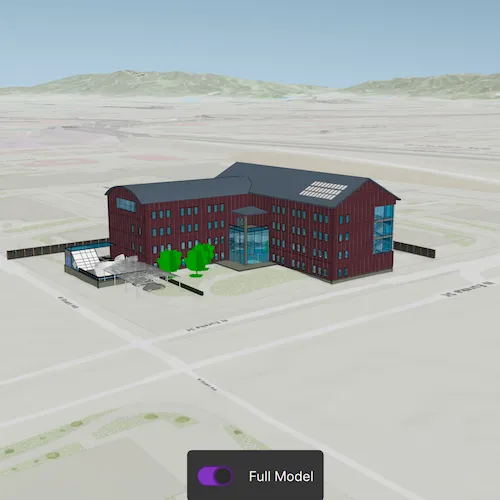
Use case
Building Scene Layers allow you to display and analyze detailed building models created from 3D BIM data. Unlike 3D object scene layers, which represent all features within a single layer, Building Scene Layers are organized into a hierarchy of sublayers representing individual building components such as walls, light fixtures, and mechanical systems. These sublayers are often grouped by disciplines like Architectural, Mechanical, or Structural. This structure enables deeper interaction and analysis of both interior and exterior features, providing insight into how a building is designed, used, and situated in its spatial context.
How to use the sample
When loaded, the sample displays a scene with a Building Scene Layer. By default, the Overview sublayer is visible, showing the building’s exterior shell. Use the “Full Model” toggle to switch to the Full Model sublayer, which reveals the building’s components. Pan around and zoom in to observe the detailed features such as walls, light fixtures, mechanical systems, and more, both outside and inside the building.
How it works
- Create a local scene object with the
Scene(SceneViewingMode::Local, BasemapStyle::ArcGISTopographic)constructor. - Create an
ArcGISTiledElevationSourceobject and add it to the local scene’s base surface. - Create a
BuildingSceneLayerand add it to the local scene’s operational layers. - Create a
LocalSceneViewobject to display the scene. - Set the local scene to the
LocalSceneView.
Relevant API
- ArcGISTiledElevationSource
- BuildingSceneLayer
- BuildingSublayer
- LocalSceneView
- Scene
Tags
3D, buildings, elevation, layers, scene, surface
Sample code
// [WriteFile Name=AddBuildingSceneLayer, Category=Layers]// [Legal]// Copyright 2025 Esri.//// Licensed under the Apache License, Version 2.0 (the "License");// you may not use this file except in compliance with the License.// You may obtain a copy of the License at// http://www.apache.org/licenses/LICENSE-2.0//// Unless required by applicable law or agreed to in writing, software// distributed under the License is distributed on an "AS IS" BASIS,// WITHOUT WARRANTIES OR CONDITIONS OF ANY KIND, either express or implied.// See the License for the specific language governing permissions and// limitations under the License.// [Legal]
#ifdef PCH_BUILD#include "pch.hpp"#endif // PCH_BUILD
// sample headers#include "AddBuildingSceneLayer.h"
// ArcGIS Maps SDK headers#include "ArcGISTiledElevationSource.h"#include "BuildingSceneLayer.h"#include "BuildingSublayer.h"#include "BuildingSublayerListModel.h"#include "Camera.h"#include "ElevationSourceListModel.h"#include "Error.h"#include "LayerListModel.h"#include "LocalSceneQuickView.h"#include "MapTypes.h"#include "Point.h"#include "Scene.h"#include "SceneViewTypes.h"#include "SpatialReference.h"#include "Surface.h"#include "Viewpoint.h"
using namespace Esri::ArcGISRuntime;
AddBuildingSceneLayer::AddBuildingSceneLayer(QObject* parent /* = nullptr */) :  QObject(parent),  m_scene(new Scene(SceneViewingMode::Local, BasemapStyle::ArcGISTopographic, this)){  // create a new elevation source from Terrain3D REST service  ArcGISTiledElevationSource* elevationSource =    new ArcGISTiledElevationSource(QUrl("https://elevation3d.arcgis.com/arcgis/rest/services/WorldElevation3D/Terrain3D/ImageServer"), this);
  // add the elevation source to the scene to display elevation  m_scene->baseSurface()->elevationSources()->append(elevationSource);}
AddBuildingSceneLayer::~AddBuildingSceneLayer() = default;
void AddBuildingSceneLayer::init(){  // Register classes for QML  qmlRegisterType<LocalSceneQuickView>("Esri.Samples", 1, 0, "LocalSceneView");  qmlRegisterType<AddBuildingSceneLayer>("Esri.Samples", 1, 0, "AddBuildingSceneLayerSample");}
LocalSceneQuickView* AddBuildingSceneLayer::localSceneView() const{  return m_localSceneView;}
// Set the view (created in QML)void AddBuildingSceneLayer::setLocalSceneView(LocalSceneQuickView* localSceneView){  if (!localSceneView || localSceneView == m_localSceneView)  {    return;  }
  m_localSceneView = localSceneView;  m_localSceneView->setArcGISScene(m_scene);
  // Sets the initial viewpoint.  const Point point(-13045109.0, // x                    4036614.0, // y                    511.0, // z                    SpatialReference::webMercator()); // spatialReference
  const Camera camera(point,                      343.0, // heading                      68.0, // pitch                      0.0); // roll
  m_scene->setInitialViewpoint(Viewpoint(point, camera));
  // Adds building scene layer to scene.  m_buildingSceneLayer = new BuildingSceneLayer(QUrl("https://www.arcgis.com/home/item.html?id=669f6279c579486eb4a0acc7eb59d7ca"), this);
  m_buildingSceneLayer->setAltitudeOffset(1.0);  m_scene->operationalLayers()->append(m_buildingSceneLayer);
  connect(m_buildingSceneLayer, &BuildingSceneLayer::doneLoading, this, [this](const Error& e)  {    if (!e.isEmpty())    {      return;    }
    // Get the overview and full model sublayers.    for (BuildingSublayer* sublayer : (*m_buildingSceneLayer->sublayers()))    {      if (sublayer->modelName() == "Overview")      {        m_overviewSublayer = sublayer;      }      else if (sublayer->modelName() == "FullModel")      {        m_fullModelSublayer = sublayer;      }    }    emit layerLoadedChanged();  });  emit localSceneViewChanged();}
void AddBuildingSceneLayer::setFullModelAndOverviewVisibility(bool showFullModel){  m_fullModelSublayer->setVisible(showFullModel);  m_overviewSublayer->setVisible(!showFullModel);}
bool AddBuildingSceneLayer::layerLoaded() const{  return m_buildingSceneLayer && m_buildingSceneLayer->loadStatus() == LoadStatus::Loaded;}
// [WriteFile Name=AddBuildingSceneLayer, Category=Layers]// [Legal]// Copyright 2025 Esri.//// Licensed under the Apache License, Version 2.0 (the "License");// you may not use this file except in compliance with the License.// You may obtain a copy of the License at// http://www.apache.org/licenses/LICENSE-2.0//// Unless required by applicable law or agreed to in writing, software// distributed under the License is distributed on an "AS IS" BASIS,// WITHOUT WARRANTIES OR CONDITIONS OF ANY KIND, either express or implied.// See the License for the specific language governing permissions and// limitations under the License.// [Legal]
#ifndef ADDBUILDINGSCENELAYER_H#define ADDBUILDINGSCENELAYER_H
// Qt headers#include <QObject>
namespace Esri::ArcGISRuntime{ class BuildingSceneLayer; class BuildingSublayer; class LocalSceneQuickView; class Scene;} // namespace Esri::ArcGISRuntime
Q_MOC_INCLUDE("LocalSceneQuickView.h");
class AddBuildingSceneLayer : public QObject{ Q_OBJECT
Q_PROPERTY(Esri::ArcGISRuntime::LocalSceneQuickView* localSceneView READ localSceneView WRITE setLocalSceneView NOTIFY localSceneViewChanged) Q_PROPERTY(bool layerLoaded READ layerLoaded NOTIFY layerLoadedChanged)
public: explicit AddBuildingSceneLayer(QObject* parent = nullptr); ~AddBuildingSceneLayer() override;
static void init(); Q_INVOKABLE void setFullModelAndOverviewVisibility(bool showFullModel); bool layerLoaded() const;
signals: void layerLoadedChanged(); void localSceneViewChanged();
private: Esri::ArcGISRuntime::LocalSceneQuickView* localSceneView() const; void setLocalSceneView(Esri::ArcGISRuntime::LocalSceneQuickView* localSceneView);
Esri::ArcGISRuntime::BuildingSceneLayer* m_buildingSceneLayer = nullptr; Esri::ArcGISRuntime::BuildingSublayer* m_fullModelSublayer = nullptr; Esri::ArcGISRuntime::LocalSceneQuickView* m_localSceneView = nullptr; Esri::ArcGISRuntime::BuildingSublayer* m_overviewSublayer = nullptr; Esri::ArcGISRuntime::Scene* m_scene = nullptr;};
#endif // ADDBUILDINGSCENELAYER_H// [WriteFile Name=AddBuildingSceneLayer, Category=Layers]// [Legal]// Copyright 2025 Esri.
// Licensed under the Apache License, Version 2.0 (the "License");// you may not use this file except in compliance with the License.// You may obtain a copy of the License at// http://www.apache.org/licenses/LICENSE-2.0
// Unless required by applicable law or agreed to in writing, software// distributed under the License is distributed on an "AS IS" BASIS,// WITHOUT WARRANTIES OR CONDITIONS OF ANY KIND, either express or implied.// See the License for the specific language governing permissions and// limitations under the License.// [Legal]
import QtQuickimport QtQuick.Controlsimport Esri.Samples
Item {
LocalSceneView { id: view anchors.fill: parent
Component.onCompleted: { // Set and keep the focus on SceneView to enable keyboard navigation forceActiveFocus(); }
Rectangle { anchors { horizontalCenter: parent.horizontalCenter bottom: view.attributionTop } width: fullModelButton.width + 20 height: fullModelButton.height + 20 color: palette.base radius: 5 visible: model.layerLoaded
Switch { id: fullModelButton anchors.centerIn: parent text: qsTr("Full Model") checkable: true onCheckedChanged: model.setFullModelAndOverviewVisibility(checked) } } }
// Declare the C++ instance which creates the scene etc. and supply the view AddBuildingSceneLayerSample { id: model localSceneView: view }
}