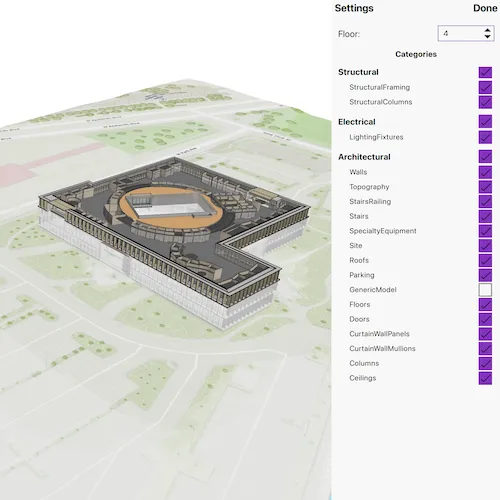
Explore details of a building scene by using filters and sublayer visibility.
Use case
Buildings and their component parts (in this example, structural, electrical, or architectural) can be difficult to explain and visualize. An architectural firm might share a 3D building model visualization with clients and contractors to let them explore these components by floor and component type.
How to use the sample
Once the scene is loaded, click the “Building Filter Settings” button to view the filtering options.
- Select a floor from the “Floor” menu to view the internal details of each floor or “All” to view the entire model. Selecting a floor applies a filter that hides all floors above the selected floor and gives the floors below a transparent, X-ray renderer.
- Expand the categories under the top-level disciplines to show or hide individual categories in the building model. The entire discipline may be shown or hidden as well.
- Click on any features in the building to view the attributes of the feature.
How it works
- Create a
Scenewith the URL to a Building Scene Layer service. - Create a
LocalSceneViewand add the scene. - Retrieve the
BuildingSceneLayerfrom the scene’s operational layers. - When a floor is selected:
- A new
BuildingFilteris created with twoBuildingFilterBlockitems. - One block defines the solid renderer for features on the selected floor.
- The second block defines the X-ray filter for features on the floors below the selected floor.
- Features that exist on floors above the selected floor are not rendered.
- If “All” is selected, the
activeFilterproperty on the building scene layer is set tonullso all features are rendered according to their default settings.
- A new
- Architectural disciplines and categories are represented by
BuildingGroupSublayerandBuildingSublayerobjects containing features within a building scene layer. When checked or unchecked, the visibility of the group or sublayer is set to true (visible) or false (hidden). - When a building feature is clicked on:
- A call to
identifyLayeron theLocalSceneViewis initiated based on the screen offset of the click. - The
sublayerResultsproperty of the returnedIdentifyLayerResultwill contain the identified features. Note that the building scene layer features are NOT returned in thegeoElementsproperty of the results. - The details of the first identified feature are shown in a popup.
- A call to
Relevant API
- BuildingComponentSublayer
- BuildingFilter
- BuildingFilterBlock
- BuildingSceneLayer
- LocalSceneView
- Scene
About the data
This sample uses the Esri Building E Local Scene web scene, which contains a Building Scene Layer representing Building E on the Esri Campus in Redlands, CA. The Revit BIM model was brought into ArcGIS using the BIM capabilities in ArcGIS Pro and published to the web as a Building Scene Layer.
Additional information
Buildings in a Building Scene Layer can be very complex models composed of sublayers containing internal and external features of the structure. Sublayers may include structural components like columns, architectural components like floors and windows, and electrical components.
Applying filters to the Building Scene Layer can highlight features of interest in the model. Filters are made up of filter blocks, which contain several properties that allow control over the filter’s function. Setting the filter mode to X-Ray, for instance, will render features with a semi-transparent white color so other interior features can be seen. In addition, toggling the visibility of sublayers can show or hide all the features of a sublayer.
Tags
3D, building scene layer, layers
Sample code
// [WriteFile Name=FilterBuildingSceneLayer, Category=Layers]// [Legal]// Copyright 2025 Esri.//// Licensed under the Apache License, Version 2.0 (the "License");// you may not use this file except in compliance with the License.// You may obtain a copy of the License at// http://www.apache.org/licenses/LICENSE-2.0//// Unless required by applicable law or agreed to in writing, software// distributed under the License is distributed on an "AS IS" BASIS,// WITHOUT WARRANTIES OR CONDITIONS OF ANY KIND, either express or implied.// See the License for the specific language governing permissions and// limitations under the License.// [Legal]
#ifdef PCH_BUILD#include "pch.hpp"#endif // PCH_BUILD
// sample headers#include "FilterBuildingSceneLayer.h"
// ArcGIS Maps SDK headers#include "AttributeListModel.h"#include "BuildingComponentSublayer.h"#include "BuildingFilter.h"#include "BuildingFilterBlock.h"#include "BuildingGroupSublayer.h"#include "BuildingSceneLayer.h"#include "BuildingSceneLayerAttributeStatistics.h"#include "BuildingSolidFilterMode.h"#include "BuildingSublayer.h"#include "BuildingSublayerListModel.h"#include "BuildingXrayFilterMode.h"#include "Feature.h"#include "FeatureLayer.h"#include "GeoElement.h"#include "IdentifyLayerResult.h"#include "LayerListModel.h"#include "LocalSceneQuickView.h"#include "MapTypes.h"#include "PopupDefinition.h"#include "Scene.h"#include "SceneQuickView.h"#include "Surface.h"
// Qt headers#include <QFuture>#include <QUrl>
using namespace Esri::ArcGISRuntime;
FilterBuildingSceneLayer::FilterBuildingSceneLayer(QObject* parent /* = nullptr */) :  QObject(parent),  m_scene(new Scene(QUrl("https://arcgisruntime.maps.arcgis.com/home/item.html?id=b7c387d599a84a50aafaece5ca139d44"), this)){  connect(m_scene, &Scene::doneLoading, this, [this]()  {    getFloorList();    getCategoriesList();  });}
FilterBuildingSceneLayer::~FilterBuildingSceneLayer() = default;
void FilterBuildingSceneLayer::init(){  // Register classes for QML  qmlRegisterType<LocalSceneQuickView>("Esri.Samples", 1, 0, "LocalSceneView");  qmlRegisterType<FilterBuildingSceneLayer>("Esri.Samples", 1, 0, "FilterBuildingSceneLayerSample");  qmlRegisterUncreatableType<BuildingSublayerListModel>("Esri.Samples", 1, 0, "AbstractListModel", "AbstractListModel is uncreateable");}
LocalSceneQuickView* FilterBuildingSceneLayer::localSceneView() const{  return m_localSceneView;}
// Set the view (created in QML)void FilterBuildingSceneLayer::setLocalSceneView(LocalSceneQuickView* localSceneView){  if (!localSceneView || localSceneView == m_localSceneView)  {    return;  }
  m_localSceneView = localSceneView;  m_localSceneView->setArcGISScene(m_scene);
  m_scene->load();
  connect(m_localSceneView, &LocalSceneQuickView::mouseClicked, this, &FilterBuildingSceneLayer::onMouseClicked);
  emit localSceneViewChanged();}
void FilterBuildingSceneLayer::onMouseClicked(QMouseEvent& mouseEvent){  if (!m_buildingSceneLayer || m_buildingSceneLayer->loadStatus() != LoadStatus::Loaded)  {    return;  }
  // Clear previous selection if any  if (m_selectedSublayer)  {    m_selectedSublayer->clearSelection();    m_selectedSublayer = nullptr;  }
  constexpr double tolerance = 5.0;
  // Identify on the building scene layer.  QFuture future = m_localSceneView->identifyLayerAsync(m_buildingSceneLayer, mouseEvent.position(), tolerance, false, this);
  future.then(this, [this](IdentifyLayerResult* result)  {    if (!result || result->sublayerResults().empty())    {      return;    }
    // Select the first identified feature and show the feature details in a popup.    IdentifyLayerResult* sublayerResult = result->sublayerResults().first();    GeoElement* geoElement = sublayerResult->geoElements().first();    Feature* identifiedFeature = static_cast<Feature*>(geoElement);
    m_selectedSublayer = static_cast<BuildingComponentSublayer*>(sublayerResult->layerContent());    if (m_selectedSublayer)    {      m_selectedSublayer->selectFeature(identifiedFeature);    }
    m_popup = new Popup(geoElement, this);    emit popupChanged();  });}
void FilterBuildingSceneLayer::getFloorList(){  if (!m_scene || !m_scene->operationalLayers() || m_scene->operationalLayers()->isEmpty())  {    return;  }
  m_buildingSceneLayer = dynamic_cast<BuildingSceneLayer*>(m_scene->operationalLayers()->first());
  // Get the floor listing from the statistics.  m_buildingSceneLayer->fetchStatisticsAsync(this).then(this, [this](QMap<QString, BuildingSceneLayerAttributeStatistics*> statistics)  {    if (statistics.value("BldgLevel"))    {      m_floorList = statistics.value("BldgLevel")->mostFrequentValues();      std::sort(m_floorList.begin(), m_floorList.end());      m_floorList.prepend("All");      emit floorListChanged();    }  });}
void FilterBuildingSceneLayer::getCategoriesList(){  if (!m_buildingSceneLayer)  {    return;  }
  connect(m_buildingSceneLayer, &BuildingSceneLayer::loadStatusChanged, this, [this]()  {    if (m_buildingSceneLayer->loadStatus() != LoadStatus::Loaded)    {      return;    }    for (BuildingSublayer* sublayer : *m_buildingSceneLayer->sublayers())    {      if (sublayer->name() == "Full Model")      {        // Get the sublayer group for the full building model.        m_fullModelSublayer = qobject_cast<BuildingGroupSublayer*>(sublayer);        break;      }    }    if (m_fullModelSublayer)    {      // The top-level sublayer groups will be the categories.      m_sublayerListModel = m_fullModelSublayer->sublayers();      emit sublayerListModelChanged();    }  });  m_buildingSceneLayer->load();}
// To update the building filters based on the selected floor.void FilterBuildingSceneLayer::updateFloorFilter(const QString& selectedFloor){  if (!m_buildingSceneLayer)  {    return;  }
  // No filtering applied if 'All' floors are selected.  if (selectedFloor == "All")  {    m_buildingSceneLayer->setActiveFilter(nullptr);    return;  }
  // Build a building filter to show the selected floor and an xray view of the floors below.  // Floors above the selected floor are not shown at all.  BuildingFilterBlock* solidBlock =    new BuildingFilterBlock("solid block", QString("BldgLevel = '%1'").arg(selectedFloor), new BuildingSolidFilterMode(this), this);
  m_blocks.append(solidBlock);
  BuildingFilterBlock* xrayBlock =    new BuildingFilterBlock("xray block", QString("BldgLevel < '%1'").arg(selectedFloor), new BuildingXrayFilterMode(this), this);
  m_blocks.append(xrayBlock);
  m_buildingFilter = new BuildingFilter("Floor filter", "Show selected floor and xray filter for lower floors.", m_blocks, this);
  // Apply the filter to the building scene layer.  m_buildingSceneLayer->setActiveFilter(m_buildingFilter);  m_blocks.clear();}
// Get the component sublayers for each category.BuildingSublayerListModel* FilterBuildingSceneLayer::getComponentSubLayerListModel(int layerId) const{  if (!m_scene)  {    return nullptr;  }
  BuildingGroupSublayer* categorySublayer = static_cast<BuildingGroupSublayer*>(m_fullModelSublayer->sublayers()->at(layerId));
  if (categorySublayer)  {    return categorySublayer->sublayers();  }
  return nullptr;}
QStringList FilterBuildingSceneLayer::floorList() const{  return m_floorList;}
void FilterBuildingSceneLayer::clearSelection(){  if (m_selectedSublayer)  {    m_selectedSublayer->clearSelection();  }}
// [WriteFile Name=FilterBuildingSceneLayer, Category=Layers]// [Legal]// Copyright 2025 Esri.//// Licensed under the Apache License, Version 2.0 (the "License");// you may not use this file except in compliance with the License.// You may obtain a copy of the License at// http://www.apache.org/licenses/LICENSE-2.0//// Unless required by applicable law or agreed to in writing, software// distributed under the License is distributed on an "AS IS" BASIS,// WITHOUT WARRANTIES OR CONDITIONS OF ANY KIND, either express or implied.// See the License for the specific language governing permissions and// limitations under the License.// [Legal]
#ifndef FILTERBUILDINGSCENELAYER_H#define FILTERBUILDINGSCENELAYER_H
// ArcGIS Maps SDK headers#include "Popup.h"
// Qt headers#include <QMouseEvent>#include <QObject>
namespace Esri::ArcGISRuntime{ class BuildingComponentSublayer; class BuildingFilter; class BuildingFilterBlock; class BuildingGroupSublayer; class BuildingSceneLayer; class BuildingSceneLayerAttributeStatistics; class BuildingSublayerListModel; class LocalSceneQuickView; class Scene;} // namespace Esri::ArcGISRuntime
Q_MOC_INCLUDE("BuildingSublayerListModel.h")Q_MOC_INCLUDE("LocalSceneQuickView.h");
class FilterBuildingSceneLayer : public QObject{ Q_OBJECT
Q_PROPERTY(QStringList floorList READ floorList NOTIFY floorListChanged) Q_PROPERTY(Esri::ArcGISRuntime::LocalSceneQuickView* localSceneView READ localSceneView WRITE setLocalSceneView NOTIFY localSceneViewChanged) Q_PROPERTY(Esri::ArcGISRuntime::Popup* popup MEMBER m_popup NOTIFY popupChanged) Q_PROPERTY(Esri::ArcGISRuntime::BuildingSublayerListModel* sublayerListModel MEMBER m_sublayerListModel NOTIFY sublayerListModelChanged)
public: explicit FilterBuildingSceneLayer(QObject* parent = nullptr); ~FilterBuildingSceneLayer() override;
static void init(); Q_INVOKABLE void clearSelection(); Q_INVOKABLE Esri::ArcGISRuntime::BuildingSublayerListModel* getComponentSubLayerListModel(int layerId) const; Q_INVOKABLE void updateFloorFilter(const QString& selectedFloor);
signals: void localSceneViewChanged(); void floorListChanged(); void sublayerListModelChanged(); void popupChanged();
private slots: void onMouseClicked(QMouseEvent& mouseEvent);
private: Esri::ArcGISRuntime::LocalSceneQuickView* localSceneView() const; void setLocalSceneView(Esri::ArcGISRuntime::LocalSceneQuickView* localSceneView); QStringList floorList() const; void getCategoriesList(); void getFloorList();
Esri::ArcGISRuntime::BuildingComponentSublayer* m_selectedSublayer = nullptr; Esri::ArcGISRuntime::BuildingFilter* m_buildingFilter = nullptr; Esri::ArcGISRuntime::BuildingGroupSublayer* m_fullModelSublayer = nullptr; Esri::ArcGISRuntime::BuildingSceneLayer* m_buildingSceneLayer = nullptr; Esri::ArcGISRuntime::BuildingSublayerListModel* m_sublayerListModel = nullptr; Esri::ArcGISRuntime::LocalSceneQuickView* m_localSceneView = nullptr; Esri::ArcGISRuntime::Popup* m_popup = nullptr; Esri::ArcGISRuntime::Scene* m_scene = nullptr;
QList<Esri::ArcGISRuntime::BuildingFilterBlock*> m_blocks; QStringList m_floorList;};
#endif // FILTERBUILDINGSCENELAYER_H// [WriteFile Name=FilterBuildingSceneLayer, Category=Layers]// [Legal]// Copyright 2025 Esri.
// Licensed under the Apache License, Version 2.0 (the "License");// you may not use this file except in compliance with the License.// You may obtain a copy of the License at// http://www.apache.org/licenses/LICENSE-2.0
// Unless required by applicable law or agreed to in writing, software// distributed under the License is distributed on an "AS IS" BASIS,// WITHOUT WARRANTIES OR CONDITIONS OF ANY KIND, either express or implied.// See the License for the specific language governing permissions and// limitations under the License.// [Legal]
import QtQuickimport QtQuick.Controlsimport QtQuick.Layoutsimport Esri.Samplesimport Esri.ArcGISRuntime.Toolkit
Item { LocalSceneView { id: view anchors.fill: parent
Component.onCompleted: forceActiveFocus() }
FilterBuildingSceneLayerSample { id: sampleModel localSceneView: view
onPopupChanged: popupView.visible = true }
Button { anchors { top: view.top right: view.right margins: 15 } text: qsTr("Building Filter Settings") onClicked: settingsPanel.visible = true }
Rectangle { id: settingsPanel anchors { right: parent.right top: parent.top bottom: parent.bottom } width: 300 visible: false color: palette.base opacity: 1
MouseArea { anchors.fill: settingsPanel acceptedButtons: Qt.LeftButton | Qt.RightButton onClicked: mouse => mouse.accepted = true onDoubleClicked: mouse => mouse.accepted = true onWheel: wheel => wheel.accepted = true }
ColumnLayout { anchors.fill: parent spacing: 14 Layout.margins: 16
RowLayout { Layout.fillWidth: true
Label { text: qsTr("Settings") font.pixelSize: 18 font.bold: true padding: 6 Layout.fillWidth: true }
Label { text: qsTr("Done") font.pixelSize: 18 font.bold: true padding: 6 horizontalAlignment: Text.AlignRight
MouseArea { anchors.fill: parent onClicked: settingsPanel.visible = false } } }
RowLayout { Layout.fillWidth: true spacing: 10 Layout.leftMargin: 12 Layout.rightMargin: 12
Label { text: qsTr("Floor:") font.pixelSize: 16 Layout.alignment: Qt.AlignVCenter }
Item { Layout.fillWidth: true }
ComboBox { id: floorSelector model: sampleModel.floorList
Layout.preferredWidth: 100 Layout.preferredHeight: 28
font.pixelSize: 14 Component.onCompleted: floorSelector.currentIndex = 0 onCurrentTextChanged: sampleModel.updateFloorFilter(currentText)
background: Rectangle { color: palette.window border.width: 1 }
popup.background: Rectangle { color: palette.window border.width: 1 } } }
Label { text: qsTr("Categories") font.pixelSize: 14 font.bold: true Layout.fillWidth: true horizontalAlignment: Text.AlignHCenter }
ListView { Layout.fillWidth: true Layout.fillHeight: true spacing: 18 clip: true model: sampleModel.sublayerListModel
delegate: Item { width: settingsPanel.width height: container.implicitHeight
ColumnLayout { id: container width: parent.width spacing: 10
Item { width: parent.width height: category.implicitHeight
Label { id: category text: name font.pixelSize: 15 font.bold: true anchors.left: parent.left anchors.leftMargin: 12 }
CheckBox { id: categoryCheckbox checked: model.visible onCheckedChanged: { if (model.visible !== checked) { model.visible = checked } } anchors.right: parent.right anchors.rightMargin: 12 } }
Repeater { model: sampleModel.getComponentSubLayerListModel(index)
Item { width: parent.width height: sublayer.implicitHeight
Label { id: sublayer text: name font.pixelSize: 13 anchors.left: parent.left anchors.leftMargin: 32 }
CheckBox { checked: model.visible onCheckedChanged: { if (model.visible !== checked) { model.visible = checked } } anchors.right: parent.right anchors.rightMargin: 12 enabled: categoryCheckbox.checked } } } } } } } }
PopupView { id: popupView anchors { top: parent.top bottom: parent.bottom right: parent.right } popup: sampleModel.popup
visible: false
onVisibleChanged: { if (!visible) { sampleModel.clearSelection(); } } }
}