import { execute, executeMany, supportsCurves } from "@arcgis/core/geometry/operators/bufferOperator.js";const { execute, executeMany, supportsCurves } = await $arcgis.import("@arcgis/core/geometry/operators/bufferOperator.js");- Since
- ArcGIS Maps SDK for JavaScript 4.31
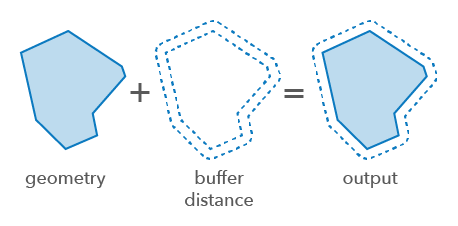
Creates planar buffers around 2D geometries. A planar buffer calculates the area around a geometry using the straight line distance between points based on a flat, two-dimensional surface. This is suitable for rendering smaller areas within a projected coordinate system where the curvature of the Earth can be ignored, such as when all features are contained in one UTM zone. Planar buffers can introduce distortions and inaccuracies when applied over larger areas.
Type definitions
ExecuteOptions
unit
- Type
- LengthUnit | undefined
The length unit of the buffer distances and max deviation. The default is the input geometry's spatial reference unit. An error will be thrown if this is set for Geographic Coordinate Systems.
ExecuteManyOptions
- Supertypes
- ExecuteOptions
Functions
execute
Creates a buffer around the input geometry.
- Signature
-
execute (geometry: GeometryUnion, distance: number, options?: ExecuteOptions): Polygon | null | undefined
Parameters
| Parameter | Type | Description | Required |
|---|---|---|---|
| geometry | The input geometry to be buffered. | | |
| distance | The buffer distance for the geometry. Unless the | | |
| options | Additional options. | |
Example
// Buffer a polyline geometryconst bufferGeometry = bufferOperator.execute(polyline, 1000); executeMany
Creates a buffer around the input geometries.
Both maxDeviation and maxVerticesInFullCircle control the quality of round joins that are in the buffers.
The precision of each buffer is maxDeviation unless the number of required vertices is too large.
- Signature
-
executeMany (geometries: GeometryUnion[], distances: number[], options?: ExecuteManyOptions): Polygon[]
Parameters
| Parameter | Type | Description | Required |
|---|---|---|---|
| geometries | The input geometries to be buffered. All the geometries must have the same spatial reference. | | |
| distances | number[] | The buffer distances for the geometries.
If the size of this array is less than the number of geometries in the input | |
| options | Additional options. | |
- Returns
- Polygon[]
Returns the buffered geometries.
Variables
supportsCurves
Indicates if the operator supports input geometries that contain curves.
The value will always be true. This will produce densified output geometries.
- Type
- boolean