import { accelerateGeometry, execute, supportsCurves } from "@arcgis/core/geometry/operators/crossesOperator.js";const { accelerateGeometry, execute, supportsCurves } = await $arcgis.import("@arcgis/core/geometry/operators/crossesOperator.js");- Since
- ArcGIS Maps SDK for JavaScript 4.31
Performs a relational operation to determine if one 2D geometry crosses another 2D geometry.
Functions
accelerateGeometry
Accelerate a geometry. This method prepares the geometry for faster crosses operations when the same geometry is tested multiple times (e.g. in a loop with hundreds of iterations). See the Acceleration guide topic for more information.
- Signature
-
accelerateGeometry (geometry: GeometryUnion): boolean
Parameters
| Parameter | Type | Description | Required |
|---|---|---|---|
| geometry | The geometry to accelerate. | |
- Returns
- boolean
Returns
trueif the geometry was successfully accelerated.
execute
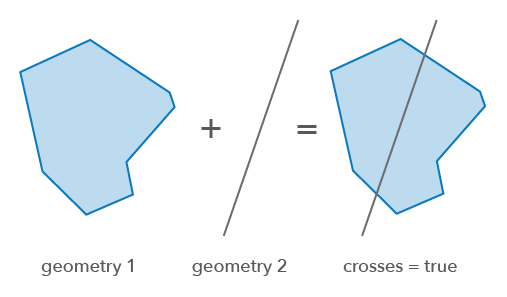
Perform the crosses operation on two geometries. This relation is true when geometries have some but not all interior points in common. The interiors must intersect and produce a geometry of smaller dimension than the maximum dimension of the two geometries. This relation may return true only between polygon and polyline, polygon and point, polyline and polyline, and polyline and point.
- Signature
-
execute (geometry1: GeometryUnion, geometry2: GeometryUnion): boolean
Parameters
| Parameter | Type | Description | Required |
|---|---|---|---|
| geometry1 | The geometry to cross. | | |
| geometry2 | The geometry being crossed. | |
- Returns
- boolean
Returns
trueifgeometry1crossesgeometry2.
Example
// Returns true if a geometry crosses another geometryconst isCrossed = crossesOperator.execute(polygon, polyline);Variables
supportsCurves
Indicates if the operator supports input geometries that contain curves.
The value will always be true.
- Type
- boolean