import { execute, supportsCurves } from "@arcgis/core/geometry/operators/cutOperator.js";const { execute, supportsCurves } = await $arcgis.import("@arcgis/core/geometry/operators/cutOperator.js");- Since
- ArcGIS Maps SDK for JavaScript 4.31
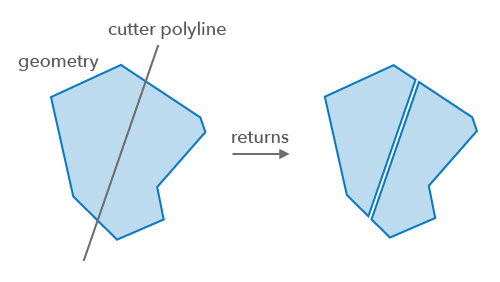
Cut 2D geometries with a polyline.
For polylines, all left cuts will be grouped together in the first geometry, right cuts and coincident cuts are grouped in the second geometry, and each undefined cut, along with any uncut parts, are output as separate polylines.
For polygons, all left cuts are grouped in the first polygon, all right cuts are in the second polygon, and each undefined cut, along with any left-over parts after cutting, are output as a separate polygon. If there were no cuts then no geometry will be returned. If the left or right cut does not exist, the returned geometry will be empty for this type of cut. An undefined cut will only be produced if a left cut or right cut was produced, and there was a part left over after cutting or a cut is bounded to the left and right of the polyline that is used to cut.
Functions
execute
Performs the cut operation on a geometry.
- Signature
-
execute (geometry: GeometryUnion, polyline: Polyline): GeometryWithoutMeshUnion[]
Parameters
| Parameter | Type | Description | Required |
|---|---|---|---|
| geometry | The input geometry to be cut. | | |
| polyline | The polyline that will be used to divide the input | |
- Returns
- GeometryWithoutMeshUnion[]
Returns an array of geometries created by cutting the input geometry with the
polyline.
Example
// Cut a polygon with a polylineconst cutGeometries = cutOperator.execute(polygon, polyline);Variables
supportsCurves
Indicates if the operator supports input geometries that contain curves.
The value will always be true.
- Type
- boolean