import { accelerateGeometry, execute, executeMany, supportsCurves } from "@arcgis/core/geometry/operators/intersectionOperator.js";const { accelerateGeometry, execute, executeMany, supportsCurves } = await $arcgis.import("@arcgis/core/geometry/operators/intersectionOperator.js");- Since
- ArcGIS Maps SDK for JavaScript 4.31
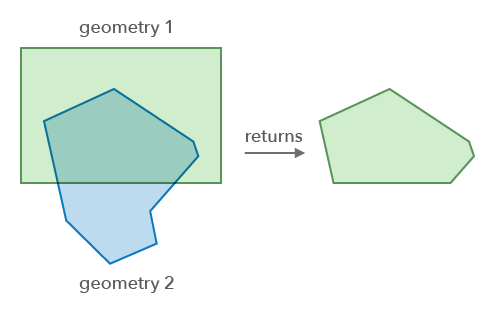
Create new geometries using the topological intersection of 2D geometries.
Functions
accelerateGeometry
Accelerate a geometry. This method prepares the geometry for faster intersection operations when the same geometry is tested multiple times (e.g. in a loop with hundreds of iterations). See the Acceleration guide topic for more information.
- Signature
-
accelerateGeometry (geometry: GeometryUnion): boolean
Parameters
| Parameter | Type | Description | Required |
|---|---|---|---|
| geometry | The geometry to accelerate. | |
- Returns
- boolean
Returns
trueif the geometry was successfully accelerated.
execute
Performs the topological intersection operation on two geometries.
If the input geometries have different dimensions (i.e. point = 0; polyline = 1; polygon = 2), then the result's dimension will be equal to the lowest dimension of the inputs.
The table below describes the expected output for various combinations of geometry types. Note that the geometries are interchangeable in this operation and will return the same result if flipped.
geometry1 type | geometry2 type | Result geometry type |
|---|---|---|
| Polygon/Extent | Polygon/Extent | Polygon |
| Polygon/Extent | Polyline | Polyline |
| Polygon | Point | Point |
| Polygon | Multipoint | Multipoint |
| Polyline | Polyline | Polyline |
| Polyline | Point | Point |
| Polyline | Multipoint | Multipoint |
| Point | Point | Point |
| Multipoint | Multipoint | Multipoint |
Note that two intersecting polylines will not return point geometries. Instead, this operator will return polyline paths that are equal or overlap between the two geometries. See executyMany() to find the point intersections of two polylines.
- Signature
-
execute (geometry1: GeometryUnion, geometry2: GeometryUnion): GeometryWithoutMeshUnion | null | undefined
Parameters
| Parameter | Type | Description | Required |
|---|---|---|---|
| geometry1 | The geometry to intersect with | | |
| geometry2 | The geometry to intersect with | |
- Returns
- GeometryWithoutMeshUnion | null | undefined
Returns the result of the intersection of the two geometries or null.
Example
// Creates a new geometry based on the intersection of two polygonsconst intersection = intersectionOperator.execute(polygon1, polygon2); executeMany
Performs the topological intersection operation on the geometry set.
The table below describes the potential results for various combinations of geometry types based on how they intersect. For example, a polyline that touches a polygon would return a multipoint. If the geometries do not intersect, an empty array will be returned.
| Input geometry type | Intersector geometry type | Result geometry types |
|---|---|---|
| Point/Multipoint | Point/Multipoint | Multipoint |
| Point/Multipoint | Polyline | Multipoint |
| Point/Multipoint | Polygon/Extent | Multipoint |
| Polyline | Point, Multipoint | Multipoint |
| Polyline | Polyline | Polyline, Multipoint |
| Polyline | Polygon/Extent | Polyline, Multipoint |
| Polygon/Extent | Point/Multipoint | Multipoint |
| Polygon/Extent | Polyline | Multipoint, Polyline |
| Polygon/Extent | Polygon/Extent | Multipoint, Polyline, Polygon |
- Signature
-
executeMany (geometries: GeometryUnion[], intersector: GeometryUnion): GeometryWithoutMeshUnion[]
Parameters
| Parameter | Type | Description | Required |
|---|---|---|---|
| geometries | The set of input geometries to be intersected by the | | |
| intersector | The geometry to intersect with the | |
- Returns
- GeometryWithoutMeshUnion[]
Returns an array of geometries created by intersecting every geometry in the input geometries with the
intersector, or an empty array if there is no intersection.
Variables
supportsCurves
Indicates if the operator supports input geometries that contain curves.
The value will always be true.
- Type
- boolean