import Transformation from "@arcgis/core/geometry/operators/support/Transformation.js";const Transformation = await $arcgis.import("@arcgis/core/geometry/operators/support/Transformation.js");- Since
- ArcGIS Maps SDK for JavaScript 4.31
The Transformation class represents 2D transformations that can be applied to geometries using the affineTransformOperator. All transformations are applied in the spatial reference units of the input geometries.
Constructors
Methods
| Method | Signature | Class |
|---|---|---|
calculateErrors(input: Point[], output: Point[]): ErrorResult | | |
flipX(x0: number, x1: number): this | | |
flipY(y0: number, y1: number): this | | |
initializeFromControlPoints(type: "conformal" | "general", input: Point[], output: Point[], inverseOut?: Transformation): void | | |
isIdentity(): boolean | | |
rotate(angleInDegrees: number, rotationX?: number, rotationY?: number): this | | |
scale(x: number, y: number): this | | |
setIdentity(): void | | |
setSwapCoordinates(): this | | |
shear(proportionX: number, proportionY: number): this | | |
shift(x: number, y: number): this | |
calculateErrors
- Signature
-
calculateErrors (input: Point[], output: Point[]): ErrorResult
Calculates distance errors for a transformation on a given set of the input points to the output points. This method is usually used to calculate errors for the transformation initialized by initializeFromControlPoints().
The length of the input and output arrays must be the same.
Parameters
- Returns
- ErrorResult
Returns an object representing the errors incurred during transformation.
Example
// Calculate the errors for a transformationconst errors = transformation.calculateErrors(inputPoints, outputPoints);// Example returned object:// { rms: 0.5, errorsOut: [0.1, 0.2, 0.3, 0.4, 0.5] } flipX
- Signature
-
flipX (x0: number, x1: number): this
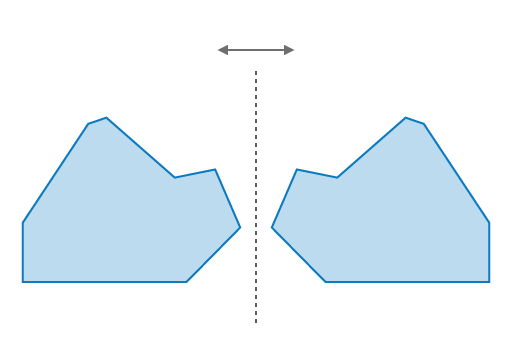
Flips all the x coordinates of geometries on the vertical y-axis (right or left) that is centered between x0 and x1.
For example, if x0 is 0 and x1 is 10, all the x coordinates of the geometries will be flipped, or mirrored, on the vertical axis centered at x = 5.
Parameters
- Returns
- this
Example
// Flip the x-coordinates of a geometry on the vertical axisconst transform = new Transformation();transform.flipX(0, 10);const result = affineTransformOperator.execute(polygon, transform);
// Flip the x-coordinates of a geometry on the vertical axis centered at the geometry's centerconst centerX = polygon.extent.center.x;transform.flipX(centerX, centerX);const result = affineTransformOperator.execute(polygon, transform);
flipY
- Signature
-
flipY (y0: number, y1: number): this
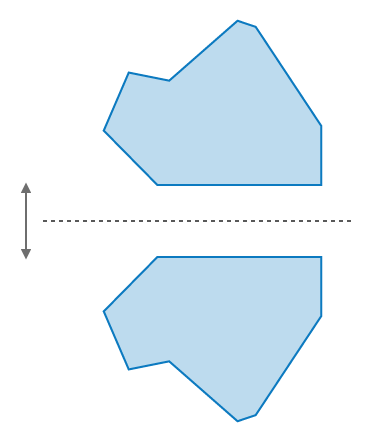
Flips all the y coordinates of geometries on the horizontal x-axis (up or down) that is centered between y0 and y1.
For example, if y0 is 0 and y1 is 10, all the y coordinates of the geometries will be flipped, or mirrored, on the horizontal axis centered at y = 5.
Parameters
- Returns
- this
Example
// Flip the y-coordinates of a geometry on the vertical axistransformation.flipY(0, 10);const result = affineTransformOperator.execute(polygon, transform);
// Flip the y-coordinates of a geometry on the horizontal axis centered at the geometry's centerconst centerY = polygon.extent.center.y;transform.flipY(centerY, centerY);const result = affineTransformOperator.execute(polygon, transform);
initializeFromControlPoints
- Signature
-
initializeFromControlPoints (type: "conformal" | "general", input: Point[], output: Point[], inverseOut?: Transformation): void
Initializes a new transformation from the input and output control points. Uses least squares method to find the best fit transformation. Adding control points allows you to snap lines and polygons to the input and output points on a map.
The length of the input and output arrays must be the same.
Parameters
| Parameter | Type | Description | Required | ||||||
|---|---|---|---|---|---|---|---|---|---|
| type | "conformal" | "general" | The type of transformation to initialize.
| | ||||||
| input | Point[] | The input points to transform from. | | ||||||
| output | Point[] | The output points to transform to. | | ||||||
| inverseOut | The transformation instance that is the inverse of the calculated transformation. | |
- Returns
- void
Example
// Initialize a transformation from control pointstransformation.initializeFromControlPoints("conformal", inputPoints, outputPoints); isIdentity
- Signature
-
isIdentity (): boolean
Determines if the transformation is in its default state, which is an identity matrix.
- See also
- Returns
- boolean
Returns
trueif the transformation is the default and has not been changed. There will be no change in the geometries when applying the transformation.
rotate
- Signature
-
rotate (angleInDegrees: number, rotationX?: number, rotationY?: number): this
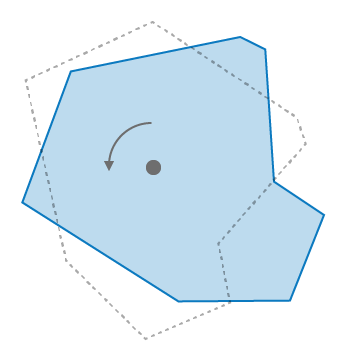
Rotates the geometries by the specified angle in degrees around the point specified by the x and y coordinates. The point can be the center of the geometries or any other point.
Parameters
- Returns
- this
Example
// Rotate a geometrytransformation.rotate(90, 0, 0);const result = affineTransformOperator.execute(polygon, transform); scale
- Signature
-
scale (x: number, y: number): this
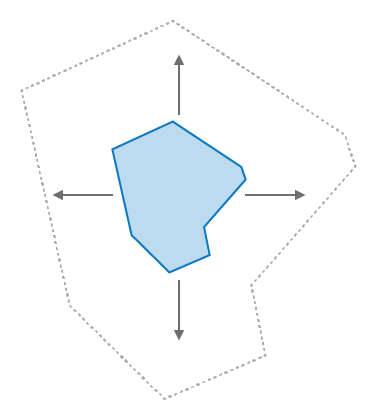
Resizes the geometries by the specified scale factors defined by the x and y coordinates. The coordinates define how much scaling is applied to the geometries in the x and y directions.
Parameters
- Returns
- this
Example
// Scale a geometrytransformation.scale(2, 2);const result = affineTransformOperator.execute(polygon, transform); setIdentity
- Signature
-
setIdentity (): void
Use this method to reset the transformation to its default state, which is an identity matrix. This method is useful when reusing the class instance for multiple transformations.
- See also
- Returns
- void
setSwapCoordinates
- Signature
-
setSwapCoordinates (): this
Use this method to swap the x and y coordinate values in the transformation. An example usage is when slicing vertically with the polgonSlicerOperator.findSlicesByArea() method.
- Returns
- this
shear
- Signature
-
shear (proportionX: number, proportionY: number): this
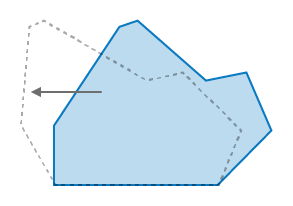
Shifts a geometry's points by the specified proportion in parallel to the x and y directions, except those points that are along the shear axis, which is a line defined by the x and y coordinates. This transformation preserves lines and parallelisms, however it may distort angles and distances. Applying this transformation will not change a geometry's area.
Parameters
- Returns
- this
Example
// Shear a geometrytransformation.shear(0.5, 0.5);const result = affineTransformOperator.execute(polygon, transform); shift
- Signature
-
shift (x: number, y: number): this
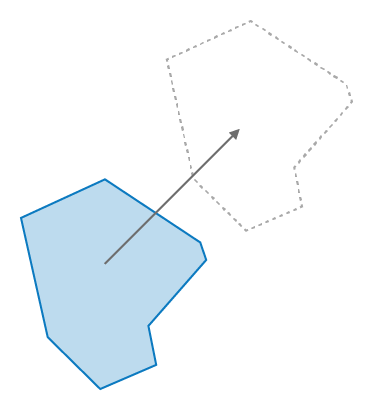
Shifts all the coordinates of the geometries by the distance and direction between the specified x and y coordinates and their current location. This operation does not change the size or shape of the geometries.
Parameters
- Returns
- this
Example
// Shift the coordinates of a geometrytransformation.shift(5, 2);const result = affineTransformOperator.execute(polygon, transform);Type definitions
ErrorResult
Object returned from the calculateErrors() method.
rms
- Type
- number
The root mean square (rms) of the 'average' distance error between the specified output points and the transformed input points.
errorsOut
- Type
- number[]
Contains the errors of the individual distance differences between specific pairs of points.