import { accelerateGeometry, execute, supportsCurves } from "@arcgis/core/geometry/operators/touchesOperator.js";const { accelerateGeometry, execute, supportsCurves } = await $arcgis.import("@arcgis/core/geometry/operators/touchesOperator.js");- Since
- ArcGIS Maps SDK for JavaScript 4.31
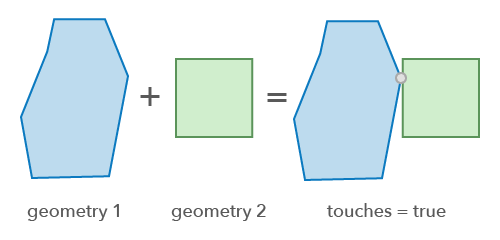
Perform a relational operation to determine if one 2D geometry touches another 2D geometry.
Functions
accelerateGeometry
Accelerate a geometry. This method prepares the geometry for faster touches operations when the same geometry is tested multiple times (e.g. in a loop with hundreds of iterations). See the Acceleration guide topic for more information.
- Signature
-
accelerateGeometry (geometry: GeometryUnion): boolean
Parameters
| Parameter | Type | Description | Required |
|---|---|---|---|
| geometry | The geometry to accelerate. | |
- Returns
- boolean
Returns
trueif the geometry was successfully accelerated.
execute
Perform a touches operation on two geometries.
- Signature
-
execute (geometry1: GeometryUnion, geometry2: GeometryUnion): boolean
Parameters
| Parameter | Type | Description | Required |
|---|---|---|---|
| geometry1 | The base geometry that is tested for the "touches" relationship with | | |
| geometry2 | The comparison geometry that is tested for the "touches" relationship with | |
- Returns
- boolean
Returns
trueif the two geometries touch.
Example
// Returns true if the line vertex touches the edge of the polygonconst isTouching = touchOperator.execute(polygon, line);Variables
supportsCurves
Indicates if the operator supports input geometries that contain curves.
The value will always be true.
- Type
- boolean